1. Company Overview |
Wuhan Jingchen Trade Co., Ltd., also known as Niimbot, is a prominent manufacturer and exporter of label printers, thermal label printers, thermal label paper, barcode label machines, and tag paper. The company is based in Hubei, China, and has established itself as a reliable supplier in the printing and scanning industry. They are known for their on-time delivery and have cooperated with numerous suppliers, including those serving Fortune 500 companies. |
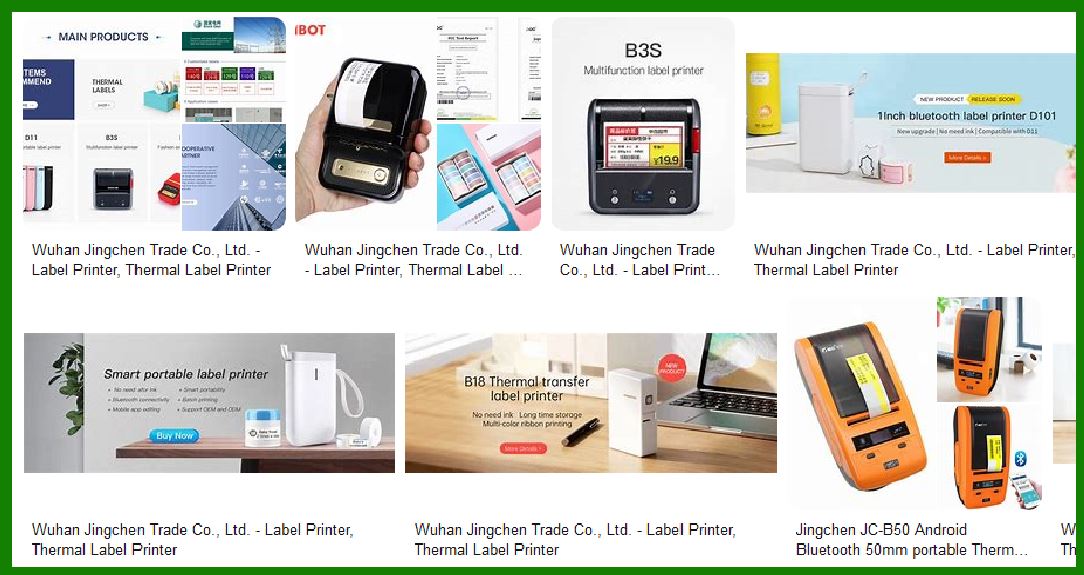
|
2. Product Range |
Wuhan Jingchen Trade offers a diverse range of barcode label printers, catering to various needs and applications. Their product lineup includes: |
2.1 Thermal Label Printers |
These printers use heat to transfer ink onto labels, making them ideal for high-volume printing tasks. They are known for their speed, efficiency, and low maintenance requirements. |
2.2 Mobile Printers |
Designed for portability, these printers are compact and lightweight, making them suitable for on-the-go printing needs. They often feature Bluetooth connectivity, allowing users to print labels directly from their mobile devices. |
2.3 Desktop Printers |
These are more robust and are designed for stationary use in offices or warehouses. They offer higher printing speeds and larger label capacities compared to mobile printers. |

|
3. Key Features |
The barcode label printers from Wuhan Jingchen Trade come with a variety of features that enhance their functionality and usability: |
3.1 Connectivity Options |
Most of their printers support multiple connectivity options, including USB, Bluetooth, and Wi-Fi. This flexibility allows users to connect the printers to various devices, such as computers, smartphones, and tablets. |
3.2 High-Resolution Printing |
Their printers are capable of high-resolution printing, ensuring that barcodes and text are clear and easily readable. This is crucial for applications where precision and accuracy are essential. |
3.3 User-Friendly Interface |
The printers are designed with user-friendly interfaces, often featuring LCD screens and intuitive controls. This makes it easy for users to set up and operate the printers without extensive training. |
3.4 Durability and Reliability |
Wuhan Jingchen Trade’s printers are built to last, with durable components that can withstand the rigors of daily use. They are also known for their reliability, minimizing downtime and maintenance costs. |

|
4. Popular Models |
Some of the popular models from Wuhan Jingchen Trade include: |
4.1 Niimbot D11 |
A portable mini Bluetooth thermal label printer, the D11 is compact and easy to carry. It is ideal for small businesses and personal use, offering high-quality printing at an affordable price. |
4.2 Niimbot D110 |
This model is a step up from the D11, offering more advanced features and higher printing speeds. It is suitable for medium-sized businesses that require efficient and reliable label printing. |
4.3 Niimbot B21 |
A desktop thermal label printer, the B21 is designed for high-volume printing tasks. It offers fast printing speeds and a large label capacity, making it ideal for warehouses and large offices. |

|
5. Applications |
The barcode label printers from Wuhan Jingchen Trade are used in various industries and applications, including: |
5.1 Retail |
Retailers use these printers to create price tags, shelf labels, and barcodes for inventory management. The high-resolution printing ensures that the labels are clear and easy to scan. |
5.2 Logistics and Warehousing |
In logistics and warehousing, these printers are used to create shipping labels, inventory tags, and barcodes for tracking and managing goods. The durability and reliability of the printers are crucial in these demanding environments. |
5.3 Healthcare |
Healthcare facilities use barcode label printers to create patient wristbands, medication labels, and lab sample tags. The high-resolution printing ensures that the information is accurate and easy to read. |
5.4 Manufacturing |
Manufacturers use these printers to create product labels, serial numbers, and barcodes for tracking and quality control. The printers’ high-speed and high-resolution capabilities are essential for efficient production processes. |

|
6. Technical Specifications |
The technical specifications of Wuhan Jingchen Trade’s barcode label printers vary by model, but some common specifications include: |
6.1 Printing Speed |
The printing speed of their printers ranges from 20mm/s to 150mm/s, depending on the model. Higher-end models offer faster printing speeds, making them suitable for high-volume tasks. |
6.2 Print Resolution |
The print resolution typically ranges from 203 DPI to 300 DPI. Higher resolutions ensure that barcodes and text are sharp and clear. |
6.3 Label Width |
The maximum label width supported by their printers ranges from 20mm to 108mm. This allows users to print a variety of label sizes for different applications. |
6.4 Connectivity |
As mentioned earlier, their printers support multiple connectivity options, including USB, Bluetooth, and Wi-Fi. This ensures compatibility with a wide range of devices. |

|
7. Software Compatibility |
Wuhan Jingchen Trade’s barcode label printers are compatible with various software applications, making it easy to design and print labels. Some of the compatible software includes: |
7.1 Label Design Software |
Their printers are compatible with popular label design software, such as Bartender and NiceLabel. These software applications offer advanced design features and templates, making it easy to create professional-looking labels. |
7.2 Mobile Apps |
For mobile printers, Wuhan Jingchen Trade offers dedicated mobile apps that allow users to design and print labels directly from their smartphones or tablets. These apps are available for both iOS and Android devices. |
7.3 Integration with ERP Systems |
Their printers can be integrated with enterprise resource planning (ERP) systems, such as SAP and Oracle. This allows businesses to streamline their label printing processes and improve efficiency. |

|
8. Customer Support and Service |
Wuhan Jingchen Trade is known for its excellent customer support and service. They offer: |
8.1 Technical Support |
Customers can access technical support through various channels, including phone, email, and live chat. The company’s support team is knowledgeable and responsive, helping customers resolve any issues quickly. |
8.2 Warranty and Repairs |
Their printers come with a standard warranty, covering defects in materials and workmanship. In case of any issues, customers can send their printers for repairs or replacements. |
8.3 User Manuals and Guides |
Wuhan Jingchen Trade provides comprehensive user manuals and guides for their printers. These documents offer detailed instructions on setup, operation, and troubleshooting, helping users get the most out of their printers. |

|
9. Environmental Considerations |
Wuhan Jingchen Trade is committed to sustainability and environmental responsibility. Their printers are designed with energy-efficient components and processes, reducing their environmental impact. Additionally, they offer recycling programs for used printers and consumables, helping customers dispose of their equipment responsibly. |
10. Market Presence and Reputation |
Wuhan Jingchen Trade has a strong market presence and a solid reputation in the printing and scanning industry. They have established partnerships with numerous suppliers and customers worldwide, including Fortune 500 companies. Their commitment to quality, innovation, and customer satisfaction has earned them a loyal customer base and positive reviews. |

|
11. Future Developments |
The company is continuously investing in research and development to improve their products and introduce new technologies. Some of the future developments they are working on include: |
11.1 Advanced Printing Technologies |
Wuhan Jingchen Trade is exploring advanced printing technologies, such as RFID printing and color label printing. These technologies will enhance the functionality and versatility of their printers, allowing customers to create more complex and detailed labels. |
11.2 Enhanced Connectivity |
The company is working on improving the connectivity options of their printers, including support for IoT (Internet of Things) and cloud-based printing. This will enable users to print labels from anywhere, using any device. |
11.3 Eco-Friendly Materials |
Wuhan Jingchen Trade is committed to sustainability and is researching eco-friendly materials for their printers and consumables. This includes biodegradable label paper and energy-efficient components. |

|
12. Conclusion |
Wuhan Jingchen Trade Co., Ltd. offers a comprehensive range of barcode label printers that cater to various industries and applications. Their printers are known for their high-quality printing, durability, and user-friendly features. With a strong commitment to customer satisfaction and continuous innovation, Wuhan Jingchen Trade is a reliable choice for businesses looking for efficient and reliable label printing solutions. |
 cs@easiersoft.com