1. Introduction to Xprinter |
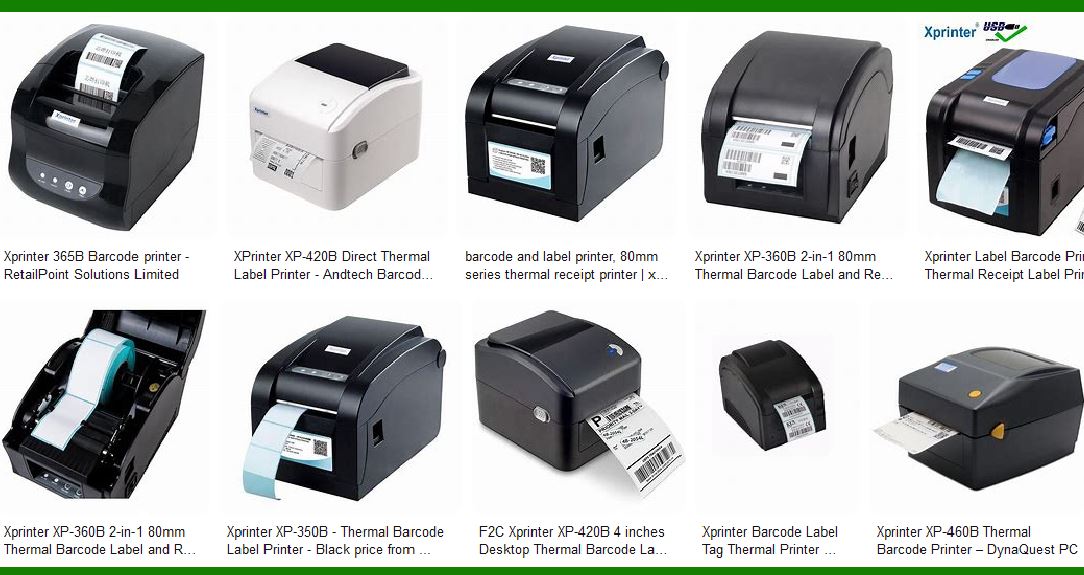
Xprinter is a well-known manufacturer of barcode label printers, offering a range of models designed to meet various printing needs. The company is recognized for its innovative technology, high-quality products, and competitive pricing. Xprinter’s product line includes direct thermal and thermal transfer printers, which are widely used in retail, logistics, healthcare, and other industries. |
|
2. Types of Xprinter Barcode Label Printers |
2.1 Direct Thermal Printers |
Direct thermal printers use heat-sensitive paper that darkens when heated. These printers are ideal for short-term applications such as shipping labels, receipts, and tickets. They do not require ink, toner, or ribbons, making them cost-effective and easy to maintain. |
2.2 Thermal Transfer Printers |
Thermal transfer printers use a ribbon to transfer ink onto the label, creating durable and long-lasting prints. These printers are suitable for applications that require high-quality, long-lasting labels, such as asset tracking, inventory management, and product labeling. |

|
3. Key Features of Xprinter Barcode Label Printers |
3.1 Print Speed |
Xprinter barcode label printers are known for their high print speeds, which can reach up to 152mm/s. This ensures efficient and quick printing, making them suitable for high-volume environments. |
3.2 Print Resolution |
Xprinter printers offer various print resolutions, typically ranging from 203 dpi to 300 dpi. Higher resolutions provide clearer and more detailed prints, which are essential for small barcodes and intricate designs. |
3.3 Connectivity Options |
Xprinter barcode label printers come with multiple connectivity options, including USB, Ethernet, Bluetooth, and Wi-Fi. This flexibility allows users to connect the printers to various devices and networks, enhancing their usability in different settings. |
3.4 Compatibility |
Xprinter printers are compatible with various operating systems, including Windows, macOS, and Linux. They also support multiple printing languages, such as ZPL, EPL, and DPL, ensuring seamless integration with existing systems. |

|
4. Popular Models of Xprinter Barcode Label Printers |
4.1 Xprinter XP-420B |
The XP-420B is a 4-inch direct thermal printer known for its reliability and performance. It features a print speed of 127mm/s and a resolution of 203 dpi. The printer supports USB and Ethernet connectivity, making it suitable for various applications. |
4.2 Xprinter XP-350B |
The XP-350B is a versatile 3-inch direct thermal printer that offers a print speed of 152mm/s and a resolution of 203 dpi. It supports USB, Serial, and Ethernet connectivity, and is designed for both label and receipt printing. |
4.3 Xprinter XP-460B |
The XP-460B is a 4-inch thermal transfer printer that provides high-quality prints with a resolution of 300 dpi. It features a print speed of 127mm/s and supports USB, Ethernet, and Bluetooth connectivity. This model is ideal for applications that require durable and long-lasting labels. |

|
5. Applications of Xprinter Barcode Label Printers |
5.1 Retail |
In the retail industry, Xprinter barcode label printers are used for printing price tags, shelf labels, and receipts. Their high print speed and reliability make them suitable for busy retail environments. |
5.2 Logistics and Shipping |
Xprinter printers are widely used in logistics and shipping for printing shipping labels, packing slips, and tracking labels. Their ability to produce clear and durable prints ensures that labels remain readable throughout the shipping process. |
5.3 Healthcare |
In healthcare, Xprinter barcode label printers are used for printing patient wristbands, prescription labels, and laboratory labels. The high print quality and reliability of Xprinter printers ensure accurate and legible labels, which are crucial for patient safety. |
5.4 Manufacturing |
In manufacturing, Xprinter printers are used for printing product labels, asset tags, and inventory labels. Their durability and high print quality make them suitable for harsh industrial environments. |

|
6. Advantages of Using Xprinter Barcode Label Printers |
6.1 Cost-Effective |
Xprinter barcode label printers are known for their affordability, making them a cost-effective solution for businesses of all sizes. The direct thermal models, in particular, offer low operating costs as they do not require ink or ribbons. |
6.2 Easy to Use |
Xprinter printers are designed with user-friendliness in mind. They feature simple interfaces and easy-to-load media, reducing the time and effort required for setup and maintenance. |
6.3 Versatile |
With a wide range of models and features, Xprinter barcode label printers can meet the needs of various industries and applications. Their compatibility with different media types and connectivity options enhances their versatility. |
6.4 Reliable |
Xprinter printers are built to last, with robust construction and high-quality components. This ensures reliable performance and minimal downtime, which is essential for business operations. |

|
7. Technical Specifications of Xprinter Barcode Label Printers |
7.1 Print Width |
Xprinter printers offer various print widths, typically ranging from 2 inches to 4 inches. This allows users to choose the appropriate model based on their specific labeling needs. |
7.2 Media Types |
Xprinter barcode label printers support a wide range of media types, including continuous, die-cut, black mark, and fan-fold labels. This flexibility allows users to print different types of labels for various applications. |
7.3 Sensors |
Xprinter printers are equipped with adjustable sensors, such as gap sensors and black mark sensors, to ensure accurate media detection and alignment. This helps prevent printing errors and ensures consistent print quality. |
7.4 Memory |
Xprinter barcode label printers come with sufficient memory to handle complex printing tasks. They typically feature 8MB of Flash memory and 8MB of SDRAM, allowing for the storage of fonts, graphics, and label formats. |

|
8. Maintenance and Support |
8.1 Maintenance |
Maintaining Xprinter barcode label printers is straightforward, thanks to their user-friendly design. Regular cleaning of the print head and sensors, along with proper media handling, can help extend the lifespan of the printer and ensure consistent print quality. |
8.2 Support |
Xprinter offers comprehensive support for its products, including online resources, user manuals, and technical support. Users can access drivers, firmware updates, and troubleshooting guides from the Xprinter website. |

|
9. Conclusion |
Xprinter barcode label printers are a reliable and cost-effective solution for various labeling needs. With their high print quality, versatile features, and robust construction, Xprinter printers are suitable for a wide range of industries and applications. Whether you need a printer for retail, logistics, healthcare, or manufacturing, Xprinter has a model that can meet your requirements. |
 cs@easiersoft.com