1. Introduction to Zebra Technologies |
Zebra Technologies is a global leader in providing solutions that give businesses real-time visibility into their operations. Founded in 1969, Zebra has been at the forefront of innovation in the field of automatic identification and data capture (AIDC). Their product portfolio includes barcode printers, mobile computers, data capture devices, and RFID solutions. Zebra’s barcode label printers are renowned for their reliability, durability, and performance across various industries. |
|
2. Types of Zebra Barcode Label Printers |
Zebra offers a wide range of barcode label printers designed to meet different business needs. These can be broadly categorized into desktop, industrial, mobile, and card printers. |
2.1 Desktop Printers |
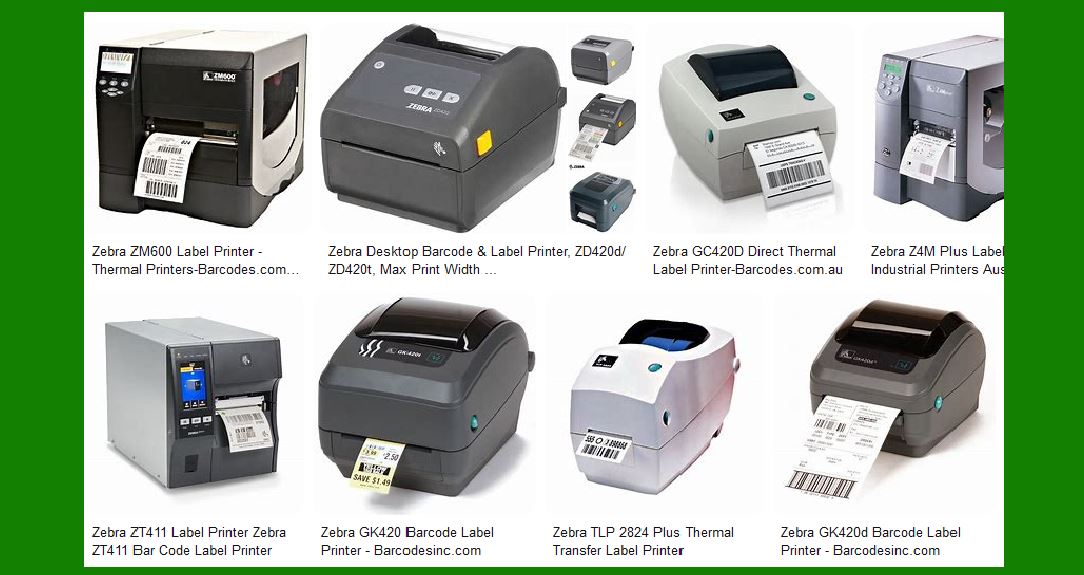
Desktop printers are compact and designed for low to mid-volume printing needs. They are ideal for office environments, retail, healthcare, and small-scale manufacturing. Key models include: |
ZD Series: Known for their ease of use, reliability, and compact design. The ZD420 and ZD620 are popular models. GK Series: Offers a balance of performance and affordability. The GK420 is a widely used model. ZD500R: A desktop RFID printer that combines the simplicity of a desktop printer with the capability to encode RFID tags. |
2.2 Industrial Printers |
Industrial printers are built for high-volume printing in demanding environments such as manufacturing, logistics, and warehousing. They are rugged and designed to handle continuous operation. Key models include: |
ZT Series: The ZT410 and ZT420 are known for their durability and high performance. The ZT600 series offers advanced features and greater durability. 110Xi4: Known for its high-speed printing and robust design, suitable for mission-critical applications. ZT510: Combines the essential features of an industrial printer with affordability. |
2.3 Mobile Printers |
Mobile printers are designed for on-the-go printing needs, enhancing productivity by allowing workers to print labels and receipts at the point of application. Key models include: |
ZQ Series: The ZQ510 and ZQ520 are rugged mobile printers designed for harsh environments. The ZQ610 and ZQ620 offer advanced features and connectivity options. QLn Series: Known for their reliability and ease of use, the QLn320 and QLn420 are popular choices. |
2.4 Card Printers |
Card printers are used for printing ID cards, membership cards, and other types of plastic cards. Key models include: |
ZC Series: The ZC100 and ZC300 are known for their sleek design and advanced security features. ZXP Series: The ZXP Series 7 and ZXP Series 9 offer high-quality printing and encoding capabilities. |

|
3. Key Features of Zebra Barcode Label Printers |
Zebra barcode label printers are equipped with a range of features that enhance their performance and usability. |
3.1 Print Quality and Speed |
Zebra printers are known for their high print quality, ensuring that barcodes are clear and easily scannable. Print speeds vary across models, with industrial printers offering the highest speeds to meet high-volume printing needs. |
3.2 Durability and Reliability |
Zebra printers are built to last, with rugged designs that can withstand harsh environments. Industrial models, in particular, are designed for continuous operation and can handle the rigors of manufacturing and logistics environments. |
3.3 Connectivity Options |
Zebra printers offer a range of connectivity options, including USB, Ethernet, Wi-Fi, and Bluetooth. This ensures that they can be easily integrated into existing IT infrastructure and can communicate with other devices and systems. |
3.4 Ease of Use |
Zebra printers are designed with user-friendliness in mind. Features such as color touchscreens, intuitive interfaces, and easy media loading make them easy to operate, even for users with minimal technical expertise. |
3.5 Advanced Features |
Many Zebra printers come with advanced features such as RFID encoding, dual-sided printing (for card printers), and support for various media types. These features enhance the versatility and functionality of the printers. |

|
4. Software and Integration |
Zebra provides a suite of software tools and applications to enhance the functionality of their printers and facilitate integration with other systems. |
4.1 ZebraDesigner |
ZebraDesigner is a label design software that allows users to create custom labels with ease. It supports a wide range of barcode symbologies and offers a user-friendly interface for designing and printing labels. |
4.2 Print DNA |
Print DNA is a suite of software tools that enhance the performance, management, and security of Zebra printers. It includes tools for remote management, device diagnostics, and security features to protect against cyber threats. |
4.3 ZebraLink |
ZebraLink is a set of tools and utilities that facilitate the integration of Zebra printers with other systems and applications. It includes drivers, SDKs, and APIs for seamless integration with enterprise systems. |
|
5. Applications of Zebra Barcode Label Printers |
Zebra barcode label printers are used across various industries for a wide range of applications. |
5.1 Retail |
In the retail industry, Zebra printers are used for printing price tags, shelf labels, and receipts. They help improve inventory management, enhance customer service, and streamline operations. |
5.2 Healthcare |
In healthcare, Zebra printers are used for printing patient wristbands, specimen labels, and medication labels. They help improve patient safety, enhance traceability, and ensure compliance with regulatory requirements. |
5.3 Manufacturing |
In manufacturing, Zebra printers are used for printing product labels, shipping labels, and work-in-progress labels. They help improve traceability, enhance quality control, and streamline production processes. |
5.4 Logistics and Warehousing |
In logistics and warehousing, Zebra printers are used for printing shipping labels, pallet labels, and inventory labels. They help improve inventory management, enhance traceability, and streamline shipping and receiving processes. |
5.5 Government and Public Sector |
In the government and public sector, Zebra printers are used for printing ID cards, permits, and asset tags. They help improve security, enhance traceability, and streamline administrative processes. |

|
6. Environmental Considerations |
Zebra is committed to sustainability and environmental responsibility. Their printers are designed with energy efficiency in mind, and they offer recycling programs for used printers and supplies. |
6.1 Energy Efficiency |
Zebra printers are designed to minimize energy consumption, with features such as sleep modes and energy-efficient components. This helps reduce the environmental impact and lower operating costs. |
6.2 Recycling Programs |
Zebra offers recycling programs for used printers, printheads, and other supplies. This helps reduce waste and ensures that materials are disposed of in an environmentally responsible manner. |

|
7. Support and Services |
Zebra provides comprehensive support and services to ensure that their printers operate smoothly and efficiently. |
7.1 Technical Support |
Zebra offers technical support through various channels, including phone, email, and online resources. Their support team is available to assist with troubleshooting, installation, and maintenance. |
7.2 Maintenance and Repair |
Zebra provides maintenance and repair services to ensure that printers operate at peak performance. They offer service contracts, on-site support, and depot repair services. |
7.3 Training and Resources |
Zebra offers training programs and resources to help users get the most out of their printers. This includes online tutorials, user manuals, and training courses. |

|
8. Conclusion |
Zebra barcode label printers are a reliable and versatile solution for a wide range of printing needs. With their high print quality, durability, and advanced features, they are well-suited for various industries and applications. Zebra’s commitment to innovation, sustainability, and customer support ensures that their printers deliver exceptional performance and value. |
 cs@easiersoft.com