Advanced Barcode Scanning Techniques: Omnidirectional Scanning |
Omnidirectional scanning is a sophisticated technique used in barcode scanning that enhances the efficiency and flexibility of capturing barcode data. This approach is particularly advantageous in high-speed, high-volume environments, such as retail checkout counters and industrial applications. The following detailed description outlines the fundamentals, mechanisms, benefits, and applications of omnidirectional scanning technology. |
|
1. Introduction to Omnidirectional Scanning |
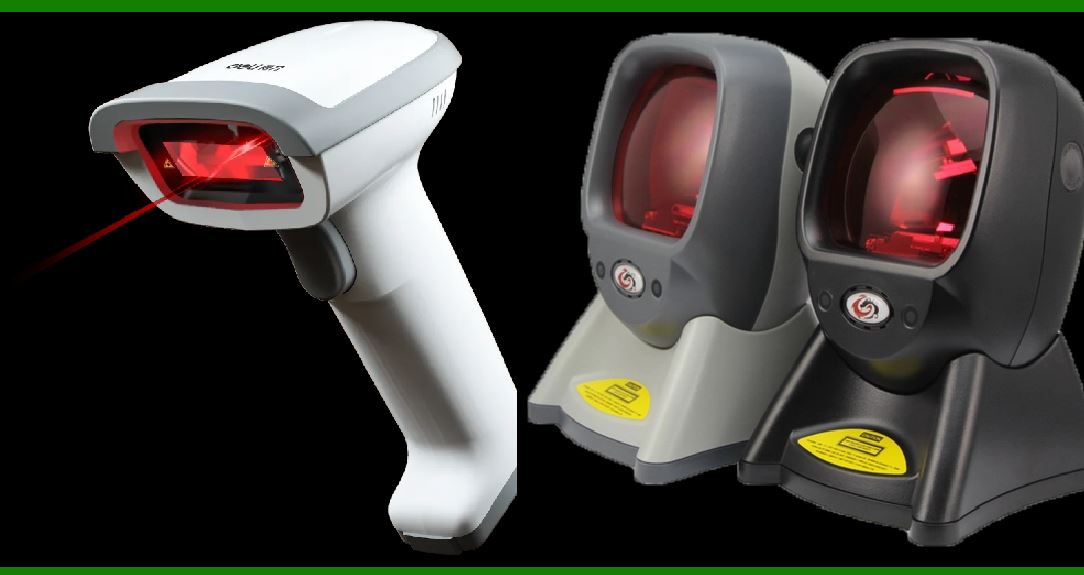
Omnidirectional scanning refers to the use of multiple laser beams or sensors to scan a barcode from various angles simultaneously. Unlike traditional scanning methods that require precise alignment between the barcode and the scanner, omnidirectional scanners can read barcodes regardless of their orientation. This ability to scan in multiple directions significantly improves the speed and accuracy of barcode scanning, making it a preferred choice for many modern applications. |

|
2. Mechanisms of Omnidirectional Scanning |
2.1. Multi-Laser Beam Systems |
1.Laser Array Configuration: Omnidirectional scanners equipped with multi-laser beam systems use an array of laser beams arranged in various angles. These lasers are often arranged in a circular pattern to cover a 360-degree field of view. The laser beams are emitted in such a way that they intersect at different points, creating a grid-like pattern of laser lines. 2.Scanning Process: As the barcode is passed through the scanner, the laser beams reflect off the barcode's printed lines. The scanner captures these reflections from multiple angles simultaneously. The pattern of reflected light is then processed to decode the barcode information. This method allows the scanner to capture data even if the barcode is not perfectly aligned. |
2.2. Imaging Sensor Systems |
1.Multiple Sensors: Some omnidirectional scanners use multiple imaging sensors arranged around the scanning area. These sensors capture images of the barcode from different angles and positions. The data from these sensors are combined to create a comprehensive image of the barcode. 2.Image Processing: The captured images are processed using advanced algorithms to detect and decode the barcode. This method can be particularly effective for scanning damaged or poorly printed barcodes, as the system can aggregate data from different perspectives to ensure accurate reading. |

|
3. Benefits of Omnidirectional Scanning |
3.1. Increased Scanning Speed |
1.Efficiency: Omnidirectional scanners significantly reduce the time required to scan a barcode. Since these scanners can read barcodes from any angle, there is no need for precise positioning, which speeds up the scanning process. 2.Reduced Scan Time: In high-traffic environments like retail stores, the ability to quickly scan items without the need for precise alignment helps in reducing customer wait times and increasing overall throughput. |
3.2. Enhanced Flexibility |
1.No Alignment Requirement: One of the primary advantages of omnidirectional scanning is the lack of need for barcode alignment. This feature is particularly useful in fast-paced environments where items are scanned quickly and may not always be perfectly oriented. 2.Handling Varied Barcode Sizes: Omnidirectional scanners can handle barcodes of various sizes and orientations, making them versatile tools for different applications, from small labels to larger, complex codes. |
3.3. Improved Accuracy |
1.Error Reduction: By capturing data from multiple angles, omnidirectional scanners reduce the likelihood of errors that can occur due to misalignment or poor barcode quality. 2.Consistency: These scanners provide consistent performance regardless of the angle or position of the barcode, ensuring that data is accurately read every time. |

|
4. Applications of Omnidirectional Scanning |
4.1. Retail |
1.Point-of-Sale Systems: In retail environments, omnidirectional scanners are commonly used at checkout counters to quickly scan a variety of products. The ability to scan barcodes from any orientation helps speed up the checkout process and reduces customer wait times. 2.Self-Checkout Stations: Self-checkout stations benefit from omnidirectional scanning technology as it allows customers to scan items efficiently without having to carefully align each barcode with the scanner. |
4.2. Warehousing and Logistics |
1.Inventory Management: In warehouses, omnidirectional scanners facilitate rapid scanning of items in various orientations. This efficiency is crucial for managing large inventories and streamlining the logistics process. 2.Package Tracking: Omnidirectional scanning helps in tracking packages through various stages of the supply chain. The ability to scan barcodes quickly and accurately ensures that packages are correctly sorted and routed. |
4.3. Healthcare |
1.Patient and Medication Tracking: In healthcare settings, omnidirectional scanners are used to read barcodes on patient wristbands and medication labels. This technology ensures accurate patient identification and medication administration. 2.Medical Inventory: Omnidirectional scanning aids in managing medical supplies and equipment, ensuring that items are quickly and accurately recorded in inventory systems. |
4.4. Manufacturing |
1.Quality Control: In manufacturing environments, omnidirectional scanners are used to verify product barcodes during quality control processes. The ability to scan barcodes from any angle ensures that each product is correctly identified. 2.Production Line Efficiency: Omnidirectional scanners improve the efficiency of production lines by quickly capturing barcode data from products moving through the manufacturing process. |

|
5. Technical Considerations |
5.1. Scanner Design and Ergonomics |
1.Form Factor: Omnidirectional scanners come in various form factors, including handheld devices, fixed mount scanners, and in-counter models. The choice of form factor depends on the specific application and space constraints. 2.User Interface: Ergonomically designed scanners that are comfortable to hold and operate can improve user experience and reduce fatigue, particularly in environments where scanning is frequent and prolonged. |
5.2. Environmental Factors |
1.Lighting Conditions: Omnidirectional scanners are generally designed to perform well under various lighting conditions, including low light and bright environments. This adaptability ensures consistent performance in different settings. 2.Barcode Quality: While omnidirectional scanners are effective at handling damaged or poorly printed barcodes, extremely degraded barcodes may still pose challenges. Regular maintenance and calibration of the scanner can help mitigate such issues. |

|
6. Future Trends and Innovations |
6.1. Integration with Other Technologies |
1.RFID Integration: Future developments may see the integration of omnidirectional scanning with RFID (Radio Frequency Identification) technology to create hybrid systems that offer both barcode and RFID scanning capabilities. 2.Advanced Imaging: Ongoing advancements in imaging technology, such as higher resolution sensors and more sophisticated image processing algorithms, will continue to enhance the capabilities of omnidirectional scanners. |
6.2. AI and Machine Learning |
1.Enhanced Data Analysis: The incorporation of AI and machine learning algorithms can further improve barcode scanning accuracy and speed by enabling scanners to learn from data and adapt to various scanning conditions. 2.Predictive Maintenance: AI-driven predictive maintenance solutions can help in monitoring the performance of omnidirectional scanners and predicting potential issues before they impact operations. |

|
7. Conclusion |
Omnidirectional scanning represents a significant advancement in barcode scanning technology, offering increased speed, flexibility, and accuracy. By utilizing multiple laser beams or imaging sensors to capture barcode data from various angles simultaneously, omnidirectional scanners address many of the limitations associated with traditional scanning methods. Their applications span across diverse fields, including retail, warehousing, healthcare, and manufacturing, demonstrating their versatility and importance in modern data capture systems. As technology continues to evolve, omnidirectional scanning is likely to see further innovations, enhancing its capabilities and expanding its applications even further. |

|
 cs@easiersoft.com