1. Introduction to CipherLab Barcode Scanners |
CipherLab is a renowned manufacturer of barcode scanners, known for their versatility, agility, and cost-effectiveness. Their scanners are designed to capture data from various types of barcodes, including regular, long, high-density, and poorly printed barcodes. CipherLab offers a range of barcode scanners with different technologies such as linear imagers, 2D imagers, and lasers. These scanners are available in both corded and cordless versions, catering to various business needs. |
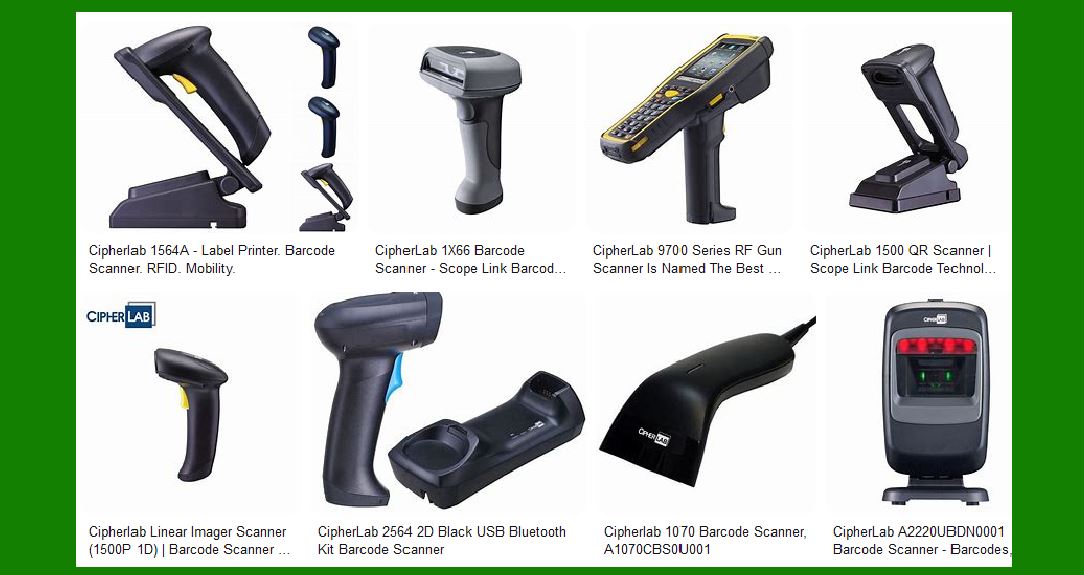
|
2. General Purpose Scanners |
CipherLab’s general-purpose barcode scanners are designed for easy and accurate scanning in retail, healthcare, and manufacturing applications. These scanners are available in both corded and cordless versions, providing flexibility and mobility. |
2.1 1000 Series General Corded Scanner |
The 1000 series offers fast, easy, and accurate scanning with incredible reliability. These scanners are known for their low cost and come with a 5-year warranty, making them a valuable investment for businesses. |
2.2 1500 Series General Handheld Scanner |
The 1500 series is designed to enhance retail productivity and performance. These scanners offer powerful reliability and efficiency, making them ideal for various retail applications. |
2.3 2200 Series Omnidirectional Presentation Scanner |
Built specifically for the retail, hospitality, and transportation industries, the 2200 series omnidirectional scanner provides fast and accurate scanning from any angle. This makes it perfect for high-volume scanning environments. |

|
3. Business Durable Scanners |
CipherLab’s business-durable scanners are designed to withstand the challenges of industrial working environments such as manufacturing, warehousing, and logistics. These scanners are built to resist bumps, drops, water, and dust, ensuring reliable performance and long-lasting value. |
3.1 2500 Series Business-Rugged Handheld Scanner |
The 2500 series is designed to meet the higher demands for updated scanning abilities in industries like retail, warehousing, and light industry. These scanners offer robust performance and durability. |

|
4. Pocket-sized Scanners |
CipherLab’s pocket-sized scanners are smaller and lighter than a mobile phone, making them easy to carry around. These scanners are ideal for healthcare, field sales, and field service applications where strong mobility is required. |
4.1 1600 Series Pocket-sized Scanner |
The 1600 series is designed to meet the scanning needs in healthcare, field sales, and field service. These scanners offer a choice of linear imager, laser, or 2D imager, ensuring that various business needs are met. |

|
5. Technological Features |
CipherLab barcode scanners come with a range of technological features that enhance their performance and usability. |
5.1 Linear Imager |
Linear imagers are used for scanning 1D barcodes. They provide fast and accurate scanning, making them suitable for various applications. |
5.2 2D Imager |
2D imagers can scan both 1D and 2D barcodes. They offer greater flexibility and are ideal for applications that require scanning of complex barcodes. |
5.3 Laser Scanners |
Laser scanners are known for their precision and speed. They are suitable for scanning barcodes from a distance, making them ideal for applications where barcodes are not easily accessible. |

|
6. Connectivity Options |
CipherLab barcode scanners offer various connectivity options to suit different business needs. |
6.1 Corded Scanners |
Corded scanners are connected to a computer or other device via a cable. They provide reliable and consistent performance, making them suitable for stationary applications. |
6.2 Cordless Scanners |
Cordless scanners use Bluetooth or other wireless technologies to connect to a computer or other device. They offer greater flexibility and mobility, making them ideal for applications where movement is required. |

|
7. Applications of CipherLab Barcode Scanners |
CipherLab barcode scanners are used in a wide range of applications across various industries. |
7.1 Retail |
In retail, CipherLab barcode scanners are used for scanning barcodes at checkout, managing inventory, and verifying prices. They help improve efficiency and accuracy in retail operations. |
7.2 Healthcare |
In healthcare, CipherLab barcode scanners are used for patient identification, medication administration, and inventory management. They help improve patient safety and streamline healthcare processes. |
7.3 Manufacturing |
In manufacturing, CipherLab barcode scanners are used for tracking parts and products, managing inventory, and ensuring quality control. They help improve efficiency and accuracy in manufacturing processes. |
7.4 Warehousing and Logistics |
In warehousing and logistics, CipherLab barcode scanners are used for tracking shipments, managing inventory, and verifying orders. They help improve efficiency and accuracy in warehousing and logistics operations. |

|
8. Maintenance and Cleaning |
Proper maintenance and cleaning are essential to ensure the longevity and performance of CipherLab barcode scanners. |
8.1 Cleaning Procedures |
CipherLab provides guidelines for cleaning and disinfecting their barcode scanners. It is important to follow these guidelines to prevent damage to the device and ensure its proper functioning. |
8.2 Maintenance Tips |
Regular maintenance, such as checking for damage and ensuring proper connections, can help extend the life of CipherLab barcode scanners. It is also important to follow the manufacturer’s instructions for any repairs or replacements. |

|
9. Customer Support and Warranty |
CipherLab offers comprehensive customer support and warranty services to ensure customer satisfaction. |
9.1 Customer Support |
CipherLab provides customer support through various channels, including phone, email, and online resources. Their support team is available to assist with any issues or questions related to their barcode scanners. |
9.2 Warranty Services |
CipherLab barcode scanners come with a warranty that covers defects in materials and workmanship. The warranty period varies depending on the model, but it typically ranges from one to five years. |

|
10. Conclusion |
CipherLab barcode scanners are versatile, reliable, and cost-effective solutions for various barcode scanning needs. With a range of models and features, they cater to different industries and applications, providing efficient and accurate scanning. Proper maintenance and customer support further enhance the value of CipherLab barcode scanners, making them a valuable investment for businesses. |
 cs@easiersoft.com