1. Introduction to Code Corporation |
Code Corporation is a leading provider of barcode scanning and data capture technologies. With over 20 years of experience, Code Corporation has developed a range of products that cater to various industries, including healthcare, retail, manufacturing, and logistics. Their barcode scanners are known for their high performance, durability, and innovative features. |
|
2. Product Range Overview |
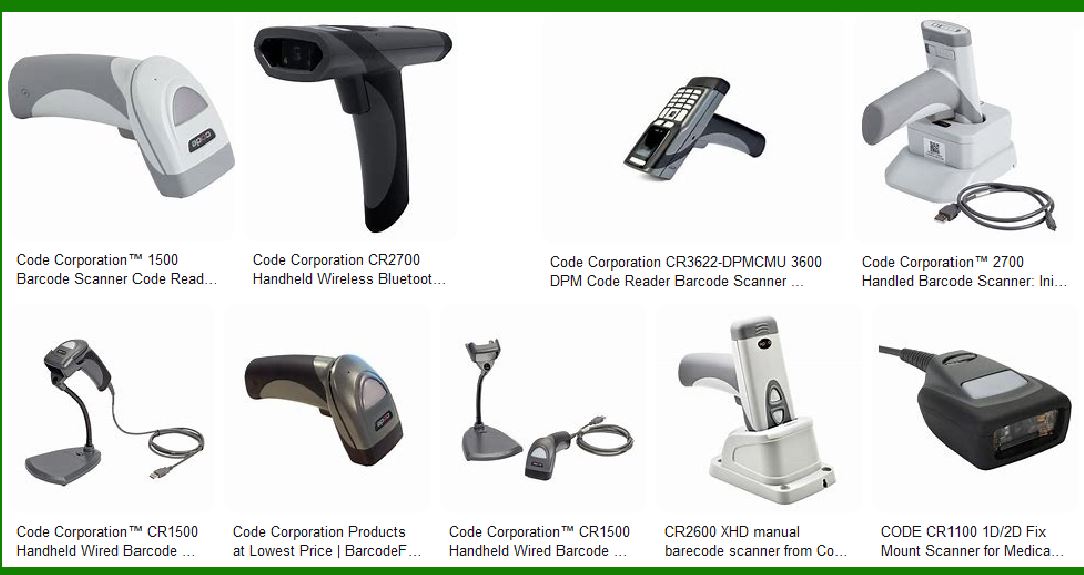
Code Corporation offers a diverse range of barcode scanners, each designed to meet specific needs and applications. Some of their popular models include the CR2700, CR1500, and CR5200. These scanners are equipped with advanced technologies to ensure fast and accurate data capture. |

|
3. Code Reader 2700 (CR2700) |
3.1 General Description |
The CR2700 is Code Corporation’s fourth-generation Bluetooth 5 barcode scanner. It combines nearly two decades of market experience with new features to improve workflow in various settings, from medical to retail environments. |
3.2 Key Features |
Bluetooth 5 Technology: Enhances data transmission security and extends battery life. Durability: Built with CodeShield? Plastics, the CR2700 can withstand harsh disinfectants and has an IP65 rating. Wireless Charging: Eliminates exposed metal, making the device more durable and easier to clean. FIPS 140-2 Certification: Ensures robust data encryption for secure data transmission. Battery Management: Features a built-in gauge to indicate when the battery needs to be changed. |
3.3 Applications |
The CR2700 is suitable for various applications, including healthcare, retail, and industrial environments. Its durability and advanced features make it ideal for settings that require frequent cleaning and high data security. |

|
4. Code Reader 1500 (CR1500) |
4.1 General Description |
The CR1500 is a compact, rugged, tethered barcode reader. It features a high-performance scan engine and a patented dual-field optical platform, making it highly reliable for reading 1D, 2D, and postal barcodes. |
4.2 Key Features |
High-Performance Scan Engine: Ensures fast and accurate barcode reading. Dual-Field Optical Platform: Provides intuitive targeting for easy barcode capture. Rugged Design: Built to withstand harsh environments and frequent use. |
4.3 Applications |
The CR1500 is ideal for applications in healthcare, retail, and logistics. Its compact and rugged design makes it suitable for environments that require reliable and fast barcode scanning. |

|
5. Code Reader 5200 (CR5200) |
5.1 General Description |
The CR5200 is a high-speed, omnidirectional barcode scanner designed for point-of-sale and ID scanning applications. It supports both 1D and 2D barcode symbologies3. |
5.2 Key Features |
Omnidirectional Scanning: Allows for quick and easy barcode capture from any angle. High-Speed Performance: Capable of scanning barcodes rapidly, making it ideal for high-traffic environments. Versatile Compatibility: Supports a wide range of barcode symbologies, including 1D and 2D codes. |
5.3 Applications |
The CR5200 is perfect for point-of-sale systems, ID scanning, and other applications that require fast and accurate barcode reading. Its high-speed performance and omnidirectional scanning capabilities make it suitable for busy environments. |

|
6. Advanced Technologies in Code Corporation Scanners |
6.1 CortexDecoder |
Code Corporation’s CortexDecoder is a software solution that enhances the performance of their barcode scanners. It allows for fast and accurate decoding of barcodes, even those that are damaged or poorly printed. |
6.2 CodeShield Plastics |
CodeShield Plastics are used in the construction of Code Corporation’s barcode scanners to ensure durability and resistance to harsh disinfectants. This makes the scanners suitable for environments that require frequent cleaning, such as healthcare settings. |
6.3 FIPS 140-2 Certification |
The FIPS 140-2 certification ensures that Code Corporation’s barcode scanners provide robust data encryption for secure data transmission. This is particularly important for applications that handle sensitive information, such as healthcare and government settings. |

|
7. Industry Applications |
7.1 Healthcare |
Code Corporation’s barcode scanners are widely used in healthcare settings for patient identification, medication administration, and inventory management. The scanners’ durability and ability to withstand harsh disinfectants make them ideal for this industry. |
7.2 Retail |
In retail environments, Code Corporation’s barcode scanners are used for point-of-sale transactions, inventory management, and customer loyalty programs. The scanners’ high-speed performance and omnidirectional scanning capabilities ensure quick and accurate data capture. |
7.3 Manufacturing and Logistics |
Code Corporation’s barcode scanners are also used in manufacturing and logistics for tracking inventory, managing supply chains, and ensuring product quality. The scanners’ rugged design and advanced features make them suitable for these demanding environments. |

|
8. Conclusion |
Code Corporation’s barcode scanners are known for their high performance, durability, and innovative features. With a range of products designed to meet the needs of various industries, Code Corporation continues to be a leader in barcode scanning and data capture technologies. |
 cs@easiersoft.com