1. Company Overview |
Hangzhou Grow Technology Co., Ltd. is a prominent manufacturer specializing in biometric products, including barcode scanners, fingerprint readers, and intelligent locks. With over a decade of experience, the company has established itself as a leader in the industry, providing high-quality products widely used in various sectors such as vending machines, parking lots, homes, enterprises, banks, and customs. |
|
2. Product Range |
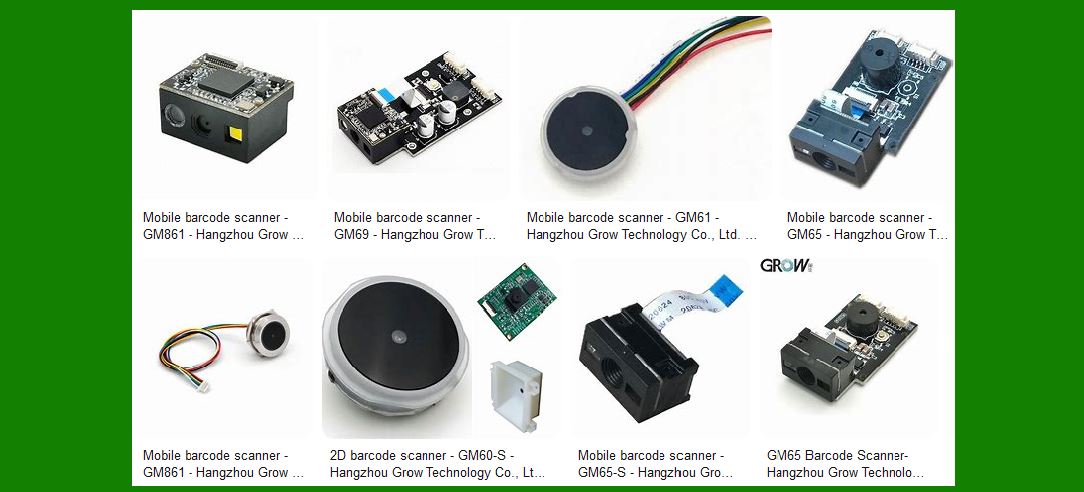
Hangzhou Grow Technology offers a diverse range of barcode scanners, each designed to meet specific needs and applications. Some of the notable models include: |
GM803 Barcode Scanner GM805 Barcode Scanner GM861S Barcode Scanner GM861 Barcode Scanner GM65 Barcode Scanner GM75 Barcode Scanner |

|
3. Key Features and Specifications |
Each barcode scanner model from Hangzhou Grow Technology comes with unique features and specifications. Here are some common attributes: |
3.1 Decoding Ability |
1D Barcodes: EAN-8, EAN-13, UPC-A, UPC-E, Code39, Code93, Code128, EAN128, Codebar, Industrial 2 of 5, Interleave 2 of 5, Matrix 2 of 5, MSI, Postal codes, etc. 2D Barcodes: PDF417, QR Code, DataMatrix, Maxicode, Aztec, etc. |
3.2 Interfaces |
USB 2.0 UART |
3.3 Resolution |
Typically around 6 mil |
3.4 Reading Distance |
Varies by model, generally between 30-150mm |
3.5 Operating Voltage and Current |
Operating Voltage: 3.3V Operating Current: Approximately 100mA |
3.6 Physical Dimensions and Weight |
Compact and lightweight, with dimensions around 30247mm and weight approximately 6g |
3.7 Scanning Angle |
Roll: 0-360° Pitch: ±55° or greater Yaw: ±55° or greater |
3.8 Environmental Tolerance |
Operating Temperature: -20°C to 55°C Storage Temperature: -40°C to 65°C Humidity: 5% to 95% relative humidity, non-condensing Light Levels: 0-10000 LUX |

|
4. Advanced Features |
Hangzhou Grow Technology’s barcode scanners are equipped with advanced features to enhance performance and usability: |
4.1 High-Efficiency Recognition |
Utilizes advanced decoding algorithms for superior reading performance, capable of capturing 1D and 2D codes on labels, paper, mobile phones, or computer screens. |
4.2 Configurable Options |
Over 180 configurable options, including programmable preamble, postamble, and termination strings. |
4.3 Buzzer for Feedback |
Equipped with a buzzer to indicate successful or unsuccessful scanning. |
4.4 Macro Support |
Supports macros to replace a string in the barcode with another, enhancing flexibility in data processing. |

|
5. Specific Models and Their Unique Features |
5.1 GM68 1D/2D Barcode Scanner |
Decoding Ability: Supports a wide range of 1D and 2D barcodes. Interfaces: USB 2.0, UART. Resolution: 6 mil. Reading Distance: 30-150mm. Operating Voltage: 3.3V. Operating Current: 100mA. Weight: 6g. Size: 30247mm. Scanning Angle: Roll: 0-360°, Pitch: ±55°, Yaw: ±55°. Environmental Tolerance: Operating Temperature: -20°C to 55°C, Storage Temperature: -40°C to 65°C, Humidity: 5% to 95% relative humidity, non-condensing, Light Levels: 0-10000 LUX. |
5.2 GM65 1D/2D Barcode Scanner |
Description: USB wired barcode scanner to capture 1D and 2D codes on various surfaces. High-Efficiency Recognition: High upload speed for improved working efficiency. Buzzer: Indicates successful or unsuccessful scanning. Interfaces: USB, UART. Configurable Options: Over 180 configurable options, including programmable preamble, postamble, and termination strings. Macro Support: Replace a string in the barcode with another. |

|
6. Applications |
Hangzhou Grow Technology’s barcode scanners are versatile and can be used in various applications, including: |
Retail: For inventory management and point-of-sale systems. Logistics and Warehousing: For tracking and managing goods. Healthcare: For patient identification and medication tracking. Manufacturing: For tracking parts and products through the production process. Government and Public Services: For document management and access control. |
7. Durability and Reliability |
The barcode scanners from Hangzhou Grow Technology are designed to be durable and reliable, with features such as: |
Impact Resistance: Built to withstand drops and rough handling. Environmental Tolerance: Operates effectively in a wide range of temperatures and humidity levels. Long Lifespan: Engineered for long-term use with minimal maintenance. |

|
8. Wearable Options |
Some models offer wearable options, providing hands-free operation for increased efficiency in environments where mobility is crucial. |
9. Wireless Connectivity |
Certain models come with wireless connectivity options, allowing for greater flexibility and ease of use in various settings. |
10. Software Compatibility |
Hangzhou Grow Technology’s barcode scanners are compatible with various software systems, ensuring seamless integration into existing workflows. They support multiple operating systems and can be easily configured to work with different applications. |

|
11. Device Compatibility |
The scanners are designed to be compatible with a wide range of devices, including PCs, tablets, and mobile phones, making them versatile tools for various industries. |
12. Multi-Symbol Reading |
Advanced models are capable of reading multiple symbols simultaneously, increasing efficiency and reducing the time required for scanning multiple items. |
13. Read Range |
The read range of the scanners varies by model, with some capable of reading barcodes from a considerable distance, making them suitable for applications where the barcode is not easily accessible. |

|
14. Image Capture Capabilities |
Some barcode scanners from Hangzhou Grow Technology are equipped with image capture capabilities, allowing them to take pictures of the scanned items for additional verification and record-keeping. |
15. Indoor vs. Outdoor Use |
The scanners are designed for both indoor and outdoor use, with features that ensure reliable performance in various lighting conditions and environments. |
16. Customer Support and Service |
Hangzhou Grow Technology provides excellent customer support and service, ensuring that users can get assistance with any issues or questions they may have. The company offers comprehensive user manuals and technical support to help users get the most out of their barcode scanners. |

|
17. Conclusion |
Hangzhou Grow Technology Co., Ltd. offers a wide range of high-quality barcode scanners designed to meet the needs of various industries. With advanced features, robust performance, and excellent customer support, their barcode scanners are reliable tools for improving efficiency and accuracy in various applications. Whether you need a scanner for retail, logistics, healthcare, manufacturing, or any other industry, Hangzhou Grow Technology has a solution to meet your needs. |
 cs@easiersoft.com