1. Introduction to Keyence Corporation |
Keyence Corporation is a leading manufacturer of automation sensors, barcode readers, machine vision systems, and other industrial automation equipment. Founded in 1974 and headquartered in Osaka, Japan, Keyence has established itself as a global leader in the field of industrial automation. The company is known for its innovative products, high-quality standards, and exceptional customer support. |
|
2. Overview of Keyence Barcode Scanners |
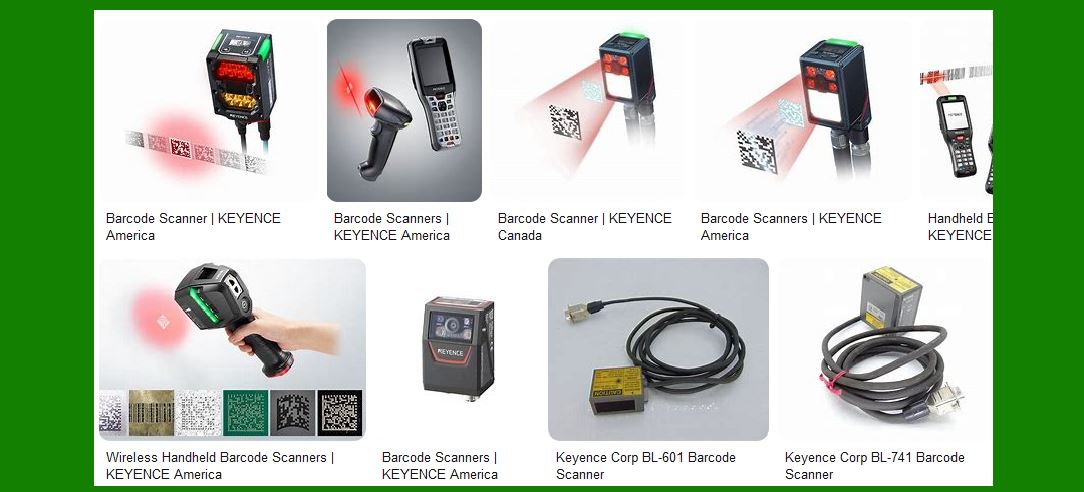
Keyence offers a wide range of barcode scanners designed to meet various industrial needs. These scanners are known for their high performance, reliability, and ease of use. Keyence barcode scanners are used in diverse industries, including automotive, logistics, food and beverage, pharmaceuticals, and electronics. |

|
3. Types of Barcode Scanners |
Keyence barcode scanners can be broadly categorized into several types based on their design and functionality: |
3.1 Fixed-Mount Barcode Scanners |
Fixed-mount barcode scanners are designed for stationary applications where the barcode passes in front of the scanner. These scanners are ideal for high-speed production lines and conveyor systems. |
3.2 Handheld Barcode Scanners |
Handheld barcode scanners are portable devices that allow users to scan barcodes manually. These scanners are versatile and can be used in various environments, including warehouses, retail stores, and manufacturing plants. |
3.3 Wireless Barcode Scanners |
Wireless barcode scanners offer the flexibility of mobility without the constraints of cables. These scanners are equipped with wireless communication capabilities, allowing them to transmit data to a host device in real-time. |

|
4. Keyence Barcode Scanner Series |
Keyence offers several series of barcode scanners, each designed to meet specific application requirements. Some of the notable series include: |
4.1 SR-X Series |
The SR-X Series is an AI-powered code reader that features a compact design and high-performance reading capabilities. It is equipped with advanced decoding algorithms and automatic focus adjustment, making it suitable for various industrial applications. |
4.2 SR-5000 Series |
The SR-5000 Series is designed for logistics applications. It offers an ultra-wide field of view, ultra-long depth of field, and high-speed reading capabilities. This series is ideal for capturing codes on fast-moving packages in logistics environments. |
4.3 SR-2000 Series |
The SR-2000 Series is a 1D/2D code reader that provides high-speed reading over long distances. It features a wide field of view and large depth of field, making it suitable for reading multiple barcodes simultaneously. |
4.4 SR-1000 Series |
The SR-1000 Series is an autofocus 1D and 2D code reader that offers easy setup and high-speed reading capabilities. It is designed to solve the issues of conventional fixed-mount code readers with its automatic calibration function. |

|
5. Key Features and Technologies |
Keyence barcode scanners are equipped with several advanced features and technologies that enhance their performance and usability: |
5.1 AI-Powered Decoding |
Many Keyence barcode scanners, such as the SR-X Series, utilize AI-powered decoding algorithms. These algorithms enable the scanners to read a wide variety of codes with high accuracy and stability, even under challenging conditions. |
5.2 Automatic Focus Adjustment |
Automatic focus adjustment is a feature that allows the scanner to automatically adjust its focus to achieve optimal reading conditions. This feature simplifies the setup process and ensures consistent reading performance. |
5.3 Wide Field of View |
A wide field of view allows the scanner to capture multiple barcodes simultaneously, reducing the need for precise barcode positioning. This feature is particularly useful in high-speed production lines and logistics applications. |
5.4 Large Depth of Field |
A large depth of field enables the scanner to read barcodes at varying distances without the need for manual adjustments. This feature enhances the scanner’s versatility and ease of use. |
5.5 High-Speed Reading |
Keyence barcode scanners are designed for high-speed reading, making them suitable for fast-moving production lines and conveyor systems. The scanners can quickly and accurately capture barcodes, ensuring efficient data collection. |

|
6. Applications of Keyence Barcode Scanners |
Keyence barcode scanners are used in a wide range of applications across various industries: |
6.1 Automotive Industry |
In the automotive industry, Keyence barcode scanners are used for part traceability, inventory management, and quality control. The scanners can read barcodes on metal parts, labels, and packaging, ensuring accurate data collection and tracking. |
6.2 Logistics and Warehousing |
In logistics and warehousing, Keyence barcode scanners are used for tracking packages, managing inventory, and optimizing supply chain operations. The scanners’ high-speed reading capabilities and wide field of view make them ideal for these applications. |
6.3 Food and Beverage Industry |
In the food and beverage industry, Keyence barcode scanners are used for product traceability, quality control, and inventory management. The scanners can read barcodes on various packaging materials, including bottles, cans, and boxes. |
6.4 Pharmaceutical Industry |
In the pharmaceutical industry, Keyence barcode scanners are used for tracking medications, managing inventory, and ensuring compliance with regulatory requirements. The scanners’ high accuracy and reliability are critical for these applications. |
6.5 Electronics Industry |
In the electronics industry, Keyence barcode scanners are used for tracking components, managing inventory, and ensuring product quality. The scanners can read barcodes on small and delicate components, providing accurate data collection. |

|
7. Advantages of Keyence Barcode Scanners |
Keyence barcode scanners offer several advantages that make them a preferred choice for industrial applications: |
7.1 High Performance |
Keyence barcode scanners are known for their high performance and reliability. The scanners can read a wide variety of barcodes with high accuracy, even under challenging conditions. |
7.2 Ease of Use |
Keyence barcode scanners are designed for easy setup and operation. Features such as automatic focus adjustment and automatic calibration simplify the setup process and ensure consistent reading performance. |
7.3 Versatility |
Keyence barcode scanners are versatile and can be used in various applications across different industries. The scanners’ wide field of view and large depth of field enhance their usability and flexibility. |
7.4 Durability |
Keyence barcode scanners are built to withstand harsh industrial environments. The scanners are designed to be rugged and durable, ensuring reliable performance in demanding conditions. |
7.5 Comprehensive Support |
Keyence offers comprehensive support for its barcode scanners, including on-site consultation, demonstration, and technical support. This ensures that customers receive the assistance they need to optimize their barcode scanning operations. |

|
8. Conclusion |
Keyence Corporation’s barcode scanners are a testament to the company’s commitment to innovation, quality, and customer satisfaction. With a wide range of products designed to meet various industrial needs, Keyence barcode scanners offer high performance, reliability, and ease of use. Whether used in the automotive, logistics, food and beverage, pharmaceutical, or electronics industry, Keyence barcode scanners provide accurate and efficient data collection, contributing to improved operational efficiency and productivity. |
 cs@easiersoft.com