1. Introduction to Microscan Systems |
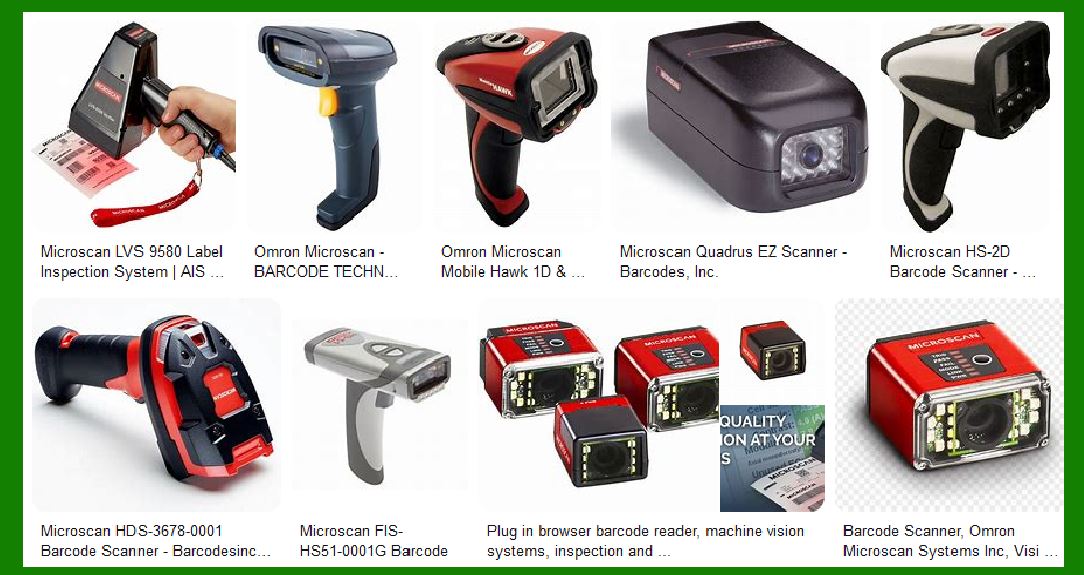
Microscan Systems, now part of Omron, is a leading provider of barcode scanners, machine vision systems, and verification solutions. The company specializes in automatic identification (auto ID) and machine vision technologies, offering a wide range of products designed to meet the needs of various industries, including manufacturing, packaging, electronics, and life sciences1. |
|
2. Product Range |
Microscan Systems offers a diverse range of barcode scanners, each tailored to specific applications and environments. The main categories include: |
2.1 Fixed-Mount Barcode Scanners |
Fixed-mount barcode scanners are designed for automated systems where the scanner remains stationary, and the items to be scanned move past it. Key products in this category include: |
MS-3 Laser Scanner: Known for its compact size and high-speed 1D barcode reading capabilities, the MS-3 is ideal for space-constrained applications. It features an IP54-rated casing, adjustable scan speeds from 300 to 1000 decodes per second, and a wide scan angle of over 70 degrees2. MS-9 Laser Scanner: This scanner offers high-performance scanning for both 1D and 2D barcodes. It is designed for high-speed conveyor systems and can handle a wide range of barcode symbologies. |
2.2 Handheld Barcode Scanners |
Handheld scanners are portable devices used for manual scanning tasks. They are commonly used in retail, healthcare, and logistics. Notable products include: |
HS-360X: A rugged handheld scanner designed for industrial environments. It supports both 1D and 2D barcode scanning and features a durable design that can withstand drops and harsh conditions. HS-51: A lightweight and ergonomic scanner suitable for general-purpose applications. It offers fast and accurate scanning of 1D barcodes. |

|
3. Key Features and Technologies |
Microscan barcode scanners are equipped with advanced features and technologies to ensure reliable and efficient barcode reading. Some of the key features include: |
3.1 High-Speed Decoding |
Microscan scanners are known for their high-speed decoding capabilities, which enable them to read barcodes quickly and accurately. This is particularly important in high-throughput environments where speed is critical. |
3.2 Wide Scan Angle |
Many Microscan scanners, such as the MS-3, feature a wide scan angle, allowing them to cover a larger area and capture barcodes from various orientations. This enhances flexibility and reduces the need for precise alignment. |
3.3 Compact Design |
The compact design of Microscan scanners makes them suitable for integration into tight spaces and small devices. For example, the MS-3 scanner measures just 44.5 mm square by 21.6 mm tall and weighs only 57 grams2. |
3.4 IP Ratings |
Microscan scanners are built to withstand challenging environments. Many models come with IP ratings that indicate their resistance to dust and water. For instance, the MS-3 has an IP54 rating, making it suitable for industrial applications. |

|
4. Applications |
Microscan barcode scanners are used in a wide range of applications across various industries. Some common applications include: |
4.1 Manufacturing |
In manufacturing, barcode scanners are used for tracking parts and components, ensuring accurate assembly, and managing inventory. Microscan scanners help improve efficiency and reduce errors in production lines. |
4.2 Packaging |
Barcode scanners are essential in packaging for verifying product labels, tracking shipments, and ensuring compliance with industry standards. Microscan scanners provide reliable performance in high-speed packaging lines. |
4.3 Electronics |
In the electronics industry, barcode scanners are used for component traceability, quality control, and inventory management. Microscan’s high-speed and compact scanners are ideal for these applications. |
4.4 Life Sciences |
In life sciences, barcode scanners are used for tracking samples, managing laboratory inventory, and ensuring accurate labeling of medical devices. Microscan scanners offer the precision and reliability required in this field. |

|
5. Integration and Compatibility |
Microscan barcode scanners are designed for easy integration into existing systems. They support various communication interfaces, including USB, RS-232, and Ethernet, allowing seamless connectivity with other devices and systems. |
5.1 Software Support |
Microscan provides software tools and SDKs (Software Development Kits) to facilitate the integration and configuration of their barcode scanners. These tools help users customize scanner settings, monitor performance, and troubleshoot issues. |
5.2 Compatibility with Automation Systems |
Microscan scanners are compatible with a wide range of automation systems, including PLCs (Programmable Logic Controllers) and MES (Manufacturing Execution Systems). This ensures that they can be easily incorporated into automated workflows. |

|
6. Durability and Reliability |
Microscan barcode scanners are built to last, with robust designs that can withstand harsh environments and heavy use. Features such as IP ratings, rugged housings, and shock-resistant components contribute to their durability. |
6.1 Environmental Resistance |
Many Microscan scanners are designed to operate in extreme temperatures, dusty environments, and areas with high humidity. This makes them suitable for use in a variety of industrial settings. |
6.2 Long Lifespan |
Microscan scanners are engineered for long-term use, with high-quality components and reliable performance. This reduces the need for frequent replacements and minimizes downtime. |

|
7. Customer Support and Services |
Microscan, as part of Omron, offers comprehensive customer support and services to ensure that users get the most out of their barcode scanners. This includes technical support, training, and maintenance services. |
7.1 Technical Support |
Microscan provides technical support through various channels, including phone, email, and live chat. Their support team can assist with product selection, installation, configuration, and troubleshooting. |
7.2 Training and Resources |
Microscan offers training programs and resources to help users understand and utilize their barcode scanners effectively. This includes online tutorials, user manuals, and in-person training sessions. |
7.3 Maintenance and Repair |
Microscan provides maintenance and repair services to keep their barcode scanners in optimal condition. This includes routine maintenance, firmware updates, and repair services for damaged or malfunctioning devices. |

|
8. Conclusion |
Microscan Systems, now part of Omron, offers a wide range of barcode scanners designed to meet the needs of various industries. With advanced features, robust designs, and comprehensive support services, Microscan barcode scanners provide reliable and efficient barcode reading solutions for a variety of applications. |
 cs@easiersoft.com