1. Company Overview |
Nanjing Barway Technology Co., Ltd. is a prominent system integrator founded in 2007. The company specializes in the development of RFID application management software, POS terminals, and the integration of barcode and RFID hardware. With over 15 years of experience, Barway has established itself as a reliable provider of barcode scanners, printers, and related consumables. |
|
2. Product Range |
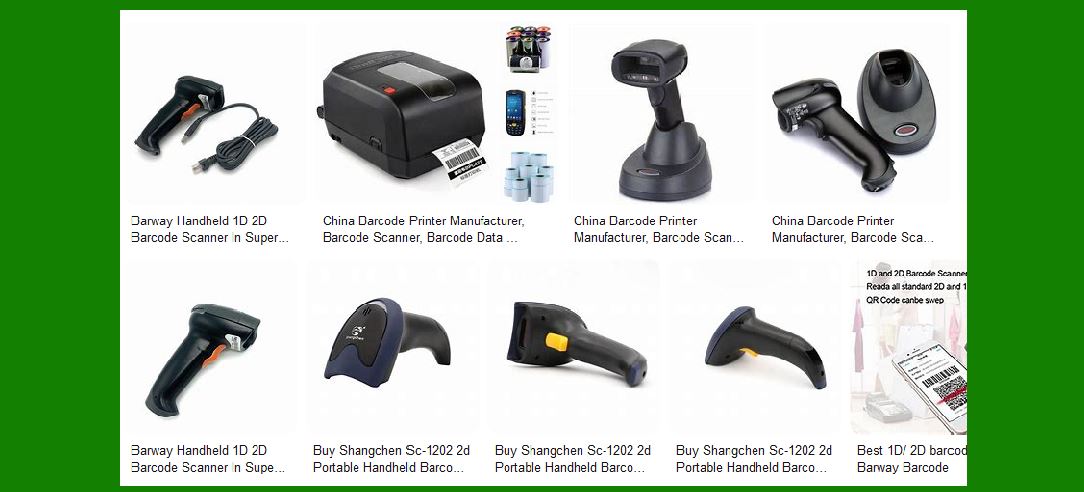
Barway offers a diverse range of barcode scanners designed to meet various industry needs. Their product lineup includes handheld scanners, fixed-mount scanners, and mobile data terminals. Each product is engineered to deliver high performance, durability, and ease of use. |

|
3. Handheld Barcode Scanners |
Handheld barcode scanners from Barway are designed for versatility and efficiency. They are suitable for retail, logistics, healthcare, and manufacturing environments. Key features include: |
Ergonomic Design: Comfortable grip and lightweight construction for prolonged use. Scanning Capabilities: Ability to read 1D and 2D barcodes, including QR codes. Connectivity Options: Available in wired (USB, RS232) and wireless (Bluetooth, Wi-Fi) models. Durability: Built to withstand drops and harsh environments, often with IP ratings for dust and water resistance. |

|
4. Fixed-Mount Barcode Scanners |
Fixed-mount scanners are ideal for automated scanning applications such as conveyor systems and kiosks. Features include: |
Compact Size: Small footprint for easy integration into various systems. High-Speed Scanning: Capable of reading barcodes at high speeds, suitable for fast-moving items. Versatile Mounting Options: Can be mounted in various orientations to fit different setups. Advanced Decoding Algorithms: Ensures accurate reading of damaged or poorly printed barcodes. |

|
5. Mobile Data Terminals |
Barway’s mobile data terminals combine barcode scanning with mobile computing capabilities. These devices are essential for inventory management, field service, and asset tracking. Key features include: |
Operating System: Typically run on Android for compatibility with a wide range of applications. Robust Construction: Designed to endure tough working conditions, often with ruggedized exteriors. Multiple Data Collection Methods: Equipped with barcode scanners, RFID readers, and cameras. Connectivity: Support for 4G, Wi-Fi, Bluetooth, and GPS for real-time data transmission and location tracking. |

|
6. Technological Innovations |
Barway is committed to innovation, continuously improving their products with the latest technology. Some notable advancements include: |
Advanced Imaging Technology: Enhanced sensors and optics for better barcode reading performance. AI-Powered Decoding: Utilizes artificial intelligence to improve the accuracy and speed of barcode decoding. Battery Efficiency: Long-lasting batteries with fast charging capabilities to minimize downtime. User-Friendly Interfaces: Intuitive software interfaces for easy operation and configuration. |

|
7. Customization and Integration |
Barway offers customization options to tailor their barcode scanners to specific customer requirements. This includes: |
Custom Firmware: Development of specialized firmware to meet unique operational needs. Integration Services: Assistance with integrating barcode scanners into existing systems and workflows. OEM Solutions: Providing OEM services for companies looking to brand their own barcode scanning devices. |

|
8. Quality Assurance |
Quality is a top priority for Barway. The company adheres to strict quality control processes to ensure the reliability and performance of their products. This includes: |
Certifications: Products are certified to meet international standards such as CE, FCC, and RoHS. Testing Procedures: Rigorous testing for durability, performance, and compliance with industry standards. Customer Feedback: Continuous improvement based on customer feedback and market trends. |

|
9. Applications and Use Cases |
Barway barcode scanners are used in a wide range of industries and applications, including: |
Retail: Point-of-sale systems, inventory management, and customer loyalty programs. Logistics: Warehouse management, shipping and receiving, and parcel tracking. Healthcare: Patient identification, medication administration, and asset tracking. Manufacturing: Production line monitoring, quality control, and parts tracking. |

|
10. Support and Services |
Barway provides comprehensive support and services to ensure customer satisfaction. This includes: |
Technical Support: Available through phone, email, and online resources to assist with troubleshooting and technical issues. Training Programs: Offering training sessions for customers to maximize the use of their barcode scanning solutions. Warranty and Repairs: Providing warranty coverage and repair services to maintain product performance. |
11. Environmental Considerations |
Barway is committed to sustainability and environmental responsibility. Their products are designed with eco-friendly materials and processes, including: |
Energy Efficiency: Products are designed to consume less power, reducing their environmental impact. Recyclable Materials: Use of recyclable materials in product design and packaging. Compliance: Adherence to environmental regulations and standards. |

|
12. Future Developments |
Barway continues to invest in research and development to stay at the forefront of barcode scanning technology. Future developments may include: |
Enhanced AI Capabilities: Further integration of AI to improve scanning accuracy and efficiency. IoT Integration: Expanding the connectivity of barcode scanners to integrate with IoT ecosystems. Augmented Reality: Exploring the use of augmented reality to enhance barcode scanning applications. |

|
13. Customer Testimonials |
Barway has received positive feedback from customers across various industries. Testimonials highlight the reliability, performance, and ease of use of their barcode scanners. Customers appreciate the company’s commitment to quality and customer service. |
14. Global Reach |
Barway serves customers worldwide, with a strong presence in Asia, Europe, and North America. The company has established a network of distributors and partners to provide local support and services. |

|
15. Conclusion |
Nanjing Barway Technology Co., Ltd. is a leading provider of barcode scanning solutions, offering a wide range of products designed to meet the needs of various industries. With a focus on innovation, quality, and customer satisfaction, Barway continues to be a trusted partner for businesses looking to enhance their operations with reliable barcode scanning technology. |
 cs@easiersoft.com