1. Introduction to Newland EMEA |
Newland EMEA is a prominent player in the Automatic Identification and Data Capture (AIDC) industry. They offer a wide range of barcode scanning solutions designed to meet the needs of various industries, including retail, healthcare, logistics, and manufacturing. Newland EMEA is known for its innovative technology, user-friendly designs, and reliable performance. |
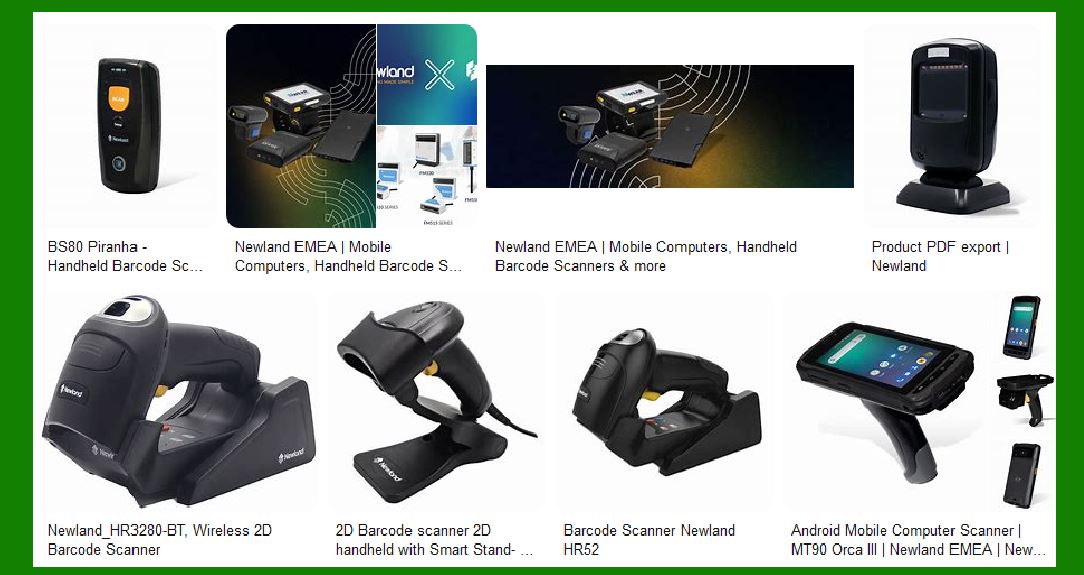
|
2. Product Range |
Newland EMEA’s product portfolio includes several types of barcode scanners, each tailored to specific applications and environments. The main categories are: |
2.1 Handheld Scanners |
Handheld scanners are versatile and widely used across different sectors. Newland EMEA offers both corded and cordless models, capable of reading 1D and 2D barcodes. Key models include: |
HR32 Marlin: Known for its ergonomic design and high-speed scanning capabilities, the HR32 Marlin is ideal for retail and logistics applications. HR42 Halibut: This model is designed for high-performance scanning, capable of reading high-density barcodes and damaged codes with ease. |
2.2 Stationary Scanners |
Stationary scanners are fixed in place and are commonly used in retail and industrial environments. They provide hands-free scanning, which enhances efficiency and reduces operator fatigue. Notable models include: |
FR4080 Koi: A compact and powerful scanner that excels in reading both 1D and 2D barcodes. It is often used at retail checkouts and in kiosks. FM430 Barracuda: Designed for industrial applications, this scanner offers robust performance and can read barcodes from a distance. |
2.3 Mobile Computers |
Mobile computers combine barcode scanning with computing capabilities, making them suitable for field operations and inventory management. Key models include: |
N7 Cachalot Pro: A rugged mobile computer with a large screen, suitable for outdoor and warehouse environments. NQuire 1000 Manta: This model features a tablet-like design and is used for price checking and inventory management in retail stores. |
2.4 Wearable Scanners |
Wearable scanners are designed for hands-free operation, enhancing productivity in environments where workers need to use both hands. Newland EMEA’s wearable scanners include: |
WD1 Watch Scanner: A wrist-worn scanner that allows workers to scan barcodes while keeping their hands free for other tasks. WD2 Ring Scanner: A ring-style scanner that fits on a finger, providing quick and easy barcode scanning. |

|
3. Key Features and Technologies |
Newland EMEA’s barcode scanners are equipped with advanced features and technologies to ensure high performance and reliability. Some of the key features include: |
3.1 UIMG Technology |
Newland’s proprietary UIMG technology enhances the scanning performance of their devices. It allows for fast and accurate reading of barcodes, even those that are damaged or poorly printed. |
3.2 2D Decoder Chip |
The 2D decoder chip is another proprietary technology from Newland. It enables the scanners to read a wide range of 2D barcodes, including QR codes, Data Matrix, and PDF417. |
3.3 Ergonomic Design |
Many of Newland’s scanners are designed with ergonomics in mind. This ensures that the devices are comfortable to use for extended periods, reducing operator fatigue and increasing productivity. |
3.4 Durability |
Newland EMEA’s scanners are built to withstand harsh environments. Many models are rated for dust and water resistance (IP ratings) and can survive drops from significant heights. |

|
4. Industry Applications |
Newland EMEA’s barcode scanners are used in various industries, each with specific requirements and challenges. Here are some examples: |
4.1 Retail |
In retail, barcode scanners are essential for point-of-sale (POS) systems, inventory management, and price checking. Newland’s handheld and stationary scanners are commonly used in this sector. |
4.2 Healthcare |
In healthcare, barcode scanners are used for patient identification, medication administration, and inventory management. Newland’s IVD scanners are specifically designed for medical applications, ensuring accuracy and reliability. |
4.3 Logistics and Warehousing |
In logistics and warehousing, barcode scanners are used for tracking shipments, managing inventory, and ensuring accurate order fulfillment. Newland’s rugged mobile computers and handheld scanners are ideal for these environments. |
4.4 Manufacturing |
In manufacturing, barcode scanners are used for tracking parts and components, managing inventory, and ensuring quality control. Newland’s industrial-grade scanners are built to withstand the demands of manufacturing environments. |

|
5. Specific Models and Their Features |
Here are detailed descriptions of some specific models from Newland EMEA: |
5.1 HR32 Marlin |
Design: Ergonomic and lightweight, making it comfortable for prolonged use. Performance: High-speed scanning of 1D and 2D barcodes, including damaged and poorly printed codes. Connectivity: Available in both corded and cordless versions, with Bluetooth connectivity for wireless models. Applications: Ideal for retail, logistics, and light industrial applications. |
5.2 FR4080 Koi |
Design: Compact and stylish, suitable for retail environments. Performance: Capable of reading a wide range of 1D and 2D barcodes, including those on mobile screens. Mounting Options: Can be mounted on counters or integrated into kiosks. Applications: Commonly used at retail checkouts, self-service kiosks, and in hospitality. |
5.3 N7 Cachalot Pro |
Design: Rugged and durable, with a large touchscreen display. Performance: Combines barcode scanning with computing capabilities, suitable for field operations. Connectivity: Supports Wi-Fi, Bluetooth, and cellular connectivity. Applications: Used in warehousing, logistics, and field service operations. |
5.4 WD1 Watch Scanner |
Design: Worn on the wrist, allowing for hands-free operation. Performance: Fast and accurate scanning of 1D and 2D barcodes. Battery Life: Long battery life, suitable for a full day of use. Applications: Ideal for warehousing, retail, and logistics where hands-free operation is beneficial. |

|
6. Integration and Compatibility |
Newland EMEA’s barcode scanners are designed to be easily integrated into existing systems and workflows. They offer compatibility with various operating systems and software platforms, ensuring seamless integration. |
6.1 Software Development Kits (SDKs) |
Newland provides SDKs for developers to integrate their scanners into custom applications. These SDKs support multiple programming languages and platforms, making it easy to develop tailored solutions. |
6.2 Plug-and-Play |
Many of Newland’s scanners are plug-and-play, meaning they can be used immediately without the need for extensive setup or configuration. This reduces the time and effort required to deploy the devices. |

|
7. Customer Support and Services |
Newland EMEA offers comprehensive customer support and services to ensure that their clients get the most out of their barcode scanning solutions. |
7.1 Technical Support |
Newland provides technical support through various channels, including phone, email, and online resources. Their support team is knowledgeable and responsive, helping customers resolve any issues quickly. |
7.2 Training and Documentation |
Newland offers training programs and detailed documentation to help customers understand and use their products effectively. This includes user manuals, installation guides, and video tutorials. |
7.3 Warranty and Repairs |
Newland’s products come with warranties that cover manufacturing defects and provide repair services. This ensures that customers can rely on their devices for long-term use. |

|
8. Conclusion |
Newland EMEA’s barcode scanners are designed to meet the diverse needs of various industries. With a wide range of products, advanced technologies, and comprehensive support services, Newland EMEA is a reliable partner for businesses looking to enhance their operations with barcode scanning solutions. |
 cs@easiersoft.com