1. Introduction to Opticon Inc. |
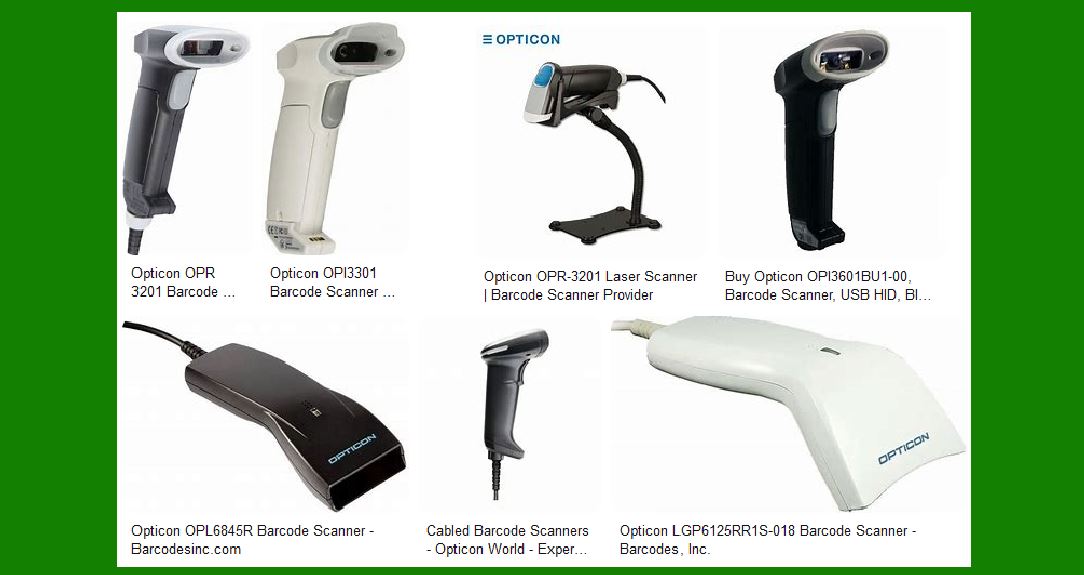
Opticon Inc. is a renowned manufacturer of barcode scanners and data capture solutions. Established in 1976, the company has over 45 years of experience in developing innovative scanning technologies. Opticon’s product range includes handheld scanners, wireless scanners, fixed mount scanners, wearable scanners, and OEM scan engines. Their solutions are used across various industries, including retail, healthcare, logistics, and industrial applications. |
|
2. Types of Barcode Scanners |
Opticon offers a diverse range of barcode scanners to meet different business needs. Here are the main types: |
2.1 Handheld Barcode Scanners |
Handheld scanners are the most common type of barcode scanners. They are designed for ease of use and portability. Opticon’s handheld scanners come in various models, including corded and cordless options. These scanners are ideal for point-of-sale (POS) systems, inventory management, and asset tracking. |
2.2 Wireless Barcode Scanners |
Wireless barcode scanners provide greater flexibility and mobility compared to their wired counterparts. They use Bluetooth or Wi-Fi to transmit data to a host device. Opticon’s wireless scanners are equipped with advanced 1D and 2D imaging technology, ensuring fast and accurate data capture. These scanners are suitable for environments where mobility is crucial, such as warehouses and retail stores. |
2.3 Fixed Mount Barcode Scanners |
Fixed mount scanners are designed for integration into various systems and machines. They are commonly used in self-checkout kiosks, parking machines, and industrial automation. Opticon’s fixed mount scanners offer high-performance scanning capabilities and can read barcodes from different angles and distances. |
2.4 Wearable Barcode Scanners |
Wearable scanners are designed for hands-free operation, making them ideal for tasks that require both hands, such as picking and packing in warehouses. Opticon’s wearable scanners are lightweight and comfortable to wear, ensuring that workers can use them for extended periods without fatigue. |
2.5 OEM Scan Engines |
Opticon provides OEM scan engines for integration into custom devices and applications. These scan engines range from entry-level models to high-performance 2D imagers. They are used in various applications, including medical devices, kiosks, and industrial equipment. |

|
3. Key Features of Opticon Barcode Scanners |
Opticon barcode scanners are known for their reliability, performance, and ease of use. Here are some key features: |
3.1 Advanced Imaging Technology |
Opticon scanners use advanced imaging technology to capture barcodes quickly and accurately. Their 2D imagers can read a wide range of barcode types, including QR codes, Data Matrix, and PDF417. The scanners are designed to perform well even in challenging conditions, such as low light or damaged barcodes. |
3.2 Durability and Ergonomics |
Opticon scanners are built to withstand harsh environments. Many models come with rugged housings that can resist drops, dust, and water. Additionally, the scanners are ergonomically designed to ensure user comfort during prolonged use. |
3.3 Connectivity Options |
Opticon offers various connectivity options, including USB, Bluetooth, and Wi-Fi. This flexibility allows the scanners to be easily integrated into different systems and devices. Wireless models provide real-time data transfer, enhancing productivity and efficiency. |
3.4 Ease of Integration |
Opticon scanners are designed for easy integration into existing systems. They come with comprehensive SDKs and documentation, making it simple for developers to incorporate scanning capabilities into their applications. The scanners also support multiple interfaces, such as RS232, USB, and keyboard wedge. |
3.5 Customizable Solutions |
Opticon provides customizable solutions to meet specific business needs. Their OEM scan engines can be tailored to fit unique applications, and their support team is available to assist with any programming challenges. |

|
4. Popular Models of Opticon Barcode Scanners |
Here are some popular models of Opticon barcode scanners: |
4.1 OPN-2006 |
The OPN-2006 is a compact and lightweight Bluetooth barcode scanner. It features a 1D laser scanner and can store up to 25,000 barcodes in its internal memory. The OPN-2006 is ideal for mobile applications, such as inventory management and event check-in. |
4.2 OPN-3002i |
The OPN-3002i is a 2D imager scanner with Bluetooth connectivity. It can read both 1D and 2D barcodes and is designed for healthcare environments with its antimicrobial coating. The OPN-3002i is suitable for applications that require high-speed and accurate scanning. |
4.3 RS-3000 |
The RS-3000 is a wearable ring scanner that provides hands-free scanning. It features a 2D imager and Bluetooth connectivity, making it ideal for warehouse and logistics applications. The RS-3000 is designed for comfort and durability, ensuring that workers can use it throughout their shifts. |
4.4 NLV-3101 |
The NLV-3101 is a fixed mount scanner that offers high-performance scanning in a compact form factor. It can read 1D and 2D barcodes and is suitable for integration into various systems, such as self-checkout kiosks and industrial automation. |

|
5. Applications of Opticon Barcode Scanners |
Opticon barcode scanners are used in a wide range of applications across different industries. Here are some examples: |
5.1 Retail |
In retail, Opticon scanners are used for point-of-sale transactions, inventory management, and customer loyalty programs. The scanners help improve efficiency and accuracy, reducing checkout times and enhancing the customer experience. |
5.2 Healthcare |
In healthcare, Opticon scanners are used for patient identification, medication administration, and inventory management. The scanners’ antimicrobial coatings and disinfectant-ready designs make them suitable for use in sterile environments. |
5.3 Logistics and Warehousing |
In logistics and warehousing, Opticon scanners are used for order picking, shipping and receiving, and inventory tracking. The scanners’ rugged designs and wireless capabilities make them ideal for these demanding environments. |
5.4 Industrial Automation |
In industrial automation, Opticon fixed mount scanners are used for quality control, assembly line automation, and product tracking. The scanners’ high-performance imaging technology ensures accurate and reliable barcode reading. |
5.5 Event Management |
In event management, Opticon portable scanners are used for ticket validation, attendee check-in, and access control. The scanners’ compact designs and wireless connectivity make them ideal for mobile applications. |

|
6. Support and Services |
Opticon provides comprehensive support and services to ensure that their customers get the most out of their barcode scanners. Here are some of the services offered: |
6.1 Technical Support |
Opticon’s technical support team is available to assist with any issues or questions related to their products. They provide troubleshooting, software updates, and configuration assistance to ensure that the scanners operate smoothly. |
6.2 Customization Services |
Opticon offers customization services to tailor their scanners to specific business needs. This includes custom firmware, software development, and hardware modifications. Their R&D team works closely with customers to develop solutions that meet their unique requirements. |
6.3 Training and Documentation |
Opticon provides training and documentation to help customers get started with their scanners. This includes user manuals, SDKs, and online tutorials. The training ensures that users can effectively operate and integrate the scanners into their systems. |
6.4 Warranty and Repair Services |
Opticon offers warranty and repair services to ensure the longevity of their products. They provide repair and replacement services for defective or damaged scanners, ensuring minimal downtime for their customers. |

|
7. Conclusion |
Opticon Inc. is a leading provider of barcode scanning solutions with a wide range of products to meet various business needs. Their scanners are known for their reliability, performance, and ease of use. Whether you need a handheld scanner for retail, a wearable scanner for logistics, or a fixed mount scanner for industrial automation, Opticon has a solution for you. With comprehensive support and customization services, Opticon ensures that their customers get the most out of their barcode scanning technology. |
 cs@easiersoft.com