1. Company Overview |
Shenzhen HCC Technology Co., Ltd., also known as HCCTG, is a prominent manufacturer specializing in various technological solutions, including barcode scanners. The company is headquartered in Shenzhen, China, and has established itself as a key player in the POS (Point of Sale) and automatic identification and data capture (AIDC) industries. |
|
2. Product Range |
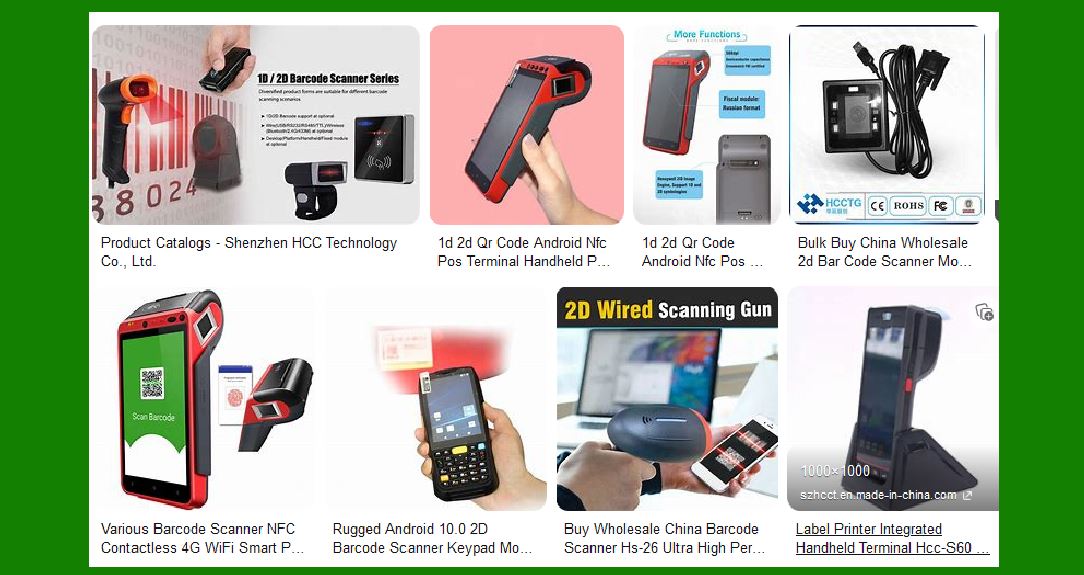
HCCTG offers a diverse range of barcode scanners designed to meet different industry needs. Their product lineup includes: |
Handheld Barcode Scanners: These are versatile and widely used in retail, logistics, and warehousing. Fixed Mount Barcode Scanners: Ideal for automated scanning in production lines and kiosks. Wireless Barcode Scanners: Provide mobility and flexibility, suitable for large warehouses and retail environments. 2D Barcode Scanners: Capable of reading both 1D and 2D barcodes, including QR codes. OEM Barcode Scanners: Customizable solutions for integration into other devices and systems. |

|
3. Key Features |
HCCTG barcode scanners are known for their advanced features, which include: |
High Precision Scanning: Equipped with advanced sensors and algorithms to ensure accurate and fast barcode reading. Durability: Designed to withstand harsh environments, with models featuring rugged construction and IP ratings for dust and water resistance. Ergonomic Design: Focus on user comfort with lightweight and well-balanced designs. Compatibility: Support for various interfaces such as USB, RS232, and Bluetooth, ensuring compatibility with different systems and devices. Ease of Use: User-friendly interfaces and plug-and-play functionality. |

|
4. Technological Innovations |
HCCTG integrates several technological innovations into their barcode scanners: |
Image Recognition Technology: Enhances the ability to read damaged or poorly printed barcodes. Multi-Platform Support: Compatibility with Windows, Android, and iOS platforms. Long Battery Life: Wireless models come with high-capacity batteries to support extended use. Fast Decoding Speed: Ensures quick and efficient barcode reading, improving productivity. |

|
5. Popular Models |
Some of the popular barcode scanner models from HCCTG include: |
ER200: A 5-inch touch screen barcode scanner with Android 11, suitable for supermarkets and retail environments. PPR100 Plus: A passport reader with RFID capabilities, ideal for security and identification applications. HC-3208: A handheld 2D barcode scanner known for its high precision and durability. |

|
6. Industry Applications |
HCCTG barcode scanners are used across various industries, including: |
Retail: For inventory management, point of sale, and customer service. Logistics and Warehousing: For tracking shipments, managing inventory, and ensuring accurate order fulfillment. Healthcare: For patient identification, medication tracking, and inventory management. Manufacturing: For tracking parts and products through the production process. Government and Security: For identification and access control. |

|
7. Customer Support and Services |
HCCTG provides comprehensive customer support and services, including: |
Technical Support: Available to assist with installation, troubleshooting, and maintenance. Customization Services: Offering tailored solutions to meet specific customer requirements. Training Programs: Providing training for users to maximize the efficiency and effectiveness of their barcode scanners. |

|
8. Global Presence |
HCCTG has a strong global presence, with products distributed in various regions, including Europe, North America, Asia, and Africa. The company collaborates with international partners to ensure the availability and support of their products worldwide. |

|
9. Certifications and Standards |
HCCTG barcode scanners comply with international standards and certifications, ensuring quality and reliability. Some of the certifications include: |
ISO 9001: Quality management system certification. CE: Conformité Européenne marking for compliance with European standards. FCC: Federal Communications Commission certification for electronic devices. |

|
10. Future Developments |
HCCTG continues to innovate and expand its product offerings. Future developments may include: |
Integration with IoT: Enhancing barcode scanners with Internet of Things (IoT) capabilities for smarter data collection and analysis. AI-Powered Features: Incorporating artificial intelligence to improve scanning accuracy and efficiency. Sustainability Initiatives: Developing eco-friendly products and practices to reduce environmental impact. |

|
11. Conclusion |
Shenzhen HCC Technology Co., Ltd. is a leading manufacturer of barcode scanners, offering a wide range of products with advanced features and applications across various industries. Their commitment to innovation, quality, and customer satisfaction makes them a reliable choice for businesses seeking efficient and effective barcode scanning solutions. |
 cs@easiersoft.com