1. Introduction to SICK AG |
SICK AG is a global leader in sensor technology and industrial automation solutions. Founded in 1946, the company has a long history of innovation and excellence in developing intelligent sensors and systems for various industries. SICK’s barcode scanners are renowned for their precision, reliability, and advanced features, making them a preferred choice for many applications. |
|
2. Types of Barcode Scanners from SICK AG |
SICK AG offers a wide range of barcode scanners designed to meet different needs and applications. These include: |
2.1 Fixed Mount Barcode Scanners |
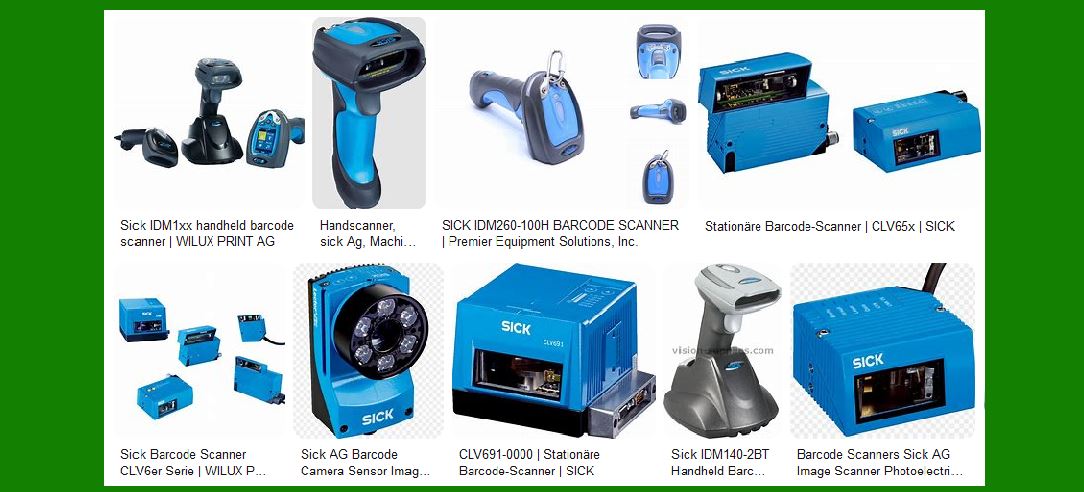
Fixed mount barcode scanners are ideal for high-speed, high-volume applications where products move along a conveyor belt. These scanners are mounted in a fixed position and can read barcodes as items pass by. Key models include: |
CLV62x Series: Known for its compact design and high reading performance, this series is suitable for various industrial applications. CLV65x Series: Offers a larger field of view and dynamic focus, making it ideal for applications with varying code positions and object heights. |
2.2 Handheld Barcode Scanners |
Handheld barcode scanners are versatile and can be used in various environments, from warehouses to retail stores. They are designed for manual operation and can read barcodes from different angles and distances. Key models include: |
IDM16x Series: These scanners are known for their ergonomic design and high reading performance, making them suitable for intensive scanning tasks. IDM26x Series: Offers advanced features such as wireless connectivity and robust construction for demanding environments. |
2.3 Mobile Barcode Scanners |
Mobile barcode scanners are designed for use with mobile devices, providing flexibility and mobility for various applications. These scanners can be integrated with smartphones or tablets to enhance data collection and processing. Key models include: |
MOBI-C Series: These scanners are compact and lightweight, making them ideal for mobile applications in logistics and retail. |

|
3. Key Features of SICK Barcode Scanners |
SICK barcode scanners are equipped with advanced features that enhance their performance and usability. Some of the key features include: |
3.1 High Reading Performance |
SICK barcode scanners are known for their high reading performance, capable of accurately reading barcodes even in challenging conditions. This includes low-contrast, damaged, or partially obscured barcodes. |
3.2 Advanced Decoding Algorithms |
The scanners use advanced decoding algorithms to ensure fast and accurate barcode reading. These algorithms can handle various barcode symbologies, including 1D and 2D codes. |
3.3 Robust Construction |
SICK barcode scanners are built to withstand harsh industrial environments. They feature rugged housings and are designed to resist dust, water, and mechanical impacts. |
3.4 Connectivity Options |
The scanners offer various connectivity options, including Ethernet, PROFINET, EtherNet/IP?, EtherCAT?, Serial, CAN, CANopen, and PROFIBUS DP. This ensures seamless integration with existing systems and networks. |
3.5 Easy Integration |
SICK barcode scanners are designed for easy integration into existing systems. They come with user-friendly software and tools that simplify the setup and configuration process. |

|
4. Applications of SICK Barcode Scanners |
SICK barcode scanners are used in a wide range of applications across various industries. Some of the key applications include: |
4.1 Logistics and Warehousing |
In logistics and warehousing, SICK barcode scanners are used for tracking and sorting packages, inventory management, and order fulfillment. The scanners help improve efficiency and accuracy in these processes. |
4.2 Manufacturing |
In manufacturing, barcode scanners are used for tracking parts and components, quality control, and production line monitoring. They help ensure that the right parts are used in the right processes and that products meet quality standards. |
4.3 Retail |
In retail, barcode scanners are used for point-of-sale (POS) transactions, inventory management, and customer service. They help streamline operations and improve the shopping experience for customers. |
4.4 Healthcare |
In healthcare, barcode scanners are used for patient identification, medication administration, and inventory management. They help improve patient safety and ensure accurate tracking of medical supplies. |

|
5. Specific Models and Their Features |
Let’s take a closer look at some specific models of SICK barcode scanners and their unique features: |
5.1 CLV62x Series |
Compact Design: The CLV62x series features a compact design that allows for easy installation in tight spaces. High Reading Performance: These scanners offer high reading performance, capable of reading low-contrast and damaged barcodes. Flexible Integration: The series supports various connectivity options, making it easy to integrate with existing systems. |
5.2 CLV65x Series |
Large Field of View: The CLV65x series offers a large field of view, making it suitable for applications with varying code positions and object heights. Dynamic Focus: These scanners feature dynamic focus, allowing them to adjust to different object heights and transport speeds. Modular Design: The series has a modular design that allows for cost-effective and straightforward integration of multiple devices. |
5.3 IDM16x Series |
Ergonomic Design: The IDM16x series features an ergonomic design that ensures comfortable use during intensive scanning tasks. High Reading Performance: These scanners offer high reading performance, capable of reading barcodes from different angles and distances. Durable Construction: The series is built to withstand harsh environments, with rugged housings that resist dust and water. |
5.4 IDM26x Series |
Wireless Connectivity: The IDM26x series offers wireless connectivity, providing flexibility and mobility for various applications. Advanced Features: These scanners come with advanced features such as robust construction and high reading performance. User-Friendly Interface: The series features a user-friendly interface that simplifies the setup and configuration process. |
5.5 MOBI-C Series |
Compact and Lightweight: The MOBI-C series is compact and lightweight, making it ideal for mobile applications. Seamless Integration: These scanners can be easily integrated with smartphones or tablets, enhancing data collection and processing. High Reading Performance: The series offers high reading performance, capable of reading various barcode symbologies. |

|
6. Industry 4.0 and SICK Barcode Scanners |
SICK barcode scanners are designed to support Industry 4.0 initiatives, providing intelligent solutions that enhance automation and data exchange in manufacturing and other industries. Key aspects include: |
6.1 Real-Time Data Collection |
The scanners enable real-time data collection, providing valuable insights into production processes and supply chain operations. This helps improve decision-making and optimize operations. |
6.2 Enhanced Traceability |
SICK barcode scanners enhance traceability by accurately tracking products and components throughout the supply chain. This helps ensure product quality and compliance with industry standards. |
6.3 Integration with IoT |
The scanners can be integrated with the Internet of Things (IoT) platforms, enabling seamless data exchange and connectivity with other devices and systems. This supports the implementation of smart manufacturing and logistics solutions. |

|
7. Support and Services |
SICK AG offers comprehensive support and services to ensure the success of their barcode scanner solutions. This includes: |
7.1 Technical Support |
SICK provides technical support to help customers with the installation, setup, and troubleshooting of their barcode scanners. This ensures that the scanners operate efficiently and effectively. |
7.2 Training and Education |
SICK offers training and education programs to help customers understand and utilize their barcode scanners effectively. This includes online resources, workshops, and on-site training sessions. |
7.3 Maintenance and Repair |
SICK provides maintenance and repair services to ensure the longevity and reliability of their barcode scanners. This includes regular maintenance checks and prompt repair services in case of any issues. |

|
8. Conclusion |
SICK AG’s barcode scanners are known for their high performance, reliability, and advanced features. They are used in various industries to enhance efficiency, accuracy, and traceability. With a wide range of models and comprehensive support services, SICK barcode scanners are a valuable asset for any organization looking to optimize their operations. |
 cs@easiersoft.com