1. Introduction to Unitech America |
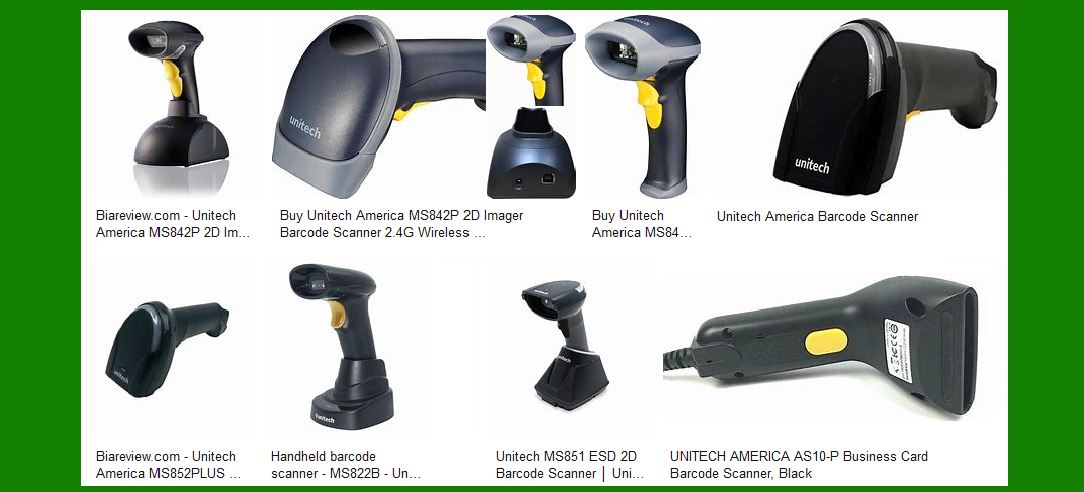
Unitech America is a leading provider of Automatic Identification and Data Capture (AIDC) solutions. Their product range includes barcode scanners, mobile computers, RFID readers, and more. Unitech barcode scanners are known for their ergonomic design, ease of use, and advanced technology, making them suitable for various industries such as retail, healthcare, logistics, and manufacturing. |
|
2. Types of Barcode Scanners |
Unitech America offers a wide variety of barcode scanners to meet different needs and applications. These include: |
2.1. Handheld Scanners |
Handheld scanners are the most common type of barcode scanners. They are designed for easy use and portability. Unitech’s handheld scanners come in various models, including 1D and 2D scanners, with options for wired and wireless connectivity. |
2.2. Presentation Scanners |
Presentation scanners are designed for hands-free operation. They are typically used in retail environments where quick and efficient scanning is required. Unitech’s presentation scanners offer high-speed scanning and can read barcodes from various angles. |
2.3. Wearable Scanners |
Wearable scanners are designed for hands-free use, allowing workers to scan barcodes while keeping their hands free for other tasks. These scanners are ideal for warehouse and logistics applications. Unitech offers wearable scanners with Bluetooth connectivity for added mobility. |
2.4. Pocket Scanners |
Pocket scanners are compact and portable, making them ideal for mobile applications. They can easily fit into a pocket or be attached to a lanyard. Unitech’s pocket scanners offer high performance in a small form factor. |
2.5. Pen and Slot Readers |
Pen and slot readers are used for reading barcodes on documents and cards. They are commonly used in libraries, offices, and other environments where document tracking is essential. Unitech’s pen and slot readers are designed for durability and ease of use. |

|
3. Key Features of Unitech Barcode Scanners |
Unitech barcode scanners come with a range of features that enhance their performance and usability. Some of the key features include: |
3.1. Ergonomic Design |
Unitech scanners are ergonomically designed to reduce user fatigue and increase productivity. The design ensures that the scanners are comfortable to hold and use for extended periods. |
3.2. Easy Configuration |
Unitech scanners offer easy configuration options, allowing users to quickly set up the devices according to their needs. This includes options for auto-discrimination, multiple interface options, and data editing. |
3.3. Advanced Scanning Technology |
Unitech scanners are equipped with advanced scanning technology, including laser, CCD, and 2D imaging. This ensures accurate and fast barcode reading, even in challenging conditions. |
3.4. Durability |
Unitech scanners are built to withstand harsh environments. Many models come with IP ratings for dust and water resistance, as well as drop protection to ensure they can handle the rigors of daily use. |
3.5. Wireless Connectivity |
Many Unitech scanners offer wireless connectivity options, including Bluetooth and Wi-Fi. This allows for greater mobility and flexibility in various applications. |

|
4. Specific Models and Their Features |
Unitech America offers a wide range of barcode scanner models, each with its own set of features and specifications. Here are some notable models: |
4.1. MS852B Plus Bluetooth 2D Imager Scanner |
The MS852B Plus is a high-performance Bluetooth 2D imager scanner. It offers a long-range scanning capability of up to 100 meters, making it ideal for large workspaces. The scanner can read OCR, DotCode, and Digimarc barcodes, providing versatility for various applications. |
4.2. MS852 DPM ESD 2D Imager Scanner |
The MS852 DPM ESD is designed for environments with stringent cleanroom and static-safe requirements. It can read 1D, 2D, and barcode markings using Direct Part Marking (DPM) technology. This makes it suitable for manufacturing and industrial applications. |
4.3. MS851 ESD Laser Scanner |
The MS851 ESD is a high-performance laser scanner designed for static-safe environments. It offers reliable barcode reading and is built to meet the requirements of cleanrooms and other sensitive areas. |
4.4. MS852B LR Bluetooth 2D Imager Ultra-Long-Range Scanner |
The MS852B LR is a Bluetooth 2D imager scanner with an ultra-long-range scanning capability of up to 21 meters. It is ideal for applications that require scanning from a distance, such as in warehouses and large retail spaces. |
4.5. MS822B Wireless 2D Imager Scanner |
The MS822B is a wireless 2D imager scanner with a 100-meter operation range. It offers IP42 protection and can withstand drops from 1.5 meters. The scanner provides up to 40 hours of operation time, making it suitable for extended use. |
|
5. Applications of Unitech Barcode Scanners |
Unitech barcode scanners are used in a variety of industries and applications. Some common use cases include: |
5.1. Retail |
In retail environments, Unitech scanners are used for point-of-sale (POS) transactions, inventory management, and customer service. The scanners help streamline operations and improve efficiency. |
5.2. Healthcare |
In healthcare settings, Unitech scanners are used for patient identification, medication administration, and inventory tracking. The scanners help ensure accuracy and improve patient safety. |
5.3. Logistics and Warehousing |
In logistics and warehousing, Unitech scanners are used for inventory management, order picking, and shipping and receiving. The scanners help improve accuracy and efficiency in these operations. |
5.4. Manufacturing |
In manufacturing, Unitech scanners are used for tracking parts and components, quality control, and work-in-progress monitoring. The scanners help improve productivity and ensure accuracy in manufacturing processes. |
5.5. Government and Public Sector |
In government and public sector applications, Unitech scanners are used for document tracking, asset management, and identification verification. The scanners help improve efficiency and accuracy in these operations. |
|
6. Conclusion |
Unitech America offers a comprehensive range of barcode scanners designed to meet the needs of various industries and applications. With their ergonomic design, advanced scanning technology, and robust features, Unitech scanners provide reliable and efficient barcode reading solutions. Whether you need a handheld scanner for retail, a wearable scanner for logistics, or a specialized scanner for cleanroom environments, Unitech has a solution to meet your needs. |
 cs@easiersoft.com