1. Introduction to Unitech Europe |
Unitech Europe is a prominent provider of Automatic Identification and Data Capture (AIDC) solutions. Their product range includes barcode scanners, mobile computers, RFID readers, and more. Unitech Europe focuses on delivering high-quality, reliable, and innovative solutions to enhance productivity and efficiency across various industries. |
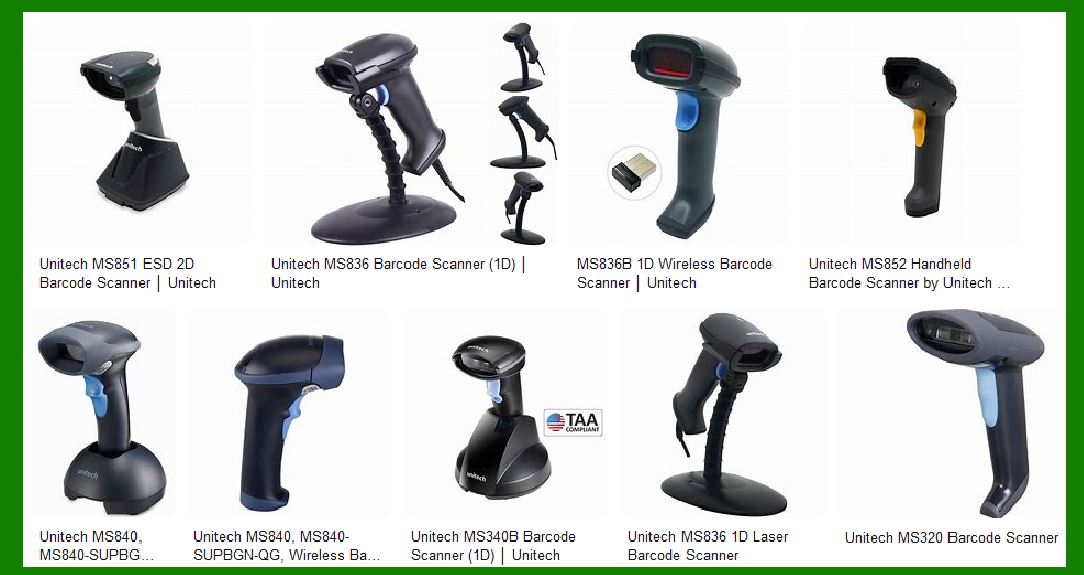
|
2. Types of Barcode Scanners |
Unitech Europe offers a diverse range of barcode scanners to cater to different needs and applications. These include: |
2.1. Handheld Scanners |
Handheld scanners are versatile and widely used across various industries. They are designed for easy use and can read barcodes from a distance. Unitech’s handheld scanners come in both wired and wireless versions, providing flexibility in different working environments. |
2.2. Wireless Scanners |
Wireless scanners offer the advantage of mobility, allowing users to move freely without being tethered to a workstation. Unitech’s wireless scanners use Bluetooth or other wireless technologies to transmit data to a host device. They are ideal for applications where mobility is crucial, such as in warehouses and retail environments. |
2.3. Pocket Scanners |
Pocket scanners are compact and portable, making them perfect for on-the-go scanning. These scanners are small enough to fit in a pocket and are often used in field service, retail, and healthcare applications. Unitech’s pocket scanners are designed for ease of use and quick data capture. |
2.4. Wearable Scanners |
Wearable scanners are designed to be worn on the body, typically on the wrist or finger. This allows for hands-free operation, which can significantly increase productivity in environments where workers need to use both hands. Unitech’s wearable scanners are lightweight and ergonomic, ensuring comfort during extended use. |
2.5. Fixed Mount Scanners |
Fixed mount scanners are stationary devices used for high-speed scanning in automated systems. They are commonly used in manufacturing, logistics, and retail environments. Unitech’s fixed mount scanners are designed for durability and high performance, capable of reading barcodes at high speeds and from various angles. |

|
3. Key Features of Unitech Barcode Scanners |
Unitech barcode scanners are known for their robust features that enhance their functionality and usability. Some of the key features include: |
3.1. Ergonomic Design |
Unitech scanners are ergonomically designed to reduce user fatigue and increase productivity. The design ensures that the scanners are comfortable to hold and use for extended periods. |
3.2. Easy Configuration |
Unitech scanners offer easy configuration options, allowing users to quickly set up and start using the devices. This includes simple pairing processes for wireless scanners and intuitive software for configuring scanning parameters. |
3.3. Multiple Interface Options |
Unitech scanners support multiple interface options, including USB, Bluetooth, RS232, and more. This ensures compatibility with a wide range of host devices and systems. |
3.4. Data Editing Capabilities |
Unitech scanners come with data editing capabilities, allowing users to customize the data output according to their specific needs. This can include formatting the scanned data, adding prefixes or suffixes, and more. |
3.5. Durability and Impact Resistance |
Unitech scanners are built to withstand harsh environments. They are designed with durable materials and often come with impact resistance ratings, ensuring they can survive drops and rough handling. |

|
4. Specific Models and Their Features |
Unitech Europe offers a variety of barcode scanner models, each with unique features tailored to different applications. Here are some notable models: |
4.1. MS852B LR Bluetooth 2D Imager |
Scanning Range: Up to 21 meters Wireless Transmission: Up to 100 meters in open sight Durability: IP42 rating and 1.5-meter drop resistance Battery Life: Up to 40 hours of operation Special Features: Reads OCR, Dot codes, and Digimarc barcodes |
4.2. MS912+ Bluetooth 2D Pocket Scanner |
Design: Small and compact Connectivity: Bluetooth 5.0 with USB Type-C support Battery Life: Long-lasting battery for extended use Applications: Ideal for mobile payments, ticketing, and coupon scanning |
4.3. MS836 Wireless Laser Scanner |
Scanning Technology: 1D laser Wireless Range: 100 meters Battery Life: Up to 30 hours of operation Durability: Designed for industrial applications with high reliability |

|
5. Applications of Unitech Barcode Scanners |
Unitech barcode scanners are used across various industries due to their versatility and reliability. Some common applications include: |
5.1. Retail |
In retail environments, Unitech scanners are used for point-of-sale transactions, inventory management, and mobile payments. Their ability to read barcodes from phone screens makes them ideal for processing digital coupons and tickets. |
5.2. Warehousing and Logistics |
In warehousing and logistics, Unitech scanners help streamline operations by enabling quick and accurate data capture. They are used for inventory tracking, order picking, and shipping processes. |
5.3. Healthcare |
In healthcare settings, Unitech scanners are used for patient identification, medication administration, and inventory management. Their ability to read barcodes from various surfaces ensures accurate data capture in critical applications. |
5.4. Manufacturing |
In manufacturing, Unitech scanners are used for tracking parts and products on assembly lines, ensuring accurate data capture and traceability. Their durability makes them suitable for harsh industrial environments. |

|
6. Advanced Technologies in Unitech Scanners |
Unitech incorporates advanced technologies in their barcode scanners to enhance performance and functionality. Some of these technologies include: |
6.1. Image Scanning |
Unitech’s image scanning technology allows for the capture of high-resolution images of barcodes, ensuring accurate and quick data capture. This technology is particularly useful for reading damaged or poorly printed barcodes. |
6.2. Wireless Communication |
Unitech’s wireless scanners use advanced communication technologies such as Bluetooth and Wi-Fi to ensure reliable data transmission. This allows for seamless integration with various host devices and systems. |
6.3. OCR and Digimarc Barcode Reading |
Some Unitech scanners are equipped with the capability to read Optical Character Recognition (OCR) and Digimarc barcodes. This expands their usability in applications requiring the reading of text and special barcodes. |

|
7. Conclusion |
Unitech Europe offers a comprehensive range of barcode scanners designed to meet the diverse needs of various industries. Their scanners are known for their ergonomic design, easy configuration, multiple interface options, and advanced technologies. Whether it’s for retail, warehousing, healthcare, or manufacturing, Unitech barcode scanners provide reliable and efficient solutions for data capture and management. |
 cs@easiersoft.com