1. Introduction to Wasp Barcode Technologies |
Wasp Barcode Technologies is a well-known company specializing in barcode solutions, including barcode scanners, printers, software, and complete tracking systems. Founded in 1994, Wasp has built a reputation for providing reliable and user-friendly products tailored to small and medium-sized businesses. Their barcode scanners are designed to improve efficiency, accuracy, and productivity in various industries such as retail, healthcare, manufacturing, and logistics. |
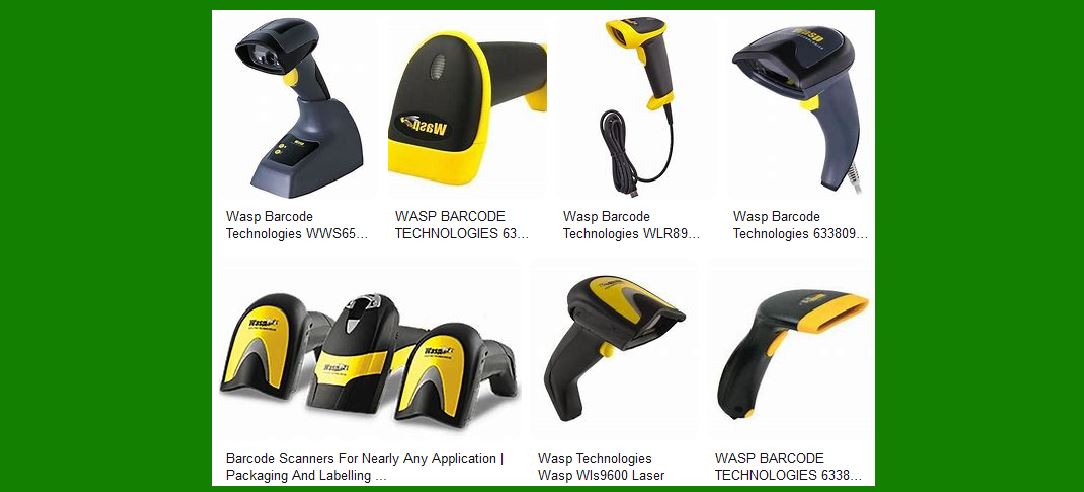
|
2. Types of Barcode Scanners Offered by Wasp |
Wasp Barcode Technologies offers a wide range of barcode scanners to meet different needs and applications. These include: |
2.1 Handheld Barcode Scanners |
Handheld barcode scanners are the most common type of barcode scanners. They are versatile and can be used in various environments. Wasp offers several models of handheld scanners, including: |
WLS9600 Laser Barcode Scanner: Known for its aggressive scanning capabilities, the WLS9600 can decode 100 scans per second and has an excellent depth-of-field of over 47.9 cm (19 inches). It supports all common 1D barcodes and features a durable design that can withstand multiple 6-foot drops to concrete1. WDI7500 2D Barcode Scanner: This scanner can read both 1D and 2D barcodes. It is USB corded and features an omni-directional scanning capability, making it ideal for retail and warehouse environments2. |
2.2 Wireless Barcode Scanners |
Wireless barcode scanners provide the flexibility to move around without being tethered to a computer or terminal. Wasp’s wireless scanners include: |
WWS650 Wireless 2D Barcode Scanner: This Bluetooth-enabled scanner can read popular 1D and 2D barcodes and is compatible with iPhone, iPad, and Android devices. It has an IP42 rating, making it suitable for various environments2. WWS750 Wireless 2D Barcode Scanner: A rugged Bluetooth scanner with an IP65 rating, it is designed for more demanding environments. It can read both 1D and 2D barcodes and is compatible with iPhone, iPad, and Android devices2. |
2.3 Mobile Computers |
Mobile computers combine the functionality of a barcode scanner with the capabilities of a mobile device. Wasp offers several models, including: |
WDT950 Android Mobile Computer: Featuring Android 10 with GMS certification, this device supports 1D/2D scanning and Bluetooth 5.1. It is IP65/IP67 rated, making it suitable for distribution, inventory, light industrial, retail, shipping, and warehouse environments2. HC1 Mobile Computer: Running on Windows 6.5 Embedded, this mobile computer has a 3.8-inch color touch screen and is available with either a 1D or 2D scan engine2. |
2.4 Pocket Barcode Scanners |
Pocket barcode scanners are compact and portable, making them ideal for on-the-go scanning. Wasp’s offerings include: |
WWS250i Pocket Barcode Scanner: A wireless pocket scanner that is compatible with iPhone, iPad, and Android devices. It comes with a USB charging cable and can transmit data up to 32 feet to the host2. WWS110i Pocket Barcode Scanner: Similar to the WWS250i, this scanner features laser aim assist and is also compatible with iPhone, iPad, and Android devices2. |

|
3. Key Features of Wasp Barcode Scanners |
Wasp barcode scanners are known for their quality, reliability, and ease of use. Some of the key features include: |
3.1 Ergonomic Design |
Wasp barcode scanners are designed with user comfort in mind. The ergonomic design ensures that the scanners are easy to hold and use for extended periods, reducing user fatigue. |
3.2 Durability |
Many Wasp barcode scanners are built to withstand harsh environments. For example, the WLS9600 can endure multiple 6-foot drops to concrete, and the WWS750 has an IP65 rating, making it resistant to dust and water12. |
3.3 High Performance |
Wasp barcode scanners offer high-performance scanning capabilities. The WLS9600, for instance, has an aggressive 100 scans per second decode rate, while the WDI7500 features omni-directional scanning for quick and accurate barcode reading12. |
3.4 Compatibility |
Wasp barcode scanners are compatible with various devices and operating systems, including Windows, iOS, and Android. This ensures seamless integration with existing systems and workflows. |
3.5 Versatility |
Wasp offers a range of barcode scanners to suit different applications, from retail and healthcare to manufacturing and logistics. Whether you need a handheld, wireless, mobile, or pocket scanner, Wasp has a solution to meet your needs. |

|
4. Applications of Wasp Barcode Scanners |
Wasp barcode scanners are used in various industries to improve efficiency and accuracy. Some common applications include: |
4.1 Retail |
In retail environments, Wasp barcode scanners are used for point-of-sale (POS) transactions, inventory management, and price checking. The WDI7500 and WWS650 are popular choices for retail applications due to their ability to read both 1D and 2D barcodes2. |
4.2 Healthcare |
In healthcare settings, barcode scanners are used for patient identification, medication administration, and inventory management. The WWS750, with its rugged design and IP65 rating, is suitable for demanding healthcare environments2. |
4.3 Manufacturing |
Manufacturing facilities use barcode scanners for tracking raw materials, work-in-progress, and finished goods. The WDT950 Android Mobile Computer is ideal for these environments due to its durability and advanced scanning capabilities2. |
4.4 Logistics and Warehousing |
In logistics and warehousing, barcode scanners are used for receiving, picking, packing, and shipping. The WWS750 and WDT950 are popular choices for these applications due to their rugged design and wireless capabilities2. |

|
5. Software Solutions from Wasp |
In addition to hardware, Wasp offers a range of software solutions to complement their barcode scanners. These include: |
5.1 Inventory Management Software |
Wasp’s inventory management software helps businesses track inventory levels, manage stock, and streamline operations. The software integrates seamlessly with Wasp barcode scanners to provide real-time inventory data3. |
5.2 Asset Tracking Software |
Wasp’s asset tracking software allows businesses to track and manage assets such as equipment, tools, and vehicles. The software supports barcode scanning for quick and accurate asset identification3. |
5.3 Barcode Label Software |
Wasp’s barcode label software enables businesses to design and print custom barcode labels. The software supports various barcode formats and integrates with Wasp barcode printers for easy label printing3. |

|
6. Customer Support and Services |
Wasp Barcode Technologies is known for its excellent customer support and services. They offer: |
6.1 Technical Support |
Wasp provides technical support to help customers with installation, configuration, and troubleshooting of their barcode scanners and software. |
6.2 Training and Resources |
Wasp offers training programs and resources to help customers get the most out of their barcode solutions. This includes online tutorials, user manuals, and webinars. |
6.3 Warranty and Repairs |
Wasp barcode scanners come with a warranty, and the company offers repair services to ensure that customers’ devices remain in good working condition. |

|
7. Conclusion |
Wasp Barcode Technologies offers a comprehensive range of barcode scanners designed to meet the needs of various industries. With their ergonomic design, durability, high performance, and compatibility, Wasp barcode scanners are a reliable choice for businesses looking to improve efficiency and accuracy in their operations. Whether you need a handheld, wireless, mobile, or pocket scanner, Wasp has a solution to meet your needs. Additionally, their software solutions and excellent customer support make Wasp a trusted partner for barcode and tracking solutions. |
 cs@easiersoft.com