1. Overview |
Barcode scanners are essential tools in various industries, from retail to logistics, healthcare, and beyond. One critical aspect to consider when selecting a barcode scanner is its device compatibility. This refers to the scanner’s ability to connect and work seamlessly with different types of devices, such as smartphones, tablets, or PCs. Ensuring compatibility is crucial for maximizing the efficiency and utility of the scanner in diverse operational environments. |
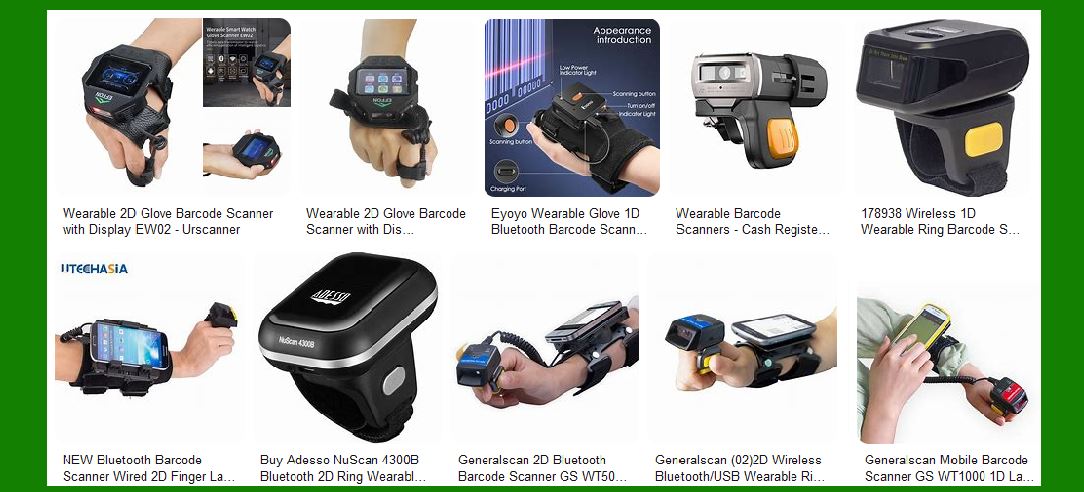
|
2. Types of Devices |
Barcode scanners can be used with a variety of devices, each serving different purposes and environments: |
2.1 Smartphones and Tablets: These mobile devices are increasingly used in retail, warehousing, and field services due to their portability and multifunctionality. Barcode scanners compatible with smartphones and tablets often use Bluetooth or Wi-Fi for wireless connectivity, allowing for greater mobility and flexibility. |
2.2 PCs and Laptops: Traditional desktop and laptop computers are commonly used in office settings, point-of-sale (POS) systems, and inventory management. Barcode scanners for these devices typically connect via USB or other wired connections, providing a stable and reliable link. |
2.3 Specialized Devices: In certain industries, specialized devices such as rugged handheld terminals or industrial tablets are used. These devices are designed to withstand harsh environments and may require barcode scanners with specific compatibility features. |

|
3. Connectivity Options |
The method by which a barcode scanner connects to a device is a key factor in determining its compatibility: |
3.1 USB: USB is the most common wired connection for barcode scanners. It offers a plug-and-play solution that is easy to set up and use. USB scanners are widely compatible with PCs, laptops, and some tablets. |
3.2 Bluetooth: Bluetooth-enabled barcode scanners provide wireless connectivity, making them ideal for use with mobile devices like smartphones and tablets. They offer the advantage of mobility but may require pairing and configuration. |
3.3 Wi-Fi: Some barcode scanners use Wi-Fi to connect to devices, offering a broader range and more stable connection compared to Bluetooth. This is particularly useful in large warehouses or retail environments. |
3.4 Serial Ports: Older barcode scanners may use serial ports (RS232) for connection. While less common today, this method is still used in some legacy systems. |
3.5 NFC (Near Field Communication): NFC-enabled scanners can connect to devices by simply tapping them together. This technology is emerging in mobile payment systems and other applications requiring quick and secure connections. |

|
4. Software Compatibility |
Beyond physical connectivity, software compatibility is crucial for ensuring that the barcode scanner can communicate effectively with the device: |
4.1 Operating Systems: Barcode scanners must be compatible with the operating systems of the devices they connect to, such as Windows, macOS, iOS, Android, or Linux. Some scanners come with drivers or software that need to be installed to ensure proper functionality. |
4.2 Applications: The scanner should work seamlessly with the software applications used for inventory management, POS systems, or other specific tasks. This may require integration with third-party software or custom development. |
4.3 Firmware Updates: Regular firmware updates from the scanner manufacturer can enhance compatibility and performance. It’s important to choose a scanner from a reputable brand that provides ongoing support and updates. |

|
5. Advantages of Versatile Scanners |
Scanners that can connect to multiple types of devices offer several benefits: |
5.1 Flexibility: Versatile scanners can be used in various environments and with different devices, making them suitable for businesses with diverse needs. For example, a retail store might use the same scanner for both POS systems and inventory checks on mobile devices. |
5.2 Cost-Effectiveness: Investing in a scanner that works with multiple devices can reduce the need for purchasing different scanners for different tasks, leading to cost savings. |
5.3 Future-Proofing: As technology evolves, having a scanner that can adapt to new devices and systems ensures longevity and reduces the need for frequent replacements. |
5.4 Improved Workflow: Seamless integration with various devices can streamline operations, reduce manual data entry, and improve overall efficiency. |

|
6. Disadvantages of Versatile Scanners |
While versatile scanners offer many advantages, there are also potential drawbacks: |
6.1 Additional Setup: Scanners that need to work with multiple devices may require more complex setup and configuration. This can involve installing drivers, pairing devices, and ensuring compatibility with different operating systems. |
6.2 Adapters and Accessories: To connect to various devices, additional adapters or accessories might be needed. This can add to the overall cost and complexity of the setup. |
6.3 Potential Compatibility Issues: Despite being designed for versatility, there may still be compatibility issues with certain devices or software applications. Ensuring full compatibility might require additional testing and troubleshooting. |
6.4 Performance Variability: The performance of the scanner might vary depending on the device it is connected to. For example, a scanner might work flawlessly with a PC but have connectivity issues with a specific tablet model. |

|
7. Case Studies and Examples |
To illustrate the importance of device compatibility, consider the following examples: |
7.1 Retail Environment: A retail chain uses barcode scanners for both checkout and inventory management. By choosing scanners compatible with both their POS systems (PCs) and mobile inventory devices (tablets), they streamline operations and reduce training time for employees. |
7.2 Warehouse Operations: A logistics company employs barcode scanners for tracking shipments. They use rugged handheld devices for outdoor use and standard PCs for office tasks. Scanners that can switch between these devices ensure continuity and efficiency. |
7.3 Healthcare Sector: In a hospital, barcode scanners are used for patient identification and medication administration. Compatibility with both mobile devices (for bedside scanning) and desktop systems (for record-keeping) is crucial for maintaining accurate and timely data. |

|
8. Future Trends |
The landscape of barcode scanner compatibility is continually evolving: |
8.1 IoT Integration: The Internet of Things (IoT) is driving the development of barcode scanners that can connect to a wide range of smart devices and systems, enhancing data collection and analysis capabilities. |
8.2 Cloud Connectivity: Scanners with cloud connectivity can sync data across multiple devices and platforms in real-time, improving accessibility and collaboration. |
8.3 Enhanced Security: As data security becomes increasingly important, barcode scanners are being designed with advanced encryption and secure connection protocols to protect sensitive information. |
8.4 AI and Machine Learning: Integration with AI and machine learning technologies can enhance the functionality of barcode scanners, enabling features like predictive analytics and automated decision-making. |

|
9. Conclusion |
Device compatibility is a critical factor in the selection and use of barcode scanners. By understanding the various connectivity options, software requirements, and potential advantages and disadvantages, businesses can make informed decisions that enhance their operational efficiency and adaptability. As technology continues to advance, the importance of versatile and compatible barcode scanners will only grow, making them indispensable tools in a wide range of industries. |
 cs@easiersoft.com