1. Wireless Bluetooth Barcode Scanners |
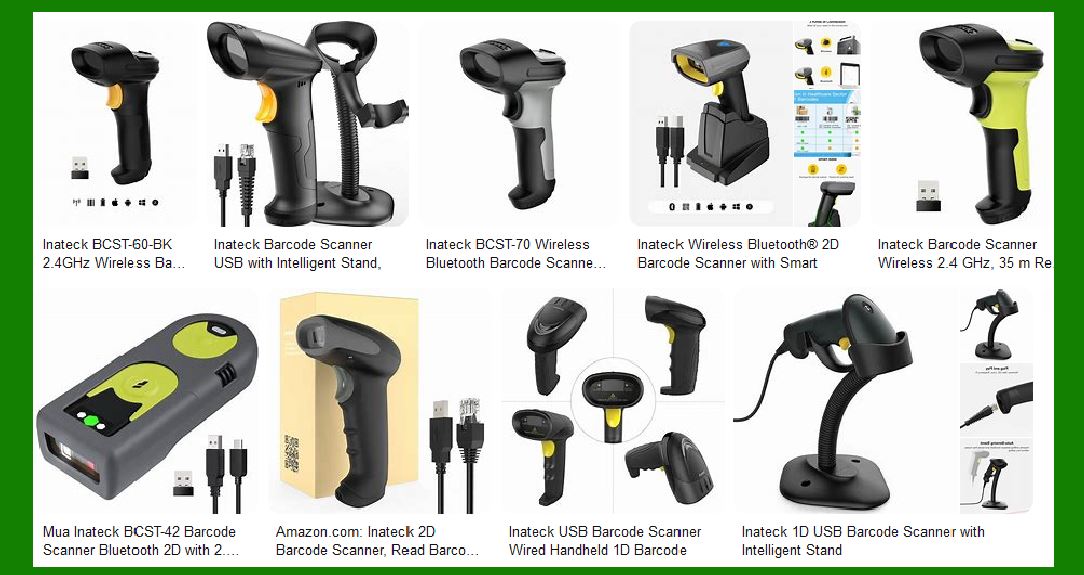
Inateck’s wireless Bluetooth barcode scanners are designed for flexibility and mobility, making them ideal for environments where users need to move around freely. |
|
1.1 BCST-70 |
Features: Bluetooth 5.0, 35m range, supports 1D barcodes. Use Cases: Retail, inventory management, and logistics. Advantages: Strong decoding ability, wide compatibility with various devices. |
1.2 BCST-73 |
Features: Bluetooth 5.0, supports 2D barcodes, APP & SDK support. Use Cases: Healthcare, warehousing, and point-of-sale systems. Advantages: High decoding speed, versatile application support. |
1.3 BCST-91 |
Features: Bluetooth 5.3, mega-pixel resolution, smart base. Use Cases: Industrial applications, large-scale inventory management. Advantages: High-resolution scanning, long transmission distance. |

|
2. USB Barcode Scanners |
These scanners are connected via USB, providing a stable and reliable connection for continuous use. |
2.1 BCST-33 |
Features: 1D barcode support, intelligent stand. Use Cases: Retail checkout, library management. Advantages: Easy to use, cost-effective. |
2.2 BCST-42 |
Features: 2D barcode support, 40m transmission range. Use Cases: Document tracking, healthcare. Advantages: Portable, high compatibility with various systems. |

|
3. 2.4GHz Wireless Barcode Scanners |
These scanners use 2.4GHz wireless technology, offering a good balance between range and performance. |
3.1 BCST-60 |
Features: 35m range, supports 1D barcodes. Use Cases: Retail, small warehouses. Advantages: Reliable connection, easy setup. |
3.2 P6 |
Features: 60m range, supports 1D barcodes. Use Cases: Large warehouses, logistics. Advantages: Long-range scanning, durable design. |
|
4. CCD Barcode Scanners |
CCD (Charge-Coupled Device) scanners use an array of tiny LED lights to read barcodes, making them suitable for specific applications. |
4.1 BS01002 |
Features: 1D barcode support, screen scanning capability. Use Cases: Retail, document management. Advantages: Accurate scanning, cost-effective. |
4.2 P7 |
Features: 100m range, supports 1D barcodes. Use Cases: Industrial applications, large-scale inventory. Advantages: Long-range, high durability. |

|
5. CMOS Imager Barcode Scanners |
CMOS (Complementary Metal-Oxide-Semiconductor) imagers use a small camera to capture barcodes, offering high versatility. |
5.1 BCST-52 |
Features: 2D barcode support, 90m transmission range. Use Cases: Healthcare, logistics. Advantages: High decoding ability, versatile applications. |
5.2 BCST-55 |
Features: 2D barcode support, 100m transmission range. Use Cases: Industrial applications, large-scale inventory. Advantages: Long-range, high-resolution scanning. |
|
6. Portable and Wearable Barcode Scanners |
These scanners are designed for maximum portability and convenience, suitable for on-the-go scanning. |
6.1 BCST-43 |
Features: Bluetooth 5.0, 40m transmission range, supports 1D barcodes. Use Cases: Mobile inventory management, retail. Advantages: Compact design, easy to carry. |
6.2 Wearable Glove Scanner |
Features: Hands-free operation, supports 1D and 2D barcodes. Use Cases: Warehousing, logistics. Advantages: Increases productivity, ergonomic design. |

|
7. Specialized Barcode Scanners |
Inateck also offers specialized scanners for unique applications. |
7.1 BCST-21 |
Features: Bluetooth, hyper long 100m transmission range, supports 1D barcodes. Use Cases: Industrial applications, large-scale inventory. Advantages: Long-range, high durability. |
7.2 BCST-23 |
Features: Bluetooth, hyper long 100m transmission range, supports 2D barcodes. Use Cases: Healthcare, logistics. Advantages: High-resolution scanning, versatile applications. |

|
8. Factors to Consider When Choosing an Inateck Barcode Scanner |
When selecting a barcode scanner, consider the following factors to ensure you choose the right model for your needs: |
8.1 Scanning Technology |
Laser Scanners: Best for 1D barcodes, long-range scanning. CCD Scanners: Suitable for linear barcodes, cost-effective. CMOS Imagers: Versatile, supports both 1D and 2D barcodes. |
8.2 Transmission Distance |
Short Range: Suitable for retail and small-scale applications. Long Range: Ideal for industrial and large-scale inventory management. |
8.3 Compatibility |
Ensure the scanner is compatible with your existing systems and software. |
8.4 Durability |
Consider the environment in which the scanner will be used. Industrial environments may require more rugged designs. |
8.5 Portability |
Portable and wearable scanners are ideal for mobile applications and on-the-go scanning. |

|
9. Conclusion |
Inateck offers a comprehensive range of barcode scanners to meet various business needs. Whether you need a simple USB scanner for retail or a high-performance Bluetooth scanner for industrial applications, Inateck has a solution. By considering factors such as scanning technology, transmission distance, compatibility, durability, and portability, you can select the right barcode scanner to enhance your business operations. |
 cs@easiersoft.com