1. Introduction to Barcode Scanners |
Barcode scanners are essential tools in various industries, from retail and logistics to healthcare and manufacturing. They help in tracking inventory, managing assets, and streamlining operations. However, the environment in which these scanners are used can significantly impact their performance and durability. This guide will explore the differences between indoor and outdoor barcode scanners, their advantages, disadvantages, and specific use cases. |
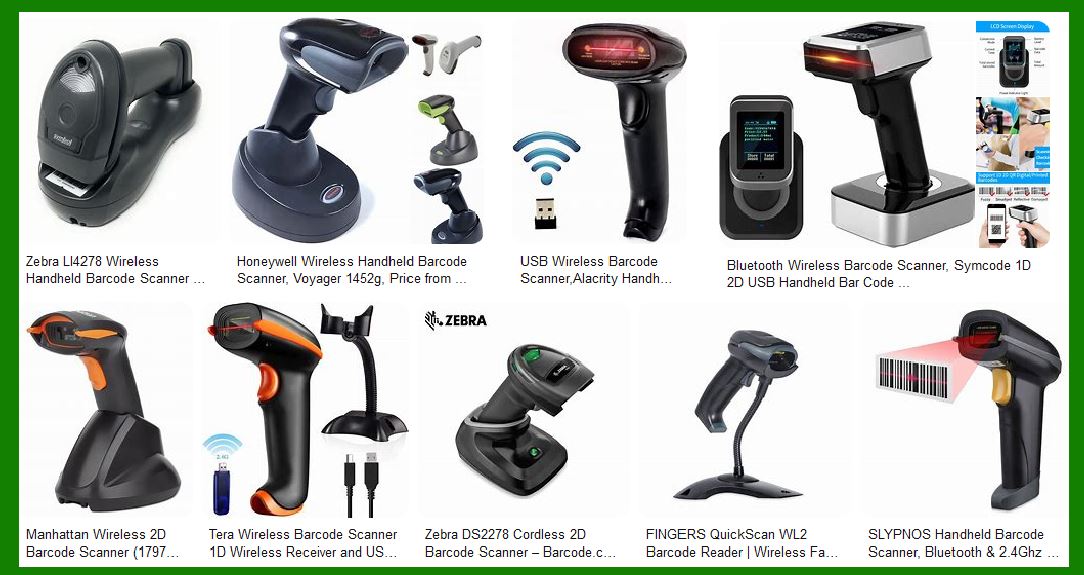
|
2. Types of Barcode Scanners |
Before diving into the specifics of indoor and outdoor use, it’s essential to understand the different types of barcode scanners available: |
2.1. Fixed Mount Scanners |
Description: These scanners are mounted in a fixed position and are commonly used in production lines and conveyor systems. |
Advantages: High-speed scanning, hands-free operation. Disadvantages: Limited to specific locations, not portable. |
2.2. Wireless Scanners |
Description: These scanners use wireless technology to transmit data to a computer or mobile device. Advantages: Mobility, flexibility in usage. Disadvantages: Battery life limitations, potential connectivity issues. |
2.3. Bluetooth Scanners |
Description: Similar to wireless scanners but specifically use Bluetooth technology for connectivity. Advantages: Compatibility with various devices, ease of use. Disadvantages: Limited range compared to other wireless technologies. |
2.4. Wired Scanners |
Description: These scanners are connected to a computer or terminal via a cable. Advantages: Reliable connection, no battery dependency. Disadvantages: Limited mobility, cable management issues. |
2.5. Wi-Fi Scanners |
Description: These scanners connect to a network via Wi-Fi. Advantages: Extended range, real-time data transmission. Disadvantages: Dependence on Wi-Fi network quality, potential security concerns. |
2.6. Handheld Scanners |
Description: Portable scanners that can be carried and used manually. Advantages: Versatility, ease of use. Disadvantages: Potential for user fatigue, limited by user’s reach. |
2.7. Ring Scanners |
Description: Small scanners worn on the finger, allowing hands-free operation. Advantages: Increased productivity, ergonomic design. Disadvantages: Limited scanning range, potential discomfort with prolonged use. |

|
3. Indoor Barcode Scanners |
3.1. Overview |
Indoor barcode scanners are designed for environments such as retail stores, offices, and warehouses. These environments are typically controlled, with stable lighting and minimal exposure to harsh conditions. |
3.2. Advantages |
Performance: Indoor scanners are optimized for stable lighting conditions, ensuring accurate and fast scanning. Durability: While not as rugged as outdoor scanners, indoor scanners are built to withstand occasional drops and bumps. Cost: Generally, indoor scanners are less expensive than their rugged outdoor counterparts. |
3.3. Disadvantages |
Limited Durability: Indoor scanners may not withstand extreme temperatures, moisture, or dust. Restricted Use: They are not suitable for harsh environments, limiting their application to controlled indoor settings. |
3.4. Use Cases |
Retail: Scanning products at checkout counters. Office: Managing documents and assets. Warehouse: Inventory management in controlled environments. |

|
4. Outdoor Barcode Scanners |
4.1. Overview |
Outdoor barcode scanners are designed to operate in harsh environments, such as construction sites, outdoor warehouses, and field operations. These scanners are built to withstand extreme temperatures, moisture, dust, and rough handling. |
4.2. Advantages |
Ruggedness: Outdoor scanners are built to endure harsh conditions, ensuring longevity and reliability. Versatility: They can be used in various environments, from extreme cold to intense heat. Performance: Designed to perform well in varying lighting conditions, including direct sunlight. |
4.3. Disadvantages |
Cost: Outdoor scanners are generally more expensive due to their rugged design and advanced features. Weight and Size: They tend to be bulkier and heavier than indoor scanners, which can affect portability. |
4.4. Use Cases |
Construction Sites: Tracking materials and equipment. Outdoor Warehouses: Managing inventory in open or semi-open spaces. Field Operations: Scanning barcodes in remote locations. |

|
5. Choosing the Right Scanner for Your Environment |
5.1. Assessing Your Needs |
Environment: Determine whether the scanner will be used indoors, outdoors, or in both settings. Durability Requirements: Consider the level of ruggedness needed based on the environment. Budget: Balance the cost with the required features and durability. |
5.2. Key Features to Consider |
IP Rating: Indicates the level of protection against dust and water. Higher IP ratings are essential for outdoor use. Temperature Range: Ensure the scanner can operate within the temperature range of your environment. Drop Resistance: Look for scanners with high drop resistance for rugged environments. |

|
6. Conclusion |
Choosing the right barcode scanner for your environment is crucial for ensuring optimal performance and durability. Indoor scanners are ideal for controlled environments, offering cost-effective and efficient scanning solutions. In contrast, outdoor scanners provide the ruggedness and versatility needed for harsh conditions, albeit at a higher cost. By assessing your specific needs and considering the key features, you can select a scanner that best suits your operational requirements. |
 cs@easiersoft.com