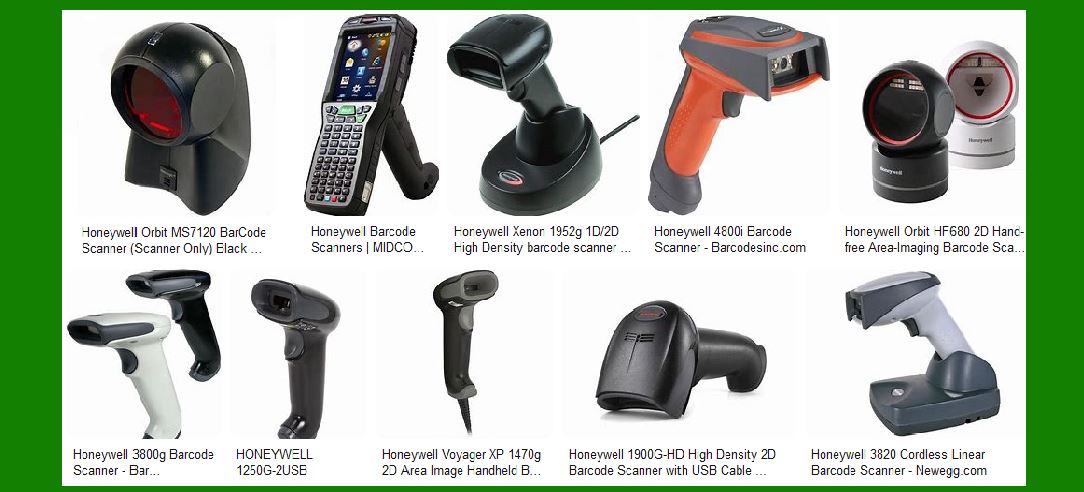
Honeywell offers a wide range of barcode scanners designed to meet various business needs, from retail to manufacturing. Below is a detailed description of the different types of barcode scanners Honeywell provides, organized into numbered sections for clarity. |
|
1. General Purpose Handheld Scanners |
Honeywell’s general-purpose handheld scanners are designed for point-of-sale (POS) and day-to-day operations. These scanners are versatile and can handle a variety of barcode types, including 1D and 2D barcodes. |
1.1 Features |
Ergonomic Design: These scanners are designed to be comfortable to hold and use for extended periods. High Performance: They offer fast and accurate scanning capabilities, even for damaged or poorly printed barcodes. Connectivity Options: Available in wired and wireless models, providing flexibility in different environments. |
1.2 Popular Models |
Voyager Series: Known for its sleek design and high performance, the Voyager series includes models like the Voyager 1200g and Voyager 1400g. Xenon Series: The Xenon 1900 series is renowned for its superior scanning performance and durability. |

|
2. Rugged Handheld Scanners |
Rugged handheld scanners are built to withstand harsh environments, making them ideal for industrial applications such as warehouses and manufacturing plants. |
2.1 Features |
Durability: These scanners are designed to survive drops, dust, and water exposure. Extended Battery Life: Long-lasting batteries ensure continuous operation in demanding environments. Advanced Scanning Technology: Capable of reading barcodes from a distance and in challenging conditions. |
2.2 Popular Models |
Granit Series: The Granit 1910i and Granit 1980i are examples of rugged scanners that offer exceptional durability and performance. |

|
3. Presentation Scanners |
Presentation scanners are designed for high-volume environments where items are quickly passed in front of the scanner, such as retail checkouts. |
3.1 Features |
Hands-Free Operation: These scanners allow for quick and efficient scanning without the need to hold the device. Wide Scan Area: Capable of reading barcodes from various angles and distances. High Throughput: Designed to handle a large number of scans per day. |
3.2 Popular Models |
Orbit Series: The Orbit 7120 is a popular presentation scanner known for its compact design and high performance. |
|
4. Healthcare Scanners |
Healthcare scanners are specifically designed to meet the needs of medical environments, ensuring patient safety and improving workflow efficiency. |
4.1 Features |
Disinfectant-Ready Housing: These scanners can be cleaned with disinfectants to prevent the spread of germs. High Accuracy: Ensures accurate data capture for patient records and medication administration. Ergonomic Design: Comfortable to use for extended periods, reducing user fatigue. |
4.2 Popular Models |
Xenon Healthcare Series: The Xenon 1902h is a popular model in healthcare settings, offering high performance and durability. |

|
5. Wearable Scanners |
Wearable scanners are designed to keep mobile workers’ hands free, improving productivity and efficiency in environments such as warehouses and distribution centers. |
5.1 Features |
Hands-Free Operation: Worn on the finger or wrist, allowing workers to scan items while keeping their hands free for other tasks. Lightweight and Comfortable: Designed to be worn for extended periods without causing discomfort. Wireless Connectivity: Ensures seamless data transmission to the host system. |
5.2 Popular Models |
8670 Ring Scanner: A popular wearable scanner that offers high performance and durability. |

|
6. Fixed Mount Scanners |
Fixed mount scanners are used in applications where items need to be scanned as they pass by on a conveyor belt or are mounted on a wall for quick accessibility. |
6.1 Features |
High-Speed Scanning: Capable of scanning items quickly as they move past the scanner. Compact Design: Can be easily integrated into various setups without taking up much space. Versatile Mounting Options: Can be mounted in different orientations to suit the application. |
6.2 Popular Models |
HF680: A popular fixed mount scanner known for its high performance and compact design. |

|
7. Pocketable Scanners |
Pocketable scanners are compact and portable, making them ideal for mobile workers who need to scan items on the go. |
7.1 Features |
Compact Size: Small enough to fit in a pocket, making them easy to carry around. Wireless Connectivity: Ensures seamless data transmission to the host system. High Performance: Despite their small size, these scanners offer fast and accurate scanning capabilities. |
7.2 Popular Models |
Voyager 1602g: A popular pocketable scanner known for its compact design and high performance. |
|
8. Hands-Free Scanners |
Hands-free scanners are designed for environments where items need to be scanned without manual intervention, such as assembly lines and retail checkouts. |
8.1 Features |
Automatic Scanning: Capable of scanning items as they pass by without the need for manual operation. Wide Scan Area: Can read barcodes from various angles and distances. High Throughput: Designed to handle a large number of scans per day. |
8.2 Popular Models |
Genesis 7580g: A popular hands-free scanner known for its high performance and versatility. |

|
9. Bioptic Scanners |
Bioptic scanners are used in high-volume retail environments where items need to be scanned quickly and efficiently. |
9.1 Features |
Dual Scan Windows: Allows for scanning items from multiple angles, improving efficiency. High Performance: Capable of reading barcodes quickly and accurately. Durable Design: Built to withstand the rigors of high-volume scanning environments. |
9.2 Popular Models |
Stratos 2700: A popular bioptic scanner known for its high performance and durability. |

|
10. Specialty Scanners |
Honeywell also offers specialty scanners designed for specific applications, such as document scanning and mobile device integration. |
10.1 Features |
Customizable: Can be tailored to meet the specific needs of different applications. High Performance: Offers fast and accurate scanning capabilities. Versatile: Can be used in a variety of environments and applications. |
10.2 Popular Models |
Xenon XP 1950g: A versatile scanner that can be used for a variety of applications, including document scanning and mobile device integration. |

|
Conclusion |
Honeywell’s extensive range of barcode scanners ensures that there is a solution for virtually any business need. From general-purpose handheld scanners to rugged industrial models, and from wearable scanners to fixed mount solutions, Honeywell provides high-performance, reliable, and versatile barcode scanning options. Each type of scanner is designed with specific features to meet the demands of different environments, ensuring that businesses can find the right tool to optimize their workflows and improve efficiency. |
 cs@easiersoft.com