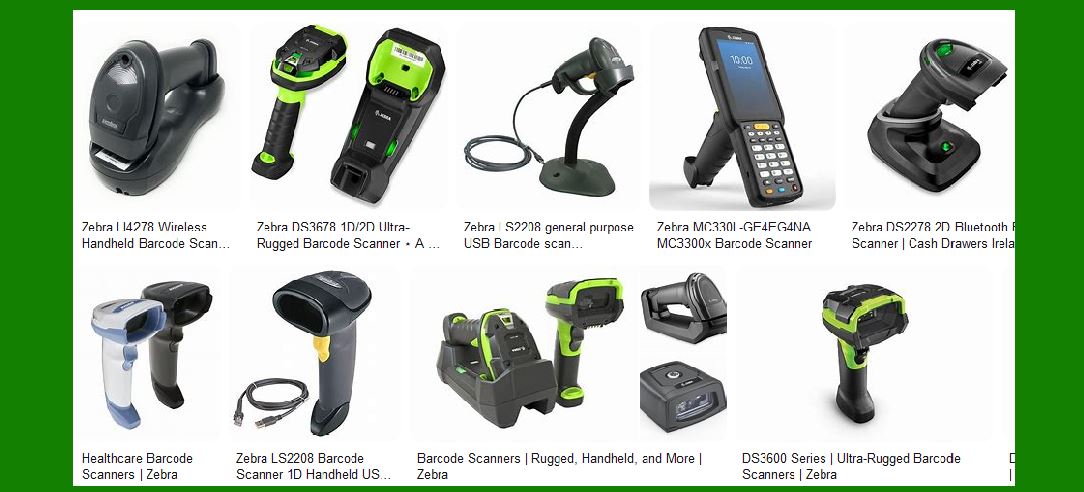
Zebra Technologies offers a wide range of barcode scanners designed to meet various industry needs and applications. Below is a detailed description of the different types of barcode scanners Zebra provides: |
|
1. General Purpose Handheld Scanners |
Zebra’s general-purpose handheld scanners are designed for a variety of applications, from retail to healthcare. These scanners are known for their versatility, ease of use, and reliability. |
1.1. DS2200 Series |
Features: The DS2200 series offers 1D and 2D barcode scanning capabilities. It is designed for ease of use with a simple setup process. Applications: Ideal for retail, hospitality, and light manufacturing environments. Connectivity: Available in both corded (DS2208) and cordless (DS2278) models. Durability: Built to withstand everyday drops and spills. |
1.2. DS4600 Series |
Features: This series includes models like the DS4608, which can capture barcodes from a distance and even read barcodes on screens. Applications: Suitable for retail, healthcare, and light industrial applications. Special Models: Includes healthcare-specific models (DS4608-HC) with disinfectant-ready housings. |
1.3. DS8100 Series |
Features: High-performance scanning with advanced features like multi-code data formatting. Applications: Perfect for high-volume retail and healthcare environments. Connectivity: Available in corded (DS8108) and cordless (DS8178) versions. Battery Life: Cordless models offer long battery life with fast charging capabilities. |

|
2. General Purpose Hands-Free Scanners |
These scanners are designed for hands-free operation, making them ideal for environments where speed and efficiency are critical. |
2.1. DS7708 |
Features: A compact, on-counter scanner that can read 1D and 2D barcodes from paper labels and mobile screens. Applications: Ideal for retail point-of-sale (POS) applications. Durability: Built to withstand the rigors of continuous use. |
2.2. DS9300 Series |
Features: Ultra-compact design with high-performance scanning capabilities. Applications: Suitable for retail, hospitality, and transportation sectors. Ease of Use: Plug-and-play setup with intuitive user interface. |

|
3. Ultra-Rugged Barcode Scanners |
Zebra’s ultra-rugged scanners are built to withstand the harshest environments, making them ideal for industrial applications. |
3.1. LI3600 Series |
Features: Includes models like the LI3608 (corded) and LI3678 (cordless) with extreme durability and advanced scanning capabilities. Applications: Perfect for manufacturing, warehouse, and distribution centers. Durability: Can withstand drops from up to 8 feet and is dust and waterproof. |
3.2. DS3600 Series |
Features: Offers 1D and 2D scanning with models like the DS3608 (corded) and DS3678 (cordless). Applications: Suitable for industrial environments where reliability and performance are critical. Special Features: Includes models with extended range scanning capabilities. |
|
4. Single-Plane and Multi-Plane Scanners |
These scanners are designed for high-volume retail environments, providing fast and accurate scanning. |
4.1. MP7000 |
Features: Multi-plane scanner with high-performance scanning capabilities. Applications: Ideal for grocery stores and other high-traffic retail environments. Efficiency: Enhances checkout speed and accuracy. |

|
5. Healthcare Barcode Scanners |
Zebra’s healthcare scanners are designed to improve patient care and safety by ensuring accurate data capture. |
5.1. DS8100-HC Series |
Features: Includes disinfectant-ready housings and advanced scanning capabilities. Applications: Suitable for hospitals, clinics, and other healthcare settings. Ease of Use: Designed for easy disinfection and use in sterile environments. |
5.2. CS60-HC Series |
Features: Convertible design that can be used as a handheld or hands-free scanner. Applications: Ideal for healthcare environments where flexibility is needed. Durability: Built to withstand frequent cleaning with disinfectants. |

|
6. Fixed Mount Scanners |
Fixed mount scanners are designed for hands-free scanning in various applications, from manufacturing to retail. |
6.1. FS40 |
Features: High-performance fixed mount scanner with advanced scanning capabilities. Applications: Suitable for manufacturing, logistics, and retail environments. Integration: Easy to integrate into existing systems and workflows. |
6.2. DS457 |
Features: Compact design with high-speed scanning capabilities. Applications: Ideal for retail, manufacturing, and transportation sectors. Versatility: Can be mounted in various orientations to fit different workflows. |

|
7. Wearable Scanners |
Wearable scanners, such as ring scanners, provide hands-free scanning capabilities, enhancing productivity and efficiency. |
7.1. RS5100 |
Features: Lightweight and ergonomic design with advanced scanning capabilities. Applications: Suitable for warehouse, manufacturing, and retail environments. Connectivity: Wireless connectivity with Bluetooth support. |
7.2. WT6000 |
Features: Wearable terminal with integrated scanning capabilities. Applications: Ideal for warehouse and logistics operations. Durability: Built to withstand harsh environments and continuous use. |

|
8. Temperature and Humidity Tolerance |
Zebra’s barcode scanners are designed to operate in various environmental conditions, including extreme temperatures and high humidity. |
8.1. LI3600 Series |
Features: Can operate in temperatures ranging from -22°F to 122°F (-30°C to 50°C). Applications: Suitable for cold storage and outdoor environments. Durability: Resistant to dust and moisture, ensuring reliable performance. |

|
9. Read Range |
Zebra offers barcode scanners with varying read ranges to meet different application needs. |
9.1. DS3600-ER |
Features: Extended range scanning capabilities, allowing it to read barcodes from a distance. Applications: Ideal for warehouse and industrial environments where long-range scanning is needed. Performance: Can read barcodes from up to 70 feet away. |
|
10. Wireless Options |
Zebra provides both Wi-Fi and Bluetooth-enabled barcode scanners for wireless data capture. |
10.1. DS8178 |
Features: Bluetooth-enabled cordless scanner with advanced scanning capabilities. Applications: Suitable for retail, healthcare, and light industrial environments. Battery Life: Long-lasting battery with fast charging capabilities. |
10.2. CS4070 |
Features: Compact, Bluetooth-enabled scanner with high-performance scanning. Applications: Ideal for mobile applications and field operations. Portability: Lightweight and easy to carry. |

|
11. Wired vs. Wireless Scanners |
Zebra offers both wired and wireless barcode scanners, each with its own advantages. |
11.1. Wired Scanners |
Advantages: Reliable connection, no need for battery management, typically lower cost. Disadvantages: Limited mobility due to the need for a physical connection. |
11.2. Wireless Scanners |
Advantages: Greater mobility, flexibility in use, can be used in larger areas without being tethered. Disadvantages: Requires battery management, potential for wireless interference. |

|
Conclusion |
Zebra Technologies provides a comprehensive range of barcode scanners designed to meet the diverse needs of various industries. From general-purpose handheld scanners to ultra-rugged models, healthcare-specific scanners, and wearable options, Zebra’s portfolio ensures that there is a scanner for every application and environment. Whether you need a wired or wireless solution, Zebra’s barcode scanners offer the performance, durability, and ease of use required to keep your operations running smoothly. |
 cs@easiersoft.com