1. Overview of Barcode Scanners’ Read Range |
1.1 Definition and Importance: The read range of a barcode scanner refers to the distance from which the scanner can accurately read and decode a barcode. This distance can vary significantly depending on the type of scanner, the barcode’s size and quality, and the environmental conditions. Understanding the read range is crucial for selecting the right scanner for specific applications, whether in retail, warehousing, manufacturing, or other industries. |
1.2 Types of Barcode Scanners: Barcode scanners come in various types, each with different read range capabilities: |
Laser Scanners: Typically have a read range from a few inches to several feet. Extended-range laser scanners can read barcodes from over 30 feet away1. Imager Scanners: These function like digital cameras and can read both 1D and 2D barcodes. Their read range can vary widely based on the model and barcode type2. Long-Range Scanners: Designed specifically for reading barcodes from greater distances, often used in industrial settings3. Extended-Range Scanners: Capable of capturing data from over 21 meters (approximately 70 feet) away4. |
|
2. Factors Affecting Read Range |
2.1 Barcode Size and Quality: The size and print quality of the barcode significantly impact the read range. Larger and higher-quality barcodes are easier to read from a distance compared to smaller or poorly printed ones5. |
2.2 Scanner Technology: Different technologies offer varying read ranges. For instance, laser scanners use a laser beam to read barcodes, which can be limited by the beam’s strength and focus. Imager scanners, on the other hand, capture an image of the barcode and decode it, allowing for more flexibility in read range2. |
2.3 Environmental Conditions: Lighting, temperature, and humidity can affect the scanner’s performance. Bright or dim lighting can interfere with the scanner’s ability to read barcodes accurately. Extreme temperatures and high humidity levels can also impact the scanner’s electronics and optics1. |
2.4 Reflective Surfaces: Reflective surfaces can enhance the read range of laser scanners. Reflective labels can be read from greater distances compared to non-reflective ones1. |
|
3. Advantages of a Longer Read Range |
3.1 Increased Flexibility: A longer read range allows for more flexibility in how and where barcodes are scanned. This is particularly useful in large warehouses or manufacturing facilities where items may be stored on high shelves or in hard-to-reach areas3. |
3.2 Improved Efficiency: With a longer read range, workers can scan items without needing to move them closer to the scanner, saving time and effort. This can lead to increased productivity and reduced labor costs4. |
3.3 Enhanced Safety: In environments where safety is a concern, such as hazardous material storage or high-traffic areas, a longer read range allows workers to scan items from a safe distance, reducing the risk of accidents3. |
3.4 Versatility: Scanners with longer read ranges can be used in a variety of settings, from retail to industrial applications. This versatility makes them a valuable investment for businesses with diverse needs2. |

|
4. Disadvantages of a Longer Read Range |
4.1 Higher Cost: Scanners with longer read ranges tend to be more expensive due to the advanced technology and components required. This can be a significant investment for small businesses or those with limited budgets4. |
4.2 Increased Complexity: Long-range scanners may require more complex setup and calibration to ensure accurate readings. This can involve additional training for staff and potential downtime during installation3. |
4.3 Potential for Interference: Longer read ranges can increase the likelihood of interference from other devices or environmental factors. This can lead to misreads or the need for additional shielding and adjustments1. |
4.4 Size and Weight: Scanners designed for long-range use may be larger and heavier than standard models, making them less convenient for handheld use. This can impact worker comfort and efficiency2. |
|
5. Applications of Long-Range Barcode Scanners |
5.1 Warehousing and Distribution: In large warehouses and distribution centers, long-range barcode scanners are essential for inventory management. They allow workers to scan items on high shelves or across large areas without needing to move closer3. |
5.2 Manufacturing: In manufacturing environments, long-range scanners can be used to track parts and materials throughout the production process. This helps ensure accuracy and efficiency in assembly lines and quality control2. |
5.3 Retail: While not as common in retail, long-range scanners can be useful in large stores or for scanning items in bulk. They can also be used in backroom operations for inventory management1. |
5.4 Transportation and Logistics: Long-range scanners are valuable in transportation and logistics for tracking shipments and managing cargo. They enable quick and accurate scanning of items in transit or at loading docks4. |

|
6. Choosing the Right Barcode Scanner |
6.1 Assessing Needs: When selecting a barcode scanner, it’s important to assess the specific needs of your business. Consider factors such as the types of barcodes used, the environment in which the scanner will be used, and the required read range3. |
6.2 Evaluating Options: There are many options available, from basic models to advanced scanners with extended read ranges and additional features. Evaluate the options based on your budget, the required read range, and any additional features that may be beneficial2. |
6.3 Testing and Calibration: Before making a final decision, it’s advisable to test the scanner in your actual working environment. This will help ensure that it meets your needs and performs well under the specific conditions of your business1. |
6.4 Training and Support: Ensure that your staff is properly trained on how to use the scanner and that you have access to support and maintenance services. This will help maximize the scanner’s performance and longevity4. |

|
7. Future Trends in Barcode Scanning Technology |
7.1 Advancements in Imaging Technology: Imaging technology continues to advance, offering improved read ranges and accuracy. Future scanners may be able to read barcodes from even greater distances and in more challenging conditions2. |
7.2 Integration with IoT: The integration of barcode scanners with the Internet of Things (IoT) is expected to enhance their capabilities. This could include real-time tracking and monitoring of items, as well as automated data collection and analysis3. |
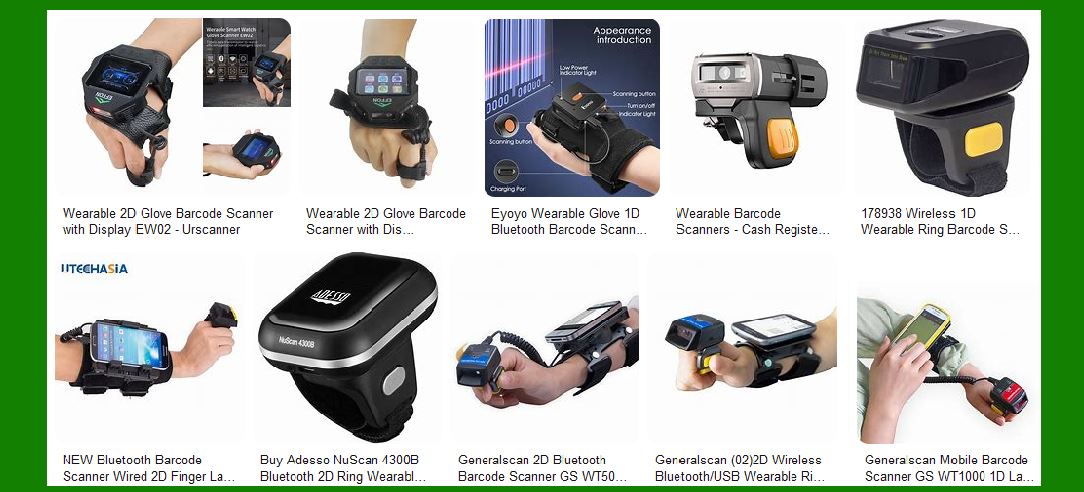
7.3 Wearable Scanners: Wearable barcode scanners, such as ring scanners, are becoming more popular. These devices offer hands-free operation and can improve efficiency and productivity in various applications1. |
7.4 Enhanced Durability: Future barcode scanners are likely to be more durable and resistant to environmental factors such as temperature, humidity, and physical impact. This will make them more suitable for use in harsh industrial environments4. |

|
8. Conclusion |
8.1 Summary: The read range of a barcode scanner is a critical factor that affects its performance and suitability for different applications. While longer read ranges offer numerous advantages, including increased flexibility, efficiency, and safety, they also come with certain disadvantages, such as higher costs and increased complexity. |
8.2 Considerations: When choosing a barcode scanner, it’s important to carefully consider your specific needs and evaluate the available options. Testing the scanner in your actual working environment and ensuring proper training and support can help maximize its benefits. |
8.3 Future Outlook: As technology continues to evolve, barcode scanners are expected to become even more advanced, offering improved read ranges, integration with IoT, and enhanced durability. Staying informed about these trends can help businesses make informed decisions and stay competitive in their respective industries. |
 cs@easiersoft.com