1. Overview of Barcode Scanners and Software Compatibility |
1.1 Introduction to Barcode Scanners: Barcode scanners are devices used to read and decode barcodes, which are visual representations of data. These devices are essential in various industries, including retail, logistics, healthcare, and manufacturing. They help in tracking inventory, managing assets, and streamlining operations. |
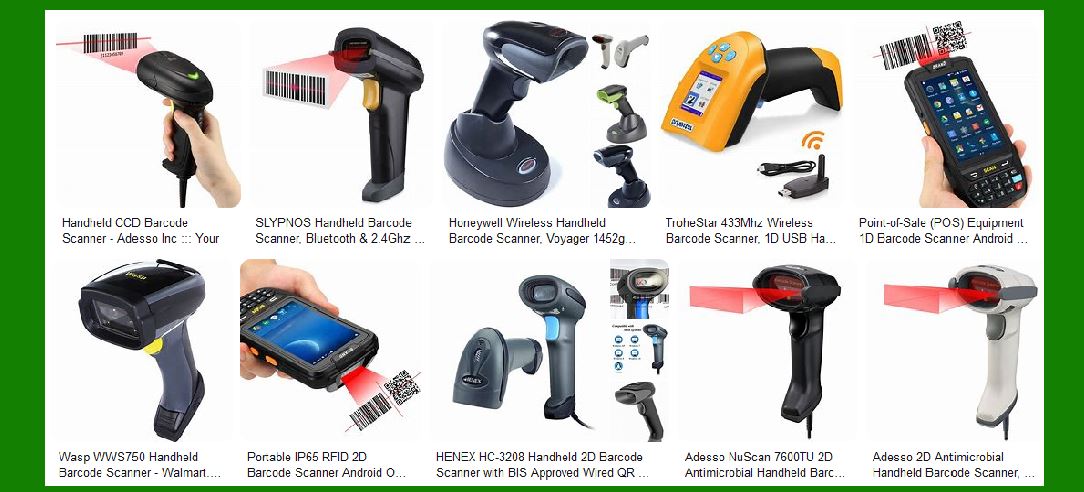
1.2 Types of Barcode Scanners: Barcode scanners come in various forms, including handheld, fixed mount, wearable, and mobile. Each type has its own set of features and is suited for different applications. Handheld scanners are versatile and commonly used in retail. Fixed mount scanners are ideal for conveyor belts and assembly lines. Wearable scanners are used in warehouses for hands-free operation, and mobile scanners are integrated into smartphones or tablets. |
1.3 Importance of Software Compatibility: Software compatibility is crucial for the effective use of barcode scanners. It ensures that the scanner can communicate seamlessly with your existing software systems, such as point-of-sale (POS) systems, inventory management software, and enterprise resource planning (ERP) systems. Without proper compatibility, the scanner may not function correctly, leading to inefficiencies and potential data errors. |
|
2. Ensuring Compatibility with Existing Software Systems |
2.1 Identifying Software Requirements: Before purchasing a barcode scanner, it is essential to identify the software requirements of your existing systems. This includes understanding the operating system (OS) compatibility, communication protocols, and any specific software integrations needed. Common operating systems include Windows, macOS, iOS, and Android. |
2.2 Checking Manufacturer Specifications: Manufacturers provide detailed specifications for their barcode scanners, including supported operating systems and software compatibility. It is important to review these specifications to ensure that the scanner will work with your existing systems. Some manufacturers also offer software development kits (SDKs) and application programming interfaces (APIs) to facilitate integration. |
2.3 Testing and Validation: Once you have identified a compatible barcode scanner, it is advisable to conduct testing and validation. This involves connecting the scanner to your software systems and verifying that it can read and transmit data accurately. Testing should include various barcode types and scanning conditions to ensure reliability. |

|
3. Advantages of Seamless Integration |
3.1 Improved Efficiency: Seamless integration of barcode scanners with your software systems can significantly improve operational efficiency. It allows for real-time data capture and processing, reducing the need for manual data entry. This leads to faster transaction times, improved inventory accuracy, and better overall productivity. |
3.2 Reduced Setup Time: When a barcode scanner is compatible with your existing software, the setup process is straightforward. There is no need for extensive configuration or custom development, which can save time and resources. Plug-and-play functionality is a common feature of compatible scanners, allowing for quick deployment. |
3.3 Enhanced Data Accuracy: Manual data entry is prone to errors, which can lead to inventory discrepancies and operational inefficiencies. Barcode scanners eliminate the risk of human error by automatically capturing and transmitting data. This ensures that your inventory records are accurate and up-to-date. |
3.4 Scalability: As your business grows, the need for efficient data capture and management becomes more critical. Barcode scanners that are compatible with your software systems can easily scale with your operations. This means you can add more scanners or upgrade your software without worrying about compatibility issues. |

|
4. Disadvantages of Incompatibility |
4.1 Additional Costs: Incompatibility between barcode scanners and software systems can lead to additional costs. This may include the need for custom development, purchasing new software, or hiring IT consultants to resolve compatibility issues. These costs can add up quickly and impact your budget. |
4.2 Integration Issues: Incompatible barcode scanners may not work correctly with your software systems, leading to integration issues. This can result in data transmission errors, system crashes, and other technical problems. Resolving these issues can be time-consuming and may require specialized technical expertise. |
4.3 Operational Disruptions: When barcode scanners are not compatible with your software, it can disrupt your operations. This may include delays in processing transactions, inventory management errors, and reduced productivity. Operational disruptions can have a negative impact on customer satisfaction and overall business performance. |
4.4 Limited Functionality: Incompatible barcode scanners may have limited functionality when used with your software systems. This can restrict the features and capabilities of the scanner, preventing you from fully leveraging its potential. For example, advanced scanning modes or data formatting options may not be available. |

|
5. Strategies for Ensuring Compatibility |
5.1 Conducting a Compatibility Assessment: Before purchasing a barcode scanner, conduct a thorough compatibility assessment. This involves reviewing the technical specifications of both the scanner and your software systems. Identify any potential compatibility issues and determine if there are solutions available. |
5.2 Consulting with Manufacturers: Reach out to barcode scanner manufacturers for guidance on compatibility. They can provide detailed information on supported software systems and offer recommendations for integration. Some manufacturers also offer technical support and resources to assist with compatibility testing. |
5.3 Utilizing SDKs and APIs: Software development kits (SDKs) and application programming interfaces (APIs) can facilitate the integration of barcode scanners with your software systems. These tools provide the necessary code and documentation to enable communication between the scanner and your software. Utilizing SDKs and APIs can streamline the integration process and ensure compatibility. |
5.4 Partnering with IT Experts: If you lack the technical expertise to assess compatibility and integrate barcode scanners, consider partnering with IT experts. They can provide valuable insights and support throughout the process, from selecting compatible scanners to configuring your software systems. |

|
6. Case Studies and Examples |
6.1 Retail Industry: In the retail industry, barcode scanners are commonly used at checkout counters and for inventory management. A major retail chain successfully integrated barcode scanners with their POS system, resulting in faster checkout times and improved inventory accuracy. The seamless integration allowed for real-time data capture and reduced the need for manual data entry. |
6.2 Healthcare Industry: In healthcare, barcode scanners are used for patient identification, medication administration, and inventory management. A hospital implemented barcode scanners compatible with their electronic health record (EHR) system. This integration improved patient safety by ensuring accurate medication administration and reduced the risk of errors. |
6.3 Manufacturing Industry: In manufacturing, barcode scanners are used for tracking raw materials, work-in-progress, and finished goods. A manufacturing company integrated barcode scanners with their ERP system, enabling real-time tracking of inventory and production processes. This integration improved operational efficiency and reduced inventory discrepancies. |

|
7. Future Trends in Barcode Scanner Compatibility |
7.1 Cloud-Based Integration: Cloud-based software systems are becoming increasingly popular, and barcode scanners are evolving to support cloud integration. This allows for seamless data synchronization and access from anywhere, improving flexibility and scalability. |
7.2 IoT and Smart Devices: The Internet of Things (IoT) is driving the development of smart barcode scanners that can communicate with other IoT devices. These scanners can provide real-time data and insights, enabling more efficient and automated operations. |
7.3 Artificial Intelligence and Machine Learning: Artificial intelligence (AI) and machine learning (ML) are being integrated into barcode scanners to enhance their capabilities. AI-powered scanners can recognize and decode barcodes more accurately, even in challenging conditions. ML algorithms can also optimize scanning performance based on usage patterns. |

|
8. Conclusion |
8.1 Summary: Ensuring software compatibility is essential for the effective use of barcode scanners. It involves identifying software requirements, checking manufacturer specifications, and conducting testing and validation. Seamless integration offers numerous advantages, including improved efficiency, reduced setup time, enhanced data accuracy, and scalability. |
8.2 Recommendations: To ensure compatibility, conduct a thorough compatibility assessment, consult with manufacturers, utilize SDKs and APIs, and partner with IT experts if needed. By following these strategies, you can avoid the disadvantages of incompatibility, such as additional costs, integration issues, operational disruptions, and limited functionality. |
8.3 Future Outlook: The future of barcode scanner compatibility is promising, with trends such as cloud-based integration, IoT, and AI/ML enhancing their capabilities. Staying informed about these trends can help you make informed decisions and leverage the full potential of barcode scanners in your operations. |
 cs@easiersoft.com