1. Handheld Barcode Scanners |
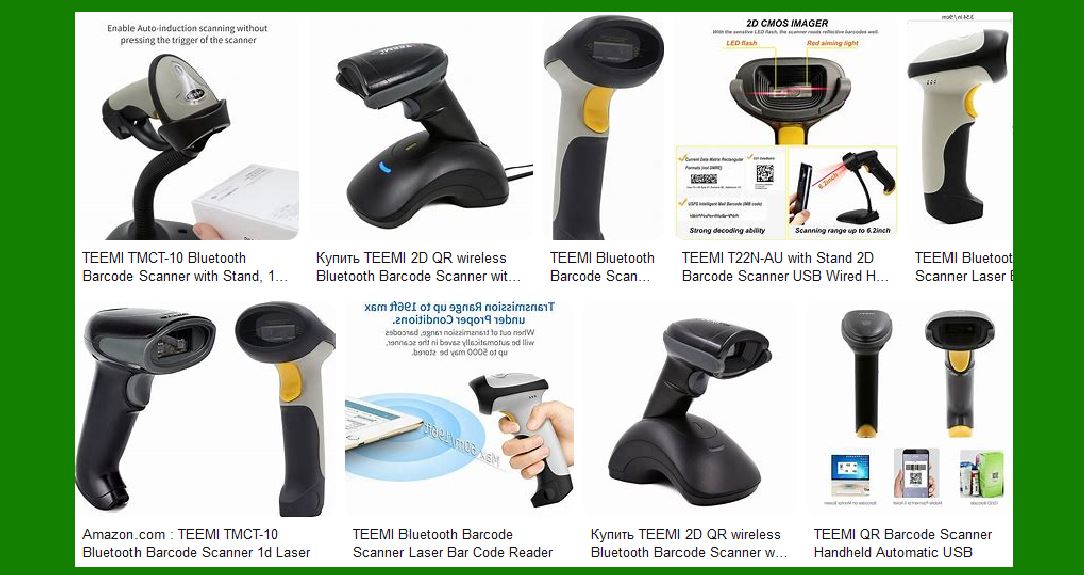
Teemi offers a variety of handheld barcode scanners designed for different applications and environments. These scanners are known for their portability, ease of use, and versatility. |
|
1.1 Teemi T22N-AU |
Type: 2D Barcode Scanner |
Connection: USB Wired Features: This model includes a stand for hands-free operation. It can scan QR codes, Data Matrix, and PDF417 barcodes. It is suitable for mobile payment and computer screen scanning. Use Case: Ideal for retail, inventory management, and point-of-sale systems. |
1.2 Teemi TMSL-74 |
Type: 1D and 2D Presentation Barcode Scanner Connection: USB Wired Features: Plug and play functionality with a large field of view for omnidirectional hands-free scanning. It is designed for high-speed scanning and can capture barcodes from screens. Use Case: Suitable for retail environments, kiosks, and inventory management. |
1.3 Teemi TMSL-56CR |
Type: QR Bluetooth 5.0 Barcode Scanner Connection: Wireless with USB Charging Cradle Features: This model supports 1D and 2D barcode scanning, including PDF417 and Data Matrix. It has a maximum transfer range of 300 yards and can scan barcodes from screens. Use Case: Ideal for logistics, warehousing, and mobile applications. |

|
2. Cordless Barcode Scanners Cordless barcode scanners from Teemi offer the flexibility of wireless operation, making them suitable for environments where mobility is essential. |
2.1 Teemi TMSL-55CR |
Type: 1D and 2D Bluetooth Barcode Scanner Connection: Wireless with USB Cradle Features: This scanner supports automatic omnidirectional scanning and can read barcodes from screens. It includes a charging station and is designed for high-speed, accurate scanning. Use Case: Perfect for retail, logistics, and inventory management. |
2.2 Teemi TMSL-53CR |
Type: 2D Bluetooth Barcode Scanner Connection: Wireless with USB Cradle Features: Equipped with a long-lasting replaceable rechargeable battery (2600mAh). It supports hands-free automatic scanning and can read various barcode types, including QR codes and PDF417. Use Case: Suitable for warehousing, logistics, and mobile applications. |

|
3. Presentation Barcode Scanners |
These scanners are designed for hands-free operation, making them ideal for high-volume scanning environments. |
3.1 Teemi TMSL-60 |
Type: 1D and 2D Presentation Barcode Scanner Connection: USB Wired Features: Omnidirectional scanning with a large field of view. It can capture barcodes from screens and is designed for high-speed, accurate scanning. Use Case: Ideal for retail, kiosks, and point-of-sale systems. |

|
4. Specialized Barcode Scanners |
Teemi also offers specialized barcode scanners designed for specific applications and environments. |
4.1 Teemi TMSL-57CR |
Type: 1D and 2D Bluetooth Barcode Scanner Connection: Wireless with Intelligent USB Cradle Features: This model includes a wall-mounted charging station and supports auto-activate omnidirectional hands-free scanning. It is designed for high-speed, accurate scanning in various environments. Use Case: Suitable for logistics, warehousing, and mobile applications. |

|
5. Barcode Scanner Accessories |
Teemi provides a range of accessories to complement their barcode scanners, enhancing their functionality and usability. |
5.1 Charging Cradles |
Description: USB charging cradles for wireless barcode scanners. These cradles ensure that the scanners are always charged and ready for use. Compatibility: Compatible with various Teemi wireless barcode scanner models. |
5.2 Stands |
Description: Stands for handheld barcode scanners, allowing for hands-free operation. These stands are designed to hold the scanners securely and enable easy access. Compatibility: Compatible with various Teemi handheld barcode scanner models. |

|
6. Technology and Features |
Teemi barcode scanners incorporate advanced technologies and features to ensure high performance and reliability. |
6.1 Scan Engines |
Types: Laser, linear imager, and 2D area imager scan engines. |
Functionality: These scan engines capture images of barcodes and transmit them to a host computer for processing. |
6.2 Connectivity Options |
Wired: USB connectivity for reliable and fast data transmission. Wireless: Bluetooth connectivity for flexibility and mobility. |
6.3 Durability |
Build Quality: Teemi barcode scanners are built to withstand harsh environments and frequent use. They are designed to be durable and reliable. |
6.4 Scanning Capabilities |
1D Barcodes: Includes traditional barcodes such as UPC, EAN, and Code 39. 2D Barcodes: Includes QR codes, Data Matrix, and PDF417. Screen Scanning: Ability to scan barcodes displayed on screens, making them suitable for mobile payment and digital coupon applications. |
6.5 Temperature and Humidity Tolerance |
Operating Conditions: Teemi barcode scanners are designed to operate in a wide range of temperatures and humidity levels, ensuring reliable performance in various environments. |

|
7. Applications and Use Cases |
Teemi barcode scanners are used in a variety of industries and applications, providing efficient and accurate barcode scanning solutions. |
7.1 Retail |
Point-of-Sale Systems: Scanning products at checkout counters. Inventory Management: Tracking and managing inventory levels. |
7.2 Logistics and Warehousing |
Shipping and Receiving: Scanning barcodes on packages and pallets. Inventory Tracking: Managing inventory in warehouses and distribution centers. |
7.3 Healthcare |
Patient Identification: Scanning patient wristbands for accurate identification. Medication Administration: Ensuring the correct medication is administered to patients. |
7.4 Mobile Payment |
Digital Coupons: Scanning digital coupons displayed on mobile devices. Mobile Payments: Scanning QR codes for mobile payment transactions. |

|
8. Customer Support and Warranty |
Teemi provides comprehensive customer support and warranty services to ensure customer satisfaction. |
8.1 Technical Support |
Availability: Lifetime technical support for all Teemi barcode scanners. Services: Assistance with setup, troubleshooting, and maintenance. |
8.2 Warranty |
Coverage: Warranty coverage for defects in materials and workmanship. Duration: Varies by product, typically includes a one-year warranty. |

|
9. Conclusion |
Teemi offers a wide range of barcode scanners designed to meet the needs of various industries and applications. Their products are known for their high performance, reliability, and advanced features. Whether you need a handheld, cordless, or presentation barcode scanner, Teemi has a solution to fit your requirements. |
 cs@easiersoft.com