1. Overview: Scanning Speed and Accuracy |
1.1 Introduction to Barcode Scanners |
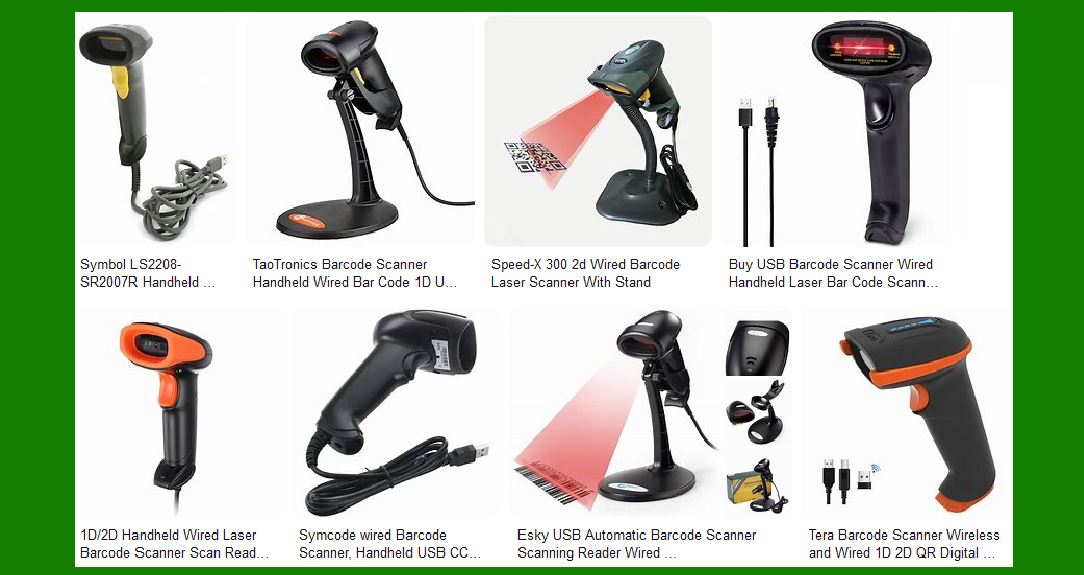
Barcode scanners are essential tools in various industries, including retail, logistics, healthcare, and manufacturing. They are designed to read and decode barcodes, which are patterns of parallel lines or other shapes that represent data. The speed and accuracy of these scanners are critical factors that determine their efficiency and reliability. |
1.2 Scanning Speed |
Scanning speed refers to the rate at which a barcode scanner can read and process barcodes. It is typically measured in scans per second (SPS). High-speed scanners can read hundreds or even thousands of barcodes per second, making them ideal for high-volume environments. The speed of a scanner is influenced by several factors, including the type of barcode, the quality of the barcode, the distance between the scanner and the barcode, and the technology used in the scanner. |
1.3 Accuracy |
Accuracy in barcode scanning refers to the scanner’s ability to correctly decode the information encoded in the barcode. High accuracy is crucial to ensure that the data captured is correct and reliable. Factors affecting accuracy include the quality of the barcode print, the condition of the barcode (e.g., whether it is damaged or dirty), the lighting conditions, and the scanner’s technology. |
|
2. Advantages of High-Speed and Accurate Barcode Scanners |
2.1 Improved Efficiency |
High-speed barcode scanners significantly improve operational efficiency. In retail environments, faster scanning speeds reduce checkout times, leading to shorter lines and improved customer satisfaction. In warehouses and distribution centers, they enable quicker inventory management and order processing. |
2.2 Reduced Wait Times |
In environments where speed is critical, such as hospitals or busy retail stores, high-speed scanners help reduce wait times. This is particularly important in healthcare settings where timely access to patient information can be crucial. |
2.3 Enhanced Data Accuracy |
Accurate barcode scanners ensure that the data captured is correct, reducing the risk of errors in inventory management, order fulfillment, and other processes. This leads to better decision-making and improved overall efficiency. |
2.4 Versatility |
Modern barcode scanners are versatile and can read a wide range of barcode types, including 1D and 2D barcodes. This versatility makes them suitable for various applications, from retail and logistics to healthcare and manufacturing. |

|
3. Disadvantages of High-Speed and Accurate Barcode Scanners |
3.1 Cost |
High-speed and highly accurate barcode scanners tend to be more expensive than their slower, less accurate counterparts. The advanced technology and components required to achieve high performance contribute to the higher cost. |
3.2 Complexity |
Advanced barcode scanners may require more complex setup and maintenance. This can include configuring the scanner to work with different types of barcodes, adjusting settings for optimal performance, and ensuring that the scanner is properly maintained. |
3.3 Power Consumption |
High-speed scanners often consume more power than slower models. This can be a consideration in environments where power efficiency is important, such as in mobile or battery-operated devices. |

|
4. Types of Barcode Scanners and Their Performance |
4.1 Wired Barcode Scanners |
Wired barcode scanners are connected to a computer or terminal via a cable. They are known for their reliability and consistent performance. However, the cable can limit mobility and flexibility. |
4.2 Wireless Barcode Scanners |
Wireless barcode scanners use Bluetooth or Wi-Fi to connect to a computer or terminal. They offer greater mobility and flexibility, making them ideal for large warehouses or retail environments. However, they may have limitations in terms of range and battery life. |
4.3 Wearable Barcode Scanners |
Wearable barcode scanners are designed to be worn on the body, such as on the wrist or finger. They allow for hands-free operation, which can improve efficiency in environments where workers need to use both hands. However, they may be less powerful than traditional handheld scanners. |
4.4 Fixed Mount Barcode Scanners |
Fixed mount barcode scanners are installed in a fixed position and are used to scan items as they pass by. They are commonly used in manufacturing and logistics environments. These scanners are highly reliable and can handle high volumes of scanning, but they lack mobility. |
4.5 Ring Barcode Scanners |
Ring barcode scanners are a type of wearable scanner that is worn on the finger. They offer the same hands-free benefits as other wearable scanners but are more compact and lightweight. They are ideal for environments where workers need to scan items quickly and efficiently. |

|
5. Factors Affecting Scanning Speed and Accuracy |
5.1 Barcode Quality |
The quality of the barcode itself is a significant factor in scanning speed and accuracy. Poorly printed or damaged barcodes can be difficult to read, leading to slower scanning speeds and lower accuracy. |
5.2 Lighting Conditions |
Lighting conditions can affect the performance of barcode scanners. Scanners that use laser technology may struggle in bright light, while those that use imaging technology may perform better in various lighting conditions. |
5.3 Distance and Angle |
The distance between the scanner and the barcode, as well as the angle at which the barcode is scanned, can impact performance. Some scanners are designed to read barcodes from a greater distance or at wider angles, improving flexibility and ease of use. |
5.4 Technology Used |
Different barcode scanning technologies offer varying levels of speed and accuracy. Laser scanners are known for their speed, while imaging scanners offer higher accuracy and the ability to read 2D barcodes. |

|
6. Conclusion |
In conclusion, the speed and accuracy of barcode scanners are critical factors that determine their effectiveness in various applications. High-speed and accurate scanners offer numerous advantages, including improved efficiency, reduced wait times, and enhanced data accuracy. However, they also come with disadvantages, such as higher costs and increased complexity. Understanding the different types of barcode scanners and the factors that affect their performance can help businesses choose the right scanner for their needs. |

|
 cs@easiersoft.com