Barcode Technology

Barcode History

Barcode Label Paper

Barcode Printer

Barcode Application

Inventory Management

AI Barcode QRCode

Barcode Scanner

Barcode Software

Barcode Software B

Barcode Software C

Barcode Software D

Barcode Software E

New Technology A

New Technology B

Robot Technology

Barcode Types

Barcode Types B

Barcode Types C

Barcode Types D

Barcode Types E

Barcode Types F

Electronic Technology

Psychology at Work

Barcode Technology and Barcode Software Related   <<< Back to Directory <<<

Bluetooth Barcode Scanners

1. Introduction to Bluetooth Barcode Scanners

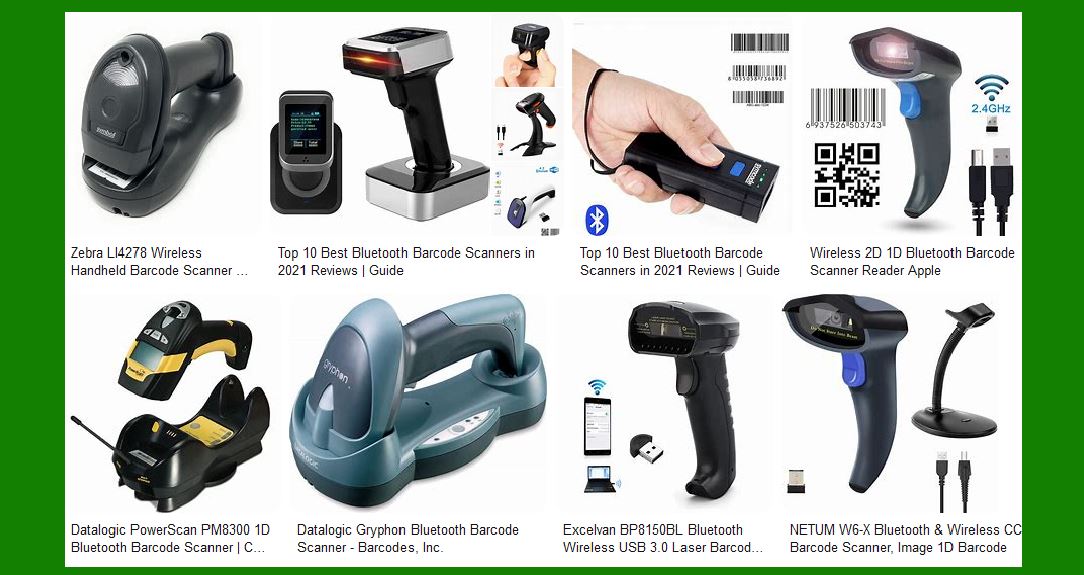
Bluetooth barcode scanners are a type of wireless scanner that connects to devices such as computers, tablets, and smartphones via Bluetooth technology. These scanners are widely used in various industries, including retail, logistics, healthcare, and manufacturing, due to their flexibility and ease of use.

2. How Bluetooth Barcode Scanners Work

Bluetooth barcode scanners operate by emitting a laser or LED light to scan barcodes. The scanner captures the reflected light and converts it into an electrical signal, which is then decoded into the barcode’s data. This data is transmitted wirelessly to a paired device via Bluetooth.

3. Types of Bluetooth Barcode Scanners

There are several types of Bluetooth barcode scanners, each designed for specific applications:

Handheld Scanners: These are the most common type, designed for general use.

Ring Scanners: Worn on the finger, these scanners are ideal for hands-free operations.

Presentation Scanners: These are stationary scanners used for high-volume scanning at checkout counters.

Mobile Computer Scanners: These combine a barcode scanner with a mobile computer, offering advanced functionalities.

4. Pairing and Connectivity

Bluetooth barcode scanners can be easily paired with various devices. The pairing process typically involves:

Turning on the scanner and enabling Bluetooth.

Searching for the scanner on the device to be paired.

Selecting the scanner from the list of available devices.

Entering a pairing code if required.

5. Advantages of Bluetooth Barcode Scanners

Bluetooth barcode scanners offer several advantages:

Easy Pairing: They can be easily paired with a wide range of devices, including smartphones, tablets, and computers.

Mobility: They are suitable for mobile applications, allowing users to move freely without being tethered by cables.

Versatility: They can be used in various environments, from retail stores to warehouses.

Cost-Effective: They eliminate the need for expensive infrastructure, such as wired connections.

6. Disadvantages of Bluetooth Barcode Scanners

Despite their advantages, Bluetooth barcode scanners have some limitations:

Limited Range: Bluetooth typically has a shorter range compared to Wi-Fi, usually up to 30 feet.

Interference: Bluetooth signals can be affected by physical obstacles and other wireless devices.

Battery Life: Wireless operation relies on battery power, which requires regular recharging.

7. Technical Specifications

Bluetooth barcode scanners come with various technical specifications, including:

Bluetooth Version: Most modern scanners use Bluetooth 4.0 or higher for better range and energy efficiency.

Scanning Technology: Options include laser, CCD, and 2D imaging.

Battery Life: Varies by model, with some offering up to 12 hours of continuous use.

Durability: Many scanners are designed to withstand drops and harsh environments.

8. Applications in Different Industries

Bluetooth barcode scanners are used in various industries:

Retail: For inventory management, point-of-sale transactions, and customer service.

Logistics: For tracking shipments, managing inventory, and streamlining warehouse operations.

Healthcare: For patient identification, medication tracking, and inventory management.

Manufacturing: For tracking parts, managing inventory, and quality control.

9. Comparison with Other Wireless Scanners

Bluetooth barcode scanners are often compared with other wireless scanners, such as Wi-Fi and RFID scanners:

Wi-Fi Scanners: Offer longer range and faster data transfer but require a Wi-Fi network.

RFID Scanners: Use radio waves to read tags, suitable for tracking large quantities of items but more expensive.

10. Future Trends

The future of Bluetooth barcode scanners looks promising with advancements in technology:

Improved Battery Life: Newer models are expected to offer longer battery life.

Enhanced Connectivity: Future scanners may support multiple wireless protocols.

Integration with IoT: Scanners may become part of the Internet of Things (IoT), enabling smarter inventory management.

11. Conclusion

Bluetooth barcode scanners are a versatile and efficient solution for various scanning needs. Their ease of use, mobility, and cost-effectiveness make them a popular choice across different industries. However, users should consider their specific requirements and the limitations of Bluetooth technology when selecting a scanner.


EasierSoft Barcode Label Design & Bulk Printing Software

---- Use Excel Data to Batch Print Barcodes on Label Sheets or Roll Labels  

---- How to use this barcode software

Download:  Free Barcode Software + Barcode Label Designer

Download Free Barcode Software at Softonic

     Download at CNET

Once you obtain a GS1/UPC/EAN barcode, or other barcode type and QR code, you can use our free software to batch print barcode labels onto Roll label paper using a professional label printer, or to batch print barcodes onto Avery 5160 label sheets using a regular laser or inkjet printer. Our software has free and paid versions.

The free version fully meets your needs for batch printing GS1/UPC/EAN barcodes. The paid version can import data from Excel and databases to batch print barcode labels with different values.

How to Start

Input Data

Import Excel Data

Print Barcode

Barcode Format

Label Designer

All Screen Shot

Export Barcode Image

Save Template

Output Word Excel

How to Use & FAQ:

Barcode Label Font Settings

Configuring the Barcode Print Rotation

Text Alignment for Barcode Labels

Automatically Adjusting Barcode Width

Text Beneath the Barcode

Configuring Barcode Size

Auto Calculate the Barcode Size

Export Barcode images

Export Barcode Image Format

File Names for Exported Barcode

Resolution of Exported Barcode Images

Fixed Folder for Exporting Barcode

Default Barcode Image Export Format

Print bulk barcodes quickly

Print barcodes to Avery 5160 label

How to bulk Barcode Printing

Sample - Avery 5162 (2x7) Label Sheet

Example: Print barcodes to 5*3cm roll

Example: Print barcodes to 5161 label

Example: Print barcodes to 5162 label

Example: Print barcodes to 5163 label

Example: Print barcodes to 5164 label

Example: Print portrait orientation 5164

Example: Print barcodes to 5167 label

Example: Print barcodes to 5168 label

Example: Print portrait orientation 5168

Example: Print barcodes to 5169 label

Example: Print barcodes to 5660 label

Example: Print barcodes to 5661 label

Example: Print barcodes to 5662 label

Example: Print barcodes to 5663 label

Example: Print barcodes to 5664 label

Example: Print portrait orientation 5664

Example: Print barcodes to 5873 label

Example: Print barcodes to 5874 label

Two ways to import Excel data

Import Excel Data - Pro Edition

Import Excel Data - Std Edition

Import Data from Excel - Detail

Load Data From Excel File

Data Editing Table

Copy Data From Excel

Four ways to input barcode data

Add ASCII Key E

Input Multiple Lines of Text for Barcodes

Generates Sequential Serial Numbers

Import or copy data from Excel sheets

Special sequence number generation

Std Details: Simple Input Form

Std Details: Multiple Line Text Input

Highlights

Excel integration: Import data directly from Excel to generate and print barcodes in bulk.

Label designer: Create complex labels with multiple barcodes, text, logos, and shapes.

Batch printing: Print thousands of barcodes at once using standard inkjet/laser printers or professional barcode printers.


Flexible editions:

Standard Edition: Simple batch printing with Excel data.

Professional Edition: Adds command-line automation for workflow integration.

Label Designer Edition: Advanced design features for complex labels.


Why Choose Our Barcode Solutions?

Cost-effective: Free online generator and permanent free desktop version available.

Easy to use: No technical expertise required—just input data and print.

Versatile: Supports nearly all 1D and 2D barcode types, including QR codes.

Trusted: Recommended by CNET and widely downloaded by users worldwide.


Suitable Use Cases

Small businesses and startups needing quick barcode labels for products.

Retailers and online sellers managing inventory with batch barcode printing.

Manufacturers requiring sequential or custom barcode labels for packaging.

Educational and testing environments where barcodes are used for tracking.


CONTACT

cs@easiersoft.com

If you have any question, please feel free to email us.


https://free-barcode.com


<<< Back to Directory <<<     Barcode Generator     Barcode Freeware     Privacy Policy