1. Introduction to Barcode Scanning |
Barcode scanning technology is crucial in various applications, from retail and logistics to healthcare and manufacturing. The performance of a barcode scanning system heavily depends on the type and configuration of the scanner. Understanding the different types of scanners and how their configurations affect performance is essential for optimizing barcode scanning operations. |
|
2. Types of Barcode Scanners |
2.1. Laser Scanners |
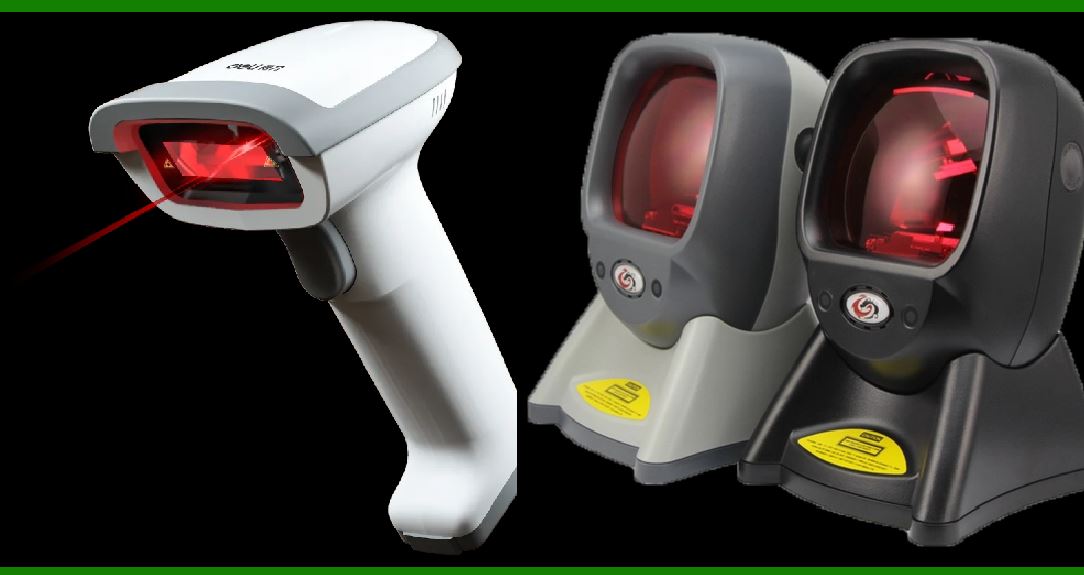
1.Technology Overview: Laser scanners, also known as laser bar code readers, use a laser beam to scan barcodes. The laser beam is emitted from a diode, and a rotating mirror or oscillating mirror directs the beam across the barcode. As the laser reflects off the barcode's lines and spaces, it is captured by a photodiode or other light sensor. 2.Capabilities: Laser scanners are highly effective for scanning 1D barcodes, such as UPC or EAN codes. They are known for their speed and accuracy, making them suitable for high-volume scanning environments like retail checkout counters. 3.Limitations: Laser scanners may struggle with 2D barcodes and poorly printed or damaged barcodes. Their performance can be affected by the quality of the barcode and environmental conditions such as lighting. 4.Applications: Commonly used in retail settings, warehousing, and logistics due to their high-speed scanning capability and reliability in controlled environments. |
2.2. Imager Scanners |
1.Technology Overview: Imager scanners, or camera-based scanners, utilize an image sensor (usually a CCD or CMOS sensor) to capture images of barcodes. These scanners process the image to decode the barcode data. Unlike laser scanners, imagers can capture 2D barcodes and perform more complex decoding tasks. 2.Capabilities: Imager scanners are versatile and can handle both 1D and 2D barcodes, including QR codes, Data Matrix, and PDF417. They are also capable of reading barcodes from screens (e.g., mobile devices) and in various orientations. 3.Limitations: Imager scanners can be slower than laser scanners when scanning 1D barcodes due to the image processing time. They may also require proper lighting conditions to achieve optimal performance, though modern imagers often include features to compensate for poor lighting. 4.Applications: Used in diverse environments such as healthcare, logistics, and retail, where reading a variety of barcode types and conditions is necessary. |

|
3. Scanner Configuration and Its Impact |
3.1. Focus |
1.Definition and Importance: The focus of a scanner refers to the ability to clearly capture and decode the barcode image. In laser scanners, focus is often achieved through optical adjustments of the laser and mirror assembly. In imager scanners, focus is achieved through lens adjustments and digital image processing. 2.Impact on Performance: Proper focus ensures that the scanner can accurately read the barcode. Misfocused scanners may produce blurry images or incorrect readings, leading to reduced accuracy and increased error rates. 3.Adjustment Techniques: Some scanners have manual focus adjustments, while others use auto-focus technology. Auto-focus scanners are generally more user-friendly and adapt to varying distances and sizes of barcodes automatically. 4.Considerations: The scanning distance and barcode size influence focus requirements. For instance, reading barcodes from a distance requires precise focus adjustments to maintain accuracy. |
3.2. Scan Angle |
1.Definition and Importance: The scan angle refers to the angle at which the scanner reads the barcode. Laser scanners typically have a fixed or adjustable scan angle, while imager scanners can often capture barcodes from a wider range of angles. 2.Impact on Performance: The scan angle affects the scanner's ability to accurately read barcodes. A narrow scan angle might be suitable for fixed or close-range scanning, while a wider scan angle is beneficial for reading barcodes from various orientations and distances. 3.Adjustment Techniques: Some scanners allow for manual adjustment of the scan angle, while others are designed to be more flexible with wider scanning angles. In environments where barcodes are presented at varying angles, scanners with wider scan angles can improve efficiency and reduce misreads. 4.Considerations: Environmental factors such as the placement of barcodes and the movement of items affect the required scan angle. For example, conveyor belt systems may require scanners with wide angles to handle items moving at different angles. |
3.3. Lighting Conditions |
1.Definition and Importance: Lighting conditions impact the scanner's ability to capture and decode barcodes. Inconsistent or poor lighting can affect the scanner's performance, leading to difficulties in reading barcodes. 2.Impact on Performance: Laser scanners are generally less affected by lighting conditions due to the coherent light beam they use. In contrast, imager scanners may be more sensitive to lighting variations and may require optimal lighting for accurate readings. 3.Adjustment Techniques: Some scanners have built-in illumination to enhance barcode visibility. For imager scanners, using ambient or supplementary lighting can help improve scanning accuracy. 4.Considerations: Scanners should be selected based on the lighting conditions of their operational environment. For example, scanners in dark or unevenly lit areas might benefit from additional lighting features or specialized scanning technologies. |
3.4. Motion Tolerance |
1.Definition and Importance: Motion tolerance refers to a scanner's ability to read barcodes accurately while the scanned item is in motion. This is particularly relevant in dynamic environments such as conveyor belts or high-speed production lines. 2.Impact on Performance: Scanners with high motion tolerance can read barcodes on moving items without significant errors. Laser scanners generally have good motion tolerance for 1D barcodes, while imager scanners may require higher processing power to handle motion effectively. 3.Adjustment Techniques: Scanners with higher frame rates and advanced image processing capabilities are better suited for environments with high motion. Calibration and setup are essential to ensure optimal performance under varying motion conditions. 4.Considerations: The speed of the moving items and the type of barcode being scanned affect motion tolerance requirements. Scanners should be tested in actual operational conditions to ensure they meet performance needs. |

|
4. Environmental Factors |
4.1. Temperature and Humidity |
1.Definition and Importance: Temperature and humidity levels can impact the performance of barcode scanners. Extreme temperatures or high humidity can affect electronic components and scanning accuracy. 2.Impact on Performance: Scanners operating outside their specified temperature and humidity ranges may experience reduced performance, including slower scanning speeds and increased error rates. 3.Adjustment Techniques: Selecting scanners with appropriate environmental ratings and providing controlled conditions can mitigate the effects of temperature and humidity. Some scanners are designed for use in harsh environments and offer enhanced protection. 4.Considerations: The operational environment should be assessed to choose scanners that can handle specific temperature and humidity conditions. |
4.2. Surface Type and Quality |
1.Definition and Importance: The surface type and quality of the barcode label can affect scanning performance. Barcodes printed on reflective or curved surfaces may pose challenges for some scanners. 2.Impact on Performance: Reflective surfaces can cause glare, making it difficult for the scanner to capture the barcode image. Curved or uneven surfaces can distort the barcode, affecting readability. 3.Adjustment Techniques: Using scanners with adjustable focus and lighting can help handle various surface types. Additionally, ensuring that barcodes are printed with high-quality standards can improve scanning reliability. 4.Considerations: The type of surfaces in the operational environment should be evaluated to choose scanners that can effectively handle different surface types and quality. |

|
5. Conclusion |
The effectiveness of a barcode scanning system is influenced by the type and configuration of the scanner. Laser scanners are optimized for high-speed 1D barcode reading, while imager scanners offer versatility for 1D and 2D barcodes. Configuration factors such as focus, scan angle, lighting conditions, and motion tolerance play significant roles in determining scanning performance. Environmental factors also impact scanner functionality, necessitating careful selection and setup based on operational conditions. |
By understanding these factors, businesses and organizations can select and configure barcode scanners to meet their specific needs, ensuring efficient and accurate barcode scanning operations. |
|
 cs@easiersoft.com