1. Overview of Fixed Mount Barcode Scanners |
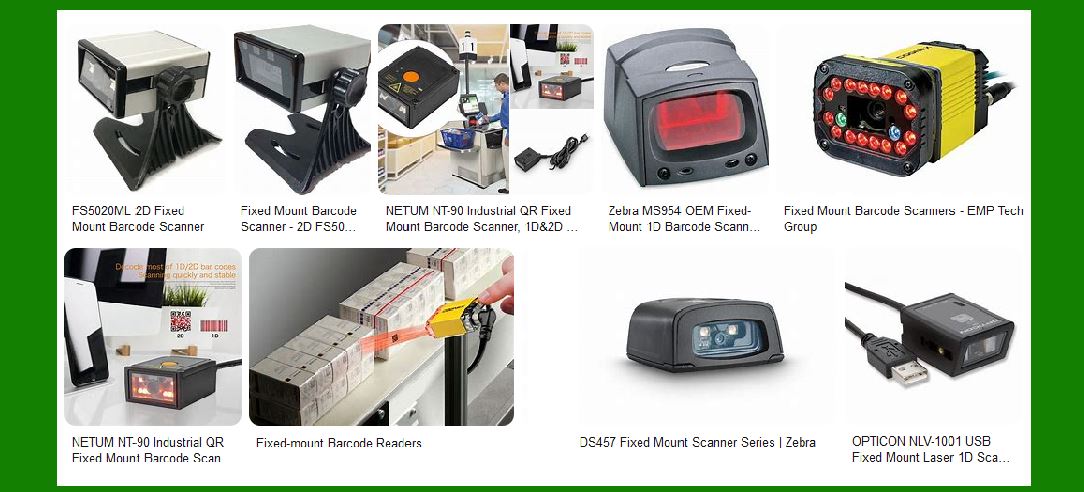
Fixed mount barcode scanners are devices designed to read barcodes without the need for manual operation. These scanners are mounted in a fixed position, making them ideal for environments where items pass by the scanner, such as checkout counters, assembly lines, and conveyor belts. They are commonly used in retail, manufacturing, logistics, and healthcare industries. |
1.1. Types of Fixed Mount Barcode Scanners |
Laser Scanners: These use a laser beam to read barcodes. They are highly accurate and can read barcodes from a distance. Imager Scanners: These use a camera to capture an image of the barcode and then decode it. They are capable of reading both 1D and 2D barcodes. Omnidirectional Scanners: These can read barcodes from any orientation, making them highly efficient in high-speed environments. |
|
2. Advantages of Fixed Mount Barcode Scanners |
Fixed mount barcode scanners offer several advantages, particularly in high-volume and automated environments. |
2.1. Hands-Free Operation |
One of the primary benefits of fixed mount barcode scanners is their hands-free operation. This allows workers to focus on other tasks, improving overall efficiency and productivity. |
2.2. High-Speed Scanning |
Fixed mount scanners are designed for high-speed scanning, making them ideal for environments where items move quickly, such as conveyor belts and assembly lines. They can scan multiple items in rapid succession without the need for manual intervention. |
2.3. Consistent Performance |
Since these scanners are fixed in place, they provide consistent performance and accuracy. There is no need to worry about the scanner being misaligned or moved, which can happen with handheld scanners. |
2.4. Integration with Automated Systems |
Fixed mount barcode scanners can be easily integrated with automated systems, such as conveyor belts and robotic arms. This integration allows for seamless data capture and processing, further enhancing efficiency. |
2.5. Durability and Reliability |
Fixed mount scanners are built to withstand harsh environments and continuous use. They are often more durable and reliable than handheld scanners, which can be dropped or damaged. |

|
3. Disadvantages of Fixed Mount Barcode Scanners |
While fixed mount barcode scanners offer many advantages, they also have some limitations. |
3.1. Limited to Fixed Locations |
As the name suggests, fixed mount barcode scanners are stationary and cannot be easily moved. This limitation makes them less versatile compared to handheld scanners, which can be used in various locations. |
3.2. Initial Setup and Installation |
Setting up fixed mount barcode scanners can be more complex and time-consuming compared to handheld scanners. Proper alignment and calibration are crucial to ensure optimal performance. |
3.3. Cost |
Fixed mount barcode scanners can be more expensive than handheld scanners, especially when considering the cost of installation and integration with automated systems. |
3.4. Maintenance |
While fixed mount scanners are generally durable, they still require regular maintenance to ensure they continue to operate effectively. This maintenance can include cleaning the scanner lens and checking for any alignment issues. |

|
4. Applications of Fixed Mount Barcode Scanners |
Fixed mount barcode scanners are used in a variety of industries and applications. |
4.1. Retail |
In retail environments, fixed mount barcode scanners are commonly used at checkout counters. They allow for quick and efficient scanning of items, reducing wait times for customers. |
4.2. Manufacturing |
In manufacturing, fixed mount scanners are used on assembly lines to track parts and products. They help ensure that the correct components are used and that products are assembled correctly. |
4.3. Logistics and Warehousing |
Fixed mount barcode scanners are used in logistics and warehousing to track inventory and shipments. They can be integrated with conveyor systems to automatically scan items as they move through the facility. |
4.4. Healthcare |
In healthcare, fixed mount barcode scanners are used to track medications, patient records, and medical equipment. They help ensure that the correct medications are administered and that patient records are accurately maintained. |

|
5. Technical Specifications |
Fixed mount barcode scanners come with various technical specifications that determine their performance and suitability for different applications. |
5.1. Scan Rate |
The scan rate refers to the number of scans the scanner can perform per second. Higher scan rates are essential for high-speed environments. |
5.2. Resolution |
Resolution refers to the scanner’s ability to read small or dense barcodes. Higher resolution scanners can read smaller barcodes with greater accuracy. |
5.3. Interface Options |
Fixed mount barcode scanners come with various interface options, including USB, RS232, and Ethernet. The choice of interface depends on the specific application and integration requirements. |
5.4. Environmental Specifications |
Environmental specifications include factors such as operating temperature, humidity, and resistance to dust and water. These specifications determine the scanner’s suitability for different environments. |

|
6. Future Trends |
The future of fixed mount barcode scanners is likely to be influenced by advancements in technology and changing industry needs. |
6.1. Integration with IoT |
Fixed mount barcode scanners are expected to become more integrated with the Internet of Things (IoT). This integration will allow for real-time data capture and analysis, improving decision-making and operational efficiency. |
6.2. Enhanced Imaging Technology |
Advancements in imaging technology will likely lead to improved performance and accuracy of fixed mount barcode scanners. This includes better resolution and the ability to read damaged or poorly printed barcodes. |
6.3. Increased Automation |
As industries continue to move towards greater automation, fixed mount barcode scanners will play a crucial role in enabling automated processes. This includes integration with robotic systems and automated guided vehicles (AGVs). |

|
7. Conclusion |
Fixed mount barcode scanners are essential tools in various industries, offering hands-free operation, high-speed scanning, and consistent performance. While they have some limitations, such as being limited to fixed locations and requiring initial setup, their advantages make them ideal for high-volume and automated environments. As technology continues to advance, fixed mount barcode scanners are expected to become even more integrated with automated systems and IoT, further enhancing their capabilities and applications. |
 cs@easiersoft.com