Handheld Barcode Scanners: A Comprehensive Overview |
1. Introduction |
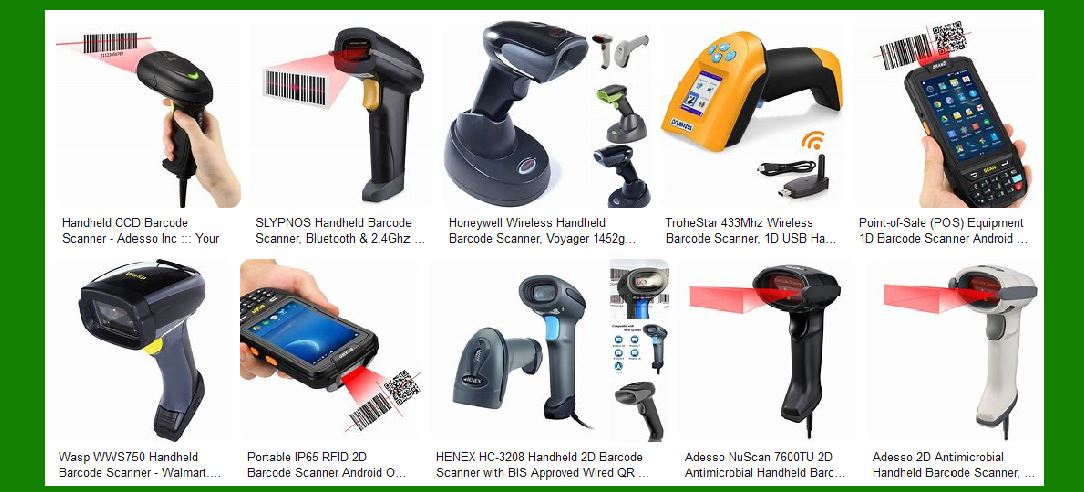
Handheld barcode scanners are ubiquitous in various industries, from retail and logistics to healthcare and manufacturing. These devices are designed to be held in the hand and used to scan barcodes, making them one of the most common types of barcode scanners available today. This detailed overview will cover the technical aspects, advantages, disadvantages, and various applications of handheld barcode scanners. |
|
2. Technical Specifications |
Handheld barcode scanners come in various forms, each with specific technical specifications tailored to different use cases. Here are some key technical aspects: |
2.1 Scanning Technology: |
Laser Scanners: Use a laser beam to read barcodes. They are known for their accuracy and ability to read barcodes from a distance. CCD (Charge-Coupled Device) Scanners: Use an array of tiny light sensors to capture the barcode image. They are durable and suitable for close-range scanning. Imager Scanners: Use a camera to capture the barcode image and decode it. They can read both 1D and 2D barcodes and are versatile in various lighting conditions. |
2.2 Connectivity Options: |
Wired Scanners: Connect to a computer or POS system via USB, RS232, or PS/2 cables. Wireless Scanners: Use Bluetooth or Wi-Fi to connect to devices, offering greater mobility and flexibility. |
2.3 Decoding Capabilities: |
1D Barcodes: Linear barcodes such as UPC, EAN, and Code 128. 2D Barcodes: Matrix barcodes such as QR codes, Data Matrix, and PDF417. |
2.4 Durability and Ergonomics: |
IP Ratings: Indicate the scanner’s resistance to dust and water. Higher IP ratings mean better protection. Drop Resistance: Many handheld scanners are designed to withstand drops from a certain height, making them suitable for rugged environments. Ergonomic Design: Features like lightweight construction, comfortable grips, and trigger buttons to reduce hand fatigue. |

|
3. Advantages of Handheld Barcode Scanners |
Handheld barcode scanners offer several advantages that make them popular across various industries: |
3.1 Versatility: |
Wide Range of Applications: Suitable for retail, warehousing, healthcare, manufacturing, and more. Compatibility: Can read various barcode types, including 1D and 2D barcodes. |
3.2 Ease of Use: |
User-Friendly: Simple point-and-shoot operation, requiring minimal training. Portability: Lightweight and easy to carry, allowing for use in different locations. |
3.3 Efficiency: |
Speed: Quick scanning speeds improve workflow efficiency. Accuracy: Reduces human errors associated with manual data entry. |
3.4 Cost-Effective: |
Affordable Options: Available in a wide price range, making them accessible for businesses of all sizes. Low Maintenance: Generally require minimal maintenance and have a long lifespan. |

|
4. Disadvantages of Handheld Barcode Scanners |
Despite their many advantages, handheld barcode scanners also have some drawbacks: |
4.1 Hand Fatigue: |
Prolonged Use: Continuous use can lead to hand fatigue and discomfort, especially in high-volume scanning environments. |
4.2 Limited Range: |
Distance Constraints: Some models have limited scanning ranges, making them less suitable for scanning barcodes from a distance. |
4.3 Battery Life: |
Wireless Models: Depend on battery power, which may require frequent recharging or battery replacement. |
4.4 Environmental Limitations: |
Lighting Conditions: Some scanners may struggle in low-light or overly bright environments. Surface Reflections: Reflective surfaces can interfere with scanning accuracy. |

|
5. Applications of Handheld Barcode Scanners |
Handheld barcode scanners are used in a variety of industries, each with specific requirements and use cases: |
5.1 Retail: |
Point of Sale (POS): Scanning products at checkout counters for quick and accurate transactions. Inventory Management: Tracking stock levels and managing inventory in real-time. |
5.2 Warehousing and Logistics: |
Receiving and Shipping: Scanning barcodes on packages to track shipments and manage logistics. Order Picking: Assisting in the accurate picking of items for order fulfillment. |
5.3 Healthcare: |
Patient Identification: Scanning patient wristbands to ensure accurate identification and medication administration. Inventory Control: Managing medical supplies and equipment inventory. |
5.4 Manufacturing: |
Work-in-Progress Tracking: Monitoring the progress of products through the manufacturing process. Quality Control: Scanning barcodes on components to ensure quality and traceability. |
5.5 Libraries and Education: |
Book Management: Scanning barcodes on books for check-in/check-out processes. Asset Tracking: Managing educational resources and equipment. |

|
6. Types of Handheld Barcode Scanners |
There are several types of handheld barcode scanners, each designed for specific applications and environments: |
6.1 Standard Handheld Scanners: |
General Use: Suitable for everyday scanning tasks in retail and office environments. Affordable: Typically more budget-friendly and easy to use. |
6.2 Rugged Handheld Scanners: |
Durable: Built to withstand harsh conditions, including drops, dust, and water exposure. Industrial Use: Ideal for manufacturing, warehousing, and outdoor applications. |
6.3 Wireless Handheld Scanners: |
Mobility: Offer the freedom to move around without being tethered to a computer or POS system. Bluetooth/Wi-Fi: Connect wirelessly to devices, providing flexibility in various settings. |
6.4 Healthcare Handheld Scanners: |
Hygienic Design: Designed with antimicrobial materials to prevent the spread of germs. Patient Safety: Used for patient identification and medication administration. |

|
7. Key Features to Consider |
When selecting a handheld barcode scanner, several key features should be considered to ensure it meets the specific needs of the application: |
7.1 Scanning Range: |
Short-Range: Suitable for close-up scanning tasks. Long-Range: Capable of scanning barcodes from a distance, useful in warehousing and logistics. |
7.2 Decoding Speed: |
High-Speed Scanning: Essential for high-volume environments where quick scanning is required. |
7.3 Connectivity: |
Wired vs. Wireless: Depending on the need for mobility and flexibility. Compatibility: Ensure compatibility with existing systems and devices. |
7.4 Durability: |
Rugged Design: Necessary for industrial and outdoor use. IP Rating: Indicates resistance to dust and water. |
7.5 Ergonomics: |
Comfortable Grip: Reduces hand fatigue during prolonged use. Lightweight: Easier to handle and carry. |

|
8. Future Trends in Handheld Barcode Scanners |
The technology behind handheld barcode scanners continues to evolve, with several trends shaping the future of these devices: |
8.1 Integration with Mobile Devices: |
Smartphone Compatibility: Scanners that can connect to smartphones and tablets for enhanced mobility. App Integration: Use of mobile apps to manage scanning tasks and data. |
8.2 Advanced Imaging Technology: |
3D Imaging: Scanners capable of capturing 3D images for more accurate and versatile scanning. AI and Machine Learning: Enhancing decoding capabilities and improving accuracy. |
8.3 Enhanced Connectivity: |
IoT Integration: Connecting scanners to the Internet of Things (IoT) for real-time data sharing and analytics. Cloud-Based Solutions: Storing and accessing scanned data in the cloud for improved accessibility and collaboration. |
8.4 Sustainability: |
Eco-Friendly Designs: Development of scanners with recyclable materials and energy-efficient components. Longer Battery Life: Innovations in battery technology to extend the operational time of wireless scanners. |

|
9. Conclusion |
Handheld barcode scanners are indispensable tools in various industries, offering versatility, ease of use, and efficiency. While they have some disadvantages, such as hand fatigue and limited range, their benefits far outweigh these drawbacks. As technology continues to advance, handheld barcode scanners will become even more integral to business operations, with new features and capabilities enhancing their functionality and performance. |
By understanding the technical specifications, advantages, disadvantages, and applications of handheld barcode scanners, businesses can make informed decisions when selecting the right scanner for their needs. Whether in retail, healthcare, manufacturing, or logistics, handheld barcode scanners will continue to play a crucial role in streamlining processes and improving productivity. |
 cs@easiersoft.com