The history and development of barcode scanning technology spans over several decades, evolving from simple linear barcodes to complex 2D codes and beyond. This technology has revolutionized industries ranging from retail and logistics to healthcare and manufacturing. Here's a detailed exploration of its evolution: |
|
1. Introduction to Barcodes |
1.1 Early Origins and Conceptualization |
The concept of barcode scanning began in the late 1940s, primarily as a response to the need for automated data capture in industrial and retail settings. The initial idea was to create a system that could encode data into visually readable patterns that machines could interpret quickly and accurately. |
1.2 Development of the First Barcodes |
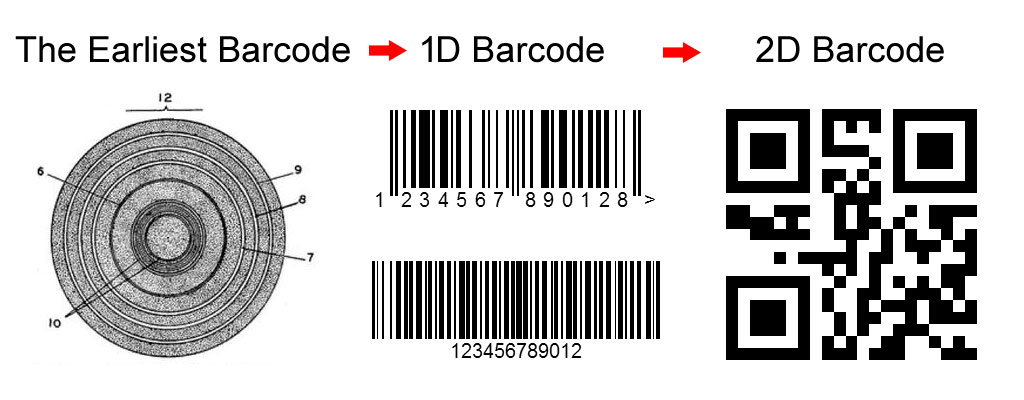
The first patent for a barcode system was filed in 1949 by Norman Joseph Woodland and Bernard Silver. Their design used patterns of concentric circles as a means of encoding data. However, it was not until the 1970s that barcode technology gained practical implementation. |

|
2. Evolution of Barcode Types |
2.1 Linear Barcodes |
UPC (Universal Product Code): Developed in the early 1970s by George Laurer at IBM, UPC became the standard for retail product labeling in North America. It consisted of a series of vertical bars and spaces. EAN (European Article Numbering): Introduced shortly after UPC, EAN extended barcode use globally with variations like EAN-13 and EAN-8, used for product identification outside North America. |
2.2 2D Barcodes |
QR Code (Quick Response Code): Developed in 1994 by Denso Wave, QR codes gained popularity for their high data capacity and fast readability. Initially used in automotive manufacturing, they later became ubiquitous in marketing and payment systems. DataMatrix: Introduced by International Data Matrix, DataMatrix codes are square matrices capable of encoding large amounts of data in a small space, ideal for applications like pharmaceuticals and electronics. |
2.3 Stacked Barcodes |
PDF417: Developed by Symbol Technologies, PDF417 barcodes can encode large amounts of data in both vertical and horizontal directions, making them suitable for applications requiring dense data storage like transportation and government identification. |

|
3. Barcode Scanning Technologies |
3.1 Laser Scanning |
Early Laser Scanners: Invented by Jerome Swartz and his team at Symbol Technologies in the 1970s, laser scanners revolutionized barcode reading with their ability to quickly and accurately decode linear barcodes. |
3.2 Imaging Technology |
CCD (Charge-Coupled Device) Scanners: Introduced in the 1980s, CCD scanners captured barcode images using light sensors, offering improved reliability and durability compared to early laser scanners. CMOS (Complementary Metal-Oxide Semiconductor) Sensors: These sensors, adopted in the 2000s, enhanced image quality and reduced power consumption, making them ideal for mobile devices and embedded systems. |
3.3 Advancements in Scanner Technology |
Imager Scanners: Combining CCD or CMOS sensors with advanced image processing algorithms, imager scanners can read both 1D and 2D barcodes from various surfaces, including screens and curved objects. Handheld and Fixed-Mount Scanners: These scanners vary in size and functionality, from compact handheld devices used in retail to fixed-mount scanners in logistics and manufacturing environments. |

|
4. Applications Across Industries |
4.1 Retail and Consumer Goods |
Inventory Management: Barcode scanning automates inventory tracking, reducing errors and improving efficiency in retail operations. Point-of-Sale (POS) Systems: Barcodes enable quick and accurate product identification and pricing at checkout counters. |
4.2 Healthcare |
Patient Identification: Barcodes on wristbands and medical records ensure accurate patient identification and medication administration. Inventory and Supply Chain: Tracking pharmaceuticals and medical supplies from manufacturing to patient use improves safety and reduces waste. |
4.3 Manufacturing and Logistics |
Supply Chain Management: Barcodes facilitate tracking of raw materials, work-in-progress, and finished goods throughout the manufacturing process. Shipping and Distribution: Barcode scanning automates package sorting and delivery tracking in logistics and courier services. |

|
5. Emerging Trends and Future Directions |
5.1 Internet of Things (IoT) Integration |
Connected Devices: IoT-enabled barcode scanners transmit data in real-time, enabling seamless integration with enterprise resource planning (ERP) systems. Cloud-Based Solutions: Barcode data stored and accessed via cloud services improve scalability and accessibility across global operations. |
5.2 Augmented Reality (AR) and Computer Vision |
AR Applications: Overlaying barcode data onto physical objects using AR enhances maintenance and repair processes in industrial settings. Computer Vision: AI-powered barcode recognition improves accuracy and speed in diverse environments, from retail stores to smart factories. |

|
6. Challenges and Considerations |
6.1 Standardization and Compatibility |
Barcode Standards: Ensuring interoperability between different barcode types and scanning devices remains a challenge, especially in global supply chains. Legacy Systems: Upgrading older barcode systems to newer technologies requires careful planning and investment in training and infrastructure. |
6.2 Security and Data Privacy |
Counterfeit Prevention: Barcode encryption and digital signatures protect against counterfeit products and unauthorized access to sensitive data. Data Encryption: Securing barcode data transmission and storage mitigates risks associated with cyber threats and data breaches. |

|
7. Conclusion |
Barcode scanning technology has evolved from its humble beginnings in the mid-20th century to become a cornerstone of modern industrial automation and consumer convenience. As new technologies like IoT, AI, and AR continue to reshape industries, barcode scanning will likely undergo further innovation, expanding its applications and capabilities in the digital era. Understanding this evolution provides insight into how businesses can leverage barcode technology to drive efficiency, accuracy, and innovation in their operations. |
This overview captures the rich history and ongoing development of barcode scanning technology, highlighting its transformative impact across various sectors and its potential future directions in an increasingly interconnected world. |
 cs@easiersoft.com