1. Understand Your Needs |
1.1 Identify Your Industry Requirements |
Different industries have distinct requirements for barcode scanning. Retail environments often need scanners that can handle high volumes of transactions quickly, while logistics might require rugged devices that can withstand harsh conditions. Healthcare settings need scanners that ensure data accuracy and hygiene. Understanding the demands of your industry will help narrow down your choices. |
1.2 Determine the Type of Barcode |
Barcodes come in various formats, such as 1D (linear) and 2D (matrix). Make sure the scanner you choose is compatible with the types of barcodes used in your business. For example, if you need to scan QR codes or DataMatrix codes, a 2D scanner is essential. |
1.3 Volume and Frequency of Scanning |
Assess how often and how many barcodes you need to scan daily. High-volume environments may require high-speed scanners with advanced features, whereas occasional use might only need a basic model. |
|
2. Types of Barcode Scanners |
2.1 Laser Scanners |
Overview: Laser scanners use laser beams to read barcodes. They are efficient at reading 1D barcodes and can perform well in various lighting conditions. Advantages: High speed, long-range scanning capability, and durability. Disadvantages: Limited to 1D barcodes and may struggle with damaged or poorly printed codes. |
2.2 CCD (Charge-Coupled Device) Scanners |
Overview: CCD scanners use an array of light sensors to capture barcode images. They are effective in various lighting conditions but are generally better suited for shorter-range scanning. Advantages: Less sensitive to lighting issues and can be more affordable. Disadvantages: Shorter scanning range compared to laser scanners and less effective with 2D codes. |
2.3 Imager Scanners |
Overview: Imager scanners use a camera to capture an image of the barcode. They can read both 1D and 2D barcodes and are versatile in various conditions. Advantages: Ability to read 2D barcodes, higher flexibility, and can capture damaged or poorly printed codes. Disadvantages: Generally more expensive and can be slower than laser scanners. |
2.4 Linear Imagers |
Overview: Linear imagers are similar to laser scanners but use imaging technology to read 1D barcodes. Advantages: Can handle more challenging conditions like low light and damaged barcodes. Disadvantages: Limited to 1D barcodes. |
2.5 2D Imagers |
Overview: 2D imagers can scan both 1D and 2D barcodes, including QR codes and DataMatrix codes. Advantages: Versatile and capable of reading a variety of barcode types, including those on screens. Disadvantages: Higher cost compared to 1D scanners. |
2.6 Ring Scanners |
Overview: Ring scanners are wearable devices that fit on the finger, allowing hands-free operation. Advantages: Great for environments where both hands are needed for other tasks. Disadvantages: Limited battery life and may not be suitable for all users. |

|
3. Connectivity Options |
3.1 Wired Scanners |
Overview: Wired scanners connect to a computer or terminal via a cable, usually USB. Advantages: Reliable connection, no need for batteries or charging. Disadvantages: Limited mobility due to cable. |
3.2 Wireless Scanners |
Overview: Wireless scanners use technologies such as Bluetooth or Wi-Fi to connect to your system. Advantages: Greater mobility and flexibility. Disadvantages: Requires battery management and may have connectivity issues. |
3.3 Bluetooth Scanners |
Overview: A type of wireless scanner that connects to devices via Bluetooth. Advantages: Easy pairing with various devices, suitable for mobile applications. Disadvantages: Limited range compared to Wi-Fi. |
3.4 Wi-Fi Scanners |
Overview: Scanners that connect over a Wi-Fi network. Advantages: Can connect to multiple devices simultaneously and cover a larger range. Disadvantages: Can be more expensive and may require network setup. |

|
4. Ergonomics and Design |
4.1 Handheld Scanners |
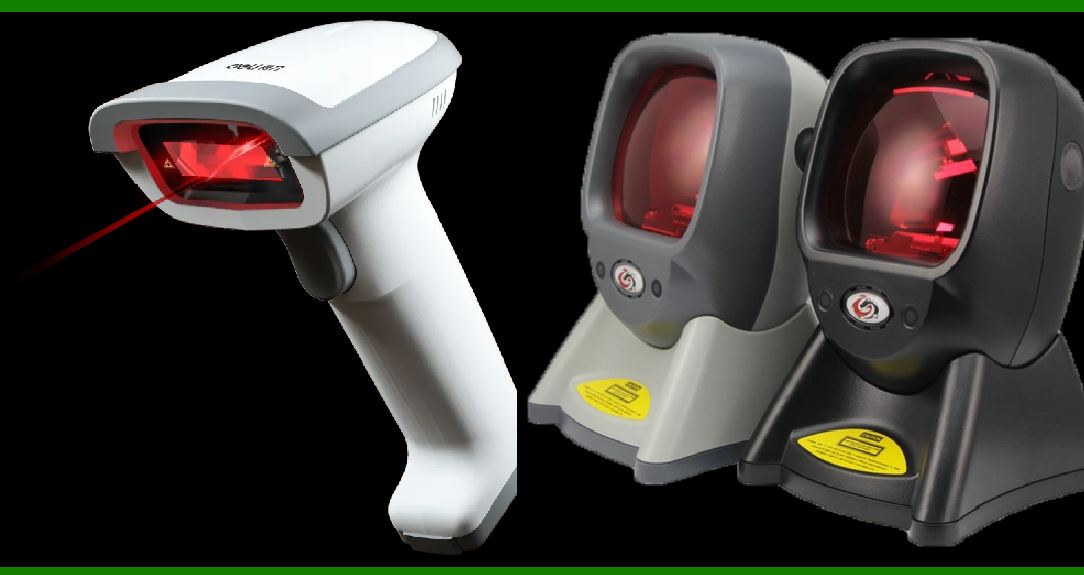
Overview: The most common type of barcode scanner, held in the hand and used to scan barcodes. Advantages: Versatile, widely used, and easy to handle. Disadvantages: Can cause hand fatigue with prolonged use. |
4.2 Fixed Mount Scanners |
Overview: Scanners mounted in a fixed position, often used at checkout counters or assembly lines. Advantages: Hands-free operation and ideal for high-volume environments. Disadvantages: Limited to fixed locations and less portable. |
4.3 Wearable Scanners |
Overview: Devices worn on the body, such as ring or wrist-mounted scanners. Advantages: Hands-free operation and suitable for environments requiring mobility. Disadvantages: Limited battery life and potential comfort issues. |

|
5. Environmental Considerations |
5.1 Indoor vs. Outdoor Use |
Overview: Some scanners are designed specifically for indoor environments, while others are rugged enough for outdoor use. Advantages: Choosing a scanner suited for your environment ensures better performance and durability. Disadvantages: Indoor scanners may not withstand harsh outdoor conditions. |
5.2 Temperature and Humidity Tolerance |
Overview: Scanners used in harsh environments need to withstand extreme temperatures and humidity levels. Advantages: Ensures reliable performance in varied conditions. Disadvantages: Rugged scanners can be more expensive. |
5.3 Durability and Impact Resistance |
Overview: Consider how often the scanner might be dropped or exposed to rough conditions. Advantages: Durable scanners last longer and reduce the risk of damage. Disadvantages: Higher durability often comes with a higher price tag. |

|
6. Barcode Scanner Features |
6.1 Scanning Speed and Accuracy |
Overview: The speed at which a scanner can read barcodes and its accuracy in decoding them. Advantages: Faster scanning improves efficiency and reduces wait times. Disadvantages: High-speed scanners may be more costly. |
6.2 Read Range |
Overview: The distance from which a scanner can accurately read a barcode. Advantages: A longer read range can improve flexibility and ease of use. Disadvantages: Scanners with longer ranges can be more expensive. |
6.3 Multi-Symbol Reading |
Overview: Ability to read multiple barcodes simultaneously or in quick succession. Advantages: Useful in environments where multiple barcodes need to be scanned quickly. Disadvantages: Not all scanners support this feature. |
6.4 Image Capture Capabilities |
Overview: Some scanners can capture images in addition to reading barcodes. Advantages: Useful for documenting items or recording additional information. Disadvantages: Adds to the cost and complexity. |

|
7. Integration and Compatibility |
7.1 Software Compatibility |
Overview: Ensure the scanner works with your existing software systems or point-of-sale (POS) systems. Advantages: Seamless integration with your software improves efficiency and reduces setup time. Disadvantages: Incompatibility can lead to additional costs or integration issues. |
7.2 Device Compatibility |
Overview: Consider whether the scanner needs to work with various devices, such as smartphones, tablets, or PCs. Advantages: Versatile scanners can connect to multiple types of devices. Disadvantages: May require additional setup or adapters. |

|
8. Budget and Cost |
8.1 Initial Cost vs. Long-Term Value |
Overview: Compare the initial cost of the scanner with its long-term value, including maintenance and operational costs. Advantages: Investing in a high-quality scanner can reduce costs related to repairs and replacements over time. Disadvantages: Higher upfront costs might be a barrier for some budgets. |
8.2 Maintenance and Support |
Overview: Consider the availability of maintenance and support services for the scanner. Advantages: Reliable support ensures quick resolution of issues and minimizes downtime. Disadvantages: Additional costs for maintenance and support services. |

|
9. Testing and Evaluation |
9.1 Testing Different Models |
Overview: Before making a final decision, test various models to assess their performance in your specific environment. Advantages: Hands-on testing helps identify the best fit for your needs and ensures compatibility. Disadvantages: Testing multiple models can be time-consuming. |
9.2 Reading Customer Reviews and Recommendations |
Overview: Research customer reviews and seek recommendations from others in your industry. Advantages: Reviews and recommendations can provide valuable insights into the performance and reliability of different scanners. Disadvantages: Reviews can sometimes be subjective and may not reflect your specific needs. |

|
10. Final Decision-Making |
10.1 Weighing Pros and Cons |
Overview: Compile the pros and cons of each scanner based on your requirements and budget. Advantages: A detailed comparison helps make an informed decision. Disadvantages: May involve complex decision-making processes. |
10.2 Making the Purchase |
Overview: Once you've chosen the best scanner, proceed with the purchase and ensure you receive proper training on its use. Advantages: A well-informed purchase decision will lead to better integration and utilization. Disadvantages: The final decision may still require adjustments based on practical use. |

|
Conclusion |
Choosing the right barcode scanner involves understanding your needs, evaluating the types of scanners available, considering environmental factors, and ensuring compatibility with your systems. By carefully assessing these factors and testing different models, you can select a scanner that enhances efficiency, accuracy, and productivity in your business operations. Whether you prioritize speed, durability, or versatility, a well-chosen barcode scanner will be a valuable asset in your workflow. |
 cs@easiersoft.com