1. Introduction to Imager Scanners |
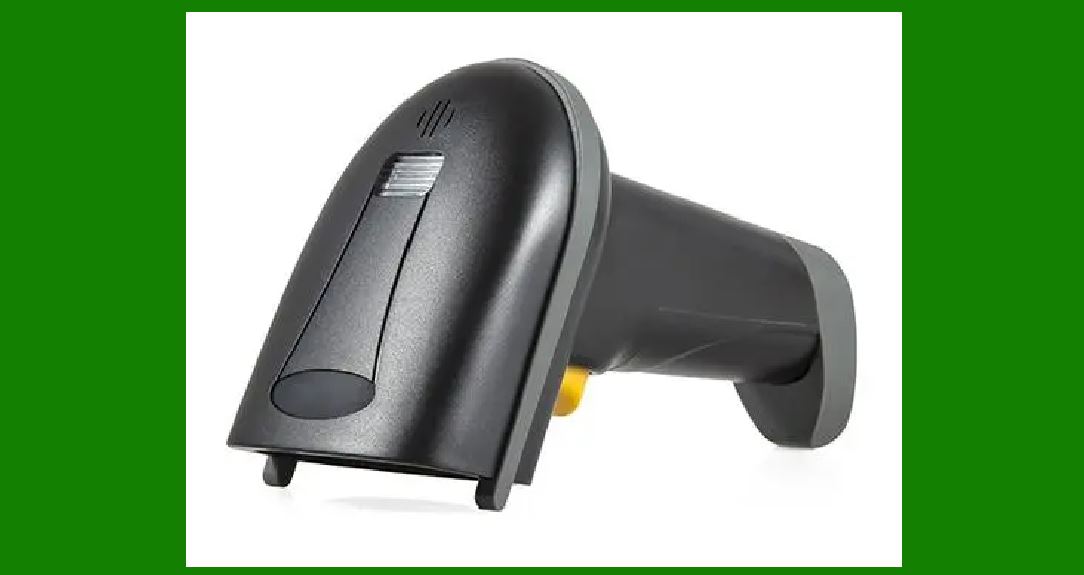
Imager scanners, also known as image-based scanners or 2D scanners, are advanced devices designed to capture and decode barcodes using digital imaging technology. Unlike traditional laser scanners, which use laser beams to read barcodes, imager scanners utilize a camera or sensor to capture a visual image of the barcode. This image is then processed using sophisticated algorithms to extract and decode the encoded data. |
|
2. Structure of Imager Scanners |
2.1. Imaging Sensor |
At the core of an imager scanner is the imaging sensor, which is typically a charge-coupled device (CCD) or a complementary metal-oxide-semiconductor (CMOS) sensor. |
Charge-Coupled Device (CCD): CCD sensors are known for their high-quality imaging and sensitivity. They work by converting light into electrical signals through a series of capacitors. Each pixel in a CCD sensor captures a portion of the image and stores it as an electrical charge. Complementary Metal-Oxide-Semiconductor (CMOS): CMOS sensors are more common in modern scanners due to their lower power consumption and cost-effectiveness. They use a different technology where each pixel has its own photodetector and amplifier, allowing for faster image capture and processing. |
2.2. Lighting System |
Imager scanners are equipped with an integrated lighting system to illuminate the barcode and enhance image quality. This system often includes: |
LED Lights: Light Emitting Diodes (LEDs) are commonly used due to their efficiency and longevity. They provide uniform illumination across the barcode to ensure that the image captured is clear and free from shadows or reflections. Laser Aiming: Some imager scanners include a laser aiming system to help users align the scanner with the barcode. This laser is not used for reading the barcode but helps in positioning the barcode within the field of view of the imaging sensor. |
2.3. Optical Lens |
An optical lens is used to focus the barcode image onto the imaging sensor. The lens system can vary in complexity, from simple fixed-focus lenses to more advanced adjustable lenses that can change focus depending on the distance to the barcode. The lens plays a crucial role in ensuring that the barcode is captured with sharp detail. |
2.4. Processing Unit |
The processing unit is responsible for analyzing the captured image and decoding the barcode data. This component includes: |
Digital Signal Processor (DSP): A DSP processes the image data captured by the sensor. It performs tasks such as noise reduction, image enhancement, and contrast adjustment to improve the quality of the image before decoding. Decoding Algorithms: The processing unit uses sophisticated algorithms to decode the barcode from the image. These algorithms are designed to handle various barcode symbologies and formats, translating the visual information into readable data. |

|
3. Working Principle of Imager Scanners |
3.1. Image Capture |
The first step in the operation of an imager scanner is capturing an image of the barcode. Here's how it works: |
Illumination: The scanner's lighting system illuminates the barcode, creating a visual contrast between the dark bars and the light spaces. Image Acquisition: The imaging sensor captures the reflected light from the barcode and converts it into an electrical signal. The CCD or CMOS sensor records the light intensity at each pixel to form a digital image. |
3.2. Image Processing |
Once the image is captured, it is processed to enhance quality and prepare it for decoding: |
Noise Reduction: The digital signal processor filters out any noise or artifacts that might interfere with decoding. This step improves the clarity of the barcode image. Image Enhancement: Techniques such as contrast adjustment and sharpening are applied to make the barcode's features more distinct and readable. Binarization: The processed image is converted into a binary format, where the barcode's bars and spaces are represented as black and white pixels. This step simplifies the decoding process. |
3.3. Barcode Decoding |
With the enhanced binary image, the decoding process begins: |
Pattern Recognition: The decoding algorithms analyze the binary image to identify the barcode's pattern. Different barcode symbologies have unique patterns, and the algorithms are designed to recognize these patterns accurately. Data Extraction: Once the pattern is identified, the decoding algorithms extract the encoded data from the barcode. This data is then converted into a readable format, such as text or numeric values. Error Correction: Many barcode symbologies include error correction codes to ensure data accuracy. The decoding algorithms use these codes to detect and correct any errors in the decoded data. |

|
4. Advantages of Imager Scanners |
Imager scanners offer several advantages over traditional laser scanners: |
4.1. Versatility |
Imager scanners can read various types of barcodes, including 1D (linear) and 2D (matrix) barcodes. This versatility makes them suitable for a wide range of applications. |
4.2. Ability to Read Damaged or Poorly Printed Barcodes |
Because imager scanners capture an image of the barcode, they can often read damaged or poorly printed barcodes that might be difficult for laser scanners to decode. |
4.3. No Moving Parts |
Imager scanners typically have no moving parts, which reduces maintenance requirements and increases durability. |
4.4. Enhanced Scanning Flexibility |
Imager scanners can capture barcodes from various angles and distances, providing greater flexibility in scanning operations. |

|
5. Applications of Imager Scanners |
Imager scanners are used in a wide range of applications due to their versatility and advanced features: |
5.1. Retail and Point of Sale (POS) |
In retail environments, imager scanners are used at checkout counters to scan product barcodes quickly and accurately. Their ability to read damaged or obscured barcodes is particularly useful in high-volume settings. |
5.2. Warehousing and Logistics |
In warehouses and distribution centers, imager scanners are used to track inventory and manage shipments. Their ability to read barcodes from different angles and distances helps streamline operations. |
5.3. Healthcare |
In healthcare settings, imager scanners are used to track medications, patient records, and medical devices. Their accuracy and reliability are critical for maintaining patient safety and regulatory compliance. |
5.4. Manufacturing |
Imager scanners are used in manufacturing environments to monitor production processes and ensure quality control. They can read barcodes on various types of products and packaging. |

|
6. Conclusion |
Imager scanners represent a significant advancement in barcode reading technology. By utilizing imaging sensors, sophisticated processing units, and advanced decoding algorithms, they provide a versatile and reliable solution for capturing and decoding barcodes. Their ability to handle various barcode symbologies and read damaged or poorly printed barcodes makes them an essential tool in numerous industries. |

|
 cs@easiersoft.com