1. Overview of Wearable Barcode Scanners |
Wearable barcode scanners are innovative devices designed to be worn on the body, allowing users to scan barcodes hands-free. These devices come in various forms, including ring scanners, wrist-mounted scanners, and even glove-integrated scanners. They are particularly useful in environments where mobility and efficiency are crucial, such as warehouses, retail, and logistics. |
1.1 Types of Wearable Barcode Scanners |
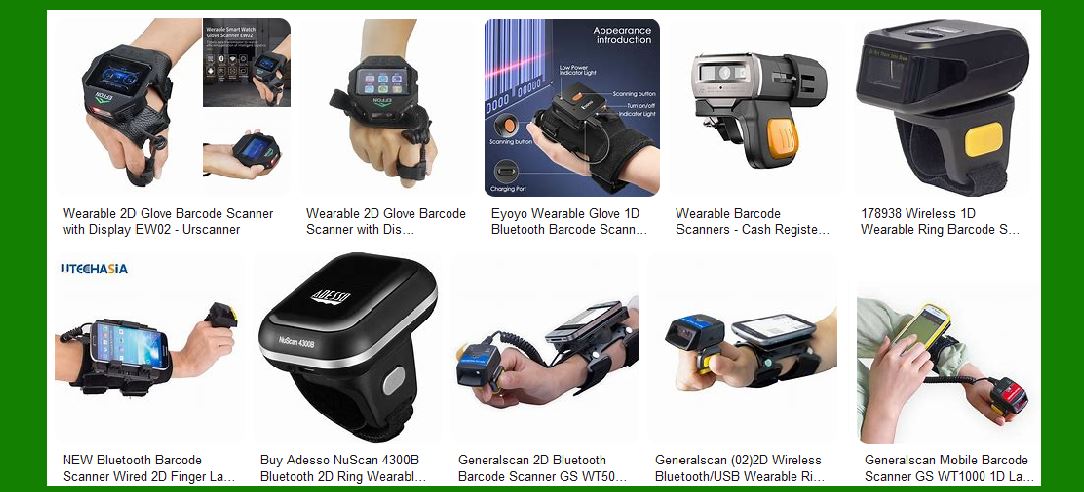
Ring Scanners: These are small, lightweight scanners worn on the finger like a ring. They are typically equipped with a trigger button that can be pressed with the thumb to scan barcodes. Wrist-Mounted Scanners: These scanners are strapped to the wrist and often paired with a small display or a mobile device. They allow for quick scanning without the need to pick up a handheld scanner. Glove Scanners: Integrated into gloves, these scanners provide a seamless scanning experience. The scanner is usually located on the back of the hand, and the trigger can be activated by pressing a button on the glove. Head-Mounted Displays (HMDs): While not as common, some wearable scanners are integrated into headsets or glasses, allowing users to scan barcodes by simply looking at them. |
|
2. Advantages of Wearable Barcode Scanners |
Wearable barcode scanners offer several advantages, making them a popular choice in various industries. |
2.1 Hands-Free Operation |
Increased Efficiency: By freeing up the hands, wearable scanners allow workers to perform other tasks simultaneously, such as picking and packing items. This leads to increased productivity and efficiency. Reduced Fatigue: Traditional handheld scanners can be cumbersome and tiring to use over long periods. Wearable scanners reduce the physical strain on workers, leading to less fatigue and higher job satisfaction. Enhanced Accuracy: With wearable scanners, workers can scan barcodes more quickly and accurately, reducing the chances of errors and improving overall workflow. |
2.2 Mobility and Flexibility |
Improved Mobility: Wearable scanners are ideal for environments that require constant movement, such as large warehouses or retail floors. Workers can move freely without being tethered to a stationary scanner. Versatility: These scanners can be used in various settings, from inventory management to order fulfillment, making them a versatile tool for businesses. Real-Time Data Capture: Wearable scanners often come with wireless connectivity options, allowing for real-time data capture and integration with inventory management systems. |

|
3. Disadvantages of Wearable Barcode Scanners |
Despite their many advantages, wearable barcode scanners also have some drawbacks that need to be considered. |
3.1 Limited Battery Life |
Frequent Charging: Wearable scanners, especially those with wireless connectivity, tend to have limited battery life. This requires frequent charging, which can be a hassle in busy work environments. Downtime: If not managed properly, the need for regular charging can lead to downtime, affecting productivity. Businesses need to have a robust charging and battery management system in place. |
3.2 Comfort and Ergonomics |
Comfort Issues: Wearing a scanner for extended periods can cause discomfort, especially if the device is not ergonomically designed. This can lead to issues such as wrist strain or finger fatigue. Fit and Adjustability: Not all wearable scanners are one-size-fits-all. Ensuring a proper fit is crucial for comfort and efficiency. Some devices may require adjustments or come in different sizes to accommodate various users. |

|
4. Use Cases of Wearable Barcode Scanners |
Wearable barcode scanners are used in a variety of industries and applications, each benefiting from the hands-free and mobile nature of these devices. |
4.1 Warehousing and Logistics |
Inventory Management: Wearable scanners are widely used in warehouses for inventory management. Workers can quickly scan items as they move through the warehouse, ensuring accurate inventory tracking. Order Fulfillment: In logistics, wearable scanners streamline the order fulfillment process. Workers can pick and pack items more efficiently, reducing the time it takes to process orders. Shipping and Receiving: Wearable scanners are also used in shipping and receiving areas to scan incoming and outgoing packages, ensuring accurate tracking and documentation. |
4.2 Retail |
Stock Replenishment: In retail environments, wearable scanners help with stock replenishment. Employees can scan items on shelves and update inventory levels in real-time. Customer Service: Wearable scanners can enhance customer service by allowing employees to quickly check prices and inventory levels without leaving the customer’s side. Loss Prevention: These scanners can also be used for loss prevention by enabling quick and discreet scanning of items to ensure they are properly accounted for. |
4.3 Manufacturing |
Production Line Efficiency: In manufacturing, wearable scanners are used to track parts and components on the production line. This ensures that the right parts are used at each stage of production. Quality Control: Wearable scanners help with quality control by allowing workers to quickly scan and verify the quality of products at various stages of production. Maintenance and Repairs: These scanners can also be used for maintenance and repairs, allowing workers to scan parts and access relevant information quickly. |

|
5. Technological Features of Wearable Barcode Scanners |
Wearable barcode scanners come equipped with various technological features that enhance their functionality and usability. |
5.1 Connectivity Options |
Bluetooth: Many wearable scanners use Bluetooth to connect to mobile devices or computers, allowing for wireless data transfer. Wi-Fi: Some advanced models come with Wi-Fi connectivity, enabling real-time data synchronization with inventory management systems. NFC: Near Field Communication (NFC) is another connectivity option that allows for quick and easy pairing with other devices. |
5.2 Scanning Capabilities |
1D and 2D Barcode Scanning: Wearable scanners can read both 1D and 2D barcodes, making them versatile for various applications. Long-Range Scanning: Some models are designed for long-range scanning, allowing workers to scan barcodes from a distance. High-Speed Scanning: Wearable scanners are built for high-speed scanning, ensuring quick and accurate data capture. |
5.3 Durability and Ruggedness |
Rugged Design: Wearable scanners are often designed to withstand harsh environments, including drops, dust, and water exposure. Temperature Resistance: These devices can operate in a wide range of temperatures, making them suitable for use in different environments, from cold storage to hot manufacturing floors. |

|
6. Future Trends in Wearable Barcode Scanners |
The future of wearable barcode scanners looks promising, with several trends and advancements on the horizon. |
6.1 Integration with Augmented Reality (AR) |
AR Displays: Future wearable scanners may come with integrated AR displays, providing users with real-time information and guidance. Enhanced Visualization: AR can enhance the visualization of data, making it easier for workers to understand and act on the information. |
6.2 Improved Battery Life |
Advanced Battery Technology: Advances in battery technology will likely lead to longer battery life for wearable scanners, reducing the need for frequent charging. Energy-Efficient Designs: Future models may feature more energy-efficient designs, further extending battery life. |
6.3 Enhanced Connectivity |
5G Integration: The integration of 5G technology will enable faster and more reliable connectivity, enhancing the real-time data capabilities of wearable scanners. IoT Integration: Wearable scanners will increasingly be integrated into the Internet of Things (IoT) ecosystem, allowing for seamless communication with other devices and systems. |

|
7. Conclusion |
Wearable barcode scanners represent a significant advancement in barcode scanning technology, offering numerous benefits such as hands-free operation, improved mobility, and enhanced efficiency. However, they also come with challenges, including limited battery life and potential comfort issues. As technology continues to evolve, we can expect to see further improvements in the design, functionality, and usability of wearable barcode scanners, making them an even more valuable tool for various industries. |
 cs@easiersoft.com