1. Overview of Wi-Fi Barcode Scanners |
1.1 Introduction to Wi-Fi Barcode Scanners Wi-Fi barcode scanners are devices that use wireless networking technology to connect to a network and transmit scanned data. Unlike traditional wired scanners, which require a physical connection to a computer or terminal, Wi-Fi barcode scanners offer greater flexibility and mobility. They are commonly used in various industries, including retail, logistics, healthcare, and manufacturing, to streamline operations and improve efficiency. |
1.2 How Wi-Fi Barcode Scanners Work Wi-Fi barcode scanners operate by capturing the barcode data and transmitting it over a Wi-Fi network to a connected device, such as a computer, tablet, or smartphone. The scanner typically includes a built-in Wi-Fi module that allows it to connect to the network. Once connected, the scanner can send data in real-time to the designated device or system, enabling immediate processing and integration. |
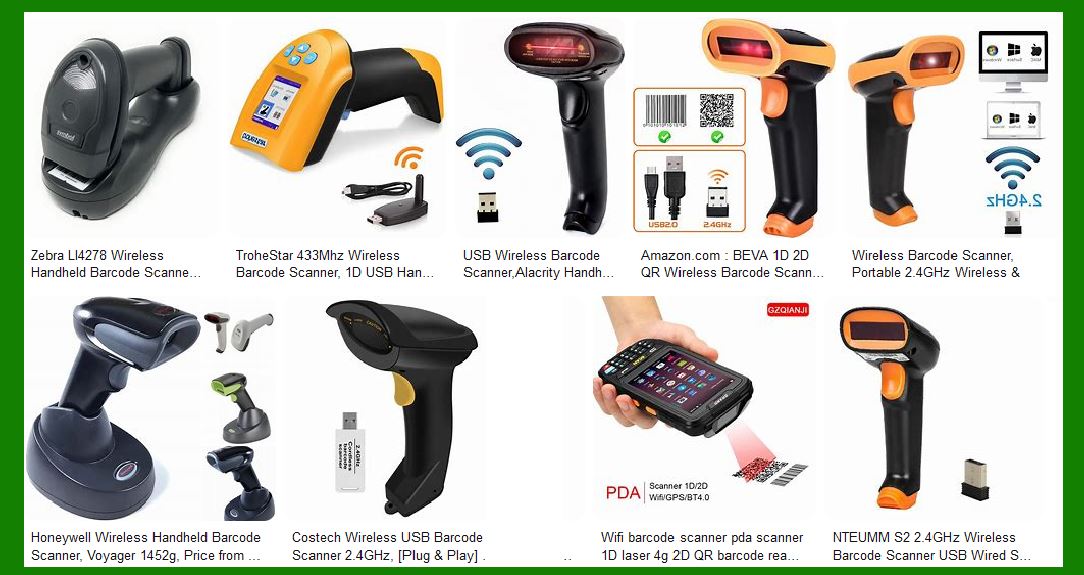
1.3 Types of Wi-Fi Barcode Scanners There are several types of Wi-Fi barcode scanners, each designed for specific applications and environments: |
Handheld Scanners: Portable devices that can be easily carried and used by operators. Fixed-Mount Scanners: Stationary scanners mounted at specific locations for automated scanning. Wearable Scanners: Scanners that can be worn on the wrist or finger, allowing hands-free operation. Mobile Computers: Devices that combine barcode scanning with computing capabilities, often running on operating systems like Android or Windows. |
|
2. Advantages of Wi-Fi Barcode Scanners |
2.1 Enhanced Mobility and Flexibility One of the primary advantages of Wi-Fi barcode scanners is their ability to operate without being tethered to a specific location. This mobility allows operators to move freely within the coverage area of the Wi-Fi network, making it easier to scan items in large warehouses, retail stores, or manufacturing facilities. |
2.2 Real-Time Data Transmission Wi-Fi barcode scanners enable real-time data transmission, which is crucial for applications that require immediate processing and updating of information. For example, in inventory management, real-time data transmission ensures that stock levels are accurately reflected in the system, reducing the risk of stockouts or overstocking. |
2.3 Multi-Device Connectivity Wi-Fi barcode scanners can connect to multiple devices simultaneously, allowing for greater flexibility in how data is collected and processed. This capability is particularly useful in environments where multiple operators need to use the same scanner or where data needs to be sent to different systems or applications. |
2.4 Extended Range Wi-Fi networks typically cover a larger area compared to Bluetooth or other short-range wireless technologies. This extended range allows Wi-Fi barcode scanners to be used in larger facilities without the need for additional infrastructure or repeaters. |
2.5 Integration with Existing Systems Wi-Fi barcode scanners can be easily integrated with existing systems and applications, such as warehouse management systems (WMS), enterprise resource planning (ERP) systems, and point-of-sale (POS) systems. This integration streamlines workflows and improves overall efficiency. |

|
3. Disadvantages of Wi-Fi Barcode Scanners |
3.1 Higher Cost Wi-Fi barcode scanners are generally more expensive than their wired or Bluetooth counterparts. The higher cost is due to the additional components required for Wi-Fi connectivity, as well as the advanced features and capabilities that these scanners offer. |
3.2 Network Setup and Maintenance Setting up and maintaining a Wi-Fi network can be complex and time-consuming. It requires proper planning, configuration, and ongoing maintenance to ensure reliable connectivity and performance. In some cases, organizations may need to invest in additional network infrastructure, such as access points and routers, to support the use of Wi-Fi barcode scanners. |
3.3 Potential for Interference Wi-Fi networks can be susceptible to interference from other wireless devices, physical obstacles, and environmental factors. Interference can lead to connectivity issues, data transmission delays, and reduced performance. Organizations need to carefully manage their Wi-Fi networks to minimize the risk of interference and ensure consistent performance. |
3.4 Security Concerns Wi-Fi networks are vulnerable to security threats, such as unauthorized access, data breaches, and cyberattacks. Organizations must implement robust security measures, such as encryption, authentication, and network monitoring, to protect sensitive data and ensure the integrity of their Wi-Fi barcode scanning systems. |

|
4. Technical Specifications and Features |
4.1 Wi-Fi Standards and Frequencies Wi-Fi barcode scanners typically support various Wi-Fi standards, such as 802.11a/b/g/n/ac, and operate on different frequency bands, including 2.4 GHz and 5 GHz. The choice of standard and frequency band can impact the scanner’s performance, range, and compatibility with existing network infrastructure. |
4.2 Scanning Technologies Wi-Fi barcode scanners use different scanning technologies to capture barcode data, including: |
Laser Scanners: Use a laser beam to read barcodes and are known for their accuracy and speed. Linear Imagers: Use a linear array of sensors to capture 1D barcodes and are suitable for close-range scanning. Area Imagers: Use a 2D array of sensors to capture both 1D and 2D barcodes, such as QR codes and Data Matrix codes. |
4.3 Battery Life and Power Management Battery life is a critical factor for Wi-Fi barcode scanners, especially for handheld and wearable models. These scanners are designed to provide extended battery life to support long hours of operation. Power management features, such as sleep modes and power-saving settings, help optimize battery usage and extend the scanner’s operational time. |
4.4 Durability and Ruggedness Wi-Fi barcode scanners are often used in demanding environments, such as warehouses and manufacturing facilities. As a result, many models are built to be durable and rugged, with features like impact resistance, dust and water protection, and reinforced housings. These features ensure that the scanners can withstand harsh conditions and continue to operate reliably. |
4.5 User Interface and Ergonomics The user interface and ergonomics of Wi-Fi barcode scanners are designed to enhance usability and comfort. Handheld models typically feature ergonomic grips, intuitive buttons, and clear displays. Wearable models are designed to be lightweight and comfortable for extended use. The user interface may include visual and auditory feedback to confirm successful scans and provide status updates. |

|
5. Applications of Wi-Fi Barcode Scanners |
5.1 Retail In retail environments, Wi-Fi barcode scanners are used for various tasks, including inventory management, price checking, and point-of-sale transactions. The mobility and real-time data transmission capabilities of Wi-Fi scanners enable retail staff to quickly and accurately manage stock levels, assist customers, and process sales. |
5.2 Warehouse and Logistics Wi-Fi barcode scanners are widely used in warehouses and logistics operations for tasks such as receiving, picking, packing, and shipping. The extended range and multi-device connectivity of Wi-Fi scanners allow warehouse workers to efficiently scan items and update inventory records in real-time, improving accuracy and productivity. |
5.3 Healthcare In healthcare settings, Wi-Fi barcode scanners are used for patient identification, medication administration, and inventory management. The real-time data transmission capabilities of Wi-Fi scanners help healthcare providers ensure accurate patient records, reduce medication errors, and maintain proper inventory levels of medical supplies. |
5.4 Manufacturing Wi-Fi barcode scanners are used in manufacturing environments for tasks such as tracking work-in-progress, managing inventory, and quality control. The durability and ruggedness of Wi-Fi scanners make them suitable for use in harsh manufacturing conditions, while their real-time data transmission capabilities support efficient production processes. |
5.5 Field Service Field service technicians use Wi-Fi barcode scanners to manage inventory, track assets, and update service records. The mobility and real-time data transmission capabilities of Wi-Fi scanners enable technicians to access and update information on the go, improving service efficiency and customer satisfaction. |

|
6. Future Trends and Developments |
6.1 Integration with IoT The integration of Wi-Fi barcode scanners with the Internet of Things (IoT) is expected to drive future developments in this technology. IoT-enabled barcode scanners can communicate with other connected devices and systems, enabling more advanced data collection, analysis, and automation. |
6.2 Advancements in Scanning Technology Advancements in scanning technology, such as improved sensor resolution and faster processing speeds, will enhance the performance and capabilities of Wi-Fi barcode scanners. These advancements will enable more accurate and efficient scanning of a wider range of barcode types and conditions. |
6.3 Enhanced Security Features As security concerns continue to grow, future Wi-Fi barcode scanners are likely to incorporate enhanced security features, such as advanced encryption, secure authentication, and real-time threat detection. These features will help protect sensitive data and ensure the integrity of barcode scanning systems. |
6.4 AI and Machine Learning Integration The integration of artificial intelligence (AI) and machine learning (ML) technologies with Wi-Fi barcode scanners will enable more intelligent and adaptive scanning solutions. AI and ML can be used to optimize scanning performance, predict maintenance needs, and provide actionable insights based on scanned data. |
6.5 Improved User Experience Future developments in Wi-Fi barcode scanners will focus on improving the user experience through enhanced ergonomics, intuitive interfaces, and seamless integration with other devices and systems. These improvements will make Wi-Fi barcode scanners more user-friendly and efficient for a wide range of applications. |

|
7. Conclusion |
Wi-Fi barcode scanners offer numerous advantages, including enhanced mobility, real-time data transmission, multi-device connectivity, and extended range. However, they also come with certain disadvantages, such as higher cost, network setup and maintenance requirements, potential for interference, and security concerns. Despite these challenges, Wi-Fi barcode scanners are widely used in various industries due to their flexibility, efficiency. |

|
 cs@easiersoft.com