1. Introduction to Wireless Barcode Scanners |
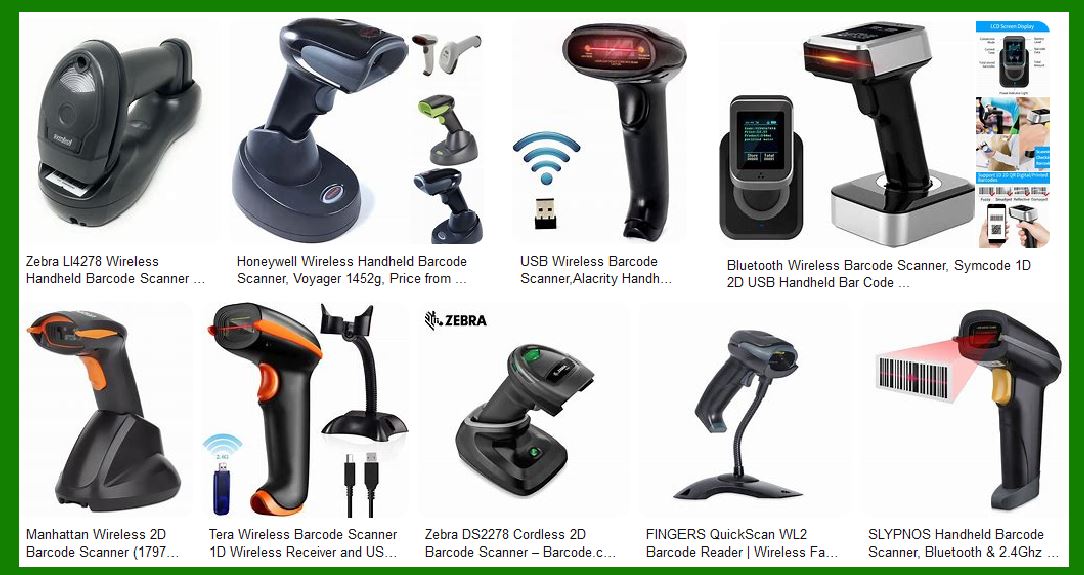
Wireless barcode scanners are devices that read and transmit barcode data to a host system without the need for physical cables. These scanners use wireless communication technologies such as Bluetooth, Wi-Fi, or proprietary RF (radio frequency) to connect to computers, tablets, smartphones, or dedicated barcode scanner bases. The primary advantage of wireless barcode scanners is their ability to provide greater mobility and flexibility in various environments, from retail stores to warehouses and manufacturing plants. |
|
2. Technologies Used in Wireless Barcode Scanners |
2.1 Bluetooth |
Bluetooth is a widely used technology in wireless barcode scanners. It allows devices to communicate over short distances, typically up to 100 meters, depending on the Bluetooth version and environmental factors. Bluetooth barcode scanners are popular due to their ease of pairing with various devices, including PCs, tablets, and smartphones. |
2.2 Wi-Fi |
Wi-Fi-enabled barcode scanners connect to a wireless network, allowing them to communicate with a host system over a larger area compared to Bluetooth. Wi-Fi scanners are ideal for environments where the scanner needs to cover a wide area, such as large warehouses or distribution centers. |
2.3 Proprietary RF |
Some wireless barcode scanners use proprietary RF technology, which can offer extended range and reliability. These systems often include a dedicated base station that communicates with the scanner. Proprietary RF solutions are typically used in industrial settings where robust and long-range communication is required. |

|
3. Types of Wireless Barcode Scanners |
3.1 Handheld Scanners |
Handheld wireless barcode scanners are the most common type. They are designed to be held and operated by hand, making them versatile for various applications. These scanners can be used in retail, logistics, healthcare, and more. |
3.2 Presentation Scanners |
Presentation scanners are designed to sit on a counter or desk and automatically scan barcodes when they are presented in front of the scanner. These are commonly used in retail environments for quick and hands-free scanning. |
3.3 Wearable Scanners |
Wearable barcode scanners are designed to be worn on the body, such as on the wrist or finger. These scanners are ideal for applications where the user needs to have both hands free, such as in warehouse picking or assembly line operations. |

|
4. Advantages of Wireless Barcode Scanners |
4.1 Greater Mobility and Flexibility |
One of the primary advantages of wireless barcode scanners is the freedom of movement they provide. Without the constraints of cables, users can move around freely, making it easier to scan items that are not easily accessible or located in different areas. |
4.2 Increased Productivity |
Wireless barcode scanners can significantly increase productivity by reducing the time and effort required to scan items. Users can quickly move from one item to another without being tethered to a fixed location, which is particularly beneficial in fast-paced environments. |
4.3 Versatility |
Wireless barcode scanners can be used in a wide range of applications and environments. They are suitable for retail, warehousing, manufacturing, healthcare, and more. The ability to connect to various devices and systems also adds to their versatility. |
4.4 Improved Safety |
Eliminating cables reduces the risk of tripping hazards and cable damage. This is especially important in busy environments where safety is a priority. |

|
5. Disadvantages of Wireless Barcode Scanners |
5.1 Battery Management |
Wireless barcode scanners rely on batteries for power, which means they need to be regularly charged or replaced. Battery management can be a challenge, especially in environments where scanners are used continuously. Users need to ensure that scanners are charged and ready for use to avoid downtime. |
5.2 Connectivity Issues |
Wireless communication can sometimes be unreliable due to interference, signal range limitations, or network congestion. Connectivity issues can lead to delays or errors in data transmission, which can impact productivity and accuracy. |
5.3 Higher Cost |
Wireless barcode scanners are generally more expensive than their wired counterparts. The additional cost is due to the wireless communication technology and the need for batteries or charging systems. Organizations need to weigh the benefits of wireless scanners against the higher initial investment. |
5.4 Security Concerns |
Wireless communication can be susceptible to security threats such as eavesdropping or unauthorized access. It is important to implement security measures, such as encryption and secure pairing, to protect sensitive data. |

|
6. Applications of Wireless Barcode Scanners |
6.1 Retail |
In retail environments, wireless barcode scanners are used for point-of-sale (POS) transactions, inventory management, and price checking. The mobility of wireless scanners allows retail staff to assist customers more efficiently and manage inventory on the sales floor. |
6.2 Warehousing and Logistics |
Wireless barcode scanners are essential tools in warehousing and logistics for tasks such as receiving, picking, packing, and shipping. The ability to move freely around the warehouse without being tethered to a workstation increases efficiency and accuracy in inventory management. |
6.3 Healthcare |
In healthcare settings, wireless barcode scanners are used for patient identification, medication administration, and inventory management of medical supplies. The mobility of wireless scanners allows healthcare professionals to provide better patient care by quickly accessing and updating patient information. |
6.4 Manufacturing |
In manufacturing environments, wireless barcode scanners are used for tracking work-in-progress, managing inventory, and ensuring quality control. The flexibility of wireless scanners allows workers to scan items on the production line or in different areas of the facility. |

|
7. Technical Specifications and Features |
7.1 Scanning Technology |
Wireless barcode scanners can use various scanning technologies, including laser, CCD (charge-coupled device), and imaging. Laser scanners are known for their accuracy and speed, while CCD and imaging scanners can read 2D barcodes and offer better performance on damaged or poorly printed barcodes. |
7.2 Range and Connectivity |
The range of wireless barcode scanners depends on the communication technology used. Bluetooth scanners typically have a range of up to 100 meters, while Wi-Fi scanners can cover larger areas depending on the network infrastructure. Proprietary RF scanners can offer extended range and reliability. |
7.3 Battery Life |
Battery life is a critical factor for wireless barcode scanners. Scanners with longer battery life reduce the need for frequent charging and minimize downtime. Some scanners come with rechargeable batteries, while others use replaceable batteries. |
7.4 Durability |
Durability is important for wireless barcode scanners used in industrial or rugged environments. Many scanners are designed to withstand drops, dust, and water, with ratings such as IP54 or IP65 indicating their level of protection. |
7.5 Ergonomics |
Ergonomic design is essential for user comfort, especially for handheld scanners used for extended periods. Features such as lightweight construction, comfortable grips, and easy-to-use triggers contribute to better user experience. |

|
8. Choosing the Right Wireless Barcode Scanner |
8.1 Application Requirements |
When selecting a wireless barcode scanner, it is important to consider the specific requirements of the application. Factors such as the type of barcodes to be scanned (1D or 2D), the scanning environment, and the required range and connectivity should be taken into account. |
8.2 Budget |
Budget is another important consideration. While wireless barcode scanners offer many benefits, they can be more expensive than wired scanners. It is important to balance the cost with the expected benefits and return on investment. |
8.3 Compatibility |
Compatibility with existing systems and devices is crucial. Ensure that the wireless barcode scanner can easily connect to the host system, whether it is a PC, tablet, smartphone, or dedicated POS system. Check for compatibility with the operating system and any required software. |
8.4 Support and Warranty |
Consider the level of support and warranty offered by the manufacturer. Reliable customer support and a good warranty can provide peace of mind and help address any issues that may arise with the scanner. |

|
9. Future Trends in Wireless Barcode Scanners |
9.1 Integration with IoT |
The integration of wireless barcode scanners with the Internet of Things (IoT) is a growing trend. IoT-enabled scanners can provide real-time data and insights, improving inventory management and operational efficiency. |
9.2 Advanced Scanning Capabilities |
Future wireless barcode scanners may offer advanced scanning capabilities, such as the ability to read barcodes from greater distances or in challenging conditions. Improvements in imaging technology and AI-driven recognition can enhance scanning performance. |
9.3 Enhanced Security Features |
As security concerns continue to grow, future wireless barcode scanners may incorporate enhanced security features, such as advanced encryption and secure pairing methods, to protect data transmission. |
9.4 Increased Battery Efficiency |
Advancements in battery technology can lead to longer battery life and faster charging times for wireless barcode scanners. This can reduce downtime and improve overall productivity. |

|
10. Conclusion |
Wireless barcode scanners offer significant advantages in terms of mobility, flexibility, and productivity. They are versatile tools that can be used in various applications, from retail and healthcare to warehousing and manufacturing. However, they also come with challenges such as battery management and potential connectivity issues. By carefully considering the specific requirements of the application and selecting the right scanner, organizations can leverage the benefits of wireless barcode scanners to improve their operations. |
 cs@easiersoft.com