Detailed Description of Laser Barcode Scanners |
1. Introduction |
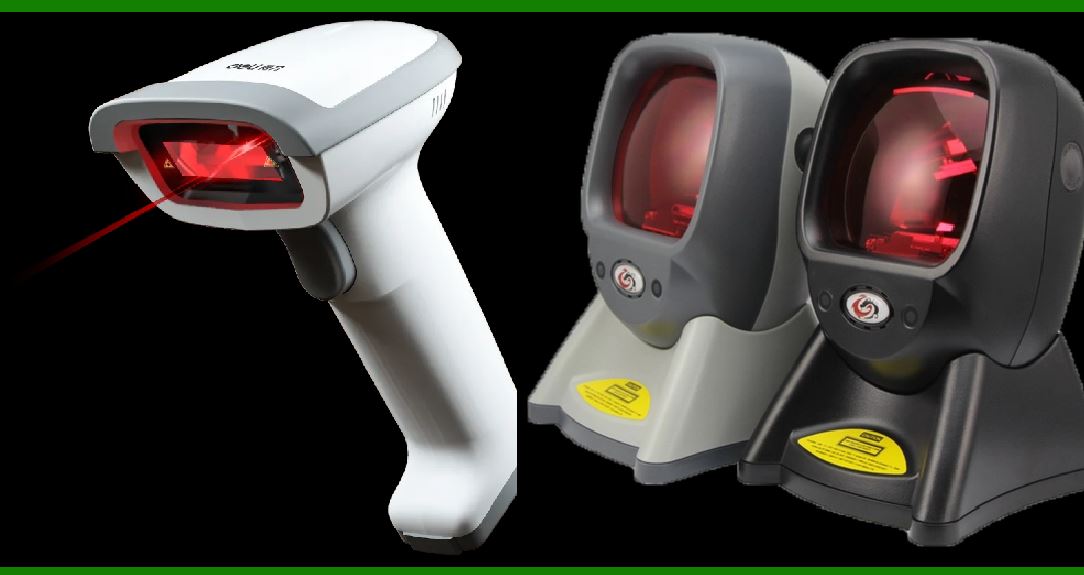
Laser barcode scanners are commonly used devices for reading barcodes by employing laser technology to capture and interpret the data encoded in the barcode patterns. The primary function of these scanners is to convert the visual representation of a barcode into a digital format that can be processed by computers or other systems. This detailed description covers the structure, working principles, and key components involved in laser barcode scanners. |
|
2. Basic Structure of Laser Barcode Scanners |
1.Laser Diode: The laser diode is the core component of a laser barcode scanner. It emits a coherent and collimated laser beam that is directed towards the barcode. The laser diode generates light at a specific wavelength, commonly in the visible red spectrum (around 650 nm) or in some advanced models, near-infrared. |
2.Optics: The optics system includes a series of lenses and mirrors designed to focus and direct the laser beam onto the barcode and to capture the reflected light. This system ensures that the laser beam is scanned across the barcode in a controlled manner. |
3.Scanning Mechanism: There are two main types of scanning mechanisms used in laser barcode scanners: |
Oscillating Mirror: In this traditional mechanism, a rotating or oscillating mirror directs the laser beam across the barcode in a sweeping motion. The oscillation or rotation creates a series of scan lines that cover the entire width of the barcode. Galvanometer Mirrors: Advanced scanners use galvanometer mirrors that move rapidly to direct the laser beam across the barcode. This mechanism allows for faster scanning and more precise control. |
4.Photo Detector: The photo detector, also known as a photodiode or a light sensor, is responsible for capturing the reflected light from the barcode. It converts the light into an electrical signal. |
5.Signal Processing Unit: The signal processing unit interprets the electrical signals from the photo detector. It converts these signals into digital data that represent the pattern of bars and spaces in the barcode. |
6.Control Electronics: The control electronics manage the overall operation of the barcode scanner. They coordinate the laser emission, scanning mechanism, and signal processing to ensure accurate data capture and processing. |
7.Output Interface: The output interface is responsible for transmitting the decoded data to external systems, such as computers, point-of-sale (POS) systems, or inventory management systems. Common interfaces include USB, RS232, and Bluetooth. |

|
3. Working Principle of Laser Barcode Scanners |
1.Laser Emission: When the barcode scanner is activated, the laser diode emits a laser beam. The beam is usually a continuous wave of light that travels in a straight line and is directed towards the barcode. |
2.Beam Scanning: |
Oscillating Mirror Mechanism: The laser beam is reflected off an oscillating or rotating mirror, which directs the beam across the entire barcode. This scanning process creates a series of scan lines that cover the barcode from top to bottom. Galvanometer Mirror Mechanism: In scanners with galvanometer mirrors, the laser beam is directed rapidly back and forth across the barcode by the mirrors. This method also creates scan lines but with higher speed and precision. |
3.Reflection and Detection: As the laser beam strikes the barcode, it interacts with the bars and spaces. The bars, which are typically dark and absorb light, reflect less light compared to the spaces, which are usually light-colored and reflect more light. The reflected light is collected by the photo detector. |
4.Signal Conversion: The photo detector converts the reflected light into an electrical signal. The amount of light reflected back varies depending on whether the laser beam hits a bar or a space, resulting in a varying electrical signal that corresponds to the barcode pattern. |
5.Signal Processing: The electrical signals are processed by the signal processing unit. This unit analyzes the variations in the signal to determine the pattern of bars and spaces. The variations in the signal correspond to the different widths of bars and spaces in the barcode. |
6.Decoding: The processed signal is decoded to extract the data encoded in the barcode. The decoding process involves interpreting the patterns of light and dark regions to identify the numeric or alphanumeric characters represented by the barcode. |
7.Data Transmission: Once the barcode is decoded, the data is transmitted to an external system via the output interface. This data can be used for various purposes, such as updating inventory, processing sales transactions, or tracking shipments. |

|
4. Advantages of Laser Barcode Scanners |
1.High Speed: Laser barcode scanners can read barcodes quickly, making them suitable for high-volume scanning environments, such as retail stores and warehouses. |
2.Accuracy: The use of lasers and precise scanning mechanisms ensures accurate reading of barcodes, even if they are partially damaged or poorly printed. |
3.Distance Reading: Laser scanners can read barcodes from a distance, allowing for more flexible scanning options and reducing the need for close proximity to the barcode. |
4.Reliability: Laser barcode scanners are generally reliable and can perform well in various lighting conditions, including low light environments. |

|
5. Limitations of Laser Barcode Scanners |
1.Sensitivity to Barcode Quality: While laser scanners are accurate, they can be sensitive to the quality of the barcode. Poorly printed or damaged barcodes may affect the scanner's ability to read them. |
2.Line of Sight Required: Laser barcode scanners require a clear line of sight to the barcode. If the barcode is obstructed or angled improperly, the scanner may not be able to read it. |
3.Limited to Linear Barcodes: Traditional laser barcode scanners are typically designed to read linear barcodes. They may not be compatible with 2D barcodes or matrix codes without additional equipment. |

|
6. Applications of Laser Barcode Scanners |
1.Retail: Laser barcode scanners are widely used in retail environments for scanning product barcodes at checkout counters, improving the efficiency of sales transactions. |
2.Warehousing: In warehouses, laser barcode scanners are used for inventory management, tracking shipments, and streamlining the picking and packing processes. |
3.Healthcare: Laser barcode scanners are employed in healthcare settings for patient identification, medication management, and tracking medical equipment. |
4.Logistics: In logistics and supply chain management, laser barcode scanners are used for tracking packages, managing shipments, and ensuring accurate delivery. |

|
7. Future Trends and Innovations |
1.Enhanced Scanning Capabilities: Advances in scanning technology may lead to faster and more accurate laser scanners with improved capabilities for reading damaged or low-contrast barcodes. |
2.Integration with Other Technologies: Future laser barcode scanners may integrate with other technologies, such as RFID or image recognition systems, to provide more comprehensive data capture solutions. |
3.Improved Durability: Innovations may focus on enhancing the durability and ruggedness of laser barcode scanners to withstand harsh environments and heavy usage. |
4.Miniaturization: Ongoing efforts in miniaturization may lead to the development of smaller, more compact laser barcode scanners that offer similar performance in a more portable form factor. |

|
8. Conclusion |
Laser barcode scanners are powerful tools that utilize laser technology to read and interpret barcodes with precision and speed. Their structure, including the laser diode, optics, scanning mechanism, photo detector, signal processing unit, control electronics, and output interface, plays a crucial role in their functionality. Despite their advantages, such as high speed and accuracy, they also have limitations related to barcode quality and line of sight requirements. The applications of laser barcode scanners span various industries, and future advancements may further enhance their capabilities and versatility. |
 cs@easiersoft.com