Part 1 Introduction to Barcode Label Printing Software Development and Programming Language Selection |
1. Introduction to Barcode Label Printing Software |
Barcode label printing software is a specialized category of application software used to design, generate, preview, manage, and print barcode labels for industrial, commercial, healthcare, logistics, retail, manufacturing, warehousing, transportation, government, and laboratory applications. These systems are critical components in modern automatic identification and data capture ecosystems. |
A barcode label printing system generally includes: |
1. Label design functionality |
2. Barcode generation engines |
3. Printer communication modules |
4. Database integration systems |
5. Image rendering engines |
6. Font management systems |
7. Multi-language support |
8. Variable data printing systems |
9. Batch printing management |
10. RFID encoding support |
11. Network printing services |
12. Driver communication layers |
13. Template management systems |
14. Security and access control modules |
15. Preview and rendering engines |

|
Modern barcode label software must support numerous barcode symbologies, including: |
1. UPC |
2. EAN |
3. Code 39 |
4. Code 128 |
5. GS1-128 |
6. ITF-14 |
7. PDF417 |
8. Data Matrix |
9. QR Code |
10. Aztec Code |
11. MaxiCode |
12. DotCode |
13. GS1 DataBar |
14. Postal barcodes |
15. Pharmaceutical barcodes |
|
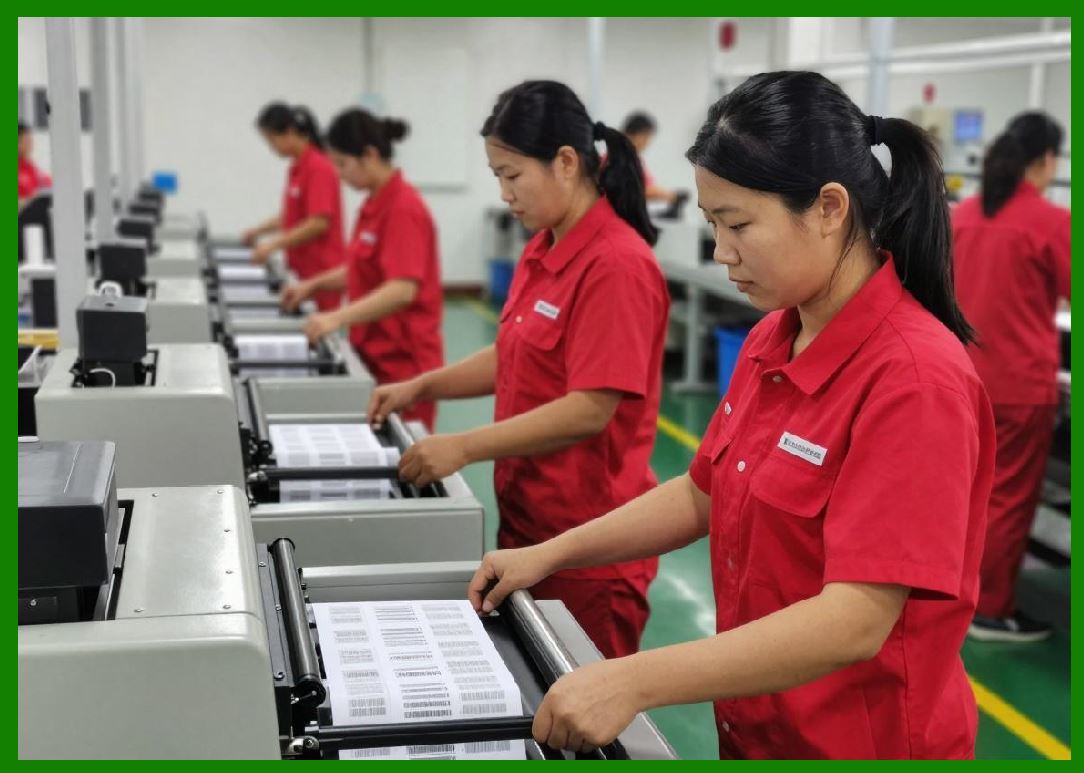
The software must also support different printer technologies: |
1. Direct thermal printers |
2. Thermal transfer printers |
3. Inkjet printers |
4. Laser printers |
5. RFID printers |
6. Industrial label printers |
7. Mobile printers |
8. Card printers |
|
The complexity of barcode printing software is much greater than many beginners initially assume. A professional-grade barcode printing platform must manage: |
1. Pixel-perfect rendering |
2. Device-independent layout |
3. Printer command optimization |
4. Cross-platform compatibility |
5. Memory management |
6. Real-time preview rendering |
7. Database synchronization |
8. Unicode text handling |
9. Vector graphics rendering |
10. Multi-threaded printing queues |
Because of this complexity, programming language selection becomes one of the most important architectural decisions. |

|
2. Core Architecture of Barcode Label Printing Software |
Before discussing programming languages, it is necessary to understand the architecture of barcode label printing systems. |
A complete barcode label printing application commonly contains several layers. |
2.1 User Interface Layer |
This layer includes: |
1. Label designer |
2. Object toolbox |
3. Property editors |
4. Template management |
5. Print preview |
6. Database configuration panels |
7. Printer settings dialogs |
The UI layer requires: |
1. High responsiveness |
2. Drag-and-drop support |
3. Real-time rendering |
4. Precise coordinate systems |
5. Multi-resolution display support |

|
2.2 Barcode Encoding Layer |
This layer converts data into barcode patterns. |
Tasks include: |
1. Data validation |
2. Check digit generation |
3. Error correction |
4. Symbol encoding |
5. Binary transformation |
6. Reed-Solomon calculations |
7. Matrix generation |
The encoding engine must strictly follow international standards. |
Examples include: |
1. ISO/IEC 15417 for Code 128 |
2. ISO/IEC 16022 for Data Matrix |
3. ISO/IEC 18004 for QR Code |
4. GS1 specifications |

|
2.3 Graphics Rendering Layer |
This layer converts barcode structures into printable graphics. |
Rendering systems may use: |
1. Raster graphics |
2. Vector graphics |
3. SVG |
4. PDF |
5. Direct printer command streams |
Rendering must handle: |
1. Anti-aliasing |
2. High DPI scaling |
3. Rotation |
4. Transparency |
5. Font embedding |
6. Line thickness precision |

|
2.4 Printer Communication Layer |
This layer communicates with printers using: |
1. Windows GDI |
2. Direct USB communication |
3. Serial communication |
4. TCP/IP |
5. Bluetooth |
6. Printer command languages |
Common printer command languages include: |
1. ZPL |
2. EPL |
3. TSPL |
4. DPL |
5. ESC/POS |
6. CPCL |
This layer often requires low-level hardware communication capabilities. |
|
2.5 Database Integration Layer |
Barcode software often connects to: |
1. MySQL |
2. PostgreSQL |
3. Oracle |
4. SQL Server |
5. SQLite |
6. Excel |
7. CSV |
8. ERP systems |
9. MES systems |
10. WMS systems |
Database functionality includes: |
1. Variable data printing |
2. Batch serialization |
3. Dynamic field mapping |
4. Real-time queries |
5. Transaction management |

|
2.6 Template Engine Layer |
Professional barcode systems allow reusable templates. |
The template engine handles: |
1. Object serialization |
2. Coordinate storage |
3. Data binding |
4. Dynamic variables |
5. Conditional printing |
6. Script execution |

|
3. Why Programming Language Selection Matters |
The programming language determines: |
1. Performance |
2. Memory usage |
3. Stability |
4. UI quality |
5. Hardware access capability |
6. Cross-platform support |
7. Development speed |
8. Maintenance difficulty |
9. Security |
10. Scalability |
Choosing the wrong language can create: |
1. Slow rendering |
2. Printer communication issues |
3. UI lag |
4. Memory leaks |
5. Platform limitations |
6. Poor scalability |
7. Difficult debugging |
8. High maintenance costs |
A correct language choice improves: |
1. Productivity |
2. Reliability |
3. Speed |
4. Long-term maintainability |
5. Commercial competitiveness |

|
4. Major Programming Languages Used in Barcode Printing Software |
Commonly used programming languages include: |
1. C |
2. C++ |
3. C |
4. Java |
5. Python |
6. Delphi |
7. Visual Basic |
8. JavaScript |
9. Go |
10. Rust |
11. Swift |
12. Kotlin |
13. PHP |
14. Dart |
15. Objective-C |
Each language has different strengths and weaknesses. |

|
5. Development Requirements of Barcode Printing Systems |
Barcode printing systems impose unique technical requirements. |
5.1 High Precision Rendering |
Barcode dimensions must be extremely precise. |
Even tiny errors can cause: |
1. Scanner failure |
2. Verification rejection |
3. Regulatory non-compliance |
The language must support: |
1. Accurate graphics APIs |
2. Floating-point precision |
3. DPI scaling |
4. Vector rendering |
5.2 Hardware Communication |
Industrial printers often require direct communication. |
Examples: |
1. USB HID |
2. COM ports |
3. Raw TCP sockets |
4. Bluetooth RFCOMM |
Some languages provide better hardware access than others. |
5.3 Performance Requirements |
Large-scale printing systems may print: |
1. Thousands of labels per hour |
2. High-resolution graphics |
3. Complex 2D barcodes |
4. Real-time database queries |
Performance bottlenecks may occur in: |
1. Rendering |
2. Encoding |
3. Image conversion |
4. Network communication |
5.4 Cross-Platform Requirements |
Modern businesses may require support for: |
1. Windows |
2. Linux |
3. macOS |
4. Android |
5. iOS |
6. Embedded systems |
Some languages are more portable. |
5.5 Long-Term Maintainability |
Enterprise barcode systems may operate for decades. |
The language must support: |
1. Stable ecosystems |
2. Large developer communities |
3. Long-term support |
4. Documentation availability |

|
6. Comparison Philosophy for Programming Languages |
When comparing languages for barcode software development, evaluation criteria include: |
6.1 Execution Speed |
Important for: |
1. Large image rendering |
2. Real-time preview |
3. Batch printing |
Generally faster: |
1. C |
2. C++ |
3. Rust |
Generally slower: |
1. Python |
2. PHP |
6.2 Memory Efficiency |
Important for: |
1. Embedded systems |
2. Mobile devices |
3. Large-scale servers |
Languages with manual memory management usually offer higher efficiency. |
6.3 Ease of Development |
Rapid development languages reduce: |
1. Coding time |
2. Bug rates |
3. Development cost |
Examples: |
1. Python |
2. C |
3. Java |
6.4 UI Development Capability |
Barcode software heavily depends on graphical interfaces. |
Languages with strong UI frameworks include: |
1. C |
2. Java |
3. Delphi |
4. C++ |
6.5 Native Printer Support |
Important for industrial printing. |
Strong native support: |
1. C++ |
2. C |
3. Delphi |
Weaker native support: |
1. JavaScript |
2. PHP |
6.6 Cross-Platform Support |
Excellent cross-platform languages: |
1. Java |
2. Python |
3. JavaScript |
4. Go |
More platform-dependent: |
1. Delphi |
2. Visual Basic |

|
7. Typical Software Categories and Suitable Languages |
Different barcode applications require different technologies. |
7.1 Industrial Desktop Software |
Recommended languages: |
1. C++ |
2. C |
3. Delphi |
Reasons: |
1. High performance |
2. Strong hardware access |
3. Native printer integration |
7.2 Cloud Barcode Platforms |
Recommended languages: |
1. Java |
2. Go |
3. Python |
4. Node.js |
Reasons: |
1. Server scalability |
2. API support |
3. Web integration |
7.3 Mobile Barcode Applications |
Recommended languages: |
1. Kotlin |
2. Swift |
3. Flutter |
4. React Native |
7.4 Embedded Barcode Systems |
Recommended languages: |
1. C |
2. C++ |
3. Rust |
Reasons: |
1. Small memory footprint |
2. Real-time performance |
3. Direct hardware control |

|
8. Common Functional Modules in Barcode Printing Software |
A professional barcode printing system commonly includes: |
8.1 Barcode Object Module |
Responsible for: |
1. Barcode generation |
2. Parameter editing |
3. Validation |
4. Rotation |
5. Scaling |
8.2 Text Rendering Module |
Handles: |
1. Unicode |
2. Font embedding |
3. International languages |
4. Rotation |
5. Alignment |
8.3 Graphics Object Module |
Supports: |
1. Lines |
2. Rectangles |
3. Circles |
4. Images |
5. Logos |
8.4 RFID Encoding Module |
Functions include: |
1. EPC encoding |
2. Tag verification |
3. Memory bank management |
4. Reader communication |
8.5 Print Queue Management |
Handles: |
1. Multi-threading |
2. Error retry |
3. Job cancellation |
4. Status monitoring |
|
9. Commercial Challenges in Barcode Software Development |
Developers must consider: |
1. Printer compatibility |
2. OS compatibility |
3. Scanner compatibility |
4. Unicode support |
5. GS1 compliance |
6. Security requirements |
7. Licensing models |
8. Cloud integration |
These challenges affect language selection. |

|
10. Importance of Graphics Libraries |
Barcode software heavily depends on graphics libraries. |
Examples include: |
1. Direct2D |
2. GDI+ |
3. Skia |
4. Cairo |
5. Qt Graphics View |
6. OpenGL |
7. SVG engines |
Different languages integrate differently with these libraries. |

|
11. Importance of Barcode SDK Integration |
Many developers integrate third-party barcode SDKs. |
Examples: |
1. ZXing |
2. ZBar |
3. Dynamsoft |
4. TEC-IT |
5. IDAutomation |
6. Aspose.BarCode |
Language compatibility affects integration complexity. |

|
12. Desktop vs Web-Based Barcode Printing |
Traditional systems were desktop-based. |
Modern systems increasingly use: |
1. Web applications |
2. Browser-based printing |
3. Cloud rendering |
4. SaaS platforms |
Different languages dominate different environments. |
Desktop leaders: |
1. C |
2. C++ |
3. Delphi |
Web leaders: |
1. JavaScript |
2. Java |
3. Python |

|
13. Evolution of Barcode Printing Software Development |
The evolution occurred in stages. |
13.1 Early DOS Era |
Common languages: |
1. C |
2. Pascal |
3. Assembly |
Characteristics: |
1. Direct printer control |
2. Minimal UI |
3. Limited graphics |
13.2 Windows Desktop Era |
Common languages: |
1. Visual Basic |
2. Delphi |
3. C++ |
Features: |
1. GUI design |
2. Driver integration |
3. WYSIWYG editing |
13.3 Enterprise Integration Era |
Common languages: |
1. Java |
2. C |
3. C++ |
Features: |
1. Database integration |
2. ERP connectivity |
3. Network printing |
13.4 Cloud and Mobile Era |
Common languages: |
1. JavaScript |
2. Python |
3. Kotlin |
4. Swift |
5. Go |
Features: |
1. Browser-based printing |
2. REST APIs |
3. Mobile printing |
4. Cloud synchronization |

|
14. Why No Single Language Is Perfect |
Every language involves trade-offs. |
For example: |
14.1 C++ |
Advantages: |
1. Extremely fast |
2. Hardware-level control |
3. High rendering efficiency |
Disadvantages: |
1. Complex development |
2. Memory management difficulty |
3. Longer development time |
14.2 Python |
Advantages: |
1. Rapid development |
2. Excellent libraries |
3. Easy maintenance |
Disadvantages: |
1. Slower performance |
2. Weak native UI |
3. Less suitable for low-level hardware access |
14.3 C |
Advantages: |
1. Excellent Windows integration |
2. Rapid GUI development |
3. Strong printer APIs |
Disadvantages: |
1. Heavier runtime |
2. Historically Windows-centric |

|
15. Basic Development Workflow for Barcode Printing Software |
Typical development steps include: |
1. Requirement analysis |
2. Architecture design |
3. UI framework selection |
4. Barcode engine selection |
5. Database integration |
6. Printer communication implementation |
7. Rendering engine development |
8. Template engine development |
9. Testing |
10. Deployment |
11. Maintenance |
Programming language choice affects every stage. |

|
16. Performance Bottlenecks in Barcode Printing Systems |
Common bottlenecks include: |
16.1 Barcode Rendering |
Especially for: |
1. QR Code |
2. Data Matrix |
3. PDF417 |
16.2 Image Scaling |
Large bitmap operations consume memory and CPU resources. |
16.3 Printer Communication |
Slow printer interfaces may create queue congestion. |
16.4 Database Queries |
Large serialization jobs may overload databases. |
16.5 UI Refresh |
Real-time preview rendering can become expensive. |
Languages with stronger optimization capabilities handle these issues better. |

|
17. Security Considerations |
Barcode systems may contain sensitive data: |
1. Product information |
2. Medical records |
3. Government identifiers |
4. Logistics tracking data |
Software must implement: |
1. Encryption |
2. User permissions |
3. Secure APIs |
4. Audit logging |
Some languages offer stronger modern security ecosystems. |

|
18. Open Source vs Commercial Development |
Programming language selection also depends on business strategy. |
18.1 Open Source Preference |
Popular languages: |
1. Python |
2. Java |
3. JavaScript |
Advantages: |
1. Large ecosystems |
2. Low cost |
3. Community support |
18.2 Commercial Enterprise Preference |
Popular languages: |
1. C |
2. C++ |
3. Java |
Advantages: |
1. Stability |
2. Enterprise tooling |
3. Vendor support |
|
19. Future Trends in Barcode Printing Software |
Future systems increasingly emphasize: |
1. Cloud-native architecture |
2. AI-assisted label design |
3. Browser-based editors |
4. IoT printer integration |
5. RFID convergence |
6. Mobile-first printing |
7. Edge computing |
8. Real-time analytics |
These trends influence language popularity. |
|
20. Preview of Upcoming Parts |
The following parts will provide detailed technical analysis of barcode software development using different languages. |
Upcoming topics include: |
1. Developing barcode software with C |
2. Developing barcode software with C++ |
3. Developing barcode software with C |
4. Developing barcode software with Java |
5. Developing barcode software with Python |
6. Developing barcode software with JavaScript |
7. Developing barcode software with Delphi |
8. Developing barcode software with Go |
9. Developing barcode software with Rust |
10. Printer driver integration techniques |
11. Barcode rendering engines |
12. Cross-platform UI frameworks |
13. Database connectivity |
14. Cloud printing architecture |
15. Performance optimization |
16. Security implementation |
17. Multi-threaded print management |
18. Mobile barcode printing |
19. RFID printing systems |
20. Deployment strategies |
|
Technical Content Summary |
This part introduced the fundamental concepts of barcode label printing software development and explained why programming language selection is critically important in such systems. |
The discussion covered: |
1. The definition and purpose of barcode label printing software |
2. Core architectural layers including UI, rendering, encoding, printer communication, and database integration |
3. The technical challenges unique to barcode systems |
4. Major programming languages used in barcode application development |
5. Evaluation criteria for comparing programming languages |
6. Desktop, cloud, embedded, and mobile deployment scenarios |
7. Performance, security, and scalability considerations |
8. Historical evolution of barcode software development |
9. Future industry trends |
10. A roadmap for upcoming detailed technical parts |
This foundational knowledge establishes the framework necessary for understanding the detailed language-specific development methodologies that will follow in subsequent parts. |
|
Referenced URLs: |
[https://www.iso.org](https://www.iso.org) |
[https://www.gs1.org](https://www.gs1.org) |
[https://www.zebra.com](https://www.zebra.com) |
[https://www.satoamerica.com](https://www.satoamerica.com) |
[https://www.honeywellaidc.com](https://www.honeywellaidc.com) |
[https://www.tscprinters.com](https://www.tscprinters.com) |
[https://github.com/zxing/zxing](https://github.com/zxing/zxing) |
[https://www.python.org](https://www.python.org) |
[https://learn.microsoft.com](https://learn.microsoft.com) |
[https://openjdk.org](https://openjdk.org) |
 cs@easiersoft.com