1. Fundamental Concepts of Barcode Label Element Design |
1.1 A barcode label is not merely a printed symbol; it is a machine-readable information carrier that must simultaneously satisfy optical, mechanical, environmental, and regulatory constraints. |
Proper label element design determines whether a barcode can be reliably scanned throughout its lifecycle, including printing, handling, transport, storage, and end-use. |
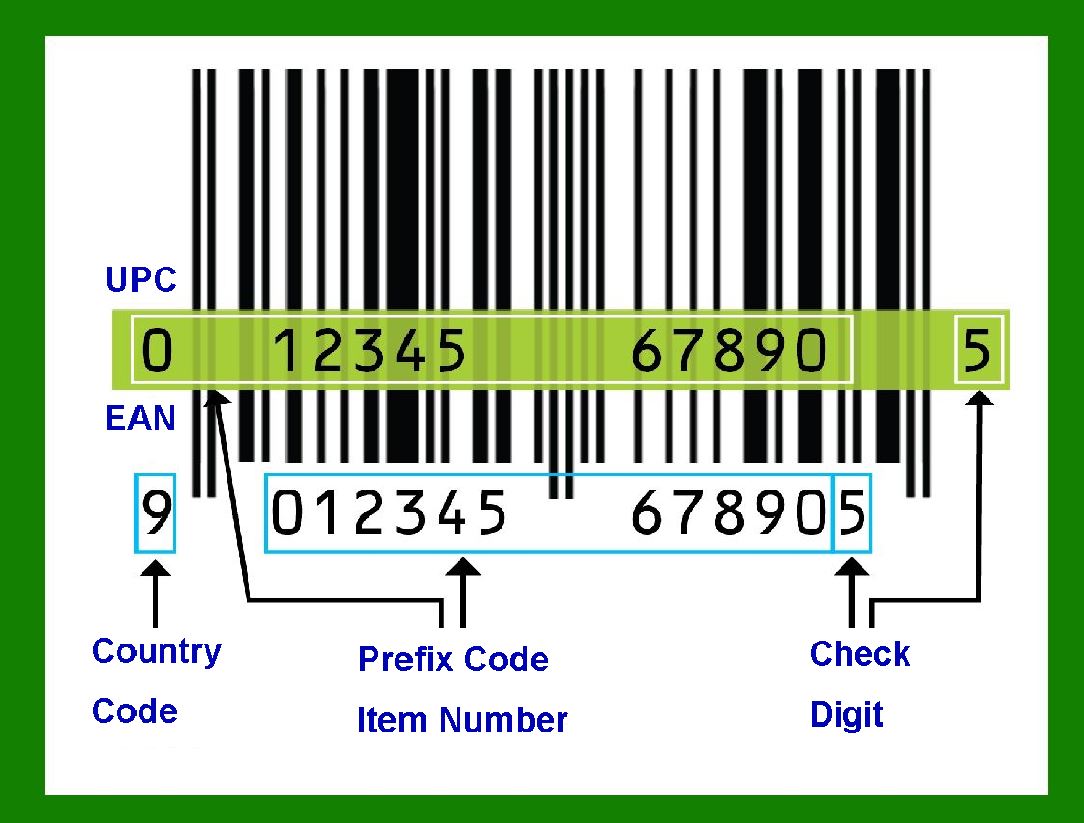
1.2 Barcode label elements typically include: |
* Barcode symbols (1D or 2D) |
* Human-readable text |
* Images and logos |
* Lines, shapes, and borders |
* Background areas and quiet zones |
1.3 Each element must be designed as part of a system, not in isolation. A visually attractive label that violates barcode standards or ignores scanning physics can lead to scan failures, logistics disruption, regulatory non-compliance, and financial loss. |
|
2. Placement of Barcode Symbols on the Label |
2.1 Barcode placement must prioritize scanner accessibility over aesthetics. The barcode should be positioned where scanners can naturally reach it without obstruction. |
2.2 Recommended placement principles: |
* Avoid edges where labels may peel or curl |
* Avoid folds, seams, or curved surfaces |
* Maintain sufficient quiet zones on all sides |
* Ensure consistent placement across batches |
2.3 Orientation matters: |
* Ladder orientation (bars parallel to the short edge) is preferred for cylindrical objects |
* Picket fence orientation (bars parallel to the long edge) is preferred for flat cartons |
2.4 For 2D barcodes, square integrity must be preserved: |
* Avoid stretching or skewing |
* Maintain equal scaling in X and Y directions |
* Prevent placement across uneven surfaces |
|
3. Quiet Zones and Surrounding Blank Space |
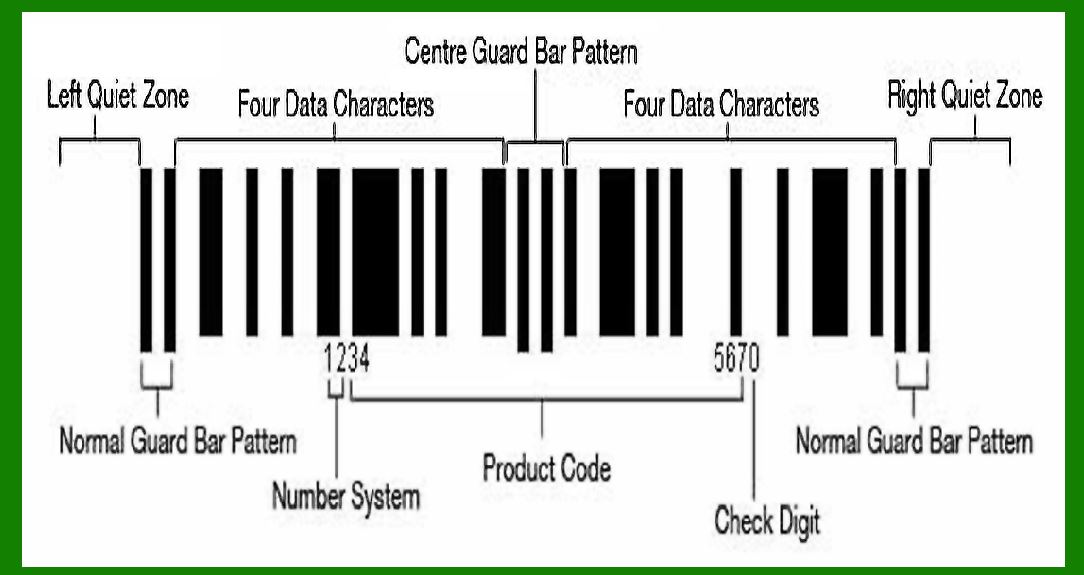
3.1 Quiet zones are mandatory blank areas around barcode symbols that allow scanners to detect symbol boundaries. |
3.2 For 1D barcodes: |
* Left and right quiet zones are critical |
* Minimum quiet zone width is typically 10the narrow bar width |
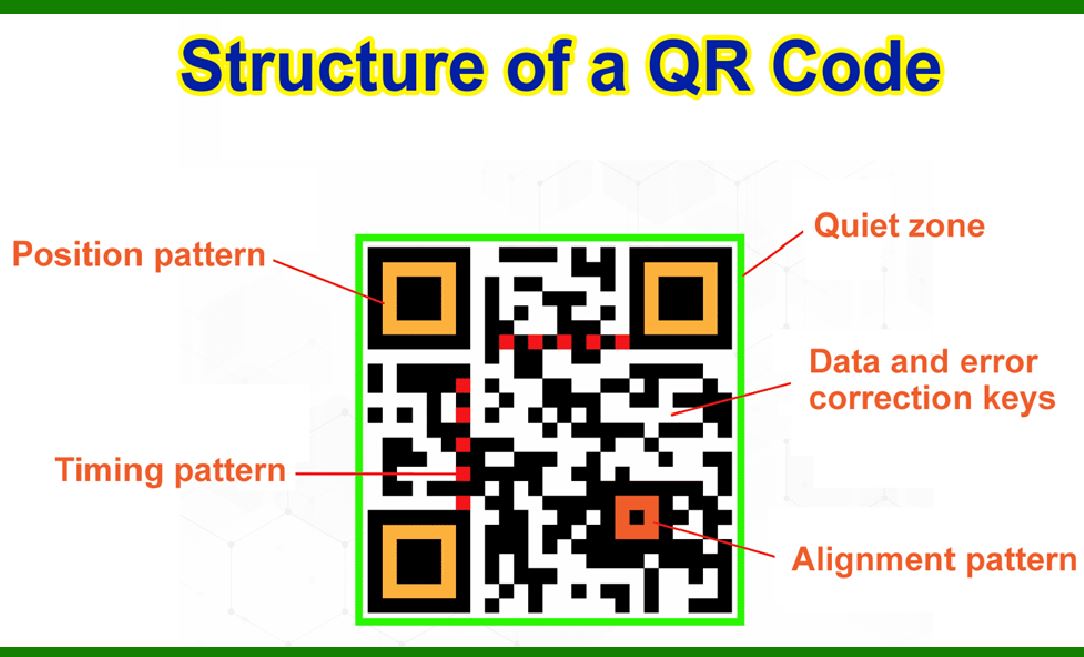
3.3 For 2D barcodes: |
* Quiet zones must surround all four sides |
* Typical requirement: at least one module width, often more in industrial environments |
3.4 Violating quiet zone requirements is one of the most common causes of unreadable barcodes, even when the barcode itself is correctly encoded. |
|
4. Barcode Symbology Selection |
4.1 Selecting the correct symbology is a strategic decision influenced by: |
* Data length |
* Character set |
* Industry standards |
* Scanner compatibility |
* Print resolution |
4.2 Common 1D symbologies: |
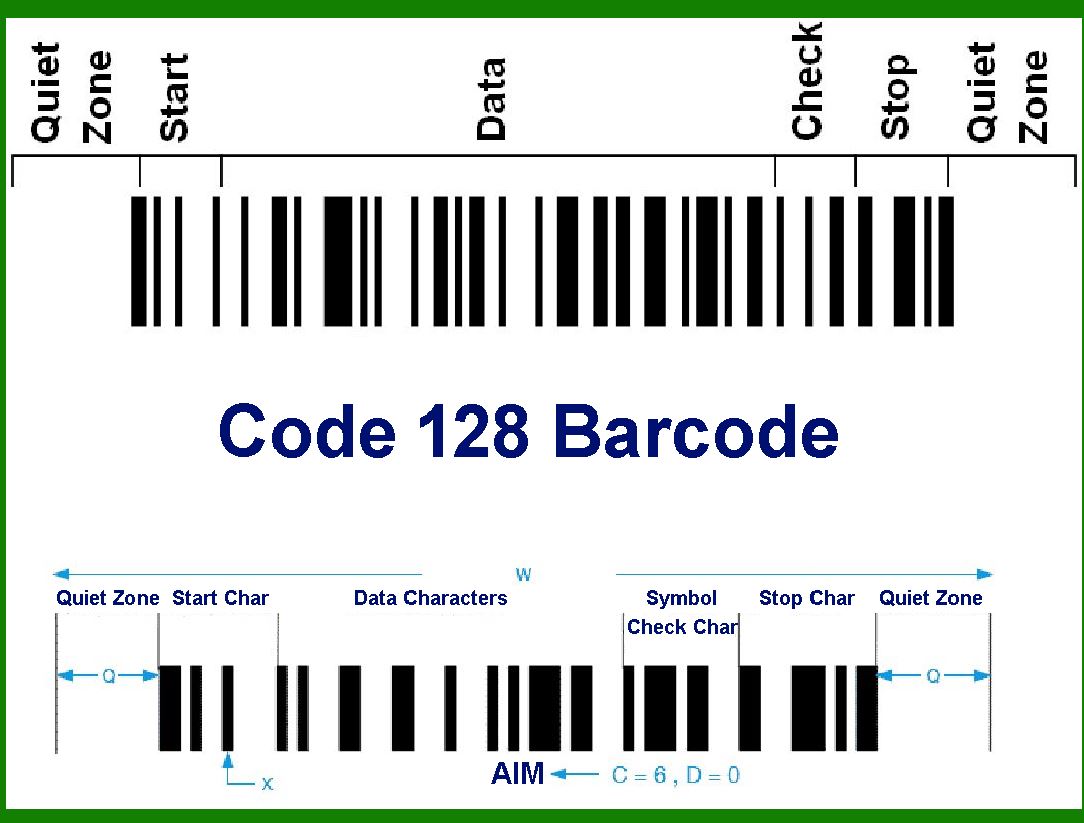
* Code 128 for high-density alphanumeric data |
* Code 39 for legacy and industrial use |
* EAN-13 and UPC-A for retail |
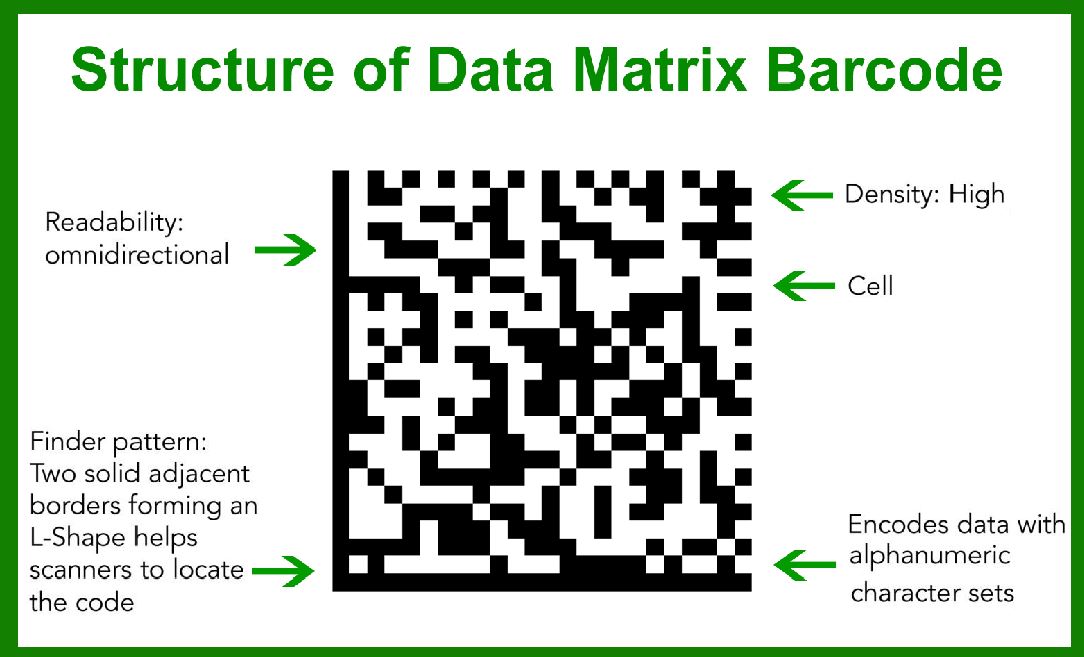
4.3 Common 2D symbologies: |
* QR Code for mobile and public interaction |
* Data Matrix for industrial and medical use |
* PDF417 for documents and logistics |
* DotCode for high-speed packaging lines |
4.4 Industry compliance must be respected: |
* GS1 standards for retail and logistics |
* HIBC for healthcare |
* ISO/IEC specifications for international interoperability |
|
5. Encoding Mode and Character Set Control |
5.1 Encoding mode defines how data is translated into barcode patterns. |
5.2 For Code 128: |
* Subsets A, B, and C affect density and character availability |
* Subset C doubles numeric density and should be used whenever possible |
5.3 For QR Code: |
* Numeric, Alphanumeric, Byte, and Kanji modes exist |
* Automatic mode switching improves efficiency but must be validated |
5.4 Improper encoding mode selection can: |
* Increase symbol size unnecessarily |
* Reduce scanning reliability |
* Cause compatibility issues with older scanners |
|
6. Check Digits and Data Integrity |
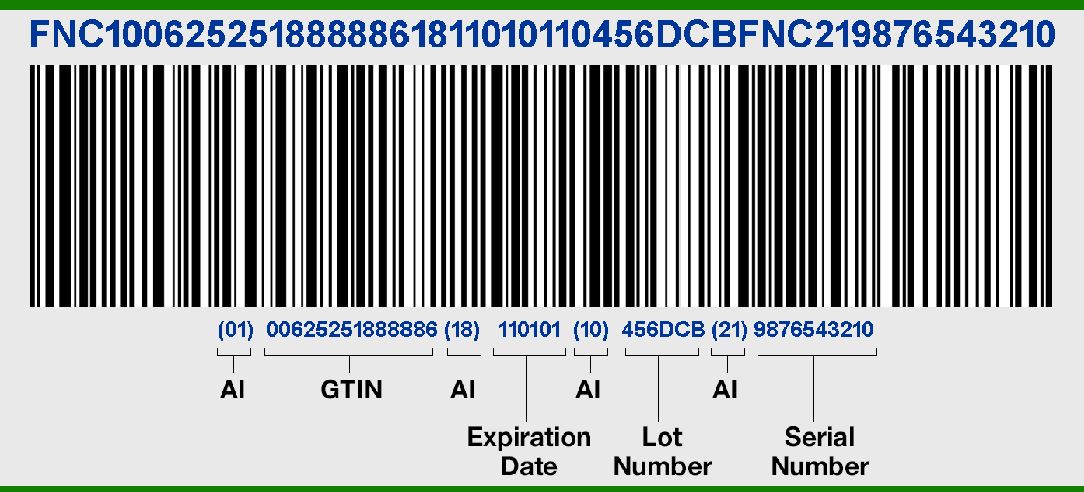
6.1 Check digits are mathematical safeguards that detect data entry and scanning errors. |
6.2 Some symbologies mandate check digits: |
* EAN-13 |
* UPC-A |
* ISBN |
6.3 Barcode software should: |
* Automatically calculate check digits |
* Prevent manual overrides unless explicitly required |
* Validate input data length before encoding |
6.4 Incorrect check digit handling results in: |
* Rejected scans at POS systems |
* Failed logistics validation |
* Regulatory non-compliance |
|
7. Module Size and X-Dimension Control |
7.1 Module size (also called X-dimension) is the smallest unit in a barcode. |
7.2 Module size must match: |
* Printer resolution |
* Scanner capability |
* Print substrate quality |
7.3 Typical guidelines: |
* Thermal printers require larger modules than laser printers |
* Industrial scanners tolerate larger variations than retail scanners |
7.4 Oversized modules waste label space; undersized modules cause: |
* Ink spread |
* Bar merging |
* Decoding errors |

|
8. Rotation and Orientation Considerations |
8.1 Barcodes may be rotated to fit label layouts, but rotation introduces risk. |
8.2 1D barcode rotation: |
* 90or 270rotation may reduce scan speed |
* Some scanners have limited omnidirectional capability |
8.3 2D barcode rotation: |
* Usually fully orientation-independent |
* Still affected by perspective distortion and lighting |
8.4 Best practice: |
* Minimize rotation unless necessary |
* Test with actual scanners used in the field |

|
9. Error Correction in 2D Barcodes |
9.1 Error correction allows partial damage recovery. |
9.2 QR Code error correction levels: |
* Low: minimal redundancy |
* Medium: balanced |
* High: maximum damage tolerance |
9.3 Data Matrix error correction: |
* Built into ECC 200 |
* Automatically calculated |
9.4 Higher error correction: |
* Increases symbol size |
* Improves durability |
* Is recommended for harsh environments |

|
10. Human-Readable Text Design |
10.1 Human-readable interpretation (HRI) supports manual verification. |
10.2 Font selection: |
* Sans-serif fonts preferred |
* Avoid decorative or condensed fonts |
10.3 Font size: |
* Must be legible at expected viewing distance |
* Should not crowd barcode quiet zones |
10.4 Placement: |
* Usually below 1D barcodes |
* Optional for 2D barcodes |

|
11. Text Wrapping, Alignment, and Spacing |
11.1 Text blocks must be designed to avoid overlap with barcode elements. |
11.2 Wrapping rules: |
* Avoid breaking critical identifiers |
* Preserve semantic meaning |
11.3 Alignment: |
* Left alignment for long descriptions |
* Center alignment for identifiers |
11.4 Line spacing must accommodate printer tolerance and substrate expansion. |

|
12. Images and Logos on Barcode Labels |
12.1 Logos enhance branding but introduce risk. |
12.2 Image placement rules: |
* Never intrude into quiet zones |
* Avoid high-contrast patterns near barcodes |
12.3 Image resolution must match print resolution to avoid pixelation. |
12.4 In regulated industries, logos must not obscure mandatory information. |

|
13. Shapes, Lines, and Borders |
13.1 Borders may define label edges but must not mimic barcode patterns. |
13.2 Avoid: |
* Vertical lines near 1D barcodes |
* Square frames around 2D barcodes that resemble finder patterns |
13.3 Line thickness must exceed printer dot gain to remain consistent. |

|
14. Background Color and Contrast Control |
14.1 Barcode readability depends on contrast, not color. |
14.2 Best practice: |
* Dark bars on light background |
* Avoid red or reflective backgrounds |
14.3 2D barcodes tolerate color better than 1D but still require luminance contrast. |

|
15. Printing Technology Constraints |
15.1 Thermal transfer: |
* Stable and durable |
* Requires ribbon compatibility |
15.2 Direct thermal: |
* Cost-effective |
* Sensitive to heat and UV |
15.3 Inkjet and laser: |
* High resolution |
* Susceptible to ink spread or toner flaking |
|
16. Environmental and Lifecycle Considerations |
16.1 Labels may be exposed to: |
* Heat |
* Cold |
* Moisture |
* Chemicals |
* Abrasion |
16.2 Design must account for: |
* Material selection |
* Adhesive strength |
* Error correction level |

|
17. Testing and Verification |
17.1 Barcode verification uses ISO grading methods. |
17.2 Parameters measured: |
* Symbol contrast |
* Modulation |
* Decodability |
* Axial non-uniformity |
17.3 Testing must be performed: |
* After design |
* After printing |
* After environmental simulation |

|
18. Common Design Errors and Risk Mitigation |
18.1 Frequent mistakes: |
* Ignoring quiet zones |
* Using decorative fonts |
* Excessive data density |
* Insufficient module size |
18.2 Mitigation strategies: |
* Standardized templates |
* Automated validation |
* Field testing with real scanners |

|
19. Software Design Implications |
19.1 Professional barcode software must provide: |
* Visual warnings |
* Automatic calculations |
* Real-time previews |
* Printer-aware scaling |
19.2 Advanced systems support: |
* Database-driven labels |
* Conditional logic |
* Batch serialization |

|
20. Conclusion |
20.1 Barcode label element design is a precision engineering task, not a graphic design exercise. |
20.2 Successful labels integrate: |
* Optical physics |
* Printing mechanics |
* Data standards |
* Human usability |
20.3 When designed correctly, barcode labels deliver: |
* High scan reliability |
* Regulatory compliance |
* Operational efficiency |
* Long-term durability |
 cs@easiersoft.com