31. Workflow Automation Enabled by Integration |
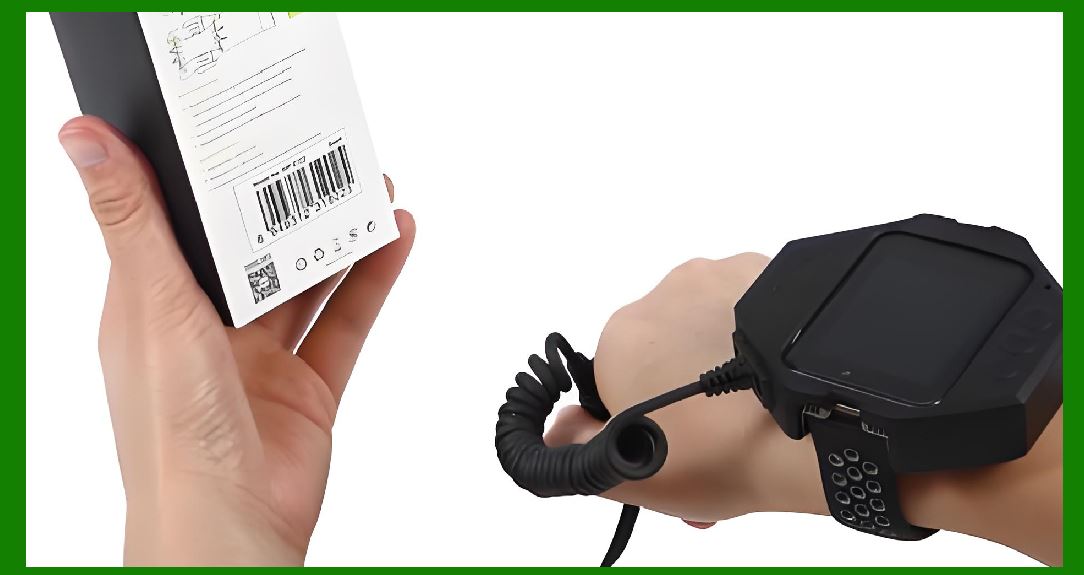
Barcode software integration enables significant workflow automation across inventory and ERP systems. Automated workflows eliminate repetitive manual tasks and ensure that system transactions occur in real time. For example, when a shipment is received, the ERP system can automatically trigger: |
* Generation of inbound labels by barcode software. |
* Assignment of put-away locations based on stock rules. |
* Notification of quality inspection teams. |
* Adjustment of on-hand inventory balances. |
* Update of financial and accounting ledgers for purchase order reconciliation. |
Automation reduces human error, increases throughput, and accelerates operational cycles. |
|
32. Real-Time Data Exchange Mechanisms |
One of the key advantages of integration is the ability to exchange data in real time between barcode systems and enterprise applications. Real-time exchange ensures that stock availability, order status, and production progress reflect actual operations. Mechanisms enabling real-time exchange include: |
* Direct API calls to ERP modules with immediate response. |
* Event-driven message queues, allowing systems to subscribe to barcode events. |
* Push notifications from barcode scanners to inventory systems when items are moved or scanned. |
Real-time data exchange is essential in high-volume operations, where delays in updating inventory records can lead to stockouts, overstock, or incorrect shipments. |
33. Batch Processing and Scheduled Updates |
While real-time integration is ideal, some scenarios require batch processing or scheduled updates. For example: |
* Nightly synchronization of inventory counts. |
* Weekly bulk label generation for promotional items. |
* Periodic reporting of serial number traceability. |
Barcode software integrated with ERP systems can process large batches efficiently, maintaining data integrity while minimizing system load. Scheduling also ensures that critical operational systems remain responsive during peak hours. |

|
34. User Interface Integration |
Barcode software integration often includes unified user interfaces within inventory or ERP systems. This integration allows operators to: |
* Launch label printing tasks directly from ERP transaction screens. |
* Scan barcodes and view validation results without switching applications. |
* Access real-time inventory data and scanning history in one interface. |
UI integration enhances user productivity, reduces training requirements, and improves system adoption. |

|
35. Mobile and Handheld Device Integration |
Modern barcode operations rely heavily on mobile scanners and handheld devices. Integration ensures that devices communicate seamlessly with inventory and ERP systems. Key aspects include: |
* Device configuration for network connectivity and security. |
* Synchronization of master data for offline scanning scenarios. |
* Real-time updates or delayed synchronization based on connectivity. |
* Support for multiple barcode symbologies and label formats. |
Effective integration guarantees that mobile devices act as accurate, real-time extensions of the ERP system. |
36. Multi-Site and Distributed Operations |
Enterprises often operate across multiple warehouses, distribution centers, or production sites. Barcode integration supports distributed operations by: |
* Standardizing label formats and barcode symbologies across sites. |
* Synchronizing inventory data in central ERP systems. |
* Allowing local scanning and printing while maintaining global data consistency. |
* Supporting inter-site transfers with automated updates to both origin and destination locations. |
Distributed integration ensures operational efficiency and consistent reporting across locations. |

|
37. Integration of Different Barcode Types |
Barcode software typically supports multiple symbologies, including 1D (Code 128, Code 39, UPC) and 2D (QR Code, Data Matrix, PDF417). Integration ensures that different barcode types align with ERP and inventory requirements: |
* 1D barcodes are often used for item identification and quick scanning in high-speed operations. |
* 2D barcodes can encode more complex information, including serial numbers, batch data, and expiration dates. |
* Integration logic ensures that the correct symbology is printed or validated according to ERP rules. |
This flexibility ensures that operations meet both functional and regulatory requirements. |
38. Conditional Label Generation |
Integrated barcode software often supports conditional label generation. This means that labels are printed or encoded based on specific criteria defined in ERP or inventory systems, such as: |
* Product type or category. |
* Batch expiration date approaching threshold. |
* Special handling requirements (e.g., hazardous materials). |
* Regional compliance standards (e.g., labeling for different countries). |
Conditional generation reduces label waste, ensures compliance, and improves operational efficiency. |

|
39. Data Validation and Error Prevention |
Barcode integration serves as a robust data validation layer. ERP systems rely on accurate input, and barcode software validates data at multiple stages: |
* Checking item codes, serial numbers, or batch numbers against master records. |
* Verifying check digits and barcode symbology rules. |
* Ensuring quantities scanned or printed match transaction requirements. |
* Detecting duplicate or missing labels in production or shipment. |
This layered validation reduces the risk of errors propagating through inventory and financial systems. |
40. Serial Number and Asset Tracking |
Integration with ERP systems allows barcode software to manage serialized items and tracked assets. Functions include: |
* Generating unique serial numbers or retrieving them from ERP records. |
* Associating serial numbers with purchase orders, work orders, or shipments. |
* Tracking assets throughout their lifecycle, including maintenance, transfers, and disposals. |
* Reporting serial-level traceability for audits and compliance. |
Integration ensures that every serialized asset is traceable, improving accountability and reducing losses. |

|
41. Regulatory Compliance Integration |
Many industries, including pharmaceuticals, food and beverage, automotive, and healthcare, are subject to strict regulatory requirements. Integrated barcode systems help companies comply with: |
* FDA regulations for drug labeling and traceability. |
* GS1 standards for global supply chain visibility. |
* ISO standards for inventory and product management. |
* Customs and import/export documentation requirements. |
Barcode software integration ensures that labels, scans, and system records meet regulatory expectations without manual intervention. |
42. Quality Control Integration |
In production and warehousing, barcode integration supports quality control by: |
* Scanning items at critical control points to verify compliance with specifications. |
* Linking scanned data to ERP-based quality management modules. |
* Triggering alerts or corrective actions for nonconforming items. |
* Providing historical records for audit and continuous improvement. |
This integration enables organizations to maintain high-quality standards efficiently. |

|
43. Reporting and Analytics Integration |
Integrated barcode systems feed high-quality data into inventory and ERP reporting systems. Benefits include: |
* Real-time stock level reporting. |
* Tracking movement history of items across locations. |
* Analyzing operational efficiency and labor productivity. |
* Supporting predictive analytics for replenishment and demand planning. |
Integration ensures that decisions are based on accurate, up-to-date operational data. |
44. Cost Reduction and Efficiency Gains |
Barcode integration significantly reduces operational costs by: |
* Minimizing manual data entry and associated errors. |
* Reducing stock discrepancies and shrinkage. |
* Streamlining warehouse and production processes. |
* Optimizing labor through guided scanning and automated validation. |
The cost savings often justify the investment in integration technologies. |

|
45. Training and Change Management |
Effective integration requires training staff to operate barcode systems in coordination with ERP and inventory software. Integrated solutions: |
* Simplify user interfaces by consolidating tasks within ERP screens. |
* Provide guided scanning prompts to reduce errors. |
* Include dashboards and feedback for performance monitoring. |
* Support remote or mobile training for distributed operations. |
Proper training maximizes the benefits of integration and ensures smooth adoption. |
46. Maintenance and System Monitoring |
Integrated barcode systems require ongoing monitoring and maintenance to ensure reliability: |
* Periodic testing of scanner connectivity and label printers. |
* Monitoring API or file-based integration performance. |
* Maintaining synchronization of master data. |
* Logging errors, exceptions, and transaction history for auditability. |
Proactive maintenance reduces downtime and ensures continuous operational continuity. |

|
47. Integration Testing and Validation |
Before deployment, integrated barcode systems undergo rigorous testing: |
* Functional testing of label generation and scanning workflows. |
* End-to-end transaction validation across inventory and ERP systems. |
* Stress testing to simulate peak operational loads. |
* Validation of error handling and recovery mechanisms. |
Comprehensive testing ensures reliability and minimizes disruption during rollout. |
|
48. Scalability Planning |
As operations grow, barcode integration must scale with increased transaction volumes, additional warehouses, and new product lines: |
* Supporting more scanners, printers, and mobile devices. |
* Expanding API capacity and message queue throughput. |
* Maintaining data integrity across multiple sites and high transaction rates. |
* Ensuring labeling workflows can adapt to new product types or regulatory changes. |
Scalable integration future-proofs operational efficiency. |
49. Disaster Recovery and Business Continuity |
Integration strategies must include disaster recovery considerations: |
* Maintaining backup configurations of barcode software, ERP, and inventory databases. |
* Redundant connectivity for scanners and label printers. |
* Ability to replay unprocessed barcode transactions after system outages. |
* Documentation of recovery procedures and testing for readiness. |
Robust disaster recovery ensures that barcode integration does not become a single point of failure. |

|
50. Future Trends in Barcode Software Integration |
The future of barcode integration is being shaped by technologies including: |
* Cloud-based ERP and inventory systems, enabling remote, multi-site integration. |
* IoT-enabled smart devices that automatically capture item movement. |
* Artificial intelligence for predictive inventory management and anomaly detection. |
* Augmented reality interfaces for guided picking and labeling. |
* Blockchain for secure, immutable tracking of barcode-scanned items. |
Integration strategies must evolve to leverage these trends for competitive advantage. |
 cs@easiersoft.com