2D Barcodes Encoding and Decoding |
Two-dimensional (2D) barcodes are a type of barcode that encode data in both horizontal and vertical dimensions, allowing for a greater amount of information to be stored compared to traditional one-dimensional (1D) barcodes. This detailed exploration will cover the encoding and decoding processes of 2D barcodes, emphasizing their various types, encoding rules, and data structures, with examples to illustrate each process. |
|
1. Introduction to 2D Barcodes |
1.1 Definition and Types: 2D barcodes, unlike their 1D counterparts, represent data in a two-dimensional space. This allows them to store significantly more information in a smaller area. Common types of 2D barcodes include QR codes, Data Matrix, PDF417, Aztec codes, and MaxiCode. Each of these types has unique characteristics in terms of encoding capacity, error correction, and visual structure. |
1.2 Applications: 2D barcodes are used in a wide range of applications including product tracking, inventory management, ticketing systems, and marketing. Their ability to store URLs, text, and other data makes them versatile tools in both industrial and consumer contexts. |
|
2. Encoding Process of 2D Barcodes |
2.1 General Encoding Principles: The encoding process for 2D barcodes involves converting alphanumeric or binary data into a graphical pattern that can be scanned and interpreted by a barcode reader. This process typically includes data input, encoding according to specific rules, and generating the barcode image. |
2.2 QR Code Encoding: |
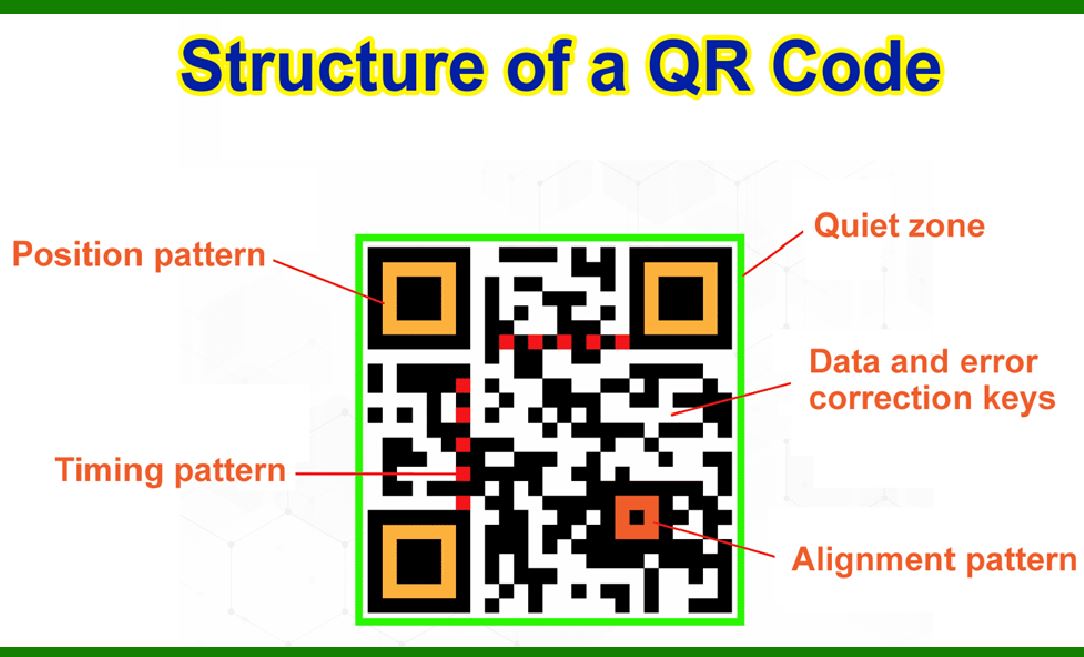
2.2.1 Structure: QR codes are made up of black and white squares arranged in a grid. The data is encoded in both horizontal and vertical patterns, which increases storage capacity and error correction. |
2.2.2 Encoding Steps: |
Data Input: The data to be encoded (e.g., URL, text) is input into the encoder. Mode Indicator: The encoder determines the mode (numeric, alphanumeric, byte, Kanji) based on the input data. Data Segmentation: The data is divided into segments, each representing a portion of the input data. Error Correction: Reed-Solomon error correction codes are generated to ensure the data can be accurately decoded even if the barcode is partially damaged. Data Placement: The data and error correction codes are placed into the QR code matrix, following a predefined pattern. Final Image: The complete QR code is generated as an image file. |
2.2.3 Example: Encoding the URL 'https://www.example.com' into a QR code involves converting the URL into byte mode, segmenting the data, generating error correction codes, and placing everything into the QR code matrix to produce the final QR code image. |

|
2.3 Data Matrix Encoding: |
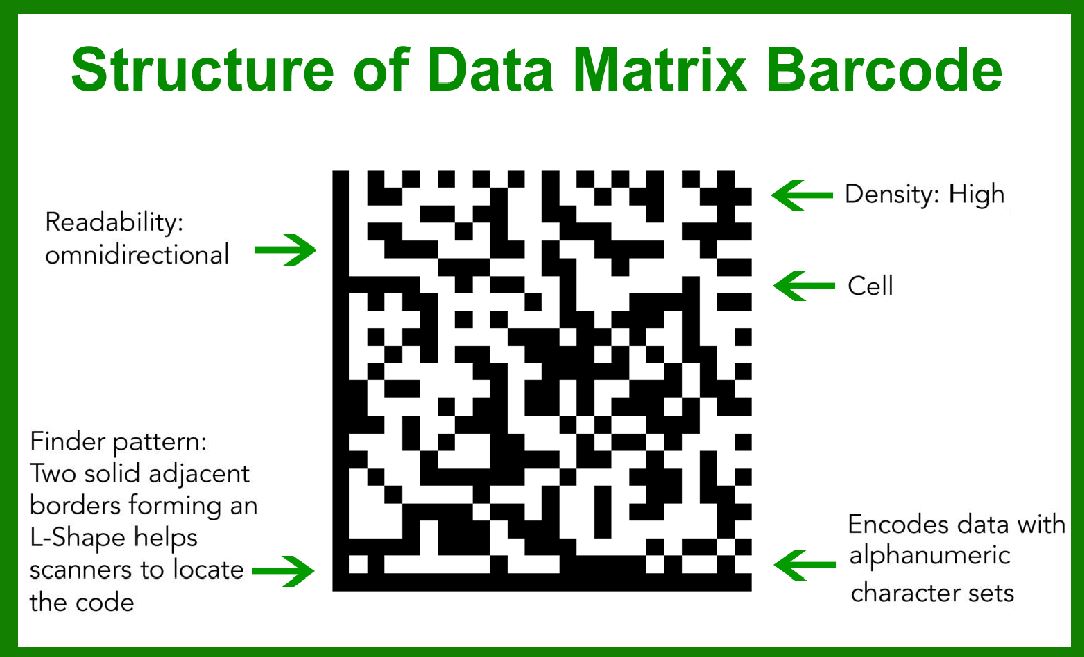
2.3.1 Structure: Data Matrix codes use a grid of black and white cells (dots or squares). They are usually enclosed by a solid border on two sides, forming an 'L' shape, which helps in locating and orienting the code during scanning. |
2.3.2 Encoding Steps: |
Data Input: The data is input into the encoder. Data Encoding: The input data is converted into a binary sequence using the ASCII or C40 encoding scheme. Error Correction: Error correction codes are generated using the Reed-Solomon algorithm. Matrix Formation: The data and error correction codes are placed into the matrix, adhering to a specific pattern and size requirements. Final Image: The Data Matrix barcode is generated. |
2.3.3 Example: Encoding the text 'Hello, World!' involves converting the text into binary form, adding error correction, and placing the bits into a Data Matrix pattern to create the barcode. |
2.4 PDF417 Encoding: |
2.4.1 Structure: PDF417 is a stacked linear barcode format that consists of multiple rows of linear barcodes stacked on top of each other, forming a 2D pattern. |
2.4.2 Encoding Steps: |
Data Input: The data is input into the encoder. Data Segmentation: The data is divided into codewords. Error Correction: Error correction codewords are added using Reed-Solomon codes. Row Formation: The codewords are arranged in rows, each with a specific start, data, and stop pattern. Final Image: The PDF417 barcode is generated. |
2.4.3 Example: Encoding a long string of text such as 'This is a PDF417 barcode example' involves dividing the text into codewords, generating error correction, and arranging everything into rows to create the barcode. |

|
2.5 Aztec Code Encoding: |
2.5.1 Structure: Aztec codes use a central finder pattern surrounded by layers of data. They do not require a quiet zone, making them more compact. |
2.5.2 Encoding Steps: |
Data Input: The data is input into the encoder. Data Encoding: The data is converted into codewords. Layer Construction: The codewords are arranged in concentric square rings around the central finder pattern. Error Correction: Error correction codewords are added. Final Image: The Aztec code is generated. |
2.5.3 Example: Encoding a numeric string like '1234567890' into an Aztec code involves converting the numbers into codewords, arranging them around the central finder, and generating the barcode image. |

|
3. Decoding Process of 2D Barcodes |
3.1 General Decoding Principles: The decoding process involves scanning the barcode image, detecting the patterns, and translating them back into the original data. This process typically includes image capture, preprocessing, pattern recognition, and data extraction. |
3.2 QR Code Decoding: |
3.2.1 Image Capture: The QR code is scanned using a barcode reader or a smartphone camera. 3.2.2 Pattern Recognition: The reader identifies the finder patterns (three large squares) in the corners to locate and orient the QR code. 3.2.3 Data Extraction: The reader extracts the data modules from the QR code matrix. 3.2.4 Error Correction: The Reed-Solomon error correction is applied to recover any corrupted data. 3.2.5 Data Decoding: The extracted data is converted back into its original form (e.g., URL, text). 3.2.6 Example: Decoding a QR code that contains the URL 'https://www.example.com' involves scanning the QR code, locating the finder patterns, extracting and correcting the data, and retrieving the original URL. |
3.3 Data Matrix Decoding: |
3.3.1 Image Capture: The Data Matrix code is scanned using a barcode reader. 3.3.2 Pattern Recognition: The reader identifies the solid borders to locate and orient the Data Matrix code. 3.3.3 Data Extraction: The reader extracts the data cells from the matrix. 3.3.4 Error Correction: Reed-Solomon error correction is applied to correct any errors. 3.3.5 Data Decoding: The extracted data is converted back into its original form (e.g., text). 3.3.6 Example: Decoding a Data Matrix barcode containing the text 'Hello, World!' involves scanning the barcode, locating the borders, extracting the data cells, correcting any errors, and retrieving the original text. |

|
3.4 PDF417 Decoding: |
3.4.1 Image Capture: The PDF417 barcode is scanned using a barcode reader. 3.4.2 Row Identification: The reader identifies the start and stop patterns of each row. 3.4.3 Data Extraction: The reader extracts the codewords from each row. 3.4.4 Error Correction: Reed-Solomon error correction is applied to correct any errors. 3.4.5 Data Decoding: The extracted codewords are converted back into their original form (e.g., text). 3.4.6 Example: Decoding a PDF417 barcode containing the text 'This is a PDF417 barcode example' involves scanning the barcode, identifying the rows, extracting and correcting the data, and retrieving the original text. |
3.5 Aztec Code Decoding: |
3.5.1 Image Capture: The Aztec code is scanned using a barcode reader. 3.5.2 Pattern Recognition: The reader identifies the central finder pattern to locate and orient the Aztec code. 3.5.3 Data Extraction: The reader extracts the data rings from the Aztec code. 3.5.4 Error Correction: Error correction is applied to correct any errors. 3.5.5 Data Decoding: The extracted data is converted back into its original form (e.g., numeric string). 3.5.6 Example: Decoding an Aztec code containing the numeric string '1234567890' involves scanning the barcode, locating the finder pattern, extracting and correcting the data, and retrieving the original numbers. |

|
4. Error Correction in 2D Barcodes |
4.1 Importance of Error Correction: Error correction is crucial in 2D barcodes to ensure data integrity and readability even if the barcode is damaged or partially obscured. |
4.2 Reed-Solomon Error Correction: |
4.2.1 Overview: Reed-Solomon codes are widely used for error correction in 2D barcodes. They can correct multiple random symbol errors within the data. |
4.2.2 Process: Redundancy: Extra redundant data is added to the original data. Error Detection: The redundant data helps detect and locate errors. Error Correction: The original data is recovered by correcting the identified errors. |
4.2.3 Example: In a QR code, Reed-Solomon error correction allows the recovery of the original URL 'https://www.example.com' even if part of the QR code is damaged or obscured. |

|
5. Specific Encoding and Decoding Algorithms |
5.1 QR Code Algorithms: |
5.1.1 Encoding Algorithm: QR code encoding involves selecting the appropriate mode, converting the data into a binary sequence, adding error correction codes, and placing everything into the QR code matrix. 5.1.2 Decoding Algorithm: QR code decoding involves detecting the finder patterns, extracting the data modules, applying error correction, and converting the binary sequence back into the original data. |
5.2 Data Matrix Algorithms: |
5.2.1 Encoding Algorithm: Data Matrix encoding involves converting the data into a binary sequence, generating error correction codes, and placing the bits into the Data Matrix pattern. 5.2.2 Decoding Algorithm: Data Matrix decoding involves detecting the borders, extracting the data cells, applying error correction, and converting the binary sequence back into the original data. |

|
5.3 PDF417 Algorithms: |
5.3.1 Encoding Algorithm: PDF417 encoding involves dividing the data into codewords, generating error correction codes, and arranging the codewords into rows to form the barcode. 5.3.2 Decoding Algorithm: PDF417 decoding involves identifying the rows, extracting the codewords, applying error correction, and converting the codewords back into the original data. |
5.4 Aztec Code Algorithms: |
5.4.1 Encoding Algorithm: Aztec code encoding involves converting the data into codewords, arranging the codewords around the central finder pattern, and adding error correction codes. 5.4.2 Decoding Algorithm: Aztec code decoding involves detecting the central finder pattern, extracting the data rings, applying error correction, and converting the codewords back into the original data. |

|
6. Advanced Topics in 2D Barcode Encoding and Decoding |
6.1 Error Correction Levels: Different 2D barcodes support varying levels of error correction. For example, QR codes have four levels (L, M, Q, H), allowing users to choose the appropriate level based on the expected damage and the required data capacity. |
6.2 Data Compaction: Some 2D barcodes use data compaction techniques to reduce the amount of space required to encode data. For example, Data Matrix codes can use different encoding schemes (ASCII, C40, Text, X12, EDIFACT, Binary) to compact data more efficiently. |
6.3 Symbology-Specific Features: Each type of 2D barcode has unique features tailored to its specific use cases. For instance, MaxiCode is designed for high-speed scanning and can be used for tracking packages in logistics. |

|
7. Conclusion |
2D barcodes are powerful tools for encoding and decoding data in a compact, efficient manner. The detailed exploration of their encoding and decoding processes reveals the complexity and sophistication involved in ensuring data integrity and readability. By understanding the principles, algorithms, and specific features of various 2D barcodes, users can leverage these technologies effectively in a wide range of applications. |
 cs@easiersoft.com