Advantages of 2D Barcodes: Error Correction |
Error correction is a critical aspect of barcode technology, ensuring the reliability and accuracy of data encoded within barcodes. While 1D barcodes have limited error correction capabilities, 2D barcodes offer advanced error correction techniques that significantly enhance data integrity and reliability. This detailed discussion explores the advantages of 2D barcodes in terms of error correction, providing examples to illustrate these points. |
|
1. Error Correction Capabilities in 1D Barcodes |
Error correction in 1D barcodes primarily relies on check digits and simple parity checks. These techniques are effective for detecting errors but offer limited capabilities for correcting them. The following are some of the key aspects of error correction in 1D barcodes: |
1.1 Check Digits |
Check digits are additional digits appended to the end of a barcode to verify the accuracy of the encoded data. The check digit is calculated based on the other digits in the barcode using a specific algorithm. When the barcode is scanned, the system recalculates the check digit and compares it to the scanned check digit. If they match, the barcode is considered valid. |
Example |
A common example is the Universal Product Code (UPC) barcode, which uses a check digit. The check digit is calculated using the modulo 10 algorithm, providing a basic level of error detection. |
1.2 Limitations of Check Digits |
While check digits can detect single-digit errors and some transposition errors, they cannot correct errors. If a barcode is damaged or misprinted, the check digit may detect an error, but it cannot identify or correct the erroneous digit. |
1.3 Parity Checks |
Parity checks are another simple error detection technique used in some 1D barcodes. A parity bit is added to the barcode, ensuring that the total number of 1s (or 0s) in the barcode is even or odd. This method can detect single-bit errors but does not provide error correction capabilities. |
1.4 Limitations of Parity Checks |
Parity checks are limited in their ability to detect errors and cannot correct any errors. They are also susceptible to multiple-bit errors, which may not be detected by a simple parity check. |

|
2. Advanced Error Correction in 2D Barcodes |
2D barcodes, on the other hand, employ advanced error correction techniques that allow for both error detection and correction. These techniques are based on sophisticated mathematical algorithms that provide robust error correction capabilities. The following sections discuss the advantages of error correction in 2D barcodes, along with examples. |
2.1 Reed-Solomon Error Correction |
One of the most widely used error correction algorithms in 2D barcodes is the Reed-Solomon error correction. This algorithm is highly effective in correcting multiple errors and is employed in various 2D barcode symbologies, including QR codes, Data Matrix, and Aztec codes. |
2.1.1 How Reed-Solomon Works |
Reed-Solomon error correction works by adding redundant data, known as error correction codewords, to the original data. These codewords allow the system to detect and correct errors in the barcode. The number of codewords determines the error correction capacity, with more codewords providing higher error correction capabilities. |
2.1.2 Levels of Error Correction |
QR codes, for example, offer four levels of error correction: Level L (Low): Can correct up to 7% of errors. Level M (Medium): Can correct up to 15% of errors. Level Q (Quartile): Can correct up to 25% of errors. Level H (High): Can correct up to 30% of errors. |

|
2.2 Example: QR Code Error Correction |
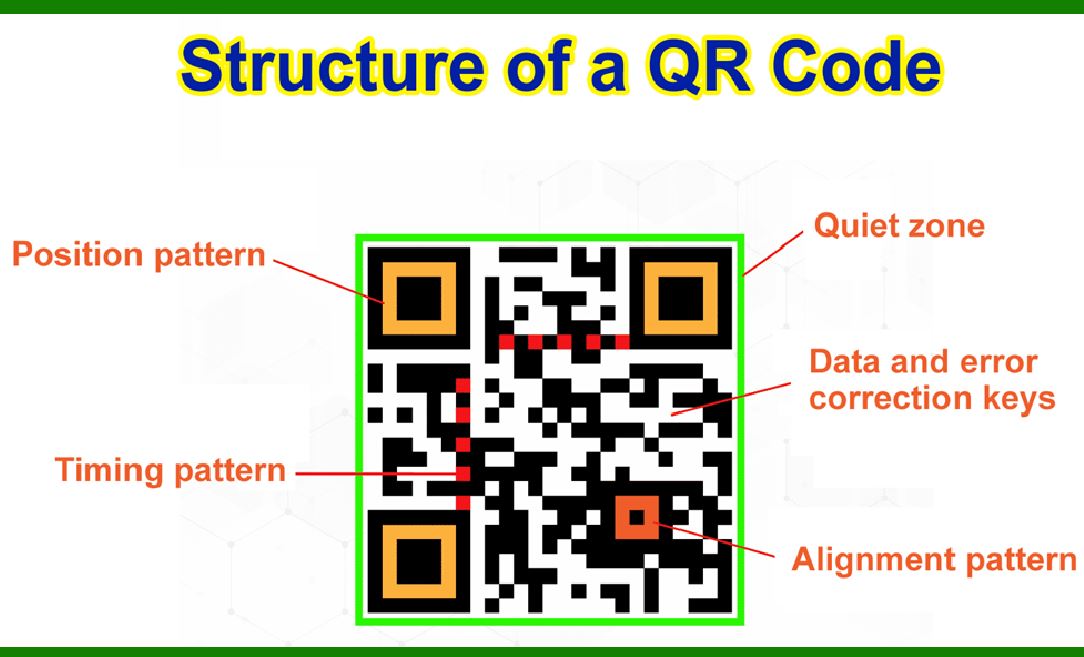
QR codes are an excellent example of how Reed-Solomon error correction is applied in 2D barcodes. The error correction capability of QR codes allows them to be read accurately even if a portion of the barcode is damaged or obscured. |
2.2.1 Damaged QR Code |
Consider a QR code with 30% of its surface damaged. If the QR code is encoded with Level H error correction, it can still be read accurately. The Reed-Solomon algorithm uses the redundant data to reconstruct the damaged parts of the QR code, ensuring data integrity. |
2.2.2 QR Code with Logo |
Many QR codes include logos or images in the center of the code. By using higher levels of error correction, these codes can still be scanned successfully despite the presence of the logo, which effectively 'damages' a portion of the QR code. |

|
2.3 Data Matrix Error Correction |
Data Matrix barcodes also utilize Reed-Solomon error correction, making them highly reliable for industrial and medical applications where data accuracy is critical. The error correction capability of Data Matrix barcodes ensures that they can be read even if they are partially damaged or printed on curved surfaces. |
2.3.1 Industrial Applications |
In industrial environments, barcodes can be exposed to harsh conditions, such as abrasion, dirt, and chemical exposure. Data Matrix barcodes with Reed-Solomon error correction can withstand these conditions and still be read accurately. |
2.3.2 Medical Applications |
In medical applications, Data Matrix barcodes are used to label small items, such as surgical instruments and vials. The error correction capability ensures that the barcodes can be read even if they are scratched or partially obscured. |

|
2.4 Aztec Code Error Correction |
Aztec codes also employ Reed-Solomon error correction, providing robust error correction capabilities. Aztec codes are designed to be read quickly and accurately, even when printed at low resolutions or on curved surfaces. |
2.4.1 Transportation and Ticketing |
Aztec codes are commonly used in transportation and ticketing systems, where barcodes may be printed on paper tickets or displayed on mobile devices. The error correction capability ensures that the codes can be read accurately, even if the tickets are folded or the screens are cracked. |
2.4.2 Emergency Identification |
Aztec codes are also used in emergency identification applications, such as medical ID cards. The robust error correction ensures that the codes can be read accurately in critical situations, even if the cards are damaged. |

|
2.5 PDF417 Error Correction |
PDF417 is a stacked linear barcode that also utilizes Reed-Solomon error correction. This barcode symbology is used in various applications, including driver's licenses, shipping labels, and inventory management. |
2.5.1 Driver's Licenses |
PDF417 barcodes are used on driver's licenses to store extensive data, such as the holder's personal information and biometric data. The error correction capability ensures that the barcodes can be read accurately, even if the licenses are scratched or worn. |
2.5.2 Shipping Labels |
In logistics and shipping, PDF417 barcodes are used on labels to encode detailed information about packages. The error correction capability ensures that the barcodes can be read accurately, even if the labels are damaged during handling. |

|
2.6 Examples of Error Correction in Practice |
The following examples illustrate how advanced error correction in 2D barcodes ensures data integrity and reliability in real-world applications: |
2.6.1 Retail and Inventory Management |
In retail and inventory management, 2D barcodes, such as QR codes and Data Matrix codes, are used to track products and manage stock levels. The error correction capability ensures that the barcodes can be read accurately, even if they are damaged or printed on curved surfaces. |
2.6.2 Healthcare and Pharmaceuticals |
In healthcare and pharmaceuticals, 2D barcodes are used to label medications, medical devices, and patient records. The error correction capability ensures that the barcodes can be read accurately, even if they are scratched or partially obscured, reducing the risk of medication errors and improving patient safety. |
2.6.3 Manufacturing and Logistics |
In manufacturing and logistics, 2D barcodes are used to track parts, products, and shipments. The error correction capability ensures that the barcodes can be read accurately, even in harsh industrial environments, improving efficiency and reducing errors in the supply chain. |

|
3. Conclusion |
The advanced error correction capabilities of 2D barcodes offer significant advantages over the basic error correction techniques used in 1D barcodes. Reed-Solomon error correction, employed in various 2D barcode symbologies such as QR codes, Data Matrix, Aztec codes, and PDF417, ensures that barcodes can be read accurately even if they are damaged or partially obscured. This robust error correction capability enhances data integrity and reliability, making 2D barcodes suitable for a wide range of applications, from retail and inventory management to healthcare, manufacturing, and logistics. |
The examples provided illustrate how error correction in 2D barcodes ensures accurate data reading in real-world scenarios, reducing the risk of errors and improving operational efficiency. As technology continues to evolve, the importance of error correction in barcode technology will remain critical, driving the continued adoption and innovation of 2D barcodes in various industries. |

|
 cs@easiersoft.com