Enhanced QR codes (such as ColorQR, 3D QR codes, etc.) significantly improve data storage capacity and functionality by breaking through the encoding limitations of traditional QR codes. The following is an analysis of its core technical features and potential application directions: |
|
1. Core technology for capacity improvement |
Multi-dimensional encoding: |
Color expansion: Traditional QR codes only use black and white to represent binary, while ColorQR uses CMYK or RGB color space (such as Microsoft's HCCB code), and a single module can store 2-4 bits, increasing capacity by 4-8 times. |
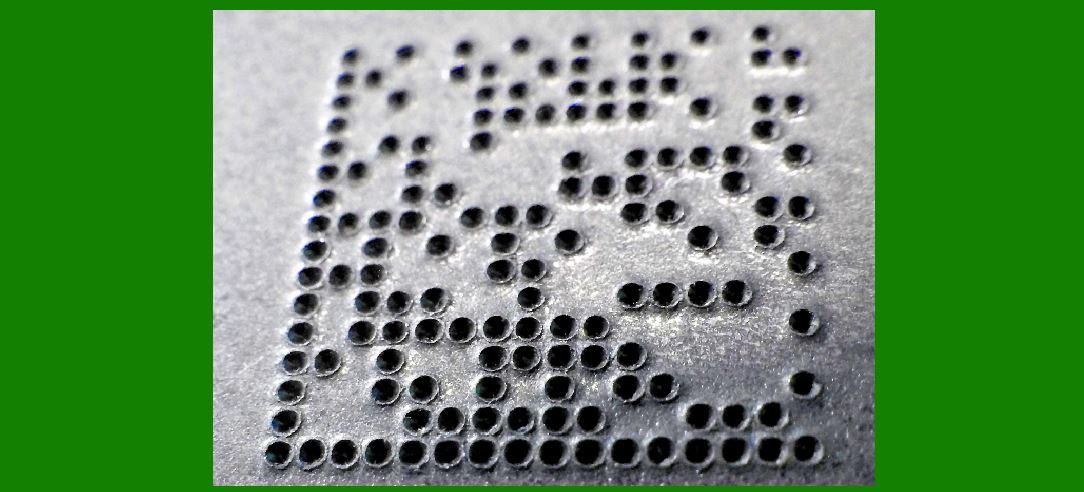
Three-dimensional structure: Three-dimensional encoding is achieved by stacking layers (such as PDF417 variants) or microstructure height (laser engraving), and the capacity can reach more than 50KB (such as 'SQRC' developed in Japan). |
Efficient error correction algorithm: |
Using an improved version of Reed-Solomon code (such as LDPC code) or deep learning-driven dynamic error correction, the error correction capability is improved by more than 30% under the same physical area. |
|
2. Implementation of dynamic content support |
Cloud linkage design: |
The QR code only stores short hash values ??or encrypted URLs (such as Google's 'Dynamic Links'), and after scanning, the updated content is pulled from the cloud in real time to achieve 'static carrier + dynamic data'. |
Time/environment trigger: |
Built-in sensors (such as NFC-QR hybrid tags) or photosensitive materials can switch display content according to time, temperature, light and other conditions (applied to shelf life monitoring, anti-counterfeiting). |
|
3. Typical application scenarios |
Industrial field: |
High-density storage of CAD drawings or equipment life cycle data (such as Siemens industrial code single code storage 20KB BOM table). |
Healthcare: |
Embed encrypted complete electronic medical records (compliant with HIPAA standards) or dynamic instructions for drug ingredients. |
New retail: |
Dynamic price tags (updated in real time through edge computing) or AR product displays (load 3D models after scanning). |
Anti-counterfeiting traceability: |
Combined with blockchain, the QR code content verifies authenticity in real time and displays the supply chain path (such as Alibaba's 'Code on Peace of Mind'). |
|
4. Current technical challenges |
Scanning compatibility: |
Color/3D QR codes require a dedicated decoder (such as WeChat does not support HCCB for the time being), and popularization depends on terminal adaptation. |
Physical durability: |
The micron-level depressions of the three-dimensional structure are easy to wear (requires nano-coating protection, and the cost increases by more than 50%). |
Security risks: |
High capacity may hide malicious code (such as ZIP bombs), and mandatory content signature verification is required. |
|
5. Future development direction |
Biomolecule storage: |
Harvard University has experimented with DNA chains to store data (1g DNA?15PB), and biological QR codes may appear in the future. |
Quantum-resistant encryption: |
NIST post-quantum cryptographic standards (such as CRYSTALS-Kyber) are combined with QR codes to deal with quantum computing attacks. |
Enhanced QR codes are evolving from 'information portals' to 'micro-databases', and their development depends on cross-breakthroughs in coding theory, material science, and edge computing. In the short term, a hybrid solution (static code + cloud) may be the most cost-effective solution. |
|
Core technology for capacity improvement |
Multi-dimensional encoding: |
Color expansion: Traditional QR codes only use black and white to represent binary, while ColorQR uses CMYK or RGB color space (such as Microsoft's HCCB code). A single module can store 2-4 bits, and the capacity is increased by 4-8 times. |
Core technology for capacity improvement: Detailed explanation of 'color expansion' of multi-dimensional encoding |
Traditional QR codes (such as QR codes) are limited to the black and white binary (1 bit/module) encoding method, and a single module can only represent 0 or 1. Enhanced QR codes significantly increase the information density of a single module by introducing the color dimension. The following is an in-depth analysis of color expansion technology: |
|
1. Color space selection and information density |
CMYK/RGB color model: |
Basic principle: expand the color of each module from black and white to multiple color levels (such as cyan, magenta, yellow, black or red, green, blue), and use the superposition of color channels to represent more bits. |
Data capacity: |
4 colors (CMYK): a single module can encode 2 bits (4 states, such as 00/01/10/11). |
8 colors (RGB primary colors + superimposed colors): a single module can encode 3 bits (8 states). |
High-level color levels: can be further increased to 4 bits/module through color depth (such as 16 grayscale). |
Case: Microsoft's HCCB (High Capacity Color Barcode) uses 4-color CMYK, with a theoretical capacity of 3KB (8 times that of traditional QR codes). |
Mathematical implementation of color coding: |
Group the binary data stream by bits (e.g., 2 bits per group) and map it to a preset color comparison table: |
Copy |
00 ? Cyan | 01 ? Magenta | 10 ? Yellow | 11 ? Black |
Identify the color value through spectral analysis or color sensor during decoding and map it back to binary. |
|
2. Key technical challenges and solutions |
Color distortion compensation: |
Problem: Color deviation of printing/display equipment, changes in lighting conditions (e.g., misjudgment of blue module under yellow light). |
Solution: |
Pre-calibrated color gamut: Embed color reference blocks (similar to 'color marks' in printing) at the edge of the QR code for dynamic correction by the decoder. |
Anti-interference coding: Use error correction codes (e.g., Reed-Solomon) to protect color data, or use complementary color pairs (e.g., cyan-red) to enhance fault tolerance. |
Decoding compatibility: |
Problem: Ordinary mobile phone cameras are not sensitive enough to CMYK (optimized to RGB by default). |
Solution: |
Hardware layer: dedicated multispectral sensor (such as Sony IMX series CMOS supports near-infrared band). |
Algorithm layer: Deep learning-driven color classification model (such as ResNet fine-tuning) real-time correction of color recognition. |
|
3. Performance boundary in practical application |
Physical resolution limit: |
The smallest color block that can be distinguished by the human eye is about 0.1mm (300dpi printing). If 4bit/module is used: |
1cm?area can accommodate about 2,500 modules ? storage capacity ?.25KB. |
Trade-off: The smaller the module, the higher the printing/scanning accuracy requirements. |
Dynamic range optimization: |
High contrast design: Avoid using colors with similar hues (such as dark blue and dark purple), and give priority to color pairs that are far apart on the CIE chromaticity diagram. |
Case: ColorZip's color QR code uses a combination of yellow, blue and black to ensure that it can still be recognized under low-end cameras. |
|
4. Synergy with other technologies |
Combined with three-dimensional structures: |
Adding height dimensions (such as microlens arrays or relief structures) on the basis of color expansion can achieve spectral + spatial dual encoding. |
Case: 'InfraredTags' developed by MIT covers the surface of the QR code with infrared fluorescent dyes, which are invisible to the human eye but readable by the mobile phone IR camera, and the capacity is doubled. |
Linked with dynamic content: |
Using electrochromic materials (such as conductive polymers), the color change of the module is controlled by voltage to achieve physical-level dynamic updates (no cloud required). |
|
5. Frontier research directions |
Metasurface optical encoding: |
Using nanostructures to control the phase/polarization of light waves (such as metasurface QR codes), a single module can encode 10+bit, and the capacity exceeds 100KB/cm?(laboratory stage). |
Biocompatible color codes: |
Biological QR codes based on fluorescent proteins or quantum dots (such as Harvard University using E. coli to encode DNA data) are suitable for medical implants. |
|
Summary |
Color expansion is the core means of increasing the capacity of enhanced QR codes by upgrading the information carrier from single-bit black and white to multi-bit color. Its technology is relatively mature (there are commercial solutions such as HCCB), but it requires cross-disciplinary optimization of color stability, decoding robustness and cost control. In the future, its combination with optical materials and AI algorithms will further unleash its potential. |
 cs@easiersoft.com