1. Introduction to RFID Technology |
Radio Frequency Identification (RFID) is a technology used to automatically identify and track tags attached to objects using radio waves. It is employed in a variety of applications, from inventory management to access control. RFID systems consist of three main components: the RFID tag, the RFID reader, and the backend system. This detailed description will explain how RFID works, focusing on the interaction between these components and providing illustrative examples. |

|
2. RFID System Components |
2.1. RFID Tag |
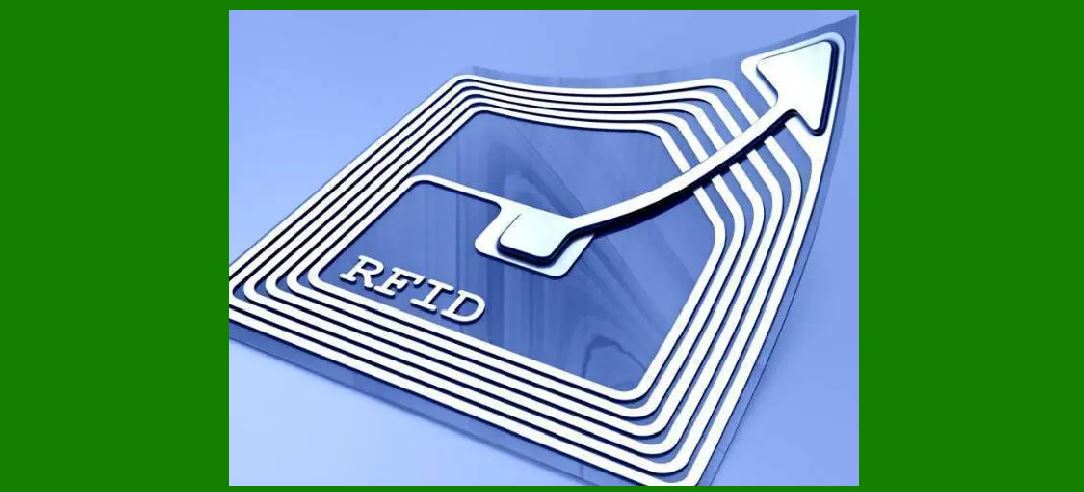
The RFID tag is a small device attached to an object that stores data. It consists of two main parts: Integrated Circuit (IC): The IC contains the memory and the logic required to store and process data. It also has the circuitry needed to communicate with the RFID reader. Antenna: The antenna allows the tag to receive and transmit signals to and from the RFID reader. |
RFID tags come in various types, including: Passive Tags: These tags do not have a battery. Instead, they rely on the energy from the RFID reader to operate. They are generally smaller, cheaper, and used for applications where only basic identification is required. Active Tags: These tags have a built-in battery that powers the IC and antenna. They can transmit signals over longer distances and store more data. Semi-Passive Tags: These tags have a battery to power the IC, but they rely on the RFID reader to energize the antenna for communication. They are used in applications requiring moderate range and data capacity. |
2.2. RFID Reader |
The RFID reader, also known as an interrogator, emits radio frequency signals that activate the RFID tag. It has two main components: Transmitter: The transmitter sends out a radio frequency signal that creates an electromagnetic field. Receiver: The receiver captures the signal transmitted by the RFID tag and converts it into a readable format. RFID readers can be handheld or fixed, depending on the application. For example, handheld readers are used in retail for inventory checks, while fixed readers are used in warehouse logistics for automated inventory management. |
2.3. Backend System |
The backend system processes the data received from the RFID reader. It typically includes: Database: Stores the information captured from RFID tags, such as product details or access records. Application Software: Processes and analyzes the data, providing insights or triggering actions based on the information received. For example, inventory management software can automatically update stock levels when an RFID tag is scanned. |
|
3. RFID System Operation |
3.1. Emission of Radio Frequency Signal |
The RFID system operates as follows: |
1.Activation: The RFID reader emits a radio frequency (RF) signal through its antenna. This RF signal creates an electromagnetic field around the reader, extending its reach to a certain distance. The strength and range of this signal depend on the power of the reader and the frequency used. |
Example: In a warehouse, fixed RFID readers installed at entry and exit points emit RF signals to track pallets as they move in and out. |
2.Detection of RFID Tag: When an RFID tag enters the electromagnetic field generated by the reader, the RF signal activates the tag. The tag's antenna picks up the signal and uses the energy to power its integrated circuit (IC). |
Example: In a library, an RFID tag on a book gets activated when it comes within range of the reader at the checkout counter. |

|
3.2. Communication Between Tag and Reader |
1.Signal Transmission: Once activated, the RFID tag sends back a signal to the reader. This signal includes the tag's unique identification number and, in some cases, additional stored data such as the product's description, price, or expiration date. The tag modulates the signal to encode this data. |
Example: An RFID tag on a medication bottle may transmit data such as the drug name, dosage, and expiration date when scanned. |
2.Data Encoding and Decoding: The RFID tag encodes the data using various modulation techniques, depending on whether it is a passive, active, or semi-passive tag. The reader receives this encoded signal through its antenna. |
Example: For a passive RFID tag, the reader's signal might energize the tag's circuitry, allowing it to reflect back the modulated signal with its ID number. |

|
3.3. Data Processing |
1.Signal Capture: The RFID reader captures the signal from the tag using its receiver. The captured signal is then decoded to extract the transmitted data. The reader processes this data and converts it into a format that can be understood by the backend system. |
Example: In a retail environment, a reader scans an RFID tag on an item and sends the product ID to the backend system for updating inventory records. |
2.Backend System Integration: The backend system receives the decoded data from the RFID reader. The system updates its database, processes the information, and performs necessary actions. For example, it might update inventory levels, trigger an alert for restocking, or log an access event. |
Example: In a logistics operation, the backend system records the arrival of a shipment when the RFID tags on the packages are scanned by fixed readers at the warehouse dock. |

|
4. Detailed Examples |
4.1. Retail Inventory Management |
In retail, RFID technology streamlines inventory management. Here's a step-by-step example: |
1.Tagging Products: Each product is tagged with an RFID tag containing a unique identifier and product information. 2.Stocking Shelves: As products are stocked on shelves, RFID readers installed in the store's backroom or checkout areas automatically scan the tags. 3.Inventory Update: The reader captures the data from the tags and sends it to the backend system. The system updates inventory records in real-time, reflecting the number of items on the shelf. |
Example: A clothing store uses RFID tags on each item. When a customer purchases a shirt, the RFID tag is scanned at checkout, and the inventory system updates to reflect the sale. |

|
4.2. Supply Chain and Logistics |
RFID enhances efficiency in supply chain management: |
1.Tagging Shipments: Pallets and packages are tagged with RFID tags that contain information about their contents, destination, and handling instructions. 2.Tracking Shipments: As shipments move through the supply chain, fixed RFID readers installed at various checkpoints capture data from the tags. 3.Real-Time Monitoring: The backend system processes this data to provide real-time tracking of shipments, monitor inventory levels, and optimize logistics operations. |
Example: A manufacturer uses RFID to track raw materials from suppliers. Fixed readers at different stages of production capture the tags, enabling the manufacturer to monitor material usage and streamline production processes. |

|
4.3. Access Control |
RFID is widely used for access control in secure facilities: |
1.Issuing RFID Cards: Employees are given RFID cards or badges with embedded tags that contain their unique identification information. 2.Access Points: RFID readers are installed at doors or gates. When an employee presents their card, the reader captures the tag's data. 3.Authentication: The backend system verifies the employee's credentials and grants or denies access based on predefined permissions. |
Example: In an office building, employees use RFID badges to access different floors. The system logs each access event and ensures that only authorized personnel enter restricted areas. |

|
5. Challenges and Considerations |
5.1. Interference and Signal Range |
RFID systems can face challenges related to signal interference and range. Environmental factors, such as metal surfaces or dense materials, can affect signal transmission and reception. |
Example: In a metal-clad warehouse, RFID signals might be obstructed by metal shelving units. Solutions include using tags designed for metal environments or increasing reader power. |
5.2. Privacy Concerns |
RFID technology raises privacy concerns, especially with passive tags that can be read from a distance. Ensuring data security and implementing anti-tampering measures are essential. |
Example: RFID tags in passports might be read by unauthorized scanners. Implementing encryption and secure communication protocols can mitigate these risks. |
5.3. Cost and Integration |
The cost of implementing RFID systems can be high, especially for large-scale deployments. Integrating RFID with existing systems requires careful planning and investment. |
Example: A large retailer may need to invest in RFID tags, readers, and backend software. Planning for integration with current inventory systems is crucial for a smooth transition. |

|
6. Conclusion |
RFID technology provides a powerful means of automatic identification and data collection. Understanding how RFID systems work-through the interaction between tags, readers, and backend systems-helps in harnessing its potential for various applications. From enhancing inventory management and supply chain efficiency to securing access control, RFID continues to revolutionize how information is captured and processed in a multitude of industries. |
By leveraging the strengths of RFID technology and addressing its challenges, organizations can achieve greater operational efficiency, accuracy, and security in their processes. |
|
 cs@easiersoft.com