Retail Example of RFID: Zara |
1. Introduction to Zara and RFID Implementation |
Zara, a leading global fashion retailer renowned for its fast-fashion model, has embraced Radio Frequency Identification (RFID) technology to optimize its inventory management and enhance customer experience. Zara, part of the Inditex Group, operates in more than 90 countries with over 2,000 stores worldwide. The company's rapid inventory turnover and need for efficient stock management make RFID an ideal solution for streamlining operations. RFID tags are used to track individual items, improve accuracy in stock levels, and expedite the shopping experience. |
|
2. Overview of RFID Technology |
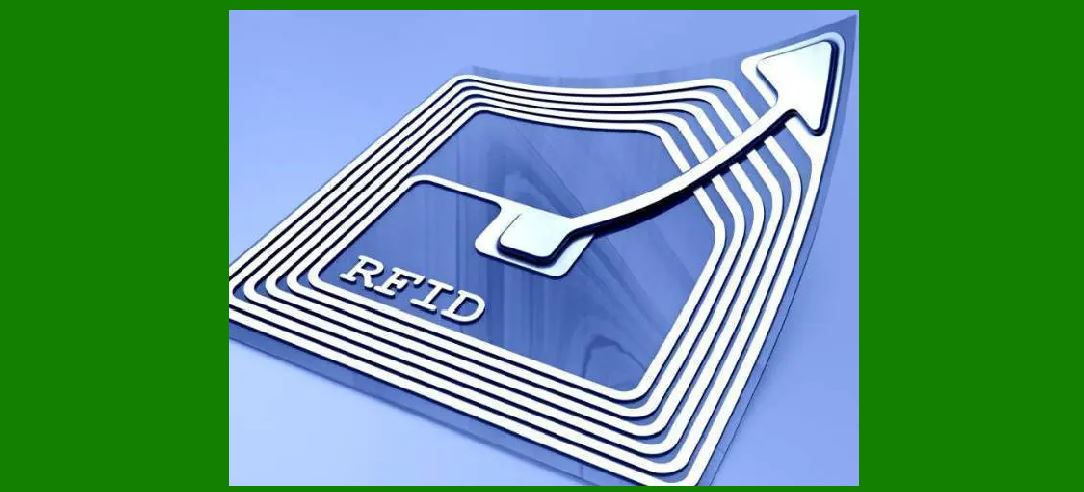
RFID technology involves the use of electromagnetic fields to automatically identify and track tags attached to objects. Each RFID tag contains a microchip and an antenna, allowing it to transmit data to a reader. There are two main types of RFID systems: |
Passive RFID: These tags do not have their own power source and rely on the reader's energy to transmit data. Active RFID: These tags have a built-in power source, which allows them to broadcast a signal continuously. |
For Zara, passive RFID tags are typically used because they are cost-effective and sufficient for inventory management purposes. |

|
3. Zara's RFID Implementation Strategy |
Zara implemented RFID technology as part of its broader strategy to enhance supply chain efficiency and improve store operations. The deployment involved several key steps: |
Tagging: RFID tags are attached to individual clothing items at the manufacturing stage. Each tag is encoded with a unique identifier that corresponds to the item's details such as size, color, and style. Integration: RFID technology is integrated with Zara's existing inventory management systems. This includes linking RFID data with Zara's central inventory database to provide real-time updates. Training: Store staff are trained to use RFID readers and understand the new processes associated with RFID technology. |

|
4. Benefits of RFID for Zara |
4.1. Improved Inventory Accuracy |
RFID enhances inventory accuracy by providing real-time visibility into stock levels. Zara's RFID system can identify and track individual items, reducing errors associated with manual stock counting. For example, if a store's inventory report shows that there should be 100 units of a particular item, RFID can accurately confirm whether the actual stock matches this figure. This minimizes discrepancies and ensures that inventory data is reliable. |
4.2. Efficient Stock Management |
With RFID, Zara can automate stock-taking processes, which were previously time-consuming and prone to errors. Store staff use handheld RFID readers to quickly scan items, updating the inventory system instantly. This efficiency allows for more frequent stock checks and timely replenishment of items. For instance, if a particular style of jeans is running low, RFID enables rapid identification and restocking of the item. |
4.3. Enhanced Customer Experience |
RFID technology contributes to an improved shopping experience by reducing stockouts and enabling better product availability. Customers are less likely to encounter situations where desired items are out of stock. Additionally, RFID helps Zara provide more accurate product information and faster checkout processes. For example, when a customer queries the availability of a specific item, RFID enables staff to quickly locate the item within the store or determine if it's available in other locations. |
4.4. Streamlined Supply Chain |
RFID aids in optimizing Zara's supply chain by improving the accuracy and speed of inventory flow from distribution centers to retail stores. The technology allows for better tracking of merchandise throughout the supply chain, ensuring that products are delivered to stores efficiently. For example, RFID can track the movement of a shipment from the warehouse to the store, providing visibility into its current status and estimated delivery time. |

|
5. Real-World Applications and Examples |
5.1. In-Store Inventory Management |
In Zara stores, RFID tags are used to manage inventory on the sales floor. Store employees use handheld RFID readers to scan racks and shelves, automatically updating the inventory system with accurate stock levels. For instance, if a batch of new dresses arrives, staff can use RFID readers to quickly check the inventory, update stock records, and ensure that the items are correctly displayed on the sales floor. |
5.2. Fitting Room Efficiency |
RFID technology also enhances the efficiency of fitting room operations. When a customer takes items into a fitting room, RFID tags are scanned to track which items are being tried on. This data helps staff manage inventory and provide better customer service. For example, if a customer is interested in trying on several sizes of a particular dress, RFID helps staff ensure that all requested sizes are available and that any items left in the fitting room are promptly returned to the sales floor. |
5.3. Checkout Process |
At checkout, RFID technology speeds up the process by allowing multiple items to be scanned simultaneously. RFID readers can scan all items in a customer's shopping bag at once, reducing the time spent at the checkout counter. For instance, if a customer purchases a handful of clothing items, RFID technology enables the cashier to scan all items quickly, improving the overall efficiency of the checkout process. |

|
6. Challenges and Solutions |
6.1. Cost of Implementation |
One of the main challenges of implementing RFID is the initial cost, including the purchase of tags, readers, and integration with existing systems. However, Zara has addressed this challenge by leveraging its scale and negotiating favorable terms with RFID suppliers. The company's significant investment in RFID technology is justified by the operational efficiencies and improved customer satisfaction it generates. |
6.2. Integration with Existing Systems |
Integrating RFID with existing inventory management and point-of-sale systems requires careful planning and execution. Zara has successfully navigated this challenge by working closely with technology partners and ensuring that the RFID system is compatible with its current infrastructure. The company's IT team played a crucial role in facilitating the seamless integration of RFID technology. |
6.3. Privacy Concerns |
RFID technology raises privacy concerns, particularly related to the tracking of individual items. Zara addresses these concerns by implementing strict data security measures and ensuring that RFID tags do not store personal information. The company also educates customers about the benefits of RFID and how it enhances their shopping experience, helping to alleviate privacy concerns. |

|
7. Future Prospects of RFID in Retail |
The successful implementation of RFID at Zara sets a precedent for other retailers looking to leverage the technology. As RFID technology continues to evolve, its applications in retail are expected to expand. Future developments may include: |
Enhanced Analytics: Advanced data analytics tools could provide deeper insights into customer behavior and inventory trends. Integration with IoT: RFID technology could be integrated with the Internet of Things (IoT) to create more connected and responsive retail environments. |
Personalized Shopping Experience: RFID could be used to deliver personalized recommendations and promotions based on individual shopping patterns. |

|
8. Conclusion |
Zara's implementation of RFID technology illustrates the significant benefits that can be achieved in retail operations. By improving inventory accuracy, streamlining stock management, and enhancing the customer experience, RFID has become a valuable tool for the global fashion retailer. The company's successful adoption of RFID technology not only demonstrates its commitment to operational excellence but also sets a benchmark for other retailers seeking to innovate and improve their supply chain processes. |
In summary, Zara's use of RFID technology exemplifies how cutting-edge solutions can transform retail operations, delivering tangible benefits for both the company and its customers. As the retail landscape continues to evolve, RFID will likely play an increasingly important role in shaping the future of shopping and inventory management. |

|
 cs@easiersoft.com