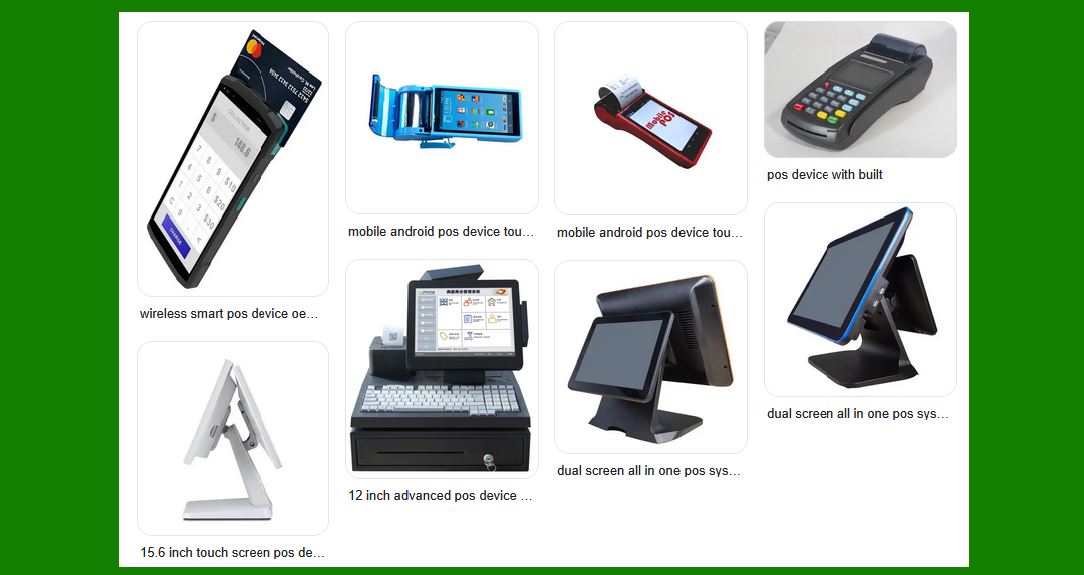
A Point of Sale (POS) system is the combination of hardware and software that businesses use to facilitate sales transactions. It includes everything from cash registers and card readers to inventory management tools and receipt printers. POS systems have evolved significantly over the years, integrating various technologies to enhance business operations. Below is a detailed breakdown of the components and technologies involved in modern POS systems: |
|
1. Hardware Components |
A typical POS system involves multiple hardware components designed to streamline the sales process. |
1.1 POS Terminal |
The terminal is the central hub where transactions occur. It is usually a computer or tablet running POS software. It can be: |
Touchscreen-based: Most POS systems today use touchscreens for easy navigation. |
PC or Tablet-based: Some POS systems use a regular computer or a tablet running POS software. |
1.2 Barcode Scanner |
Barcode scanners are essential for quickly and accurately entering product information. Types include: |
Laser Scanners: These are used for scanning barcodes on products. Laser-based scanners use light to read the barcode¡¯s reflected pattern. |
CCD Scanners: These use an array of light sensors to capture an image of the barcode. |
2D Barcode Scanners: They can read both 1D and 2D barcodes (like QR codes). |
1.3 Receipt Printer |
The receipt printer is used to print transaction receipts. There are two primary types: |
Thermal Printers: Commonly used due to their fast printing speeds and low maintenance needs. |
Dot Matrix Printers: Less common in modern POS systems but still used in some cases for multi-part receipts. |
1.4 Cash Drawer |
The cash drawer is a secure compartment that holds cash, coins, and checks during transactions. It's connected to the POS system to open automatically when needed. |
1.5 Payment Terminal/Card Reader |
These devices enable businesses to accept payments through credit cards, debit cards, and digital wallets. Types include: |
EMV Terminals: These support chip card technology. |
NFC Readers: Used for contactless payments like Apple Pay, Google Pay, and other mobile wallets. |
Magstripe Readers: These read the magnetic stripe on older cards but are being phased out in favor of EMV. |
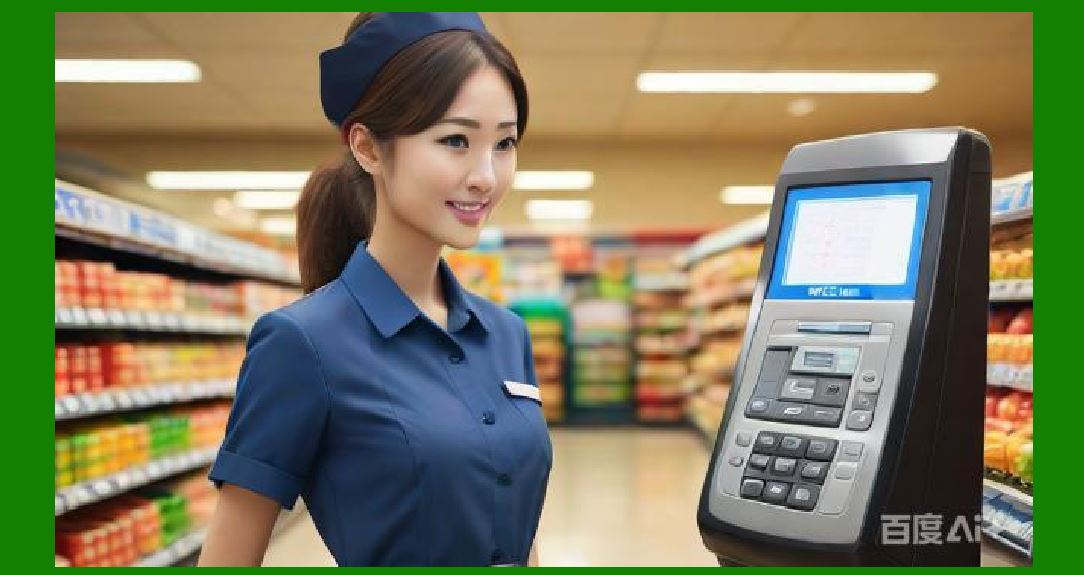
1.6 Customer Display |
A customer-facing display shows the transaction details to the customer. It can be a simple digital screen or a more advanced touchscreen for interactive engagement. |
|
2. Software Components |
The software is responsible for managing sales transactions, inventory, customer data, and more. |
2.1 POS Software |
POS software is the core of any POS system. It provides the functionality for processing sales transactions, tracking inventory, and managing customer data. It typically includes: |
Transaction Processing: This is the feature responsible for handling sales transactions, calculating totals, and applying discounts and taxes. |
Inventory Management: Tracks stock levels, orders, and reordering needs. |
Customer Management: Stores customer data, purchase history, and loyalty programs. |
Reporting and Analytics: Generates reports on sales, revenue, expenses, and other business metrics. |
2.2 Cloud-based vs. On-premise Software |
Cloud-based Software: This allows the business to access the system remotely and store data securely online. It often includes features such as automatic updates, remote access, and real-time reporting. |
On-premise Software: This software is installed on local computers or servers, and the data is stored on-site. It's typically used in larger businesses or those with specific security needs. |
2.3 Payment Gateway Integration |
A payment gateway allows the POS system to securely process credit card, debit card, and mobile wallet payments. Popular gateways include PayPal, Square, and Stripe. |
2.4 Inventory Management System |
Most modern POS systems integrate with inventory management tools that track product quantities in real time. Features include: |
Automated Stock Updates: The system automatically adjusts inventory levels with each sale. |
Stock Alerts: Alerts when stock levels are low. |
Order Management: Facilitates purchase orders to suppliers when stock is running low. |
2.5 Employee Management |
POS software may also include employee management features, such as: |
Time Tracking: Employees can clock in and out via the POS system. |
Access Control: The system can restrict access to certain features based on employee roles. |
|
3. Network and Connectivity |
The POS system needs a robust network infrastructure to operate efficiently. |
3.1 Internet Connectivity |
Wired Connections: Some businesses use Ethernet cables for reliable, high-speed internet access. |
Wireless Connections: Many POS systems rely on Wi-Fi for greater flexibility, especially in retail environments like food trucks or outdoor markets. |
3.2 Mobile POS (mPOS) |
Mobile POS systems use smartphones or tablets as terminals, enabling businesses to process transactions on the go. Mobile devices are typically paired with Bluetooth card readers, barcode scanners, and receipt printers. |
3.3 Cloud Integration |
Cloud-based POS systems sync sales and inventory data in real-time, allowing business owners to monitor operations from anywhere. Cloud systems also tend to be more secure because they automatically back up data. |

|
4. Security Features |
POS systems store sensitive customer and financial data, so security is critical. |
4.1 Data Encryption |
End-to-End Encryption (E2EE): POS systems use encryption to protect payment card data, ensuring that data cannot be intercepted by hackers. |
Secure Socket Layer (SSL): This is used to encrypt data during online transactions. |
4.2 PCI-DSS Compliance |
POS systems must comply with the Payment Card Industry Data Security Standard (PCI-DSS) to ensure that they securely handle payment card data. |
4.3 Access Control |
Role-based Access: Only authorized personnel can access sensitive features, such as refund processing or administrative settings. |
Two-Factor Authentication: An additional layer of security for logging into the system. |
|
5. Additional Features and Innovations |
As technology advances, POS systems are integrating new features to improve business operations. |
5.1 Customer Relationship Management (CRM) |
POS systems can integrate CRM tools to track customer preferences, purchase history, and engagement, helping businesses personalize their marketing efforts and improve customer service. |
5.2 Loyalty Programs |
Many POS systems support loyalty programs, allowing businesses to offer rewards and discounts to repeat customers based on their purchasing habits. |
5.3 Omnichannel Support |
Some POS systems are designed to handle both in-store and online sales, integrating with e-commerce platforms to manage sales, inventory, and customer data across multiple channels. |
5.4 Artificial Intelligence (AI) |
AI is being incorporated into POS systems for predictive analytics, sales forecasting, inventory management, and personalized customer experiences. AI-powered POS systems can analyze sales trends and recommend products based on customer preferences. |
|
6. Industry-Specific POS Systems |
Retail POS Systems: These focus on quick and efficient checkout, inventory management, and customer service. They are commonly used in grocery stores, clothing retailers, and other consumer goods businesses. |
Restaurant POS Systems: These systems often include features such as table management, order taking, and kitchen communication. They may also integrate with digital menu boards and online ordering platforms. |
Salon and Spa POS Systems: These POS systems may include appointment scheduling, client management, and integration with payment processing for tips and services. |
|
7. Benefits of a Modern POS System |
Improved Efficiency: Faster transaction processing and fewer errors. |
Better Inventory Control: Automated tracking and low stock alerts reduce stockouts and overstocking. |
Enhanced Customer Experience: Streamlined checkouts, loyalty programs, and personalized service improve customer satisfaction. |
Remote Management: Cloud-based POS systems enable business owners to manage sales, inventory, and employees from anywhere. |
Data-Driven Insights: Reporting and analytics help businesses make informed decisions and optimize operations. |

|
Conclusion |
POS systems are essential tools for modern businesses, providing everything from transaction processing to inventory management. The integration of cloud technology, mobile devices, and advanced payment solutions makes POS systems increasingly efficient and versatile, offering significant benefits to businesses across various industries. |
|
Deeper dive into the structure of POS Terminal |
A POS (Point of Sale) Terminal is a crucial component in the POS system, and its structure integrates both hardware and software elements designed to handle the processing of sales transactions efficiently. Here's a deep dive into the various elements that make up the POS terminal: |
1. Core Hardware Components of a POS Terminal |
The POS terminal is essentially the main device where transactions are processed. It can be a full-fledged computer, tablet, or specialized terminal, designed to operate seamlessly with peripheral devices. Below are the key hardware components that form the structure of a POS terminal: |
1.1 Central Processing Unit (CPU) |
Purpose: The CPU is the brain of the POS terminal. It performs all the calculations, runs the POS software, and processes transaction data. Modern POS terminals often have multi-core processors to handle complex tasks. |
Type: Most POS terminals use energy-efficient processors like Intel Core i3, i5, or ARM processors for tablets and mobile POS devices. |
Speed & Power: The performance of the POS system largely depends on the processor¡¯s speed. A faster processor will handle a higher volume of transactions and more demanding tasks like reporting, inventory management, and customer relationship management (CRM). |
1.2 Display (Screen) |
Touchscreen Display: The majority of modern POS terminals use touchscreen displays that allow the cashier or sales associate to interact directly with the system. This simplifies navigation and speeds up transaction processing. |
Size and Resolution: Typical sizes range from 10¡± to 15¡± for retail terminals, with a resolution of 1024x768 pixels or higher for clear visibility. |
Multi-Touch Support: Most touchscreen POS systems support multi-touch capabilities, allowing multiple actions (like swiping or zooming) to be performed simultaneously. |
Durability: The screen must be durable, especially in high-traffic areas. Some POS terminals use Corning Gorilla Glass or other protective materials to prevent scratches and impacts. |
1.3 Motherboard |
Integration: The motherboard serves as the central hub for all components, including the CPU, RAM, storage, and peripheral connections. |
Ports and Slots: The motherboard includes various ports for connecting additional devices like printers, scanners, and card readers (USB, Ethernet, etc.). |
Expansion: Modern POS terminals may have expansion slots for adding more hardware features, like additional memory, Wi-Fi modules, or security modules. |
1.4 Memory (RAM) and Storage |
RAM: POS systems generally require 4GB to 8GB of RAM. This memory is crucial for running multiple applications and processing transactions in real time. |
Storage: The storage capacity depends on the software needs of the business. POS systems typically use: |
SSD (Solid State Drives): These are more common due to their faster data access speeds, reliability, and lower power consumption compared to traditional hard drives. |
HDD (Hard Disk Drives): These are less common today but may still be used in older or larger systems that require extensive storage for data, such as in large chain stores. |
1.5 Power Supply and Battery |
Power Supply: Most POS terminals are plugged into a standard AC outlet. The power supply is crucial to maintain consistent performance, especially in environments with fluctuating voltage. |
Battery Backup: For mobile POS terminals or systems that need to function during power outages, battery backup or uninterruptible power supplies (UPS) are essential. |
1.6 Peripheral Ports |
USB Ports: These are used to connect external devices like barcode scanners, receipt printers, and cash drawers. |
Serial Ports: Although becoming less common, serial ports are still used in some specialized environments for connecting older devices. |
Ethernet & Wi-Fi: POS terminals need an internet connection to process payments and synchronize data with cloud-based systems. Ethernet ports or Wi-Fi adapters provide this connectivity. |

|
2. Software and Operating System |
The operating system and POS software determine the usability and functionality of the terminal. These two elements play a huge role in the speed, security, and user experience of the POS system. |
2.1 Operating System (OS) |
Windows-based POS: Many traditional POS systems run on Windows OS, offering compatibility with a wide range of software applications and peripheral devices. |
Windows POS typically provides a desktop interface, which may be more suited for traditional retail environments. |
Android-based POS: Many mobile POS systems use Android OS, which is lightweight, flexible, and easily customizable for various applications. |
Android-based POS terminals often integrate well with other Google services and are cheaper to maintain due to the vast developer ecosystem. |
Cloud-Based POS Software: Some POS terminals run lightweight operating systems (like Chrome OS or proprietary Linux builds) but are primarily designed to connect to a cloud-based POS platform for transaction processing, reporting, and inventory management. |
2.2 POS Software |
Transaction Processing: The software is responsible for capturing customer details, processing sales data, managing payments, and calculating totals. |
Inventory Management: The software communicates with the inventory database to update stock levels after each transaction, triggering alerts when stock levels are low. |
Customer Relationship Management (CRM): Many POS systems store customer data (like contact information and purchase history), which is used to personalize marketing efforts, loyalty programs, and promotions. |
Integration with Other Systems: Modern POS terminals often integrate with accounting software, eCommerce platforms, and supply chain management tools. |

|
3. Connectivity and Networking |
A POS terminal¡¯s ability to communicate with other systems (payment processors, inventory management, etc.) relies on its network connectivity. |
3.1 Wired Network (Ethernet) |
Stability: Ethernet is the most reliable form of connection, offering stable speeds for processing transactions. |
Security: Wired connections are often more secure than wireless, reducing the risks of data breaches and unauthorized access. |
3.2 Wireless Connectivity (Wi-Fi, Bluetooth) |
Wi-Fi: Wi-Fi-enabled POS terminals offer flexibility in placement and are especially useful in environments where mobility is important, like restaurants or mobile vendors. |
Bluetooth: For connecting wireless peripherals, like receipt printers and barcode scanners, Bluetooth is often used in mobile POS systems. |
3.3 Cloud Integration |
Real-time Data Syncing: Cloud-connected POS terminals enable real-time syncing of transaction data, customer data, and inventory updates to centralized servers. |
Remote Access: Business owners can access their POS system remotely, view sales reports, and manage inventory without being physically present at the terminal. |

|
4. Security Features |
Security is a critical aspect of any POS terminal, given the sensitive financial and personal data they handle. |
4.1 Encryption |
End-to-End Encryption (E2EE): This ensures that transaction data (like credit card details) is encrypted before it leaves the POS terminal, protecting it from hackers. |
Secure Wi-Fi: Ensures that all wireless communication is protected from eavesdropping and interception. |
4.2 Payment Card Industry Data Security Standard (PCI-DSS) |
Compliance: POS terminals must comply with PCI-DSS standards to ensure they protect sensitive payment data, including card details and transaction histories. |
Tokenization: This is the process of replacing sensitive card information with a non-sensitive token, making it more secure for storage and transmission. |
4.3 User Authentication |
Password Protection: POS terminals use secure passwords and multi-factor authentication to ensure only authorized users can access the system. |
Role-based Access Control (RBAC): Certain functionalities (like refund processing, user management) are restricted based on the user¡¯s role within the company. |

|
5. User Interface and Interaction |
A POS terminal must have an intuitive interface for ease of use. Interaction is often via the touchscreen, though physical keys may also be used in some designs. |
5.1 Cashier Interface |
Layout and Navigation: The interface should be simple, with clear icons and intuitive workflows for managing sales, applying discounts, and processing payments. |
Speed: It¡¯s crucial that the interface responds quickly to touch inputs, ensuring fast transaction processing. |
5.2 Customer-Facing Display |
Many POS terminals include an additional screen facing the customer, showing transaction details, total amounts, and even promotions. |
Interactive Displays: Some terminals allow customers to interact directly with the terminal (e.g., selecting their payment method or verifying their purchase). |

|
6. Customization and Scalability |
POS terminals can be customized to suit the needs of specific industries (retail, hospitality, healthcare, etc.), and they should be scalable to accommodate growing businesses. |
6.1 Modular Design |
Many POS terminals are modular, meaning they can be upgraded with additional peripherals (new card readers, additional receipt printers) as needed. |
6.2 Software Flexibility |
POS terminals that run on Android or Windows allow for easy installation of new software modules, making it easier to add features like loyalty programs or advanced analytics. |

|
Conclusion |
The POS terminal is the central point where a business processes sales transactions. Its structure is built around a combination of essential hardware components (CPU, display, peripherals) and software systems (transaction processing, inventory management, security) that enable it to function efficiently and securely. The terminal¡¯s design can vary based on the specific needs of the business, from traditional retail setups to mobile and cloud-based systems for dynamic environments. With advances in technology, modern POS terminals are more powerful, flexible, and secure than ever before, offering businesses a comprehensive tool for managing sales, inventory, and customer relationships. |

|
Barcode Scanner of POS system |
A barcode scanner is one of the key hardware components in a POS (Point of Sale) system, enabling fast and accurate data entry by scanning product barcodes. The scanner essentially replaces manual data entry, reducing human error and improving checkout speed. There are several types of barcode scanners, each with specific features and technologies. Below is a comprehensive deep dive into the structure, technology, and functionality of barcode scanners used in POS systems. |
1. Overview of Barcode Scanners in POS Systems |
A barcode scanner is designed to read printed barcodes on products and translate the encoded data into machine-readable information. When integrated with a POS system, it helps identify products, retrieve pricing, and update inventory records in real time. |
Key Functions of Barcode Scanners in a POS System: |
Product Identification: Scanning a barcode identifies the product, which is linked to the corresponding item in the database. |
Price Lookup: The scanner retrieves the correct price from the POS system based on the product¡¯s unique barcode. |
Inventory Updates: After scanning, the POS system adjusts inventory levels to reflect the transaction. |
Transaction Speed: Barcode scanners expedite the checkout process by allowing faster data input. |

|
2. Types of Barcode Scanners |
Barcode scanners used in POS systems can be broadly categorized based on their scanning mechanism and design. Each type has its strengths and ideal use cases. |
2.1 Laser Scanners |
Mechanism: Laser scanners use a laser beam to illuminate the barcode, and the reflected light is captured by a photodiode. The scanner decodes the pattern of light and dark to interpret the data. |
Working Principle: The laser beam scans the barcode in a straight or oscillating pattern, depending on the scanner¡¯s design. |
Pros: |
High-speed Scanning: Laser scanners are known for their fast scanning speeds. |
Long Range: They can scan barcodes from a greater distance (typically up to 12 inches or more), which is helpful in retail environments where products are displayed at varying heights. |
Cons: |
Limited to 1D Barcodes: Laser scanners are typically designed to read 1D barcodes (linear barcodes), such as UPC, Code 128, or EAN-13. |
Not Suitable for Poorly Printed Barcodes: If the barcode is damaged or poorly printed, laser scanners may struggle to read it. |
Use Case: Laser scanners are commonly used in traditional retail environments, where most products are packaged with standard 1D barcodes. |
2.2 CCD (Charge Coupled Device) Scanners |
Mechanism: CCD scanners use an array of light sensors (called CCD elements) to capture an image of the barcode. The captured image is then processed and decoded into digital data. |
Working Principle: The scanner illuminates the barcode with light from multiple sources, and the sensors capture the reflected light pattern. The information is then sent to the POS system for decoding. |
Pros: |
Compact and Lightweight: CCD scanners tend to be smaller and lighter than laser scanners. |
Low Cost: Generally less expensive than laser scanners, making them a cost-effective solution for many retail businesses. |
Cons: |
Shorter Range: CCD scanners usually have a shorter scanning range compared to laser scanners, often requiring the barcode to be placed closer to the scanner (usually within 4-6 inches). |
Limited to 1D Barcodes: Like laser scanners, CCD scanners are typically limited to reading 1D barcodes. |
Use Case: Ideal for environments where products are close to the scanner, such as small retail counters or compact POS setups. |
2.3 2D Image Scanners (Imagers) |
Mechanism: 2D scanners, also known as imagers, use a camera to capture a 2D image of the barcode, similar to how a digital camera works. This image is processed by the scanner's software to decode the data. |
Working Principle: The scanner illuminates the barcode using LED lights and takes a snapshot of the barcode, capturing a two-dimensional image. The software then decodes the data from the image. |
Pros: |
Read Both 1D and 2D Barcodes: Imagers can read both linear (1D) barcodes and two-dimensional (2D) barcodes, such as QR codes, Data Matrix, and PDF417. This is beneficial for businesses that use a variety of barcode types. |
Superior Performance in Challenging Conditions: They can read barcodes from a variety of materials and surfaces (including curved surfaces), and handle damaged or poorly printed barcodes better than laser or CCD scanners. |
Versatility: Capable of reading barcodes from displays (e.g., mobile phones) as well as physical products. |
Cons: |
Slower than Laser Scanners: While 2D scanners are versatile, they may not be as fast as laser scanners for reading simple 1D barcodes. |
Higher Cost: 2D imagers tend to be more expensive than CCD or laser scanners due to their advanced features and capabilities. |
Use Case: Ideal for environments with a mix of barcode types (e.g., retail, healthcare, logistics), or where barcodes may be displayed digitally, such as in mobile payments or loyalty programs. |
2.4 Omnidirectional Scanners |
Mechanism: Omnidirectional scanners are a type of 2D imager that scans in multiple directions simultaneously, allowing them to read barcodes from virtually any angle. |
Working Principle: These scanners use a series of lasers or imaging sensors arranged in a circular pattern. When a barcode is placed in front of the scanner, the device captures data from several angles, reducing the need for precise alignment. |
Pros: |
Faster Scanning: Omnidirectional scanners can scan barcodes quickly from any angle, improving transaction speed. |
Error Reduction: They are easier to use since the cashier does not have to align the barcode perfectly with the scanner. |
Cons: |
More Expensive: Due to their complexity and the advanced technology involved, omnidirectional scanners are typically more expensive than single-line scanners. |
Larger Footprint: Omnidirectional scanners tend to be bulkier than other types, which may not be suitable for small counters. |
Use Case: Common in environments with high transaction volume (e.g., supermarkets, department stores), where speed and ease of use are crucial. |

|
3. Key Features of Barcode Scanners |
While the basic function of barcode scanners is to capture and decode data, modern scanners include several advanced features to enhance their functionality and performance in POS systems. |
3.1 Connectivity Options |
Wired: Wired barcode scanners typically connect to the POS terminal via USB or serial port. This provides a reliable, fast connection. |
Wireless: Wireless barcode scanners connect via Bluetooth or Wi-Fi. This provides greater flexibility, especially in retail environments where mobility is essential. Wireless models often come with a base station to recharge the scanner and maintain communication with the POS system. |
USB HID (Human Interface Device): These scanners connect to the POS terminal as input devices (like a keyboard), automatically sending scanned data into the system without needing additional software or configuration. |
3.2 Durability and Ergonomics |
Industrial-grade: In environments where the scanner might be exposed to harsh conditions (e.g., warehouses, factories), industrial-grade scanners are designed to be drop-resistant, dustproof, and waterproof. These scanners typically have higher IP ratings (Ingress Protection) to withstand rough handling. |
Ergonomics: Modern barcode scanners are designed to be comfortable for prolonged use. Many come with hand grips, trigger buttons, and lightweight designs to reduce fatigue. |
3.3 Scanning Speed and Accuracy |
Speed: Scanning speed is crucial in a fast-paced retail environment. Most barcode scanners can process a single barcode in less than a second. High-end models, like omnidirectional scanners, can process multiple barcodes simultaneously, further reducing wait times. |
Accuracy: Accuracy is vital in ensuring that the scanned data matches the correct item in the POS system. Scanners with advanced image processing and error-correction features can read even damaged or poorly printed barcodes with high precision. |
3.4 Decoding Capabilities |
Error Correction: Some barcode scanners are equipped with advanced decoding algorithms that help read damaged, distorted, or poorly printed barcodes. This is particularly important in industries like logistics and healthcare, where barcode quality may vary. |
Multi-barcode Reading: Some scanners can read multiple barcodes at once, speeding up the scanning process in environments with large quantities of products (e.g., inventory management or bulk scanning). |

|
4. Integration with POS System |
The barcode scanner is a key input device in the POS system, and its integration with the software platform is essential for smooth operation. |
4.1 Product Lookup and Price Matching |
When a barcode is scanned, the system matches the scanned data (usually the product¡¯s unique identifier) to an entry in the inventory database. This triggers the POS to display the product¡¯s price, and any discounts or promotions are automatically applied. |
Real-time inventory management ensures that product availability is updated as soon as a sale is processed. |
4.2 Tracking and Reporting |
Barcode scanners, when integrated with inventory management systems, help track stock levels in real-time. Scanning items updates the database, keeping stock records accurate and up to date. |
4.3 Security Features |
Anti-theft Features: Some barcode scanners include anti-theft functionality, such as detecting stolen items or verifying price matches to prevent fraud. |
Data Encryption: Barcode scanners that process sensitive data may encrypt the scanned information before it is sent to the POS system to ensure data security. |

|
Conclusion |
Barcode scanners are critical components of POS systems, helping streamline transactions and improve operational efficiency. The choice of barcode scanner depends on various factors, such as the types of barcodes used, the scanning environment, and the required scanning speed. With advancements in scanning technology, modern barcode scanners are faster, more versatile, and capable of handling a variety of barcode types, from simple 1D codes to complex 2D matrices, providing greater flexibility and accuracy in POS environments. |

|
How barcode work with and POS system |
The integration of a barcode scanner with a POS (Point of Sale) system is a seamless process that significantly improves the efficiency of sales transactions, inventory management, and customer experience. Below is a detailed breakdown of how barcodes work in tandem with POS systems: |
1. Basic Workflow of Barcode and POS System Integration |
The process of scanning a barcode in a POS system involves several key steps, from the moment the barcode is scanned to the completion of a transaction. Here's how the system works: |
1.1 Barcode Scanning |
Step 1: The cashier uses a barcode scanner to scan the product¡¯s barcode, which could be a 1D (linear) or 2D (matrix) code. |
For 1D barcodes, such as UPC or EAN, the scanner uses a laser or light sensor to detect the black and white bars, converting them into a digital signal. |
For 2D barcodes, such as QR codes or Data Matrix, the scanner captures an image and decodes the data embedded in the pattern of the barcode. |
Step 2: The barcode scanner converts the barcode into machine-readable data (usually an alphanumeric code), which represents a unique identifier for the product. |
1.2 Data Transmission to POS Terminal |
The barcode scanner transmits the scanned data to the POS terminal (either wirelessly or via a wired connection such as USB). |
The POS terminal receives the product's identifier (a unique code that corresponds to a specific item) and sends this data to the POS software for processing. |
1.3 Database Lookup |
Step 3: The POS software uses the product identifier (from the scanned barcode) to query the database of the store¡¯s inventory management system. |
The database holds detailed information about each product, such as: |
Product name |
Price |
Inventory level |
Product description |
Applicable discounts or promotions |
Step 4: Once the POS system retrieves the product information, it displays the product's name and price on the terminal's screen. If discounts or promotions are applied, those are also calculated and displayed. |
1.4 Inventory Update |
After the sale, the POS system updates the inventory database to reflect the quantity of the product sold. |
If the inventory management system is linked with the POS system, stock levels are adjusted in real-time, preventing stockouts and overstocking. |
1.5 Transaction Processing |
Step 5: The customer proceeds to pay for the items, and the cashier processes the payment via a payment terminal (for credit cards, mobile payments, or cash). |
Upon payment, the POS system completes the transaction, generates a receipt, and triggers the cash drawer to open (if applicable). |

|
2. Key Components Involved in Barcode & POS System Integration |
Several components work together to ensure smooth barcode scanning and transaction processing within a POS system. Below are the key elements: |
2.1 Barcode Scanner |
Function: Scans the barcode and converts the image or pattern into data that can be read by the POS terminal. |
Connection: The scanner is connected to the POS terminal through either a wired connection (USB, serial port) or a wireless connection (Bluetooth, Wi-Fi). |
Types of Barcodes: |
1D Barcodes: Linear barcodes that consist of a series of vertical lines and spaces, such as UPC, EAN, Code 128, Code 39, and others. |
2D Barcodes: Matrix barcodes that encode data in both vertical and horizontal dimensions, such as QR codes, Data Matrix, PDF417, etc. |
2.2 POS Terminal |
Function: The point-of-sale hardware where the cashier inputs transaction data and interacts with the customer. |
Role in Integration: It receives the data from the barcode scanner and communicates with the POS software to look up the product information, apply pricing, and finalize the transaction. |
2.3 POS Software |
Function: The software that runs on the POS terminal. It manages sales transactions, pricing, inventory control, and reporting. |
Database Integration: The POS software communicates with the inventory database to query and update product information based on scanned barcodes. |
Payment Integration: It handles payment processing by integrating with payment gateways to securely process credit card, debit card, or mobile wallet transactions. |
2.4 Inventory Management System |
Function: The system that tracks the stock levels of products. It is often integrated with the POS software to update inventory in real-time as sales are made. |
Real-Time Stock Updates: When a product is scanned, the inventory system is automatically updated to reflect the sale, allowing for accurate stock tracking across all channels. |
2.5 Receipt Printer |
Function: Prints the receipt for the customer, typically after payment is processed. |
Integration: After a barcode is scanned and the transaction is completed, the POS software sends the transaction details to the receipt printer, generating a printed receipt. |

|
3. Step-by-Step Example of a Barcode Scan in a POS System |
Scenario: A Customer Makes a Purchase at a Retail Store |
Barcode Scanning: |
The cashier picks up a product, and the barcode scanner is used to scan the barcode on the item. The scanner captures the barcode and sends the data to the POS terminal. |
Product Lookup: |
The POS terminal receives the barcode data and sends it to the POS software. |
The POS software looks up the product in the inventory database using the product¡¯s unique identifier (barcode data). |
The software retrieves the product's information, such as its name, price, and available stock. |
Price Calculation: |
The POS software calculates the total cost of the transaction, including applicable taxes, discounts, or promotions. |
If a promotion is applied (e.g., 10% off on selected items), the POS system reflects that in the price displayed on the terminal. |
Inventory Update: |
The system checks the product¡¯s stock level in real-time. |
After completing the sale, the inventory system automatically decreases the stock of the product by one unit. |
If the product is out of stock, the system will alert the cashier or prompt the customer about the item¡¯s availability. |
Payment Processing: |
The cashier proceeds with payment, whether by cash, credit card, or mobile wallet. |
The payment is processed through a payment terminal that interfaces with the POS system. |
Transaction Finalization: |
Once payment is successful, the POS system generates a receipt that includes the product details, total amount, and transaction ID. |
If the customer paid by card, the payment terminal will print a card authorization receipt as well. |
Inventory Sync: |
The POS system sends updated inventory data back to the central database to ensure that stock levels are always accurate and up-to-date. |

|
4. Advantages of Barcode Integration with POS Systems |
4.1 Faster Transactions |
Scanning barcodes allows cashiers to process sales quickly compared to manual entry, leading to faster checkout times and better customer satisfaction. |
4.2 Reduced Errors |
Barcode scanning eliminates manual data entry, reducing the chances of pricing or inventory mistakes. The scanned barcode pulls data directly from the database, minimizing human error. |
4.3 Real-Time Inventory Management |
As products are scanned and sold, the POS system updates the inventory automatically, providing real-time tracking of stock levels and avoiding issues like overstocking or stockouts. |
4.4 Better Reporting and Analytics |
Barcode-based sales data can be logged and analyzed to provide insights into product performance, sales trends, and customer purchasing behaviors. |
4.5 Enhanced Customer Experience |
A fast, error-free checkout process leads to a more pleasant customer experience. In addition, barcode scanning allows businesses to track customer purchases, enabling loyalty programs and personalized marketing. |
4.6 Improved Security |
Since product prices and inventory data are pulled directly from the database using the barcode, there is less risk of price manipulation or errors during checkout. |

|
5. Challenges and Considerations |
5.1 Barcode Quality |
The readability of a barcode can be affected by factors such as printing quality, wear and tear, or environmental conditions. Poor-quality barcodes can slow down the scanning process or cause errors. |
Solution: Regular quality checks and the use of high-quality barcode printing technologies can mitigate these issues. |
5.2 Complexity of 2D Barcodes |
While 2D barcodes (like QR codes) offer more data capacity, they require more sophisticated scanners and may take slightly longer to decode than 1D barcodes. |
Solution: Use 2D imagers or hybrid scanners capable of reading both 1D and 2D barcodes for flexibility. |
5.3 Barcode Duplication |
If two different products are mistakenly assigned the same barcode, it could lead to errors in inventory management or pricing discrepancies. |
Solution: Proper database management and regular audits can help prevent barcode duplication. |
|
Conclusion |
The integration of barcode technology with a POS system enables businesses to streamline their checkout process, improve inventory accuracy, and enhance the overall customer experience. Barcodes provide a fast, reliable, and error-free way to track products, and when combined with real-time inventory and transaction data, they offer a seamless flow of information across the entire retail operation. Whether using simple 1D barcodes or advanced 2D codes, the key to success lies in selecting the right barcode scanner and ensuring smooth integration with the POS system for efficient and secure transactions. |
 cs@easiersoft.com