Introduction to Anoto Dot Pattern and Digital Paper |
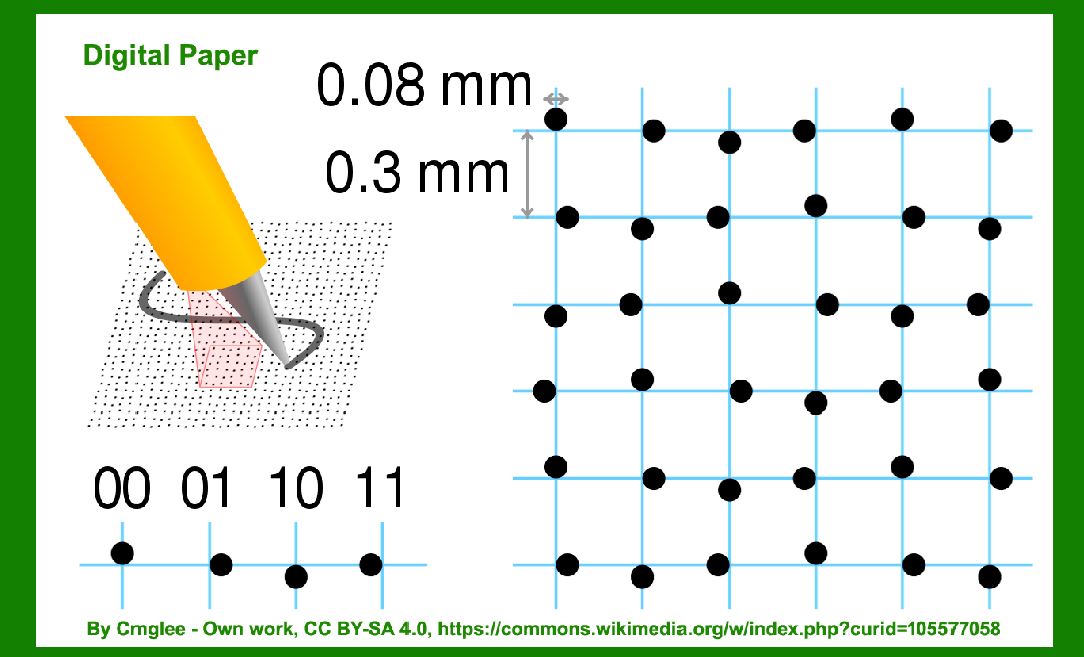
The Anoto dot pattern is a revolutionary technology that transforms traditional paper into a platform for digital interaction. Developed by Anoto Group AB, this system involves printing a unique pattern of microdots on paper. These dots are strategically arranged in a grid, enabling precise identification and encoding of information. The technology leverages digital pens equipped with cameras and image processing algorithms to capture and interpret handwritten or printed content written on Anoto-enabled paper. |
|
Technical Specifications of Anoto Dot Pattern |
Dot Grid and Encoding |
The core of the Anoto dot pattern is its grid of microdots, which are printed in a precise layout across the surface of the paper. Each dot is uniquely identified within the grid, allowing the digital pen to capture its position and interpret the handwritten or printed content associated with it. The dots are encoded with positional information using a proprietary algorithm, ensuring accuracy and reliability in data capture. |
Pen Technology |
Digital pens used in conjunction with Anoto-enabled paper are equipped with infrared cameras that capture images of the dot pattern as the pen moves across the paper. These images are processed in real-time by onboard software or transmitted to a computing device for further analysis. The pen also records stroke data, enabling precise replication of handwriting or drawing on digital devices. |
Connectivity and Data Transmission |
Once captured, the digital data from the pen can be transmitted wirelessly or via USB to a computer or mobile device. This seamless connectivity enables real-time synchronization of handwritten notes, sketches, or forms with digital applications, databases, or cloud services. The data can be stored, edited, and shared electronically, bridging the gap between analog writing and digital workflows. |

|
Printing Processes for Anoto Dot Pattern |
Printing Technology |
Anoto dot patterns are typically printed using specialized printers capable of high-resolution output. These printers are calibrated to ensure precise alignment and clarity of the dot grid across the entire surface of the paper. The printing process involves integrating the dot pattern seamlessly into the background of the paper, maintaining its functionality without compromising the readability of printed text or images. |
Paper Compatibility |
Anoto technology is compatible with various types of paper, including notebooks, forms, and specialty paper products. The dot pattern can be integrated into pre-printed designs or added to blank sheets as needed. Paper used with Anoto technology must meet specific quality standards to ensure accurate dot placement and reliable data capture by digital pens. |
Customization and Integration |
Manufacturers and publishers can customize Anoto-enabled paper to suit specific applications or branding requirements. This customization may include adding logos, forms, or security features alongside the dot pattern. Integrated solutions allow businesses to streamline processes such as data collection, document management, and interactive customer engagement using Anoto technology. |

|
Applications of Anoto Dot Pattern and Digital Paper |
Education and Training |
Anoto technology enhances learning environments by digitizing handwritten notes and sketches in real-time. Educators can capture and share lecture notes, annotations, and diagrams with students electronically. Interactive textbooks and worksheets allow students to complete assignments digitally while preserving the familiarity of pen and paper. |
Healthcare and Medical Records |
In healthcare settings, Anoto-enabled forms and medical charts streamline data collection and patient documentation. Clinicians can capture patient information, treatment notes, and diagnostic results directly on digital devices using Anoto digital pens. This integration improves accuracy, efficiency, and compliance with electronic health record (EHR) systems. |
Business and Administration |
Anoto technology facilitates efficient document workflows in business environments. From capturing meeting notes to completing forms and contracts, digital pens enable seamless data entry and integration with enterprise systems. Companies can automate data processing, reduce paperwork, and enhance collaboration among employees working both in-office and remotely. |
Retail and Consumer Engagement |
Retailers utilize Anoto-enabled paper for inventory management, order processing, and customer interactions. Sales associates can capture product information, process transactions, and record customer preferences using digital pens. Interactive catalogs and promotional materials enhance customer engagement and facilitate personalized marketing campaigns. |
Legal and Compliance |
Legal professionals use Anoto technology to create, edit, and archive legal documents securely. Digital pens capture signatures, annotations, and case notes in real-time, ensuring document integrity and compliance with regulatory standards. Law firms benefit from streamlined document review processes and enhanced client communication. |
Creative and Design Industries |
Designers and artists leverage Anoto digital pens to sketch concepts, annotate blueprints, and collaborate on creative projects. The technology preserves the spontaneity and precision of hand-drawn artwork while enabling digital editing and sharing. Architects, engineers, and graphic designers use Anoto-enabled paper to streamline design revisions and project management. |
Government and Public Services |
Government agencies adopt Anoto technology for voter registration, census data collection, and administrative paperwork. Digital pens facilitate accurate data capture in field settings, ensuring timely delivery of public services and compliance with data privacy regulations. Integrated solutions support transparent governance and efficient resource allocation. |

|
Advantages of Anoto Dot Pattern and Digital Paper |
Seamless Integration |
Anoto technology integrates seamlessly with existing paper-based workflows and digital systems. Users can transition between handwritten and digital tasks without disruption, improving productivity and collaboration across diverse industries. |
Real-Time Data Capture |
Digital pens equipped with Anoto technology capture data instantaneously, eliminating the need for manual transcription and reducing errors associated with traditional data entry methods. Real-time synchronization ensures up-to-date information across digital platforms. |
Enhanced Mobility and Flexibility |
Anoto-enabled paper allows users to work offline and synchronize data when connectivity is available. Mobile professionals, field workers, and educators benefit from the flexibility to capture and share information in any environment, regardless of access to technology infrastructure. |
Security and Compliance |
Anoto technology supports secure data transmission and storage, maintaining confidentiality and integrity of sensitive information. Encryption protocols and audit trails enhance data security, meeting regulatory requirements in industries such as healthcare, finance, and legal services. |

|
Challenges and Considerations |
Cost of Implementation |
Adopting Anoto technology involves initial investment in digital pens, printers, and compatible paper products. Organizations must evaluate cost-benefit ratios and scalability when integrating digital paper solutions into existing operations. |
Training and User Adoption |
Effective deployment of Anoto technology requires training for end-users on digital pen functionality, data capture techniques, and software applications. Organizations should provide ongoing support to optimize user proficiency and maximize the benefits of digital paper solutions. |
Maintenance and Upgrades |
Regular maintenance of digital pens, printers, and software infrastructure is essential to ensure optimal performance and longevity of Anoto-enabled systems. Upgrades to hardware and software may be necessary to accommodate evolving business needs and technological advancements. |

|
Future Trends and Innovations |
Artificial Intelligence and Machine Learning |
Integration of AI algorithms with Anoto technology enables advanced data analytics, handwriting recognition, and predictive modeling. Machine learning algorithms enhance the accuracy and efficiency of data processing, driving innovation in document management and decision support systems. |
Internet of Things (IoT) Integration |
IoT-enabled digital pens and sensors expand the capabilities of Anoto technology in smart environments. Real-time data collection, environmental monitoring, and asset tracking applications benefit from seamless integration with IoT platforms and cloud-based services. |
Augmented Reality (AR) and Virtual Reality (VR) |
AR and VR technologies enhance user interaction with Anoto-enabled paper, creating immersive experiences for education, training, and entertainment. Integration of spatial computing and gesture recognition expands the usability of digital paper in gaming, simulation, and interactive storytelling. |
Sustainability and Eco-Friendly Solutions |
Development of eco-friendly printing technologies and recyclable paper products supports sustainable practices in Anoto technology adoption. Organizations prioritize environmental stewardship through reduced paper waste, energy-efficient manufacturing processes, and carbon footprint mitigation. |

|
Conclusion |
The Anoto dot pattern and digital paper represent a transformative approach to bridging the gap between analog and digital communication. By embedding intelligent microdots into paper surfaces, Anoto technology enables seamless data capture, document management, and interactive user experiences across diverse industries. From education and healthcare to business administration and creative design, the applications of Anoto-enabled paper are expanding the boundaries of traditional paper-based workflows. As technological advancements and user demands evolve, Anoto continues to innovate, driving productivity, efficiency, and connectivity in the digital era. |
This detailed exploration underscores the technical sophistication, practical applications, and future potential of Anoto dot pattern and digital paper in shaping the future of interactive and immersive digital experiences. |
 cs@easiersoft.com