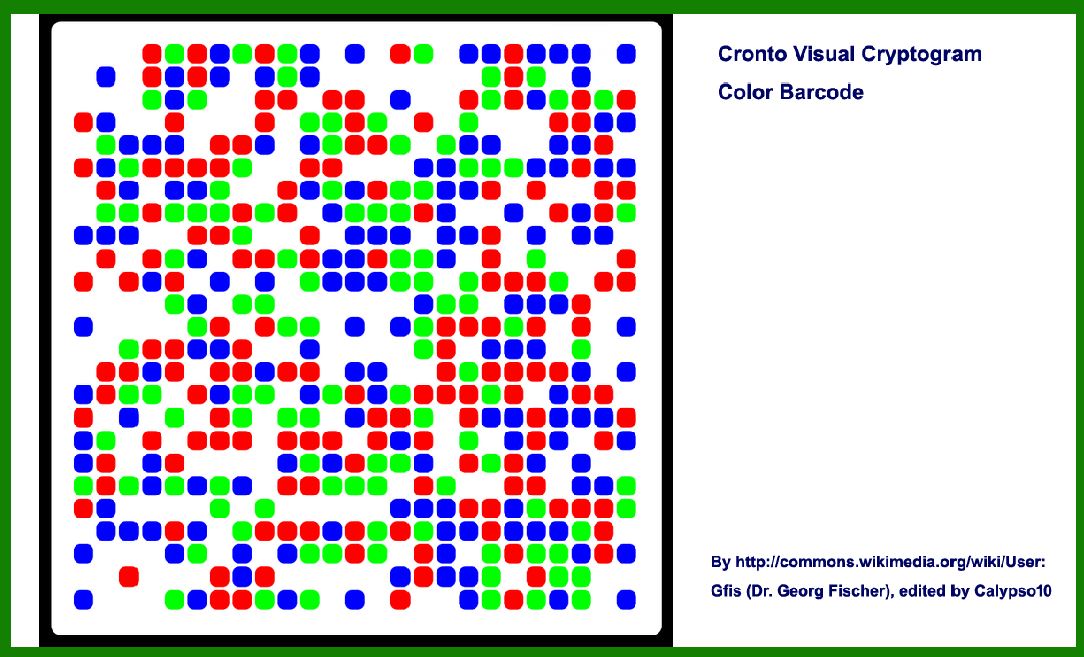
The Cronto Visual Cryptogram (CVC) barcode is a specialized form of barcode primarily used in the financial sector for secure authentication and transaction authorization. |
Developed by Cronto Ltd., a company acquired by VASCO Data Security International in 2012, the CVC barcode integrates cryptographic techniques with visual representation to enhance security in online banking and other sensitive transactions. This technology is particularly notable for its robustness against various forms of attacks, including phishing and man-in-the-middle attacks, offering a high level of assurance and usability. |
|
Overview of Cronto Visual Cryptogram (CVC) Barcode |
1. Introduction to CVC Barcode |
The Cronto Visual Cryptogram (CVC) barcode is designed as a two-dimensional matrix code that encodes a cryptographic challenge. It typically consists of a grid of dots arranged in a square or rectangular pattern. Each dot position within the grid represents binary data that forms part of the cryptographic challenge. The visual representation is designed to be easily readable by humans and can be scanned using a mobile device or dedicated reader. |
2. Technology and Encoding |
Matrix Structure: The CVC barcode utilizes a matrix structure where each dot position corresponds to a specific bit of data. This structure allows for efficient encoding and decoding of information. Cryptographic Challenge: At its core, the CVC barcode encodes a cryptographic challenge that is used to authenticate a transaction or login attempt securely. This challenge is generated dynamically for each transaction, enhancing security by preventing replay attacks. Secure Encoding: The barcode's encoding process involves cryptographic algorithms to ensure the integrity and confidentiality of the challenge data. This includes encryption techniques to protect the challenge against interception and tampering. |

|
3. Applications in Financial Security |
a. Online Banking |
One of the primary applications of CVC barcode technology is in online banking security: |
Transaction Authorization: Banks use CVC barcodes to securely authorize transactions initiated through online banking platforms. The barcode is typically generated dynamically based on transaction details, ensuring that each transaction receives a unique cryptographic challenge. Two-Factor Authentication: CVC barcodes serve as a form of two-factor authentication (2FA), where the barcode is scanned using a mobile banking app or a dedicated device to verify the user's identity and authorize the transaction. Phishing Prevention: By integrating a dynamic visual element that changes with each transaction, CVC barcodes mitigate the risk of phishing attacks. Attackers cannot intercept and reuse the barcode for unauthorized transactions. |
b. Secure Login Authentication |
Beyond transaction authorization, CVC barcodes are used for secure login authentication in various financial applications: |
Secure Access Codes: Users may be required to scan a CVC barcode displayed on their banking website to securely log in. This process ensures that the login attempt is genuine and protected against interception. Multi-Step Authentication: In multi-step authentication processes, CVC barcodes add an additional layer of security by providing a visual confirmation of the login attempt's authenticity. |

|
4. Security Features |
a. Dynamic Challenge Generation |
Unique Challenges: Each CVC barcode encodes a unique cryptographic challenge generated for a specific transaction or authentication session. This dynamic generation prevents attackers from predicting or reusing the challenge data. Time-Sensitive: Some implementations of CVC barcodes incorporate time-sensitive elements, where the barcode expires after a short period. This feature further enhances security by limiting the window of opportunity for attackers to intercept and misuse the barcode. |
b. Resistance to Attacks |
Phishing Resistance: The visual nature of CVC barcodes makes them resistant to phishing attacks. Unlike static codes or passwords, CVC barcodes cannot be easily replicated or intercepted for unauthorized use. Man-in-the-Middle Protection: By dynamically generating challenges that are not transmitted directly over the network, CVC barcodes mitigate the risk of man-in-the-middle attacks where attackers intercept and alter communication between the user and the banking system. |

|
5. Implementation and Usability |
a. Integration with Banking Systems |
Backend Integration: CVC barcode technology requires integration with banking systems to generate, display, and validate the cryptographic challenges. This integration ensures seamless authentication and transaction authorization processes for users. User Interface: Banking applications and websites display CVC barcodes in a user-friendly manner, often as a dynamic image that users can scan using their mobile devices or dedicated authentication tools. |
b. User Experience |
Ease of Use: Despite its sophisticated security features, CVC barcodes are designed to be user-friendly. Users can scan the barcode quickly using their smartphones or other scanning devices without needing to manually input complex codes. Accessibility: The visual nature of CVC barcodes accommodates users with disabilities, ensuring that secure authentication methods are accessible to a broad range of individuals. |

|
6. Future Developments and Trends |
a. Enhanced Security Measures |
Biometric Integration: Future implementations may integrate biometric authentication methods with CVC barcodes to further enhance security and usability. Blockchain Integration: Some developments explore integrating blockchain technology to enhance the transparency and security of transaction authentication processes involving CVC barcodes. |
b. Expansion Beyond Banking |
E-commerce Security: CVC barcode technology shows potential for enhancing security in e-commerce transactions, particularly for high-value purchases or sensitive transactions where secure authentication is crucial. Government and Healthcare Applications: Beyond financial sectors, CVC barcode technology may find applications in government services, healthcare, and other sectors requiring secure transaction authentication and user verification. |

|
Conclusion |
The Cronto Visual Cryptogram (CVC) barcode represents a significant advancement in secure transaction authentication, particularly in the financial sector. By combining cryptographic techniques with a visually intuitive format, CVC barcodes provide robust protection against phishing, man-in-the-middle attacks, and other forms of cyber threats. As technology continues to evolve, CVC barcode implementations are likely to expand into new sectors and applications, further enhancing security and usability in digital transactions. |
 cs@easiersoft.com