The Anoto dot pattern is a proprietary, high-resolution, and flexible digital pattern that is used to capture handwritten information with digital pens. It is extensively used in various applications including forms processing, digital note-taking, and interactive paper-based interfaces. The pattern consists of small, barely visible dots that are arranged in a specific manner to uniquely identify every point on the paper, enabling precise tracking and digital capture of pen strokes. |
Error correction is a crucial component of the Anoto dot pattern system, as it ensures the accurate capture and interpretation of handwritten data, even in the presence of noise or distortions. This detailed description will delve into the mechanisms, algorithms, and practical examples of how error correction is implemented in the Anoto dot pattern system. |
|
1. Overview of Anoto Dot Pattern |
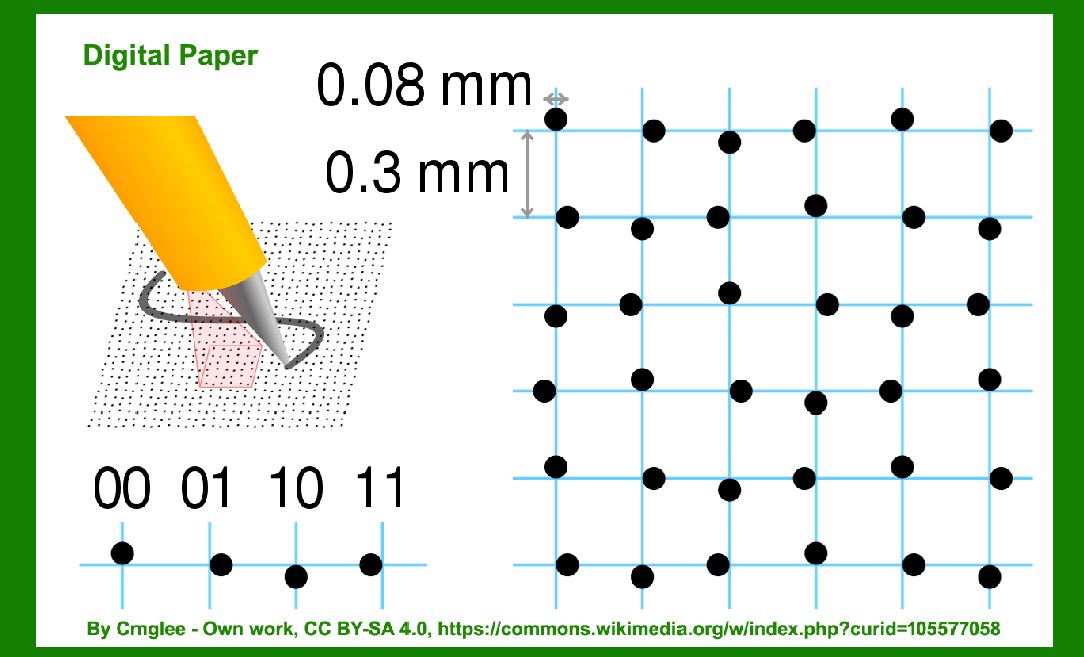
The Anoto dot pattern is a grid of dots printed at a resolution of 600 dots per inch (dpi). The pattern is based on a grid with a spacing of 0.3 mm between the dots, forming a nearly invisible background on the paper. The pattern can cover a large surface area, effectively creating a unique identifier for each small section of the grid. |

|
2. Structure of the Anoto Dot Pattern |
The Anoto dot pattern encodes positional information using a relative positioning system. Each dot in the grid can be offset slightly from its nominal position to encode binary information. The pattern is designed so that the position of each dot in a 6x6 grid (known as a cell) uniquely determines the absolute position on the paper. |
Each 6x6 grid cell contains 36 dots, and the offsets of these dots from their nominal positions encode the information. The offset directions can be represented as binary data, which is then used to reconstruct the position data during digital pen usage. |

|
3. Error Correction Mechanisms |
Error correction in the Anoto dot pattern system is essential for reliable data capture, especially given the high density and subtlety of the pattern. The error correction process involves several key mechanisms: |
3.1. Redundancy and Spatial Coding |
One of the primary methods of error correction in the Anoto dot pattern is the use of redundancy. The pattern is designed such that any 6x6 grid cell overlaps partially with its neighboring cells. This overlapping ensures that even if part of the pattern is damaged or obscured, the information can still be recovered from adjacent cells. |
The spatial coding of the dot offsets within the grid cells is also designed to be error-tolerant. Small errors in dot positions are less likely to result in incorrect positional data because the system can cross-reference multiple dots to verify the correct position. |
3.2. Reed-Solomon Error Correction |
The Anoto dot pattern system employs Reed-Solomon error correction codes. Reed-Solomon codes are widely used in digital communications and data storage for their ability to correct multiple random symbol errors within a block of data. |
In the context of the Anoto dot pattern, Reed-Solomon codes are applied to the binary data encoded by the dot offsets. This allows the system to detect and correct errors in the encoded positional information. The specific implementation details of the Reed-Solomon codes, such as the size of the symbols and the redundancy level, are optimized based on the expected error rates and the characteristics of the printing and scanning processes. |
3.3. Error Detection and Correction Algorithms |
When the digital pen scans the Anoto dot pattern, the captured image of the dots is processed to extract the binary data encoded by their offsets. This binary data is then subjected to error detection and correction algorithms. The steps involved are as follows: |
1.Dot Detection and Position Estimation: The system first detects the positions of the dots in the captured image. Given the high resolution and density of the pattern, sophisticated image processing techniques are used to accurately determine the dot positions. 2.Binary Data Extraction: The offsets of the detected dots are analyzed to extract the encoded binary data. This involves mapping the dot positions to their corresponding binary values based on the predefined encoding scheme. 3.Error Detection: The extracted binary data is checked for errors using the Reed-Solomon code. This involves calculating syndrome values to determine if any errors are present in the data. 4.Error Correction: If errors are detected, the system attempts to correct them using the Reed-Solomon error correction algorithm. This process can correct up to a certain number of errors within the data block, depending on the redundancy level of the code. 5.Positional Data Reconstruction: Once the errors are corrected, the system reconstructs the positional data from the corrected binary values. This reconstructed data represents the precise coordinates of the pen on the paper. |

|
4. Practical Examples of Error Correction |
To illustrate the error correction process in the Anoto dot pattern system, let's consider some practical examples: |
Example 1: Single Dot Error |
Suppose a digital pen captures a portion of the Anoto dot pattern where one dot is slightly misaligned due to a printing defect. The binary data extracted from this cell might have a single-bit error. The Reed-Solomon error detection process identifies the error by calculating a non-zero syndrome. The error correction algorithm then corrects the single-bit error, allowing the system to reconstruct the correct positional data. |
Example 2: Multiple Dot Errors |
In a scenario where multiple dots are misaligned due to smudging or paper damage, the binary data might contain multiple errors. The Reed-Solomon code can detect these errors if they are within the correctable range. For instance, if the code is designed to correct up to 4 errors per block, and the data contains 3 errors, the algorithm will successfully correct them. However, if the number of errors exceeds the correction capability, the system might not be able to recover the correct data, highlighting the importance of optimizing the error correction parameters. |
Example 3: Overlapping Cell Correction |
Consider a case where a portion of the pattern is partially obscured by a stain, affecting several adjacent cells. Due to the overlapping nature of the grid cells, the positional data can still be recovered by combining information from the neighboring cells. Even if one cell's data is entirely lost, the redundancy ensures that the overall positional data remains intact. |

|
5. Challenges and Optimizations |
Implementing error correction in the Anoto dot pattern system involves several challenges and optimizations: |
5.1. Balancing Redundancy and Efficiency |
There is a trade-off between redundancy and efficiency. Higher redundancy increases the error correction capability but also requires more data to be encoded in each cell. Optimizing this balance is crucial for maintaining high-resolution capture without excessive data overhead. |
5.2. Environmental Factors |
Environmental factors such as lighting conditions, paper quality, and printing accuracy can affect the dot detection process. The error correction system must be robust enough to handle variations in these factors to ensure reliable data capture. |
5.3. Algorithm Performance |
The error detection and correction algorithms need to be efficient to operate in real-time. This involves optimizing the Reed-Solomon code implementation and the image processing algorithms for dot detection and binary data extraction. |

|
6. Conclusion |
The error correction mechanism in the Anoto dot pattern system is a sophisticated combination of redundancy, spatial coding, and Reed-Solomon error correction. These mechanisms work together to ensure accurate and reliable capture of handwritten data, even in the presence of noise and distortions. The overlapping grid cells, robust image processing, and efficient error correction algorithms collectively contribute to the robustness and precision of the Anoto dot pattern system. |
By implementing these detailed error correction techniques, the Anoto dot pattern system can maintain its high-resolution and flexible digital capture capabilities, making it a powerful tool for various applications requiring precise tracking and digital recording of handwritten information. |

|
 cs@easiersoft.com