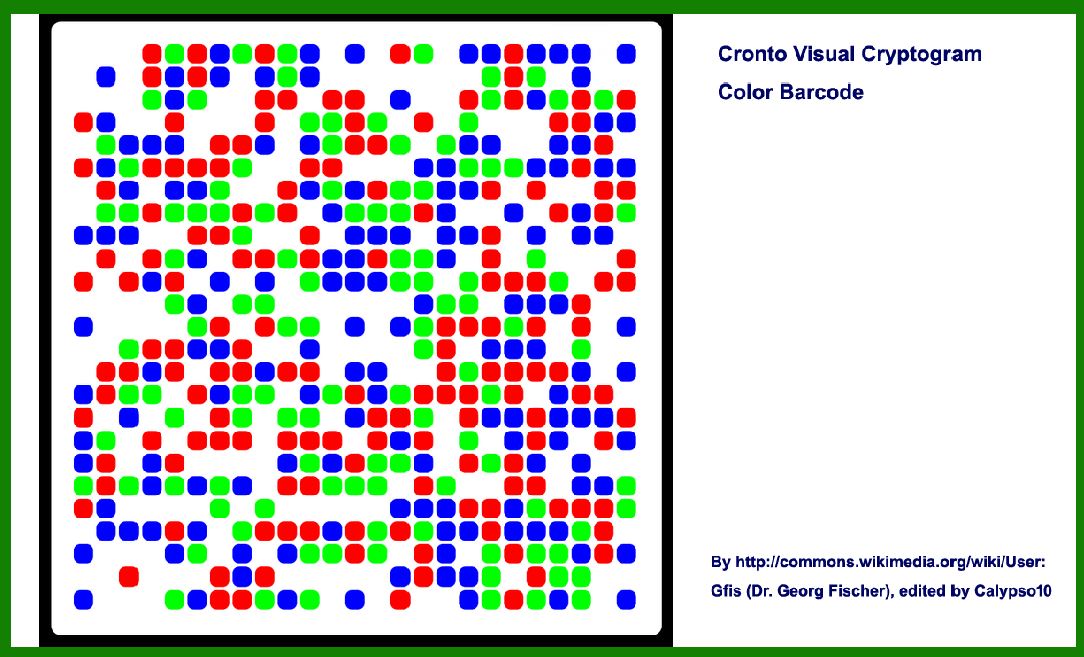
To delve into the error correction of the Cronto Visual Cryptogram (CVC) barcode, we need to understand its unique structure and how error correction mechanisms are implemented within it. The CVC barcode is primarily used in banking and financial sectors for secure transaction authorization and authentication. It employs visual cryptography to ensure security and integrity. Here's a detailed exploration of the error correction methods used in the CVC barcode: |
|
Error Correction in Cronto Visual Cryptogram (CVC) Barcode |
1. Basic Structure and Encoding |
The CVC barcode consists of a grid of black and white cells, typically arranged in a square format. Each cell can be either black or white, and these arrangements encode information based on specific algorithms designed to ensure both security and readability. The barcode is meant to be visually scanned or photographed using a mobile device for transaction authorization. |

|
2. Error Sources |
Errors in the context of CVC barcodes can arise due to various factors such as: |
Photographic Distortions: Images captured from mobile devices may suffer from distortions due to lighting conditions, camera quality, or movement during capture. Printing or Display Artifacts: If the barcode is displayed on a screen or printed, errors can occur due to ink smudges, low print quality, or scanning artifacts. Environmental Factors: External factors like glare, dirt on the camera lens, or ambient light can interfere with the scanning process. |

|
3. Error Correction Techniques |
CVC barcodes incorporate error correction techniques to ensure robustness against these potential errors. These techniques typically fall into two categories: |
a. Reed-Solomon Error Correction |
Reed-Solomon codes are widely used in various barcode technologies due to their effectiveness in correcting errors introduced during transmission or scanning. In the context of CVC barcodes: |
Redundancy: Extra data bits are added to the original data before encoding. These redundancy bits allow the barcode reader to detect and correct errors up to a certain threshold. Symbol-Level Correction: Errors are corrected by analyzing the symbols (black and white cells) within the barcode. The redundancy introduced ensures that even if some symbols are misread or distorted, the original data can still be reconstructed correctly. |
b. Checksums and Verification |
In addition to Reed-Solomon codes, CVC barcodes often use checksums or verification algorithms to detect errors: |
Checksum Calculation: Before encoding, checksums or cryptographic hashes of the data may be calculated. These checksums are encoded into the barcode alongside the actual data. During scanning, the scanner recalculates the checksum and verifies it against the encoded checksum to detect any discrepancies. Challenge-Response Mechanisms: Some CVC implementations use challenge-response mechanisms where the barcode encodes a challenge that requires a specific response from the user. Error correction ensures that even if part of the challenge is misread, the correct response can still be generated. |

|
4. Example Scenario |
Imagine a CVC barcode used for authorizing a financial transaction: |
Generation: The CVC barcode is generated by encoding transaction details along with error correction data using Reed-Solomon codes. This ensures that even if there are minor distortions during scanning, the transaction details can still be accurately retrieved. Scanning: A user scans the CVC barcode displayed on their banking app using their smartphone camera. The scanning software processes the image, decodes the barcode, and verifies the integrity of the transaction details. Error Correction: If there are errors due to poor lighting or camera movement during scanning, the Reed-Solomon error correction algorithm kicks in. It analyzes the barcode symbols and corrects any errors up to a predefined threshold. For example, if some cells are misinterpreted due to glare, the algorithm can correct these errors and reconstruct the original transaction details. Authentication: Once errors are corrected, the scanned data is compared against the expected transaction details. If they match within the error correction limits, the transaction is authorized. Otherwise, an error message may prompt the user to rescan or verify the transaction details manually. |

|
5. Implementation Variations |
Different implementations of CVC barcodes may vary in the specifics of their error correction techniques: |
Thresholds: The number of errors that can be corrected varies based on the implementation and the chosen parameters for Reed-Solomon encoding. Security vs. Readability: There's a trade-off between security (reducing error correction thresholds to enhance security against tampering) and readability (ensuring the barcode remains scannable under various conditions). Dynamic Adjustments: Some systems dynamically adjust error correction parameters based on environmental conditions or the quality of the scanning device. |

|
Conclusion |
The error correction mechanisms in Cronto Visual Cryptogram (CVC) barcodes are crucial for ensuring reliable and secure transaction authorization in banking and financial applications. By leveraging Reed-Solomon error correction codes and checksum verification techniques, CVC barcodes can withstand common sources of errors such as photographic distortions and printing artifacts. These techniques not only enhance the robustness of the barcode against errors but also contribute to the overall security and reliability of financial transactions conducted using CVC technology. |

|
 cs@easiersoft.com